An AI meeting assistant sounds like a single product you can compare on price. It is not. The five options in this guide differ in how they get into your meeting in the first place, which meeting platforms they can cover, what they do with the recording afterwards, which administrative controls exist and on which plan, and how the bill is calculated. Two of them are features of a platform you might already have. Three of them are separate products that join your calls as a participant.
This guide is written for a small business making that decision once, properly. Everything factual below comes from vendor documentation, help centres or official pricing pages read in September 2026, and every source is linked. Where documentation does not establish something, the article says so rather than filling the gap. There is no winner at the end, because the right answer depends almost entirely on where your meetings already happen.
What an AI meeting assistant actually does
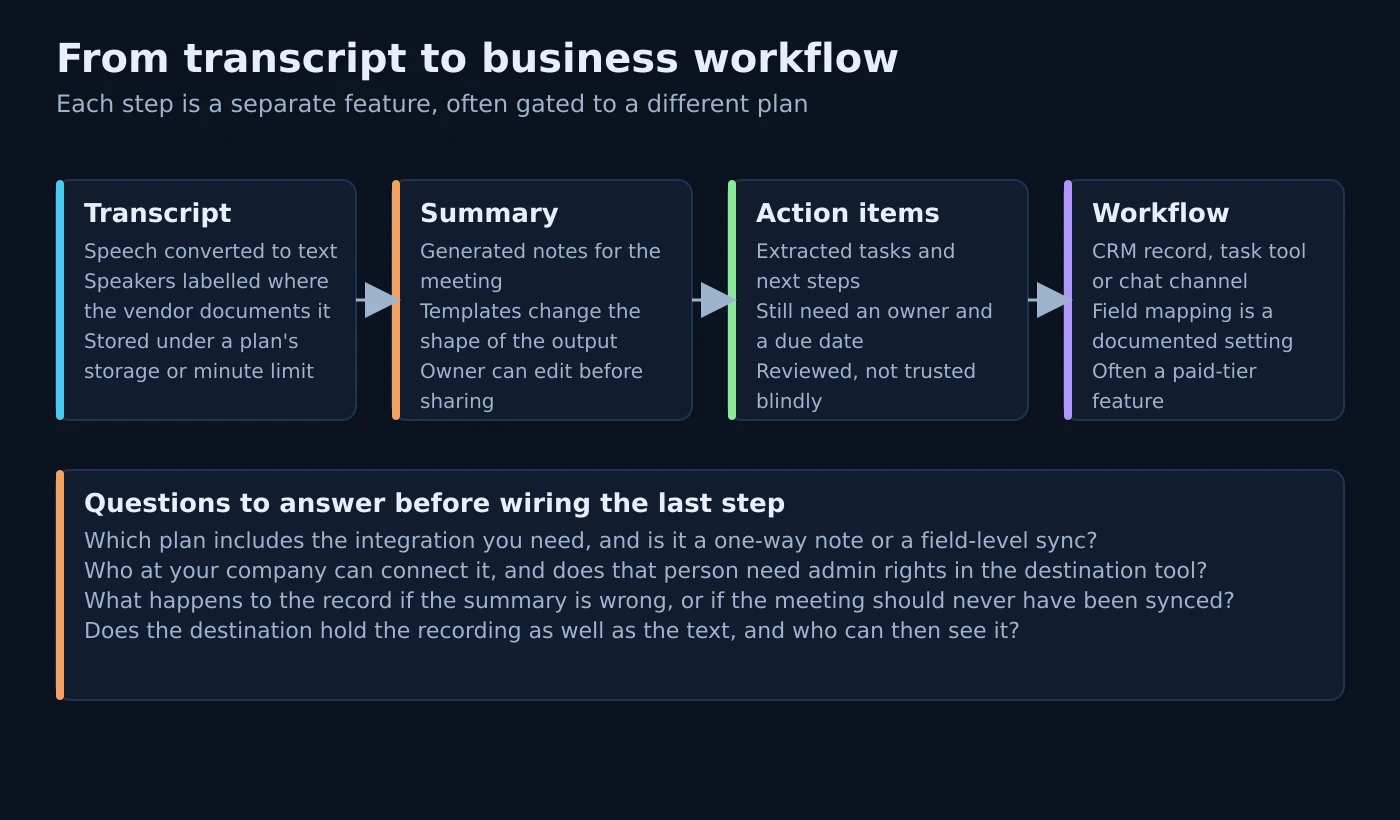
Strip away the marketing and every product here performs the same four mechanical jobs: it obtains the audio of a conversation, converts it to a transcript, generates a summary and a list of suggested next steps, and then makes that output available somewhere else — an email, a chat channel, a task tool or a CRM record. The differences that matter to a buyer sit inside those four steps rather than around them.
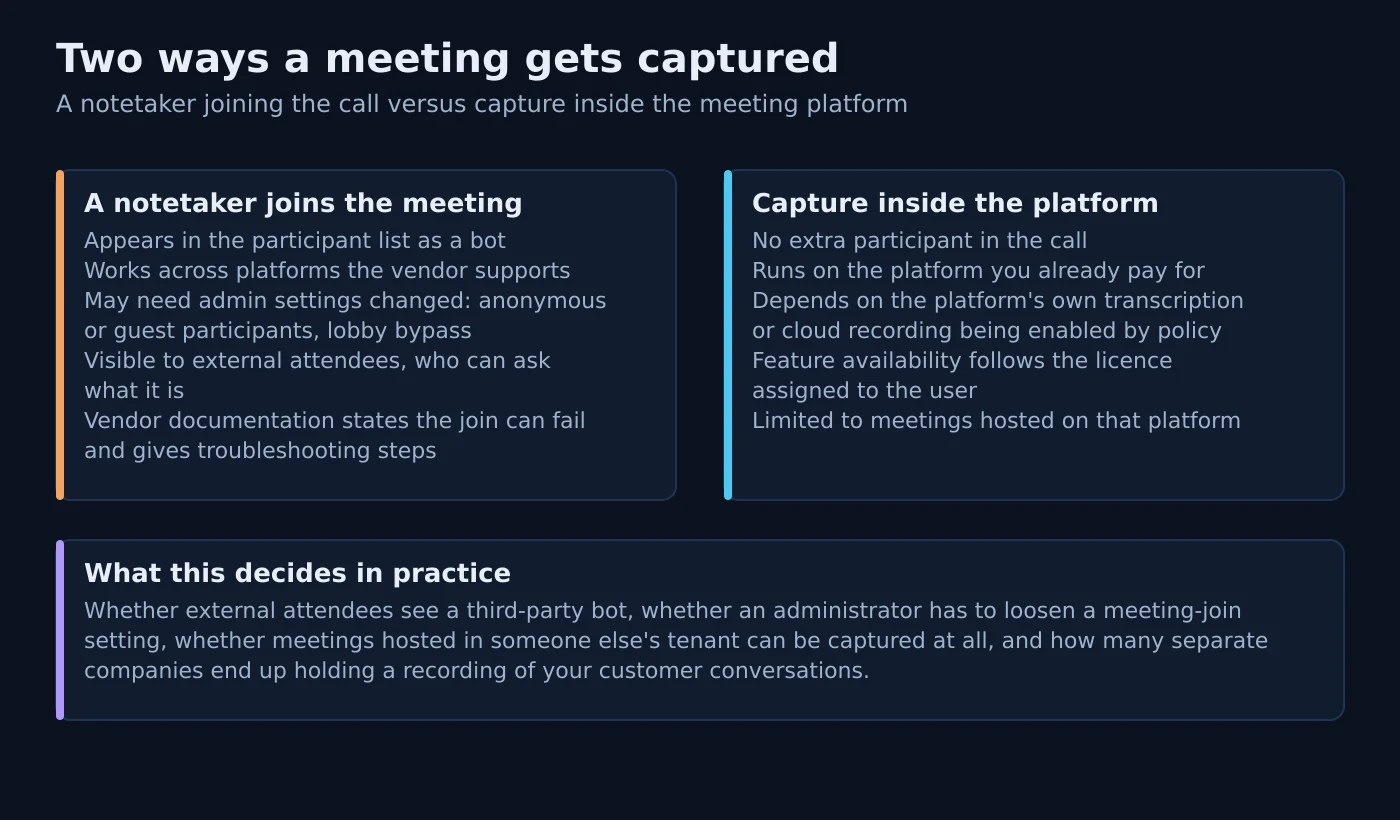
Getting the audio is the first real fork. Otter, Fireflies and Fathom document a notetaker that joins the meeting as a participant. Zoom’s AI features work inside Zoom’s own meetings, and Zoom separately documents an assistant that can be invited into Google Meet and Microsoft Teams calls as a participant. Microsoft’s recap is produced by Teams itself from the meeting transcript, with no additional attendee involved. That single architectural difference drives what your administrator has to change, what external attendees see, and whether meetings hosted by other companies can be captured at all.
The output side is where plan gating bites. Generating a summary is table stakes; getting that summary into the system where work actually happens is usually a paid feature, and often a higher-tier one. Otter documents syncing meeting insights into Salesforce opportunity or HubSpot deal fields, with the mapping configured field by field. Fathom documents summary-note sync to HubSpot deal fields as available on its Business and Enterprise plans specifically. Reading the destination step before the summary step is the single most useful thing a buyer can do.
Before, during and after: where the work actually happens
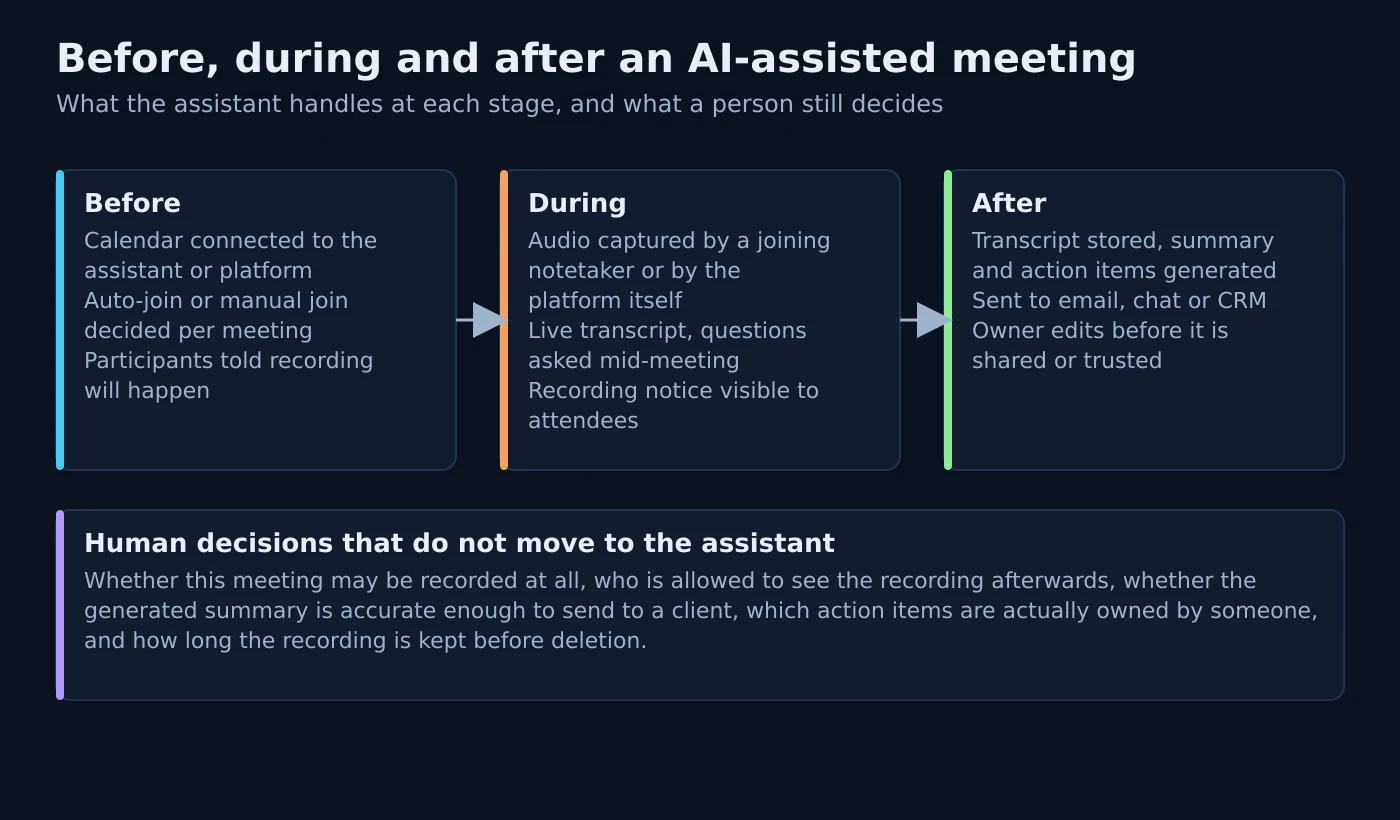
Before the meeting. Every product in this guide relies on a calendar connection to know a meeting exists. Otter’s documentation covers joining Zoom, Microsoft Teams and Google Meet meetings automatically. Fireflies documents two routes: adding its assistant manually by inviting fred@fireflies.ai to a calendar event that contains a video conferencing link, or letting it auto-join calendar meetings. Fathom pulls meetings from your authenticated calendar into its desktop app, and its Microsoft documentation notes it only picks up events that carry a Teams link in the location field. Zoom requires a connected calendar before its assistant can be invited into a third-party meeting.
During the meeting. This is the stage buyers underestimate. Where a bot joins, it is visible. Zoom documents that when its assistant joins a Google Meet or Microsoft Teams meeting, a chat message is posted three minutes after the meeting starts and the assistant’s video tile shows Zoom branding, the name of the owner and an activity status of transcribing. Fathom states plainly that there is no way to silently record: on the bot experience the participant is visible and Zoom notifies the host, and on the newer bot-free experience a recording notice is posted in the meeting chat or an in-app consent prompt appears.
After the meeting. The transcript is stored, a summary is generated, and suggested next steps are extracted. Zoom’s smart recording documentation describes smart chapters, recording highlights, next steps and host analytics covering talk speed, talk-listen ratio, longest monologue, filler word usage and patience — and states that a cloud recording and a processed audio transcript must both exist first. Fireflies documents a set of post-meeting features built on the stored transcript. Otter documents exporting the summary and syncing insights onward.
Atlas editorial assessment. The after-stage is where most small-business rollouts quietly fail. Notes are generated, nobody owns them, and within a month the assistant is producing artefacts that nobody reads. Deciding who reviews a summary before it is shared, and where action items are supposed to land, is more important than which product you pick. Our guide to implementing AI automation across small-business workflows covers that discipline in more depth.
What should stay under human control
Nothing in the documentation of any product here removes the following decisions from a person, and treating them as automated is how small companies end up with an awkward conversation with a client.
- Whether a specific meeting may be recorded at all. Otter’s own recording permissions article states that recording laws vary by location, distinguishes jurisdictions where one party’s consent suffices from those where all parties must consent, and recommends applying an all-party practice universally.
- Whether the summary is accurate enough to send onward. Zoom’s data documentation notes AI features may produce incorrect or inaccurate responses and that it is important to check generated content for accuracy.
- Who owns each action item. Extracted next steps are suggestions with no owner and no due date until a person assigns them.
- Who can see the recording afterwards. Fathom documents that settings access and view access are two independent permissions, so a team admin can exist without being able to see team calls.
- How long recordings are kept. Fathom documents retention policies as available only on its Enterprise plan and not self-serve. Fireflies lists custom data retention among its Enterprise-tier capabilities.
How to judge transcription and summaries without inventing numbers
No vendor here publishes an accuracy methodology that would let you compare products fairly, and this article does not publish one either. Accuracy varies with accents, microphone quality, crosstalk, background noise and how many people are dialling in from a phone. Any figure you read on a comparison site for these products is almost certainly not reproducible, which is why none appear here.
What you can do is test against your own meetings and judge specific, observable things. Run the same awkward call through each shortlisted product: several speakers, one poor headset, one phone participant, someone joining late. Then check whether speakers are labelled correctly, whether the summary captures the decision rather than the topic, and whether extracted next steps match what was actually agreed.
Speaker handling is worth checking specifically because the documentation differs. Otter documents speaker management for tagging, renaming and merging speakers, and its pricing page lists speaker identification on every plan including the free one. Zoom’s documented coaching analytics imply per-speaker attribution for the host. Fireflies and Fathom did not document a comparable speaker-identification feature on the official pages verified for this article, so this guide records that as not documented rather than absent.
Five approaches, judged on what the documentation says
Each product below is described in two parts: documented vendor facts, then Atlas editorial assessment. The first part contains nothing that is not on a linked first-party page. The second is our opinion about workflow fit, and it does not introduce new facts.
Otter.ai — a notetaker with the deepest documented admin surface
Documented vendor facts. Otter’s notetaker joins Zoom, Microsoft Teams and Google Meet meetings to write and share notes, and its pricing page lists that platform coverage on the free Basic plan as well as paid ones. For Microsoft Teams, Otter documents a Teams admin change: anonymous users must be allowed to join a meeting in the Teams admin centre, together with the relevant meeting policies. Blocking the notetaker from meetings whose titles contain particular keywords is documented as not yet available in the interface — workspace admins submit a support request instead. Otter also documents a host-priority setting to stop several attendees’ notetakers duplicating the same meeting.
On the administrative side, Otter’s IT administrator guide covers single sign-on, domain capture and directory sync, and the directory sync article states that provisioning requires the Enterprise plan and a minimum seat count. Its public API is documented as available to Enterprise workspaces, authenticated with a bearer token, limited to two API keys per user and ten requests per second, with workspace webhooks delivering summaries, action items, insights, outlines and transcripts to your own endpoint. HIPAA support is documented as available only on the Enterprise plan under a business associate agreement, alongside a SOC 2 Type II report. CRM work is documented as syncing meeting insights into custom Salesforce opportunity or HubSpot deal fields, mapped individually, with a configurable write behaviour. Custom meeting templates are documented on all plans with usage limits that differ by plan.
On price, Otter’s official pricing page lists Pro at $8.33 per user per month on annual billing and Business at $19.99 per user per month on annual billing, with Enterprise arranged through a demo. The free Basic plan is listed with three hundred monthly transcription minutes and a thirty-minute cap per conversation; Pro is listed with one thousand two hundred monthly minutes per user and a ninety-minute cap; Business is listed as unlimited meetings with a four-hour cap and a billed-user ceiling.
Atlas editorial assessment. Otter documents more of the boring administrative machinery than anything else in this comparison, which is exactly what you need when a customer sends you a security questionnaire. The trade-off is that the controls you would want in that situation — provisioning, the API, HIPAA coverage — are concentrated on the Enterprise plan, so a ten-person company gets the notetaker cheaply and the governance not at all. The transcription-minute caps on the lower plans are the thing to model first, because a team that runs long client workshops will hit them quickly.
Fireflies.ai — the clearest published limits, and the most tier-gated storage
Documented vendor facts. Fireflies is invited into a meeting either manually, by adding its assistant address to a calendar event that already contains a conferencing link, or automatically through calendar-based auto-join; its documentation notes the manual invitation will not pull the assistant into a call that has already started. For conversations that never happen on a conferencing platform, Fireflies documents a browser-based web recorder for in-person meetings.
Fireflies publishes unusually specific limits. Storage is measured in total meeting minutes rather than a monthly allowance, does not reset each month, and is documented as four hundred minutes pooled across the team on the free plan, eight thousand minutes per seat on Pro, and unlimited on Business and Enterprise; at the limit new meetings are still captured but older ones must be deleted to be accessible. Transcription credits are documented separately from AI credits, with paid tiers described as unlimited for transcription and the free plan allocated a small number of credits that differ by whether you use the web app, the browser extension or the mobile app. The developer documentation sets out upload ceilings and API rate limits that step up by plan, including a per-day cap on the free and Pro tiers and a per-minute cap on Business and Enterprise.
Two governance features are documented as Enterprise-only: private storage, where data is processed on Fireflies servers in the United States but stored in your own bucket, and the super admin role, which the documentation describes as bypassing meeting privacy restrictions rather than adding new controls. Its pricing page and plan documentation list Pro at $10 per seat per month billed annually, Business at $19 per seat per month billed annually and Enterprise at $39 per seat per month billed annually, with monthly billing listed higher on the first two tiers at $18 and $29 respectively; the same page places single sign-on, provisioning, audit logs, HIPAA support and custom data retention on Enterprise.
Atlas editorial assessment. Fireflies is the easiest product here to budget accurately, because it publishes the numbers that usually surprise people — storage, credits and API limits — instead of hiding them behind a sales call. The catch is that its storage model is cumulative rather than monthly, so a busy team on the lower tiers is eventually forced into a housekeeping habit rather than a one-off decision. The super admin role deserves an explicit conversation before rollout: a role documented as bypassing meeting privacy restrictions is a governance decision, not a convenience.
Fathom — the only option here documenting a bot-free capture path
Documented vendor facts. Fathom’s notetaker joins Zoom, Microsoft Teams and Google Meet calls, and its documentation states an important constraint: Fathom can only record a call if you are also present, and it leaves when the meeting ends. Its Microsoft Teams guide explains that only calendar events carrying a Teams link in the location field appear in the desktop app, with a manual join option for anything that does not. A separate Teams setup and troubleshooting article lists the conditions that block a join, including anonymous-participant settings, verification checks, lobby configuration, end-to-end encryption and third-party bot restrictions. Its getting-started article notes that the newer bot-free experience does not require adding a notetaker to the meeting at all, and the pricing page describes that bot-free capture as a beta feature for Mac.
Consent handling is documented in unusual detail. Fathom can email attendees before a scheduled meeting to request recording consent, marks calls where an attendee has asked in advance not to be recorded, and recommends consulting a lawyer about the laws applying to the jurisdictions you operate in. On security it documents HIPAA, SOC 2 Type II and GDPR compliance, states that its AI sub-processors are not contractually permitted to train on customer data, describes using de-identified customer data to improve its own models with an opt-out available at user and organisation level, and states that data is stored in the United States. Retention policies are documented as Enterprise-only, requested by email rather than configured in the interface, with a single policy per team.
Workflow integrations are documented per destination. The HubSpot integration requires HubSpot admin rights to connect, supports one connected HubSpot account at a time, and documents summary-note sync to deal fields as a Business and Enterprise capability. A Zapier integration exposes meeting triggers that can be scoped to your own meetings or to team meetings visible to you. Its cross-meeting question feature has documented usage limits by plan, with the free plan restricted to a recent window of calls and the higher plans given broader history. Pricing on the official page lists a free individual plan with unlimited recordings and transcription, Premium for individuals at $16 per user per month on annual billing, Team at $15 per user per month on annual billing with a two-user minimum, Business at $25 per user per month on annual billing, and Enterprise through sales with single sign-on, provisioning and custom retention. Fathom’s help centre also notes that its plan names changed, which is worth knowing when you read older material about it.
Atlas editorial assessment. Fathom is the most interesting option for a small team that dislikes bots in client calls, because it is the only product here documenting a capture path with no extra participant while still working across platforms. Treat the beta label seriously: test it on internal meetings before a client call depends on it. The presence requirement is a genuine constraint rather than a footnote — if your intention was to send an assistant to a meeting you cannot attend, this is not the product for that job.
Zoom AI Companion — capability you may already own, metered by plan
Documented vendor facts. Zoom documents its AI features as built into Zoom Workplace plans rather than sold as a separate meeting product, with availability depending on plan, add-ons and assigned permissions. The AI feature overview lists meeting summary, in-meeting questions, smart recording and a voice recorder for in-person meetings among the meeting-related capabilities, each configurable at account, group and user level. Using meeting summary is documented as requiring a licensed user on a paid Zoom Workplace plan, and enabling it is an account owner or admin action. Summaries are documented as delivered by email and, when the relevant chat setting is enabled, posted to the meeting’s group chat.
Zoom also documents capturing meetings that are not on Zoom. When enabled, licensed users can invite the assistant into Google Meet and Microsoft Teams meetings, where it joins as a participant, transcribes and produces a summary; the documented requirements include a paid Zoom Workplace plan, a connected calendar integration, the third-party capability enabled by an administrator and a minimum desktop app version. The same article documents an optional pre-meeting email notification to the host or to all invitees, sent shortly before the scheduled start, disclosing that the assistant will join to assist with transcription.
On data handling, Zoom’s AI data article lists the content used for each feature, states that third-party model providers are not permitted to use your data to improve or train their models, and notes that optional feedback submissions may be reviewed by Zoom employees. It also warns that AI output may be incorrect and should be checked. On commercial terms, Zoom’s pricing page presents plans in local currency with plan-level AI limits attached — the free Basic plan is listed with a small monthly allowance of meeting summaries and AI queries, while the paid Workplace tiers are listed with unlimited meeting summaries and in-meeting questions and a monthly allowance of custom summary templates. Zoom’s plan documentation confirms the Basic, Pro, Business and Enterprise structure, and its pricing page states that plans are billed annually as a single upfront charge with monthly rates shown for comparison. Because that page renders in the visitor’s local currency, this guide does not freeze a Zoom price; check the official page for your own region. Zoom’s documentation also notes that some newer agentic capabilities are metered and require a separate licence and credit balance.
Atlas editorial assessment. If your meetings are overwhelmingly on Zoom and you already pay for a Workplace plan, the honest first step is to check what your existing licence includes before buying anything at all. The third-party meeting capability makes Zoom a broader option than it first looks, but it is still a Zoom subscription with a Zoom-branded participant appearing in someone else’s Teams call, which is a conversation worth having internally first. The plan-level metering on AI features is the detail most likely to catch out a team that upgrades one person and expects everyone to benefit.
Microsoft Teams and Microsoft 365 Copilot — native capture, layered licensing
Documented vendor facts. Teams does not summarise meetings on a standard subscription. Transcription must be permitted by policy, and Microsoft’s intelligent recap documentation sets out the licensing in layers: AI-generated notes, mentions and suggested tasks require either a Teams Premium licence or a Copilot licence; audio recap requires Copilot specifically; and video recap requires the meeting to be both recorded and transcribed, being unavailable where a meeting is transcribed but not recorded. Microsoft is explicit that Teams Premium is an add-on requiring both a Teams licence and the Premium licence rather than replacing the first. Administrative scope and controls are covered in the Teams Premium admin overview.
For Copilot in meetings, Microsoft documents how the assistant relies on the meeting transcript and describes what users can ask during and after a meeting. Eligibility and prerequisites are set out in the Copilot licensing documentation and the Copilot requirements page. On price, Microsoft publishes Teams Premium at $10.00 per user per month paid yearly, and lists the Microsoft 365 Copilot add-on at $18.00 per user per month paid yearly, shown as reduced from $21.00, alongside bundled Microsoft 365 plans that include Copilot at $23.50 and $32.00 per user per month paid yearly.
Atlas editorial assessment. This is the only option that introduces no additional company into the data path, which is often the deciding factor once a customer starts asking who holds recordings of their calls. Both licences are per-user add-ons, so covering only the people who genuinely need recap is legitimate and usually the right first move. The weakness is scope: Microsoft’s meeting licences do not write notes into your CRM, and they only help with meetings that happen in Teams. We covered the Teams-specific version of this decision in more depth in our comparison of meeting assistants for Microsoft Teams.
Decision matrix
Every cell below reflects the documentation linked in the sections above. There are no scores, stars or rankings, because none of the vendors publish data that would justify one.
| Approach | How the meeting is captured | Meeting environments documented | Transcript and summary workflow | Team and admin controls | Integration route | How it is billed | Situation it suits |
|---|---|---|---|---|---|---|---|
| Otter.ai | Notetaker joins the meeting as a participant; Teams joins require anonymous-participant settings in the Teams admin centre | Zoom, Microsoft Teams and Google Meet, listed on free and paid plans | Transcript with speaker management, summaries, exportable output, meeting templates with plan-dependent usage limits | Single sign-on and domain capture documented; provisioning documented as Enterprise with a seat minimum; host-priority setting prevents duplicate notetakers | Insights sync to Salesforce opportunity or HubSpot deal fields; public API and webhooks documented as Enterprise | Per-user subscription with monthly transcription-minute caps on lower plans; Enterprise arranged through a demo | A team that expects to answer security and provisioning questions and wants the admin surface documented up front |
| Fireflies.ai | Assistant joins as a participant by calendar auto-join or manual invitation; browser web recorder documented for in-person meetings | Conferencing meetings that carry a link in the calendar invitation, plus in-person capture via the web recorder | Transcript plus documented post-meeting features; transcription credits and AI credits counted separately | Audit logs, provisioning and single sign-on documented on Enterprise; super admin role documented as bypassing meeting privacy restrictions | Integrations plus a documented API with per-plan upload and rate limits | Per-seat subscription, annual or monthly, with cumulative storage minutes rather than a monthly reset | A team that wants published limits it can budget against, and a free tier to trial before committing |
| Fathom | Notetaker joins the meeting, or a bot-free path documented as beta for Mac; recording requires the user to be present on the call | Zoom, Microsoft Teams and Google Meet, with documented Teams join prerequisites and troubleshooting | Transcript, summaries, AI action items and cross-meeting questions with documented per-plan history limits | Separate settings access and view access permissions; team admin distinct from account admin; retention policies documented as Enterprise and not self-serve | HubSpot with deal-field sync documented on Business and Enterprise; Salesforce, Close and Zapier documented | Free individual plan; per-user paid plans for individuals and teams with a two-user minimum on team plans | A small team that wants CRM write-back or dislikes a visible bot in client calls |
| Zoom AI Companion | Native inside Zoom meetings; documented as able to join Google Meet and Microsoft Teams calls as a participant when enabled | Zoom meetings, plus Google Meet and Microsoft Teams through the documented third-party capability | Meeting summary by email and meeting chat; smart recording adds chapters, highlights, next steps and host coaching analytics from a cloud recording and transcript | Account, group and user level controls; third-party joining enabled by an administrator; optional pre-meeting notification to host or all invitees | Zoom platform features rather than a documented CRM sync; some newer agentic capability is metered and separately licensed | Included in paid Zoom Workplace plans with plan-level AI allowances; billed annually as a single upfront charge, prices shown in local currency | A business whose meetings are already almost entirely on Zoom and that wants no extra vendor |
| Microsoft Teams and Microsoft 365 Copilot | Native: Teams produces the transcript and recap itself, with no additional participant in the call | Microsoft Teams meetings and calls only | Transcription enabled by policy; intelligent recap needs Teams Premium or Copilot; audio recap needs Copilot; video recap needs the meeting recorded and transcribed | Managed through your existing Microsoft tenant and Teams policies; Teams Premium documented as an add-on requiring both licences | No CRM write-back in the meeting licences; Copilot works across the wider Microsoft 365 apps | Per-user add-on licences published at a yearly-paid monthly rate, on top of an existing Microsoft 365 subscription | A company standardised on Microsoft 365 that wants no third party holding recordings of customer calls |
Two patterns in that table matter more than any single cell. First, only the two platform-native approaches avoid adding a visible participant to the call, and one of those can still join calls hosted elsewhere. Second, the governance features a small business is asked about during a customer review — provisioning, audit logging, custom retention — sit on the top plan at every third-party vendor here.
How each option is actually purchased
Prices in this category change often and some are promotional. Every figure below was read on the vendor’s own page in September 2026, with the billing basis stated; where a page renders in local currency, the commercial model is described instead of a number. Verify each figure before committing budget.
| Product | Free option | Paid structure | Seat component | Usage or AI component | Where current terms are published |
|---|---|---|---|---|---|
| Otter.ai | Free Basic plan with a monthly transcription-minute allowance and a per-conversation cap | Pro listed at $8.33 per user per month on annual billing; Business listed at $19.99 per user per month on annual billing; Enterprise through a demo | Per user, with a maximum number of billed users on the lower plans | Monthly transcription minutes per user on Basic and Pro, a longer per-meeting cap on Business, and template usage limits that differ by plan | otter.ai pricing |
| Fireflies.ai | Free plan with pooled storage minutes and a small AI credit allowance | Pro listed at $10 per seat per month billed annually and $18 per seat per month billed monthly; Business at $19 per seat per month billed annually and $29 per seat per month billed monthly; Enterprise at $39 per seat per month billed annually | Per seat, billed annually or monthly | Cumulative storage minutes that do not reset monthly, AI credits by tier, and documented API upload and rate limits by plan | fireflies.ai pricing |
| Fathom | Free individual plan documented with unlimited recordings and transcription | Premium for individuals listed at $16 per user per month on annual billing; Team at $15 and Business at $25 per user per month on annual billing, both with a two-user minimum; Enterprise through sales | Per user, with team plans requiring at least two users | Cross-meeting question limits documented by plan; CRM deal-field sync and retention policies gated to higher plans | fathom.video pricing |
| Zoom AI Companion | Basic plan includes a small monthly allowance of meeting summaries, AI queries and note-taking uses | Included in paid Zoom Workplace plans rather than sold separately; billed annually as a single upfront charge with monthly rates shown for comparison | Per licensed user on the chosen Workplace plan | Plan-level AI allowances, including a monthly cap on custom summary templates on Pro, and separately licensed metered capability for newer agentic features | Zoom Workplace pricing |
| Microsoft Teams and Copilot | No free meeting-recap tier; transcription requires a Teams licence and an admin policy | Teams Premium published at $10.00 per user per month paid yearly; Microsoft 365 Copilot add-on published at $18.00 per user per month paid yearly, shown as reduced from $21.00 | Per user add-on assigned to specific people, on top of an existing Microsoft 365 subscription | No metered AI allowance published for meeting recap; capability is determined by which licence is assigned | Teams Premium pricing and Copilot for business pricing |
Atlas editorial assessment. Compare the configuration you would actually buy rather than the headline tier: the number of seats that genuinely need capture, multiplied by the plan that contains the feature you are buying it for, on the billing period you will realistically choose. That is also the calculation that stops a meeting assistant becoming another line on the subscription list nobody reviews — the exercise in our step-by-step SaaS spend audit.
Recording, consent and data handling
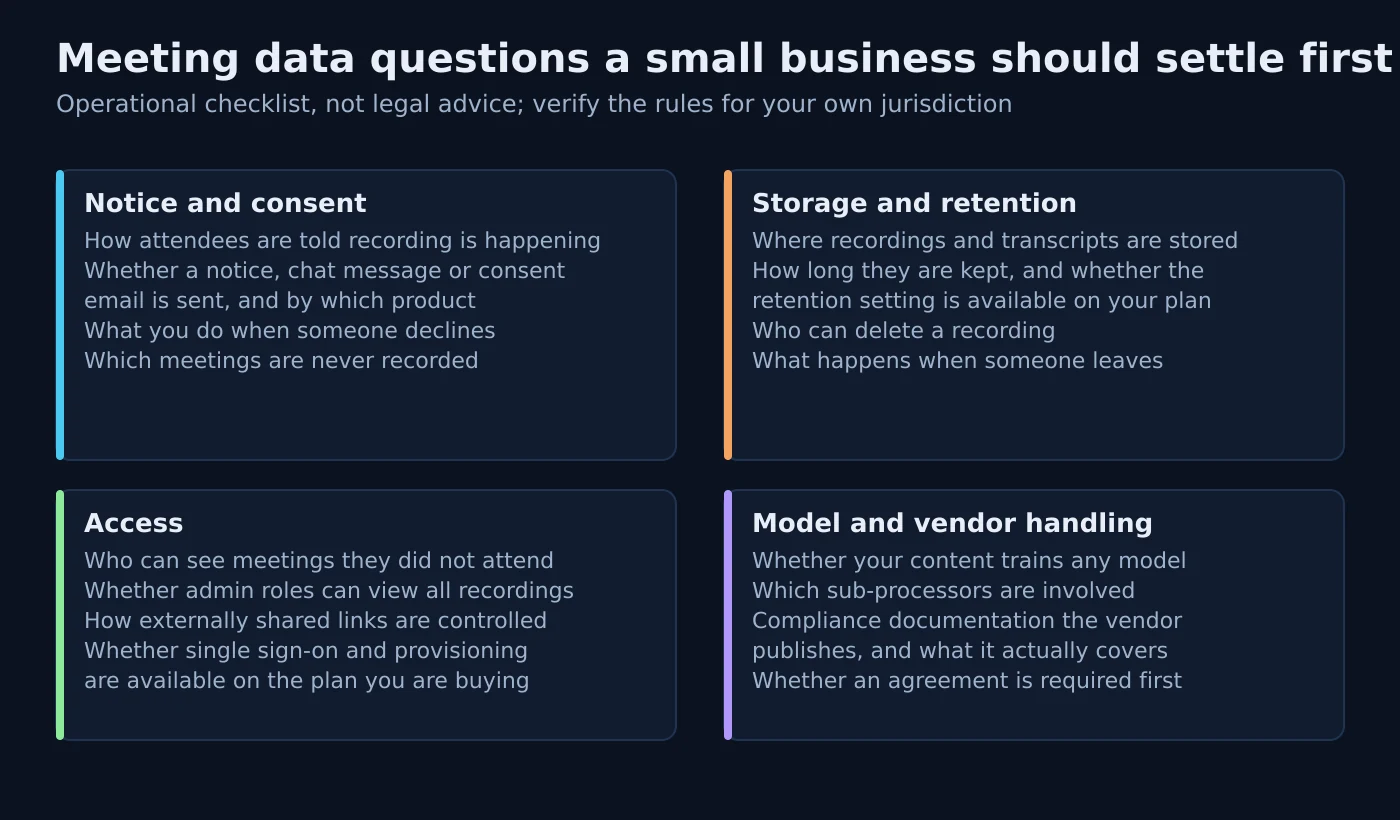
This section is operational, not legal advice. Recording and consent requirements depend on your jurisdiction, who is on the call and why you are recording, and you should verify the rules that apply to your own circumstances before rolling anything out.
The vendors themselves say the same thing in their documentation. Otter’s recording permissions article distinguishes places where one participant’s consent is enough from places where every participant must consent, names jurisdictions in both categories, and recommends an all-party practice as the safe default. Fathom recommends consulting a lawyer about the jurisdictions you operate in and documents consent emails, an in-meeting recording notice and a warning marker on calls where someone has asked not to be recorded. Where a statutory rule is what you need, read the primary text: California Penal Code section 632 is the commonly cited example of a two-party rule in the United States.
In the United Kingdom and the European Union the question is framed differently. The Information Commissioner’s Office publishes guidance on choosing a lawful basis for processing personal data, separate guidance on monitoring workers that is directly relevant when internal meetings are recorded routinely, and guidance on AI and data protection. Transparency obligations for AI systems that interact with people are set out in the EU Artificial Intelligence Act as published in the Official Journal. None of these replace advice about your own situation.
- Decide your standing disclosure once. A per-meeting decision is a per-meeting mistake waiting to happen.
- Know what the tool tells attendees, and when. Zoom documents a chat message posted a few minutes after its assistant joins a third-party meeting, plus an optional email notice before the meeting starts. Fathom documents consent emails and an in-meeting recording notice.
- Treat guest-join settings as a tenant-wide change. Both Otter and Fathom document Microsoft Teams join prerequisites involving anonymous or guest participants and lobby behaviour, which is an administrative decision with implications beyond one product.
- Check who can see recordings they did not attend. Fathom’s separation of settings access from view access, and the Fireflies super admin role documented as bypassing meeting privacy restrictions, are both worth reading before rollout rather than after.
- Ask every vendor the same training question. Zoom states third-party model providers may not use your data to train their models. Fathom states its sub-processors are not contractually permitted to train on customer data and documents an opt-out from its own de-identified model improvement. Keep the answers with the contract.
- Price retention before you promise it. Custom retention is documented as an Enterprise capability at both Fathom and Fireflies, so a deletion policy has a cost attached.
Integrations and what happens to the output
A summary that lives in the meeting assistant is a nicer archive. A summary that reaches the system where work happens is a workflow change. The documentation is specific about which of those you are buying.
Otter documents syncing meeting insights into custom Salesforce opportunity or HubSpot deal fields, mapped individually, with a choice of write behaviour when the field already contains something. Fathom documents its HubSpot integration in similar depth, including the requirement to be a HubSpot admin to connect it, the limit of one connected HubSpot account, and summary-note sync to deal fields as a Business and Enterprise capability, with Salesforce, Close and Zapier documented separately. Fireflies documents integrations alongside an API whose upload sizes and rate limits step up by plan. Zoom’s documented meeting output flows through Zoom’s own surfaces, by email and meeting chat, rather than through a documented CRM field sync. Microsoft’s meeting recap licences do not include CRM write-back at all.
Atlas editorial assessment. If the reason you are buying is that nobody updates the CRM after calls, then the integration is the product and everything else is packaging — so test the destination on the plan you intend to pay for, not on a trial of a higher tier. Where a native integration stops short, a general automation layer usually closes the gap; our comparison of Zapier and Make for small businesses covers that trade-off, and meeting output is a natural trigger for the kind of client onboarding sequence we documented step by step. Sales teams working specifically inside Salesforce should also read our review of meeting assistants for Salesforce.
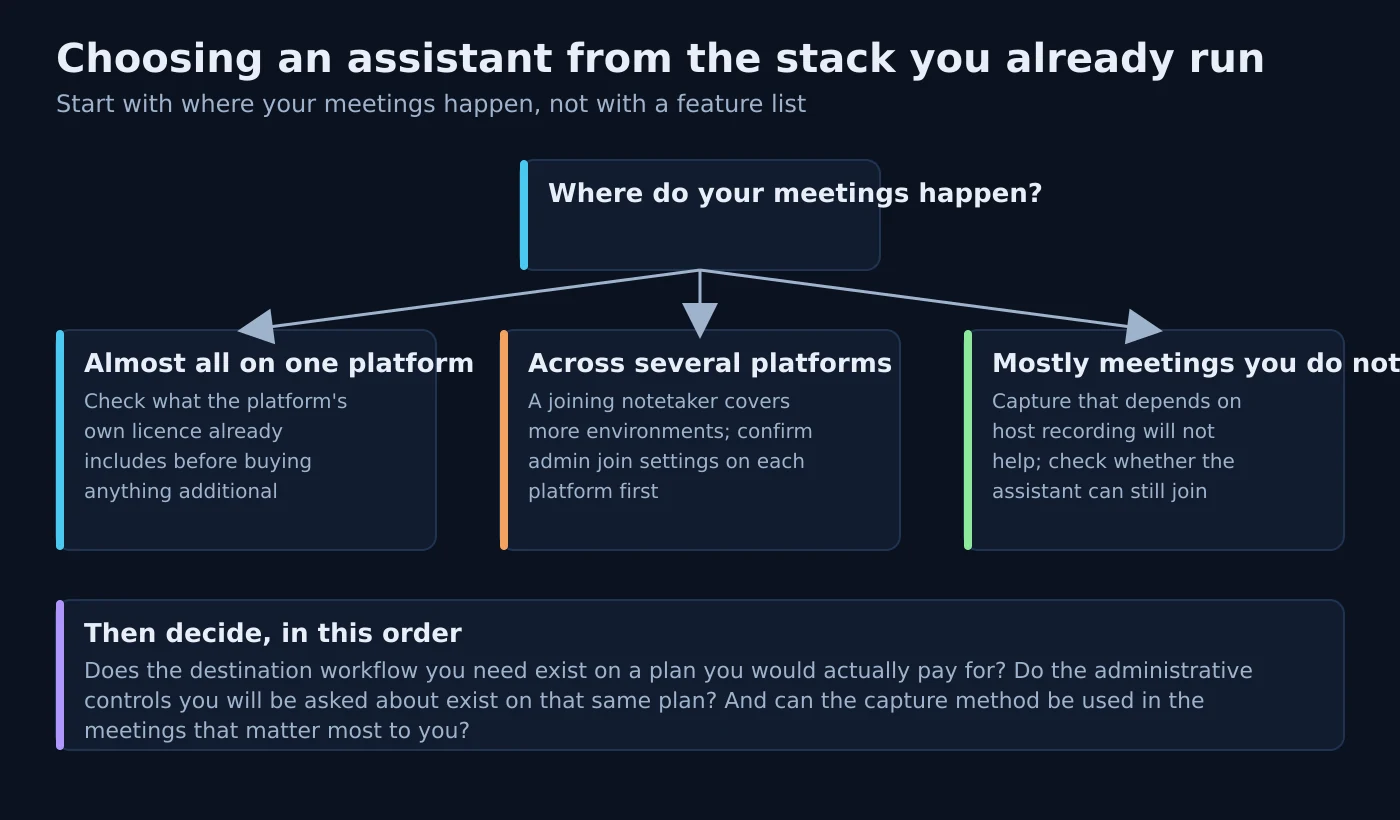
Choosing based on the meeting stack you already run
Start with where your meetings happen, because that eliminates more options than any feature list will.
Almost everything on Microsoft Teams. Check what your tenant already permits and what licences people already hold. Transcription is a policy setting, and recap capability follows the Teams Premium or Copilot licence. Only then compare a third-party notetaker, remembering that both Otter and Fathom document a Teams admin change as a prerequisite for joining.
Almost everything on Zoom. Your paid Workplace plan already carries documented AI meeting features with plan-level allowances, so the first question is what you own rather than what to buy. Zoom’s third-party capability also covers Google Meet and Teams calls when an administrator enables it.
A genuine mix of platforms. A joining notetaker is the pragmatic answer, and here the differences narrow to price model, storage limits and administrative controls rather than platform coverage. Confirm the join prerequisites for each platform before you promise coverage to anyone.
Mostly meetings hosted by other companies. Capture that depends on your own platform’s recording will not help you. A notetaker you can bring into someone else’s meeting will, subject to their admin settings — and note Fathom’s documented requirement that you be present on the call yourself.
A lot of in-person conversation. Fireflies documents a browser-based recorder for meetings that never touch a conferencing platform, and Zoom documents a voice recorder for in-person meetings among its AI features.
Implementation considerations
- Confirm what you already own before buying. On Microsoft and Zoom, meeting intelligence is a licensing and policy question first. Several purchases in this category are avoidable.
- Decide the capture model before the shortlist. If a visible third-party participant in client calls is unacceptable, the shortlist is the platform-native options and Fathom’s documented bot-free path, and you have saved yourself several trials.
- Get the admin change agreed early. A notetaker that needs anonymous participants allowed in Teams is a request to whoever administers your tenant, and that conversation is slower than a trial signup.
- Trial on internal meetings only. Keep client conversations out of a trial until the vendor has cleared whatever review you apply to processors.
- Test the awkward meeting deliberately. Several speakers, one poor headset, one phone participant. That is where summary quality separates, and no vendor demo shows you that call.
- Test the destination, not the notes. If CRM write-back is the point, confirm it on the plan you intend to pay for, because both Otter and Fathom document that capability on specific tiers.
- Assign an owner for the output. Someone has to review summaries before they are shared and convert suggested next steps into real tasks with real owners.
- Write down the data answers. Retention period, deletion route, who at the vendor can access recordings, whether single sign-on is on your plan. Screenshot the pricing page too; this category re-prices frequently.
Atlas editorial assessment. A week of disciplined testing in this order will beat a month of feature comparison, because the failure modes are administrative rather than technical. The products all transcribe. What differs is whether your tenant lets them in, whether the output reaches anywhere useful, and whether the plan you can afford includes the controls you will be asked about.
Limitations of this comparison
- No accuracy or productivity figures appear here. No vendor publishes a methodology that would make such a comparison reproducible, so any number would be decoration.
- Speaker identification is documented by Otter and implied by Zoom’s per-speaker coaching analytics. On the official Fireflies and Fathom pages verified for this article it was not documented, which is recorded as not documented rather than absent.
- Zoom’s pricing page renders in the visitor’s local currency, so no Zoom price is stated here. The commercial model is described and the official page is linked instead.
- Fathom’s bot-free capture is described on its own pricing page as a beta feature for Mac, so it is reported as documented but not treated as a settled capability.
- Plan contents, credit allowances and storage limits in this category change frequently, and several published prices are promotional. Verify every figure on the vendor’s page before committing budget.
- Nothing here has been tested in a laboratory or scored. This is a documentation comparison, and the trials it recommends are meant to be run on your own meetings.
- Regulatory pages are cited as primary sources for the recording and data-protection discussion, not as legal advice about your circumstances.
Frequently asked questions
Does a bot have to join my meetings?
Not always. Microsoft’s recap is produced by Teams itself and Zoom’s AI features work inside Zoom meetings without an extra attendee. Otter, Fireflies and Zoom’s third-party capability all document joining as a participant, and Fathom documents both a joining notetaker and a bot-free path described on its pricing page as a beta feature for Mac.
Can an assistant attend a meeting I cannot make?
Fathom documents that it can only record when you are present and that it leaves when the meeting ends. Otter documents auto-join from the calendar and a host-priority setting for deduplication, and Fireflies documents calendar-based auto-join. Whether an unattended join is acceptable to the meeting host is a separate question from whether the product supports it.
Do I need my IT administrator involved?
For Microsoft Teams, yes in every case documented here. Transcription is a Teams policy setting, Otter documents allowing anonymous participants in the Teams admin centre, Fathom documents anonymous-participant and lobby prerequisites among the reasons a join fails, and Zoom documents an administrator enabling its third-party joining capability.
Are free plans usable for real work?
They are usable for evaluation. Otter’s free plan is documented with a monthly transcription-minute allowance and a per-conversation cap, Fireflies’ free plan with pooled storage minutes and a small credit allowance, Zoom’s Basic plan with a small monthly allowance of summaries and queries, and Fathom’s free individual plan with unlimited recordings and transcription but the advanced summary and action-item features listed on paid tiers. Microsoft publishes no free recap tier.
Which one puts notes into my CRM?
Otter documents insight sync into Salesforce opportunity or HubSpot deal fields, and Fathom documents HubSpot, Salesforce, Close and Zapier with deal-field sync on its Business and Enterprise plans. Fireflies documents integrations alongside its API. Zoom’s documented meeting output stays within Zoom surfaces, and Microsoft’s meeting recap licences do not include CRM write-back.
What about compliance documentation?
Otter documents HIPAA support on its Enterprise plan under a business associate agreement together with a SOC 2 Type II report. Fathom documents HIPAA, SOC 2 Type II and GDPR compliance and states that data is stored in the United States. Fireflies lists HIPAA support and custom data retention among Enterprise capabilities. Ask each vendor what their documentation actually covers for your use case rather than treating a badge as an answer.
Is it cheaper to use the platform we already pay for?
Sometimes, and it is always worth checking first. On Zoom, paid Workplace plans include documented AI meeting features with plan-level allowances. On Microsoft, recap is an add-on licence published at a yearly-paid monthly rate per user, so the comparison is that add-on against a third-party seat, including the administrative work you avoid or take on.
How to decide
Answer four questions in order. Where do your meetings actually happen, and what does that platform’s licence already include? Is a visible third-party participant acceptable in your client calls? Where does the output have to land for this purchase to change anything? And which administrative controls will you be asked about by a customer, on which plan do they appear, and can you afford that plan?
Those four answers usually leave one credible option and one runner-up, and they leave them for reasons you can explain to a colleague. If the answers point back at the platform you already pay for, that is a legitimate outcome rather than a failure to shop around. Support and meeting workflows tend to raise the same questions about where automation helps and where a person is still required, which we examined for customer support automation.
Sources
- Otter.ai pricing — plan prices on annual billing, transcription-minute allowances, per-conversation caps, speaker identification and plan-level integration footnotes.
- Otter: set up the notetaker to join Microsoft Teams meetings — the Teams admin centre prerequisites.
- Otter: IT administrator setup — single sign-on, domain capture and directory sync.
- Otter: directory sync and provisioning — plan and seat-count requirements.
- Otter: recording permissions — one-party and all-party consent jurisdictions and the recommended default practice.
- Otter: speaker management — tagging, renaming and merging speakers.
- Otter: prioritise the meeting host’s notetaker — deduplication when several attendees have notetakers.
- Otter: block the notetaker by meeting-title keyword — documented as a support request rather than a self-serve setting.
- Otter: export summary — how summary output leaves the product.
- Otter: CRM insight sync to custom fields — Salesforce opportunity and HubSpot deal field mapping and write behaviour.
- Otter: custom meeting templates — availability across plans with differing usage limits.
- Otter public API — plan requirement, authentication, key limit and request rate.
- Otter workspace webhooks — the summary, action item, insight and transcript payload.
- Otter HIPAA documentation — plan requirement, agreement requirement and SOC 2 Type II.
- Fireflies.ai pricing — tier prices on annual and monthly billing, credit allowances and Enterprise governance features.
- Fireflies: pricing plans documentation — the same tiers described in the help centre.
- Fireflies: meeting storage limits — cumulative storage minutes by plan and behaviour at the limit.
- Fireflies: transcription credits — how credits are allocated and what they are consumed by.
- Fireflies: how to invite the assistant to meetings — manual invitation and calendar auto-join.
- Fireflies: post-meeting features — what is produced after the call.
- Fireflies: web recorder for in-person meetings — browser-based capture.
- Fireflies: private storage — Enterprise-only storage in your own bucket, processed in the United States.
- Fireflies: super admin role — Enterprise-only role documented as bypassing meeting privacy restrictions.
- Fireflies developer documentation: limits — upload sizes and API rate limits by plan.
- Fathom pricing — free, individual, team, business and enterprise plans, seat minimums and the beta bot-free capture note.
- Fathom: what does Fathom cost — the free version and the plan renaming.
- Fathom: adding Fathom to a meeting — scheduled and unscheduled joins, and the bot-free experience.
- Fathom: can the notetaker join without me — the user-presence requirement.
- Fathom: using Fathom with Microsoft Teams — calendar sync and the Teams link requirement.
- Fathom: Teams setup and join troubleshooting — anonymous participants, lobby, encryption and bot restrictions.
- Fathom: automatically requesting recording consent — consent emails, recording notice and declined-recording handling.
- Fathom: can I record without asking permission — the documented absence of silent recording.
- Fathom: is Fathom secure — compliance claims, sub-processor training terms, opt-out and data location.
- Fathom: retention policies — Enterprise-only, requested rather than self-serve, one policy per team.
- Fathom: account-wide question usage limits — per-plan history limits.
- Fathom: team admin role — settings access and view access as separate permissions.
- Fathom: HubSpot integration — admin requirement, single connected account and deal-field sync tiers.
- Fathom: Zapier integration — triggers and scoping to your own or team meetings.
- Zoom Workplace pricing — plan structure, plan-level AI allowances and annual billing terms.
- Zoom: Workplace plans and licences — the Basic, Pro, Business and Enterprise structure.
- Zoom: getting started with AI features — the feature list and where each is managed.
- Zoom: using meeting summary — licence requirement and how summaries are delivered.
- Zoom: enabling or disabling meeting summary — the admin requirement.
- Zoom: using smart recording — chapters, highlights, next steps and host analytics, and the recording and transcript prerequisite.
- Zoom: using the assistant in third-party meetings — requirements, participant behaviour and the in-meeting notice.
- Zoom: enabling third-party meeting joining — the administrator setting.
- Zoom: how AI features handle your data — content used per feature, model-training terms and the accuracy warning.
- Microsoft: intelligent recap for Teams calls and meetings — licence requirements for text, audio and video recap.
- Microsoft: Teams add-on licensing — Teams Premium as an add-on requiring both licences.
- Microsoft: Teams meeting transcription and captions — the transcription policy requirement.
- Microsoft: Teams Premium overview for admins — feature scope and administrative controls.
- Microsoft: Copilot and Teams transcription — how the assistant depends on the transcript.
- Microsoft: use Copilot in Teams meetings — what users can ask during and after a meeting.
- Microsoft 365 Copilot licensing — eligible plans and assignment.
- Microsoft 365 Copilot requirements — prerequisites and caveats.
- Microsoft Teams Premium pricing — the published per-user rate paid yearly.
- Microsoft 365 Copilot for business pricing — add-on and bundled plan rates paid yearly.
- Information Commissioner’s Office: a guide to lawful basis — choosing a lawful basis for processing.
- Information Commissioner’s Office: monitoring workers — guidance relevant to routine recording of internal meetings.
- Information Commissioner’s Office: AI and data protection — data-protection expectations for AI systems.
- California Penal Code section 632 — primary text of a commonly cited two-party consent rule.
- EU Artificial Intelligence Act, Official Journal text — transparency obligations for AI systems interacting with people.