A signup form that asks for one work email is the right form. It is also the reason your CRM fills up with records that carry a name, an address and nothing a salesperson can act on. B2B data enrichment is the practice of taking that thin record and adding the business context around it: the company behind the domain, the person’s role, the size and location of the organisation, sometimes a direct phone number.
For a small SaaS team the decision is rarely about which vendor holds the largest database, because no vendor publishes a figure you can independently check. The decision is about the mechanics you will live with: which identifiers the product matches on, how a run is triggered, how consumption is metered, which values are allowed to overwrite what your buyer typed, and what happens when someone asks you to delete what you hold about them.
This comparison covers five options that a small team can realistically operate: enrichment built into HubSpot’s CRM, the Apollo.io API, Clay as an orchestration layer, Hunter for email discovery and verification, and the Lusha API. Every statement about a product below is drawn from that vendor’s own documentation, and each source is linked in the Sources section at the end. Where the assessment is ours rather than the vendor’s, it is labelled as an Atlas editorial assessment.
What an enrichment run actually does to one record
Before comparing products it helps to see the pipeline, because every vendor in this article implements the same five stages with different names. A record arrives with a first-party identifier. The product resolves that identifier to a person or a company. It looks the entity up, either in its own dataset or by falling through to other providers. It validates whatever came back. Then something decides whether the returned value is allowed to touch your CRM field.
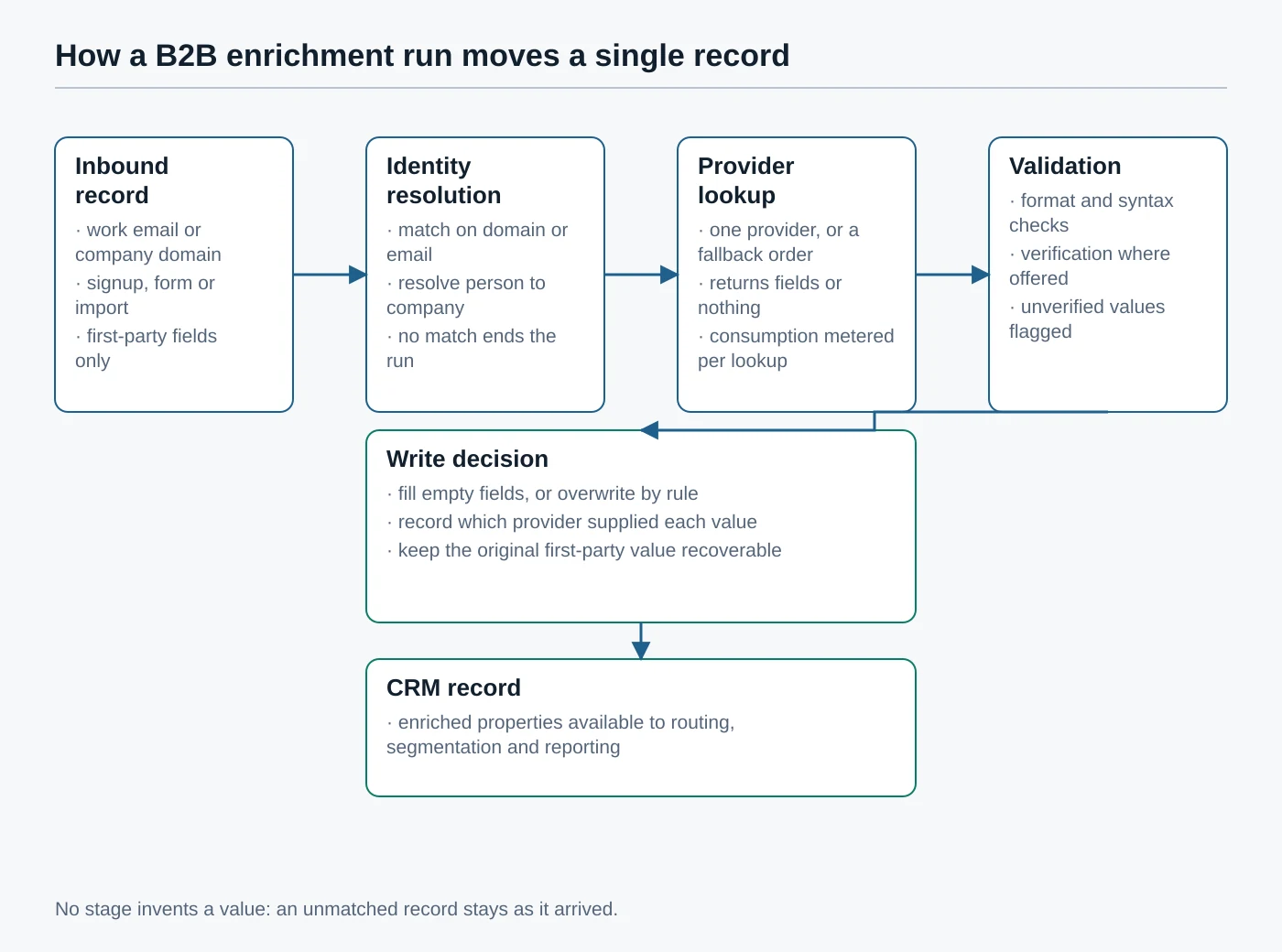
Two stages carry most of the risk, and neither belongs to the vendor. The identity resolution stage decides whether the person you have is the person the dataset describes; a shared inbox address or a personal address on a business record will resolve badly or not at all. The write stage decides whether a stale job title from a dataset silently replaces the title your buyer typed into your form last week. HubSpot documents that enrichment uses a defined set of identifying fields for exactly this reason: first name, last name and work email address for contacts, and the company domain for companies, as set out in its explanation of how data enrichment works.
Atlas editorial assessment: treat the write stage as the product you are actually buying. A vendor with a smaller dataset and precise field-level control will do less damage to a CRM than a broad dataset wired to overwrite everything nightly.
How these five options were compared
There is no honest way for an outside publisher to measure match quality across vendors. Coverage varies by region, by seniority, by industry and by how recently a company changed its website, and any single sample says more about the sample than the product. So this comparison deliberately avoids match-rate claims, and compares only what each vendor commits to in writing.
That constraint is not a limitation of this article so much as a description of the purchase. You cannot buy a match rate; you can only buy a mechanism, and the mechanism is the thing you will still be living with a year later. The six dimensions below are the ones that show up in support tickets and in awkward conversations with a prospect, and every one of them is documented publicly by all five vendors.
- Input identifiers. Which fields the product needs to attempt a match, and whether it can start from a bare company domain.
- Trigger model. Whether enrichment happens on demand, on a schedule, when an input value changes, or continuously in the background.
- Consumption model. What the vendor documents as the billable unit, and whether a lookup that returns nothing still consumes it.
- Rate limits. Whether documented limits are published per plan, and what the product returns when a limit is hit.
- CRM write behaviour. What the vendor documents about which properties can be written, and who may change that.
- Subject rights. Whether the vendor publishes a route for an individual to see or remove the data it holds.
Every URL cited was reachable when this article was verified in September 2026. Where a vendor publishes pricing openly the pricing page is linked rather than summarised, because published plan structures change more often than product mechanics do, and a stale figure in an article is worse than no figure at all.
| Option | Shape of the product | Primary inputs it documents | Where the mechanics are published |
|---|---|---|---|
| HubSpot data enrichment | Enrichment native to the CRM, off by default, configured by an administrator | First name, last name and work email for contacts; company domain for companies | How enrichment works · enrichment settings |
| Apollo.io API | REST endpoints for person and company enrichment, single and bulk | Email, name plus company, domain or a social profile URL | People enrichment · rate limits |
| Clay | A table-and-workflow layer that orchestrates many providers, including your own accounts | Whatever column you point an enrichment at, including imported CRM records | Enrichments · actions and data credits |
| Hunter | Email discovery and verification, with a documented REST API | Company domain, or a person’s name plus a domain | API v2 reference · email verifier |
| Lusha API | A search-then-enrich REST API with bulk operations and activity signals | Contact identifiers such as email or profile URL, or name plus company; company name or domain | API overview · contact endpoints |
HubSpot data enrichment: fewest moving parts
If your CRM is already HubSpot, the enrichment built into the CRM is the option with the least new surface area. There is no second system holding a copy of your records, no API key to rotate and no field mapping to maintain, because the enriched properties are HubSpot properties.
How it is triggered and controlled
HubSpot documents enrichment as optional and turned off by default, with Super Admin permission required to configure it and a separate enrichment permission required to enrich records at all, per its settings documentation and its user permissions guide. Once enabled, an administrator chooses between enriching records manually, enriching newly created records automatically, and continuous enrichment that updates supported properties when better information becomes available. The getting-started article sets out those options, and the list of properties that enrichment can populate is published in the contact and company enrichment article.
Two details that change how you should use it
First, scope. HubSpot states that when automatic or continuous enrichment is on, the records enriched are those created after you enabled it plus existing records you select yourself. A backlog of old records is therefore a deliberate act, not a side effect, which is the behaviour you want when a database has grown for years without governance.
Second, reciprocity. HubSpot’s documentation explains that enrichment draws on its own commercial dataset, third-party providers and publicly available information, and that where a record can be verified, a limited set of fields may be contributed back to that commercial dataset. It also notes that accounts using only continuous enrichment do not add data to the dataset, and that turning enrichment off stops future activity without removing values already written. Read that section before enabling anything, because it describes a data flow leaving your account.
Where it runs out
Enrichment inside the CRM is bounded by the properties HubSpot supports and by the identifiers it accepts. It will not chase a direct dial through several vendors, and it is not the tool for a research workflow that needs arbitrary fields such as which cloud provider a prospect uses. It is also tied to a subscription, so the cost conversation is a CRM conversation; the published HubSpot CRM pricing page is the only figure worth quoting. Teams that already treat HubSpot as the system of record should also read how properties are created and edited and how deleted records are restored before turning automation loose.
Atlas editorial assessment: the natural default for a small SaaS team already on HubSpot, precisely because permissioning and scope are administrator decisions rather than a script somebody wrote and left running.
Apollo.io API: the documented cost per lookup
Apollo publishes an unusually candid API reference, and that candour is the reason to consider it. Its people enrichment endpoint matches a single person from identifiers you already hold, its bulk endpoint accepts up to ten people per request, and organization enrichment resolves a company from a domain. Authentication is a key sent with each request, described in the authentication reference.
Consumption is documented per outcome, not per call
The API pricing documentation states that endpoints which create, update, list or manage records consume no credits, while enrichment and search endpoints consume credits when qualifying data is returned. Person enrichment is documented at one to nine credits per person: one for demographic or email data, with a larger charge when a mobile phone number comes back. Company enrichment is one credit per organisation, and search endpoints charge per page of results rather than per record.
The same page describes what happens when you enable waterfall enrichment, where Apollo falls through to other vendors for a phone number or an email. Consumption then depends on the vendors in your configuration, and Apollo warns plainly that some vendors consume credits per lookup even when no data is found, that email waterfalls typically land in a low single-digit range but can cost far more on an expensive match, and that phone waterfalls are more expensive again. Apollo’s advice is to test a small request and review credit usage in the product before scaling a job, which is the correct advice for any metered enrichment API.
Rate limits you can plan against
Apollo publishes limits per plan and per endpoint category in its rate limits documentation, including per-minute, per-hour and per-day ceilings, lower limits for bulk endpoints on the free tier, and a usage endpoint that returns your account’s current limits programmatically. It also states the obvious constraint that a higher request ceiling is not a licence to spend: the credit balance still governs how much data you can enrich. Plan structures themselves are on the published Apollo pricing page.
The governance side
Apollo maintains a privacy policy and a privacy centre that describes how individuals can exercise rights over data held about them. Read both before you build, because the notice you owe the people you contact depends on where the data came from.
Atlas editorial assessment: the strongest option for a team that wants enrichment inside its own product flow and is prepared to own a queue, a retry policy and a consumption ceiling. The published credit table makes a run’s cost estimable in advance, which is rarer than it should be.
Clay: orchestration when one provider is not enough
Clay is a different category of tool. Rather than being a dataset with an API, it is a table where each column can be an enrichment step, and those steps can call many providers, including ones you already license directly. Its enrichments documentation describes adding an enrichment to a table, selecting an integration, and connecting your own account so that your existing vendor contract is used instead of Clay’s bundled access.
Run control is the actual feature
Three documented run settings decide whether a Clay table is a controlled workflow or an expensive loop. Auto-update re-runs an enrichment whenever its input value changes. A conditional setting runs a step only when a formula you supply evaluates as true, so you can decline to look up a record that already has the field you need. A delay setting waits a defined number of seconds after conditions are met, up to ten minutes, which exists because external systems need time to sync. Used together, those three settings are how you stop paying twice for the same record.
Two meters, not one
Clay documents two separate units in its actions and data credits reference and the matching credits guide. Actions measure orchestration: one action per record enriched, one per AI run, one per record exported to a sequencer or synced to a CRM. Data credits pay for third-party data bought through Clay’s marketplace, and vary by the type of data requested. Importing your own records, running formulas, filtering and moving data between tables consume neither, and bringing your own provider key still consumes an action because you are still using the platform.
The distinction matters when you forecast. A workflow that enriches a list and syncs the survivors to a CRM spends actions twice per record, once on the enrichment and once on the export. Clay publishes a credit usage dashboard that breaks consumption down by table and integration, and an open pricing page with the plan tiers those allowances sit in. The wider Clay University library documents the rest of the workflow surface.
What you are taking on
Clay is a build environment, and build environments accumulate. A table someone assembled during a campaign will keep running after that person moves on, and its outputs will keep landing in your CRM. If you adopt it, treat each production table as a system with an owner and a documented purpose, the same way you would treat a scheduled job. Teams that already run automation platforms will recognise the pattern from comparing Zapier and Make for small-business automation, and the ownership discipline is the same one described in our guide to implementing automation without breaking a process. Clay’s privacy policy covers the data you push through it.
Atlas editorial assessment: the right choice when the hard problem is routing between providers rather than any single provider’s coverage, and the wrong choice for a team that wants one integration to configure and forget.
Hunter: narrow scope, verification included
Hunter does less than the other four, deliberately. It is built around finding and verifying work email addresses at a domain, and its v2 API reference is specific about how each endpoint behaves. Domain search returns the addresses associated with a domain, the email finder resolves a named person at a domain, and the email verifier checks whether an address is deliverable before you send to it.
Documented limits and error behaviour
Authentication accepts a key as a query parameter, a dedicated header, or a bearer token, so it fits both a quick script and a production service. Endpoint-level throughput is published rather than implied: the domain search endpoint documents a limit of fifteen requests per second and the discover endpoint five per second, and a rate-limited request returns a forbidden status. Some newer endpoints are explicit about cost as well, with a domain finder that consumes no credits and a multi-domain reveal that charges one credit per personal email, and a single credit for all generic addresses on a domain. Keys are managed from the API keys page, and the endpoint index sits at the API documentation home.
Verification is the part worth paying for
For a small SaaS team the highest-value use of Hunter is often not discovery at all. It is running the addresses you already collected through verification before they reach a sequencer, because bounced mail damages sending reputation in a way that is slow and expensive to repair. That is a narrow job with a measurable outcome, and it does not require you to buy anybody’s contact database.
Hunter is also unusually direct about individual rights. It publishes a claim page through which a person can control the data associated with their address, alongside its privacy policy and a data-protection page. Published plan structures are on the Hunter pricing page.
Atlas editorial assessment: the least ambitious option here and often the most defensible one. Pairing verification with a CRM-native enrichment covers most of what a small team actually needs, without a second contact database to govern.
Lusha API: search first, then enrich
Lusha’s current API is organised around a two-step pattern that is worth understanding even if you choose another vendor. Its API overview describes searching for a contact or company using known identifiers to obtain an internal identifier, then calling an enrich endpoint with that identifier to retrieve the full profile. A combined search-and-enrich endpoint exists for the single-call case, and both contact and company sides are documented separately in the contact reference and the company reference.
Why the two steps help
Splitting search from enrichment lets you decide whether a match is the right person before you pay for the full profile. A contact search accepts an identifier, a profile URL, an email address, or a name combined with a company name or domain; a company search accepts a name or a domain. Atlas editorial assessment: for a small team the value of that split is auditability, because the record of what you asked for and what you accepted lives in your own logs rather than inside a vendor’s black box.
Operational surface
Authentication is an API key passed in a request header on every call, as described in the authentication documentation. Rate limits are enforced per plan across minute, hour and day windows, with the current values published for account holders rather than in the public reference, and a too-many-requests status returned when a limit or daily quota is exceeded; the rate limit page sets out the response headers that report your remaining allowance, and the help centre article on how the Lusha API works is the reference for plan-specific numbers. The wider developer hub covers bulk operations, activity signals and reusable contact tables, and the published Lusha pricing page carries the plan structure.
Lusha also documents a fall-through option on contact enrichment, where a request can be allowed to reach enabled third-party providers when Lusha’s own data has no match. That is the same trade Apollo describes: more reach, less predictable consumption. Whichever vendor you use it with, decide deliberately rather than leaving the default in place. Lusha’s privacy policy sets out its own data practices.
Atlas editorial assessment: a reasonable choice for a team building enrichment into a product or an internal service, particularly where activity signals matter. Its plan-specific limits being private makes capacity planning harder than Apollo’s published table.
The part that breaks CRMs: writing values back
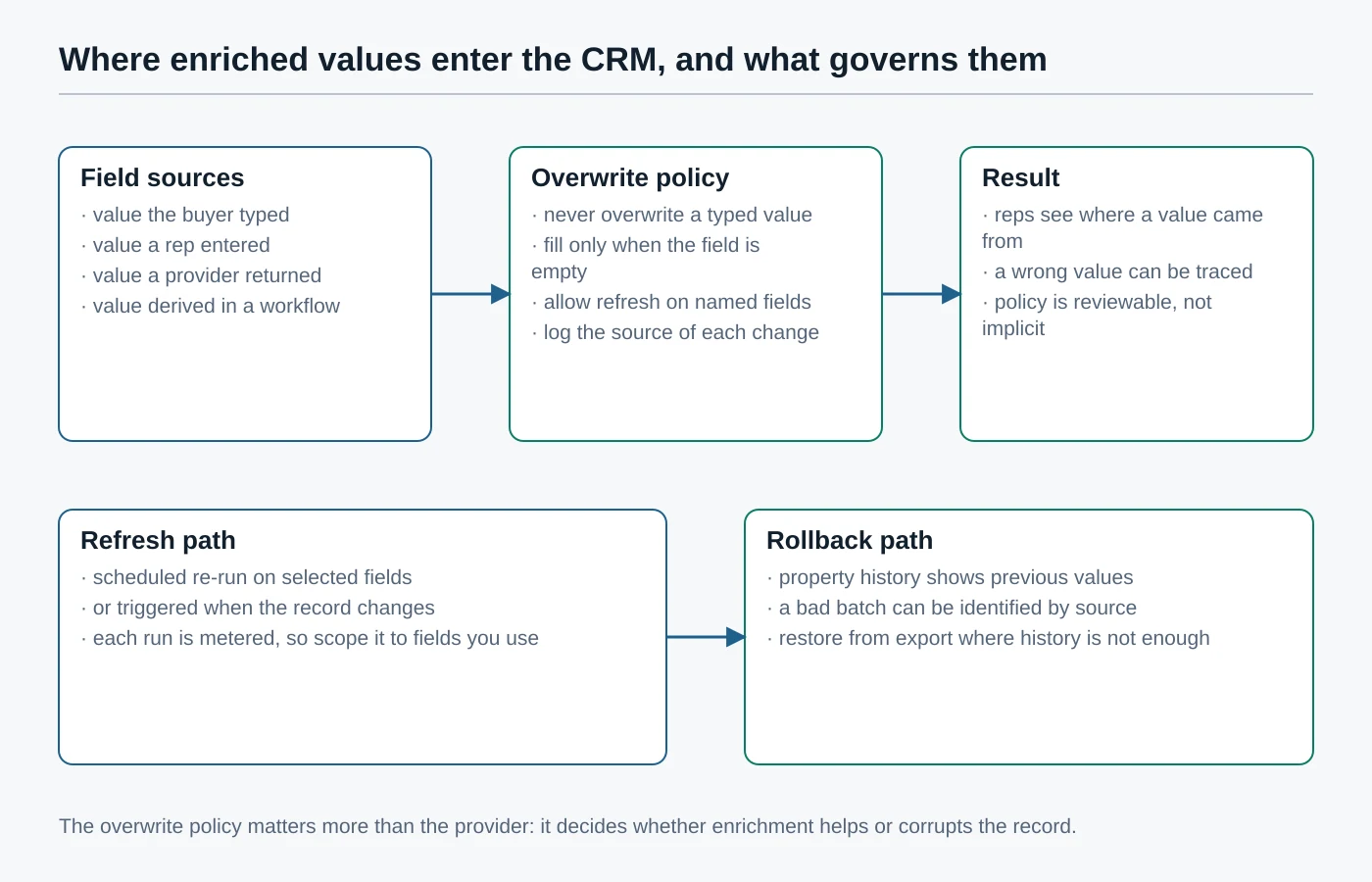
Almost every enrichment failure a small team reports is a write-back failure rather than a data failure. A provider returned a plausible job title from an old dataset, a workflow was set to overwrite, and now a sales rep is addressing somebody by a role they left. Nothing in the vendor’s documentation is wrong; the policy around it was never written down.
Four rules that survive contact with a real database
- Never overwrite a value a human typed. A field a buyer or a rep filled in is evidence; a bought value is an inference. Fill empty fields by default and treat overwriting as an exception you name field by field.
- Record where every value came from. A property showing which provider supplied it, and when, is what lets you find and undo one bad batch instead of distrusting the whole database.
- Keep the refresh scope narrow. Re-running enrichment on fields nobody reads spends consumption and adds churn to your audit trail. Refresh the two or three fields that drive routing.
- Decide the rollback route before the first run. HubSpot exposes property history and record restoration; a bespoke integration has whatever you built. Either way, know the answer before you need it.
HubSpot users get much of this without building it: the platform documents how properties are created and edited, how enrichment settings control the way enriched data is applied, and how deleted records are restored. Teams writing through the API should read the contacts API guide and its reference documentation for the association behaviour between contacts and companies, because an enrichment that creates a duplicate company object is a data-quality problem wearing a helpful face.
| Option | Documented billable unit | Charged on a miss? | Documented rate limits | Who controls a run |
|---|---|---|---|---|
| HubSpot data enrichment | Subscription plus HubSpot credits, per enrichment options | Not applicable; runs are scoped by setting rather than per call | Not published as request limits | Super Admin, plus users granted enrichment access |
| Apollo.io API | Credits per matched person or organisation, per API pricing | No for its own data; yes for some waterfall vendors, which Apollo states explicitly | Per plan and endpoint category, published in full | Whoever holds the API key, so hold it server side |
| Clay | One action per record enriched or exported, plus data credits by data type | Actions count as platform usage regardless of provider or result | Not published as request limits; run settings throttle instead | The owner of each table, which is why tables need named owners |
| Hunter | Credits per revealed address; a domain finder that consumes none | Documented per endpoint, with generic addresses on a domain charged together | Per endpoint in requests per second, in the API reference | Whoever holds the key, managed at API keys |
| Lusha API | Credits per enriched profile, with usage and credit endpoints in the API | Search and enrich are separate calls, so a rejected match need not be enriched | Per plan across minute, hour and day windows, reported in headers | Whoever holds the key; account endpoints expose remaining allowance |
Building the integration without leaving a hole
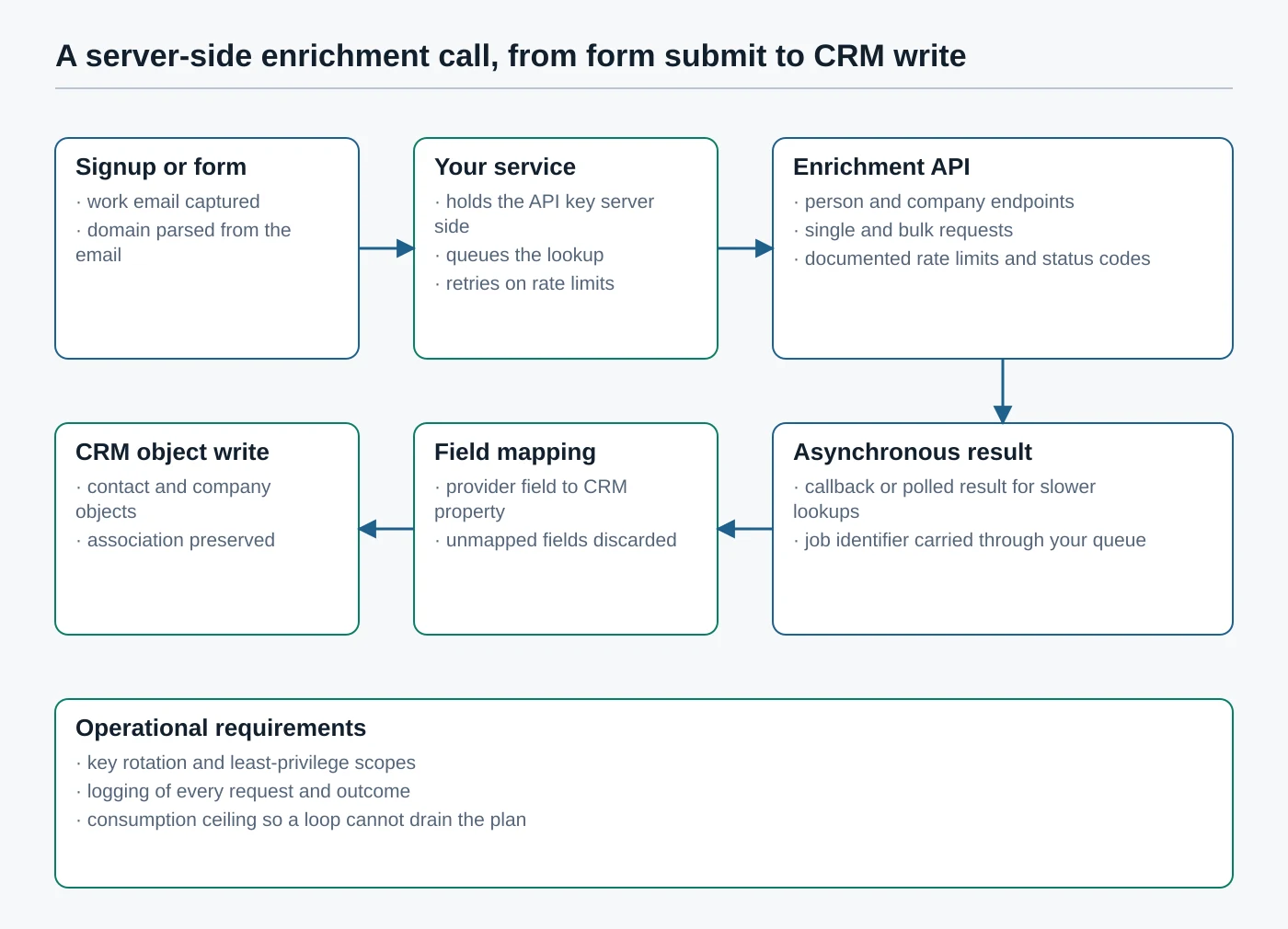
If you choose an API rather than CRM-native enrichment, the integration is a small piece of production software and deserves to be treated as one. The shape below is deliberately unexciting, and it is the shape that stops a marketing experiment from becoming an incident.
Five requirements worth writing into the ticket
- The key never reaches a browser. Enrichment keys spend money and read personal data. They belong in server-side configuration, rotated on a schedule, with the same discipline you apply to identity credentials as covered in our review of single sign-on for small businesses.
- Every call is queued and retried deliberately. Providers publish rate limits and return a documented status when you cross them; a queue with backoff turns that from an outage into a delay.
- A consumption ceiling exists in your code. A loop that re-enriches the same record cannot drain a plan if your own service refuses past a daily threshold you set.
- Requests and outcomes are logged. Store what you asked, what came back, and which fields you accepted. That log is your evidence when someone asks where a value originated.
- Field mapping is explicit and short. Map only the properties you use for routing, segmentation or reporting, and discard the rest rather than storing data you cannot justify holding.
Teams without an engineer to spare can assemble the same flow on an automation platform, accepting less control over retries and logging in exchange for not maintaining code; the trade-offs are laid out in our Zapier and Make comparison. Either way the enrichment step belongs in a documented process rather than in somebody’s head, which is the argument made at length in our piece on automating client onboarding.
Choosing between the five
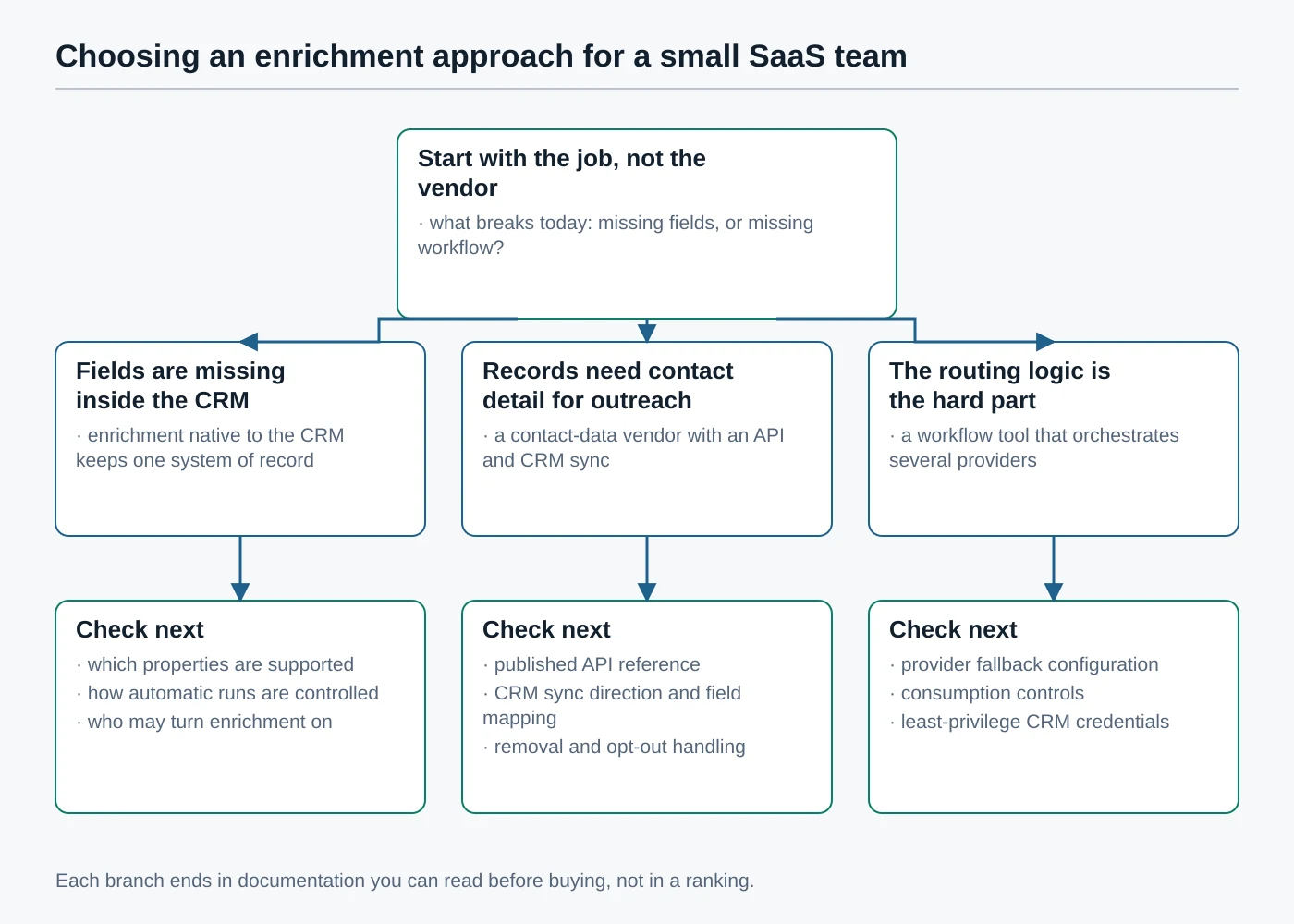
The useful first question is not which vendor is strongest. It is which part of your current process is broken: the fields are missing, the outreach has nothing to dial, or the routing logic between several sources is the real work. Each answer points at a different shape of product, and each shape has a short list of things to check in the documentation before you commit.
If your CRM records are simply thin
Start with enrichment native to your CRM. One system of record, administrator-level control over what may be written, and no key to protect. For HubSpot teams that means the settings described in its enrichment settings documentation, and reading the property list first so you know what enrichment can and cannot fill.
If outreach is starved of contact detail
This is where a dedicated contact-data vendor earns its place, and where consumption discipline matters most. Apollo’s published credit table and Lusha’s split of search from enrichment both let you control spend per record; Hunter’s verification stops you burning sending reputation on addresses that were never going to deliver. Decide in advance whether a direct phone number is worth its documented premium, because that single choice moves cost more than the choice of vendor does.
If the routing between sources is the hard part
That is the case Clay is built for, and the case where a single-vendor API will frustrate you. Accept in exchange that you are adopting a build environment with its own governance needs, and set the run conditions on day one rather than after the first surprising invoice. A periodic review of what these tools cost belongs in the same exercise described in our walkthrough of a SaaS spend audit.
Atlas editorial assessment: most small SaaS teams are best served by CRM-native enrichment plus verification, and should only add a contact-data API when a named workflow is provably blocked without it. Adding a second source of truth for company data is a decision with an ongoing cost in reconciliation, not a one-off purchase.
The obligations that stay with you
Buying business contact data does not transfer responsibility for it. The moment an enriched value lands in your CRM you are the one holding it, and the person it describes may never have heard of you. None of the following is legal advice; it is the set of published guidance a small team should read before its first enrichment run, and a lawyer in your jurisdiction is the right person to apply it.
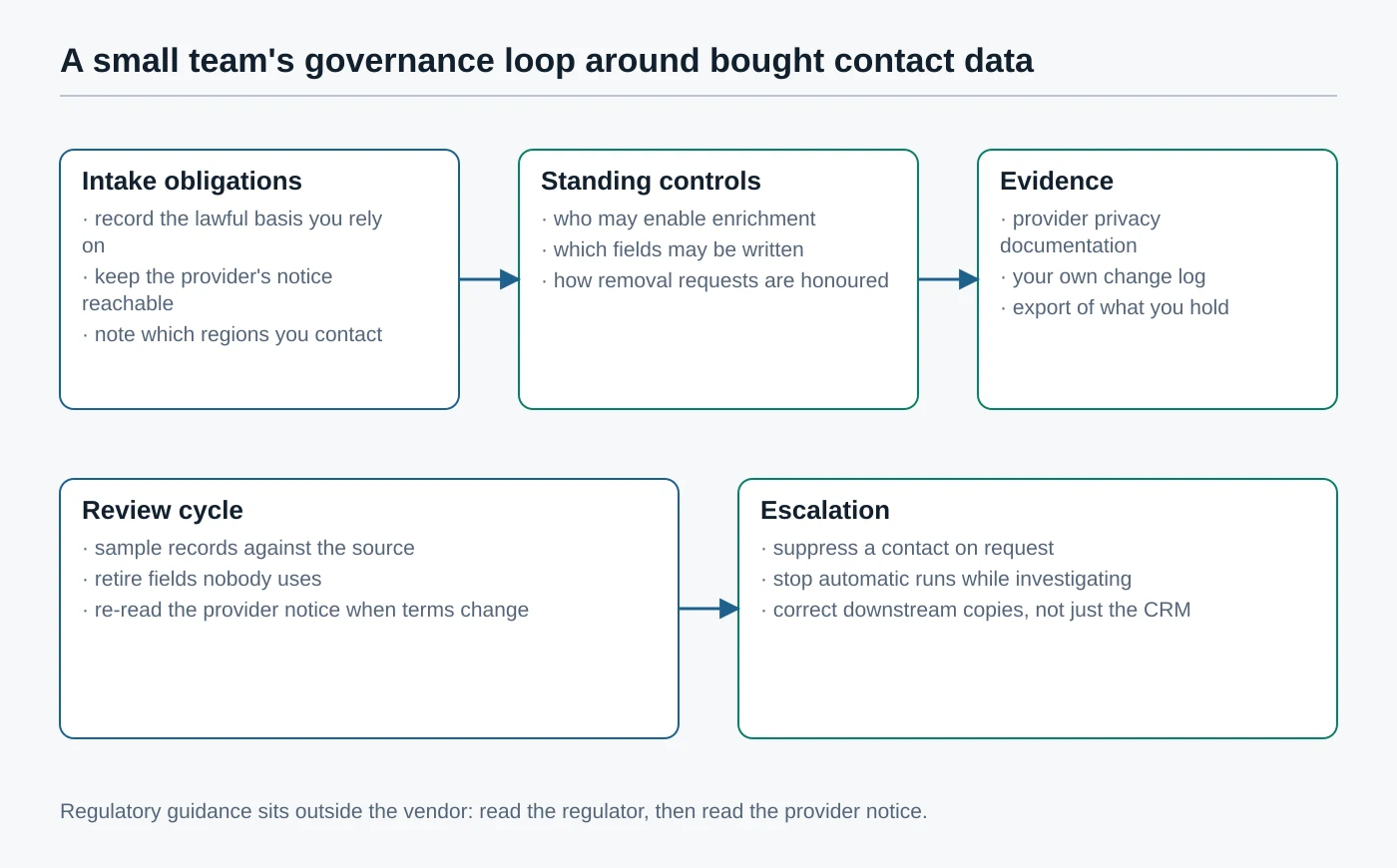
- Tell people where their data came from. Where UK or EU rules apply, information obtained other than from the individual carries specific notice duties; see the ICO’s right to be informed guidance and Article 14 of the GDPR.
- Check the rules for the channel, not just the data. Electronic marketing and calling have their own regimes: the ICO publishes direct marketing guidance, the FTC publishes a CAN-SPAM compliance guide and the Telemarketing Sales Rule.
- Honour deletion and opt-out routes. Suppress the contact in your own systems as well as the vendor’s, and remember downstream copies in sequencers and spreadsheets. California’s consumer privacy provisions and the FTC’s privacy and security guidance both bear on this.
- Keep the vendor’s notices reachable. Apollo’s privacy centre, Hunter’s data-protection page, HubSpot’s data privacy resources and HubSpot’s privacy policy are the documents a prospect or a regulator may ask you to produce.
- Use guidance written for organisations your size. The ICO maintains advice for small organisations, and the EDPB publishes the European guidelines and recommendations that supervisory authorities work from.
Atlas editorial assessment: the practical test is whether you could answer one question from a stranger in a single working session. Asked where you got their phone number, could you name the provider, the date, and the request that returned it? If not, the logging described earlier is the gap to close first, ahead of any vendor change.
A short sequence for the first run
None of this needs a project. It needs a small, reversible first run that produces evidence, and a decision made on that evidence rather than on a demo.
- Name the two or three fields that actually change what happens to a record: the fields that decide routing, segmentation or a reply. Everything else is optional.
- Take a small sample of records you know well and check what each candidate returns for them by hand. Reading the misses tells you more than counting the hits.
- Write the overwrite policy down before enabling anything, field by field, and decide who is allowed to change it later.
- Enable enrichment for newly created records only, leaving the existing database alone until the policy has survived a few weeks of real traffic.
- Put a consumption ceiling and a log in place, then schedule a review of the fields you enabled and retire the ones nobody used.
One more habit is worth building in early. Whenever an enriched value turns out to be wrong, correct the record and note which provider supplied it. A handful of those notes tells you more about a vendor’s fit for your particular market than any published coverage claim, and it is evidence you own rather than evidence you were given.
Enrichment is at its best when it is boring: a couple of fields, filled reliably, from a source you can name. The teams that get hurt are the ones that bought coverage and skipped the policy. If you are extending this into the wider revenue stack, the same restraint applies to the meeting and note-taking layer covered in our reviews of assistants for Salesforce and Microsoft Teams.
Sources
Every claim about a product above traces to one of the following first-party pages, each reachable when this article was verified in September 2026. Regulator and supervisory-authority pages are listed for the obligations section.
- HubSpot — how data enrichment works, get started with data enrichment, enrich contact and company data, manage enrichment settings, user permissions guide, create and edit properties, restore deleted records, contacts API guide, contacts API reference, CRM pricing, privacy policy, data privacy resources.
- Apollo.io — people enrichment, bulk people enrichment, organization enrichment, API credit usage, rate limits, authentication, pricing, privacy policy, privacy centre.
- Clay — enrichments, actions and data credits, credits guide, credit usage, Clay University, pricing, privacy policy.
- Hunter — API v2 reference, API documentation, API keys, email finder, email verifier, verification, pricing, claim page, privacy policy, data protection.
- Lusha — API overview, contact endpoints, company endpoints, authentication, rate limits, developer hub, API help centre article, pricing, privacy policy.
- Regulators and supervisory authorities — ICO right to be informed, ICO direct marketing guidance, ICO advice for small organisations, EDPB guidelines and recommendations, GDPR Article 14, FTC CAN-SPAM compliance guide, FTC Telemarketing Sales Rule, FTC privacy and security guidance, California Attorney General consumer privacy provisions.