Almost every small business already has a password system: a shared spreadsheet, a pinned chat message, a note in someone’s phone, and one long-serving employee who remembers the rest. It works until somebody leaves, a laptop disappears, a supplier account gets taken over, or an insurer asks how shared credentials are controlled. At that point the question stops being “should we use a password manager” and becomes the harder one: which of these products actually fits the way a ten-person company is run?
This guide compares four approaches — 1Password, Bitwarden, Dashlane and Keeper — using each vendor’s own documentation and published pricing, read in September 2026. It is not a ranking, it does not crown a single product, and nothing here is based on laboratory testing or timing exercises that Atlas did not perform. Where a vendor does not document something, the article says so instead of estimating. What it does do is compare the parts that determine whether a rollout survives its first year: how a credential is stored and unlocked, how shared containers are structured, who is allowed to administer what, what happens on the day an employee leaves, how a locked-out member gets back in, and which of those controls are gated behind a higher plan than the one you were about to buy.
What a business password manager actually changes
A consumer password manager solves a personal problem: too many passwords, all reused, none memorable. A business password manager solves a different problem — shared access to accounts that belong to the company rather than to a person. That change of ownership is the whole point, and it is what separates a business plan from four employees each buying a personal subscription.
All four vendors describe the same underlying architecture. Data is encrypted on the member’s own device before it reaches the vendor, and the vendor states it cannot read it. 1Password’s security overview explains that your account password is used to encrypt and decrypt your data and is never shared with 1Password, and documents AES-GCM-256 authenticated encryption with PBKDF2-HMAC-SHA256 key derivation. Bitwarden’s help centre documents AES-CBC 256-bit encryption of vault data before it is sent to the cloud, with the full process described in its security white paper. Dashlane’s security page states its platform is built on zero-knowledge architecture, with vaults encrypted and decrypted locally on user devices. Keeper’s documentation states that each vault record is encrypted by a unique, client-side generated 256-bit AES key in GCM mode, and that its encryption and decryption always occur locally on the user’s device.
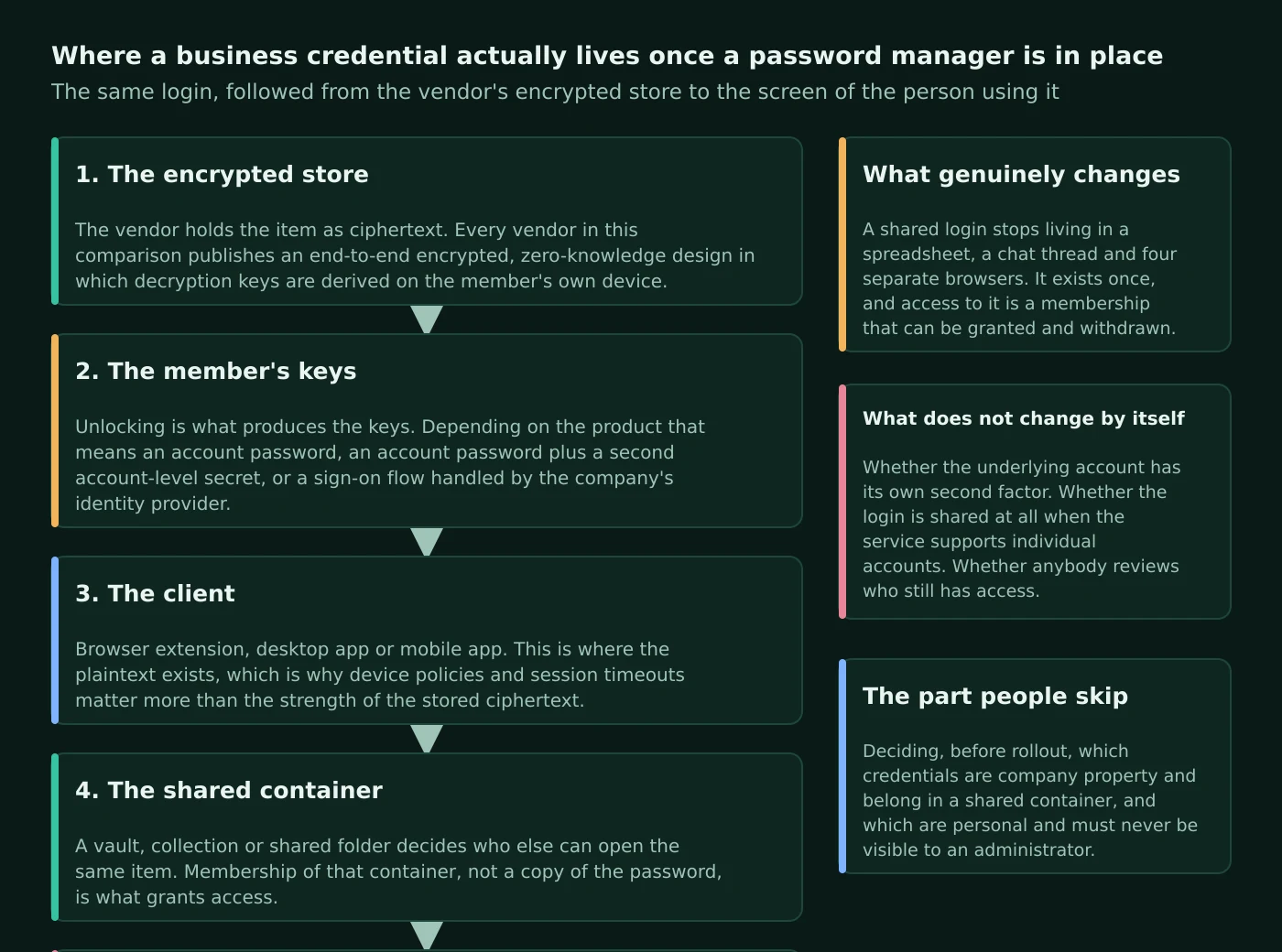
Atlas editorial assessment. Two things do not change by themselves, and both are commonly assumed. A password manager does not add multi-factor authentication to the underlying services; that still has to be enabled account by account, which is why national guidance such as CISA’s guidance on turning on MFA treats it as a separate control. And a password manager does not decide whether a login should be shared at all. Where a service supports individual named accounts, individual accounts are almost always the better answer, because they produce their own audit trail. Sharing is for the accounts that genuinely cannot be split. If you are formalising access more broadly, our guides to single sign-on for small businesses and to cloud access control cover the neighbouring decisions.
How the four approaches differ
Strip away branding and the four products differ along four documented lines: the shape of the shared container, the way administrative authority is divided, what unlocks the vault, and where the plan boundaries fall.
The container. 1Password’s unit is the vault: vaults are created in the apps or on the website, and its documentation notes that administrators can manage vaults by default unless that option is turned off, in which case only owners retain access. Bitwarden’s unit is the collection inside an organisation; its documentation states that items in collections belong to the organisation rather than an individual, and that organisation-owned items must be in at least one collection. Dashlane’s units are sharing groups and Collections, with group sharing documented for admins and group managers of professional plans and explicitly unavailable on the consumer Standard plan. Keeper’s units are shared folders and teams, with documentation describing nested shared folders up to five levels deep with role-based folder permissions, alongside classic shared folders.
Administrative authority. Here the differences are sharper. 1Password ships with three built-in groups — Team Members, Administrators and Owners — where administrators can add and manage vaults, groups and people and recover accounts, and owners can additionally change billing and delete the team. Bitwarden documents three default member roles plus Enterprise-only custom roles, and is unusually explicit about the split: only owners can reach billing details, assign new owners, manage organisation two-step login, the API key and SCIM configuration, while admins manage members, SSO, policies and event logs but not billing. Dashlane separates admins, group managers and billing contacts, and its policy documentation notes that billing contacts cannot access policies and plan members cannot access the Admin Console at all. Keeper draws the line differently again, distinguishing roles, which define permissions and enforcement policies and carry delegated administrative functions, from teams, which exist for sharing, and layering both on top of nodes that mirror organisational structure.
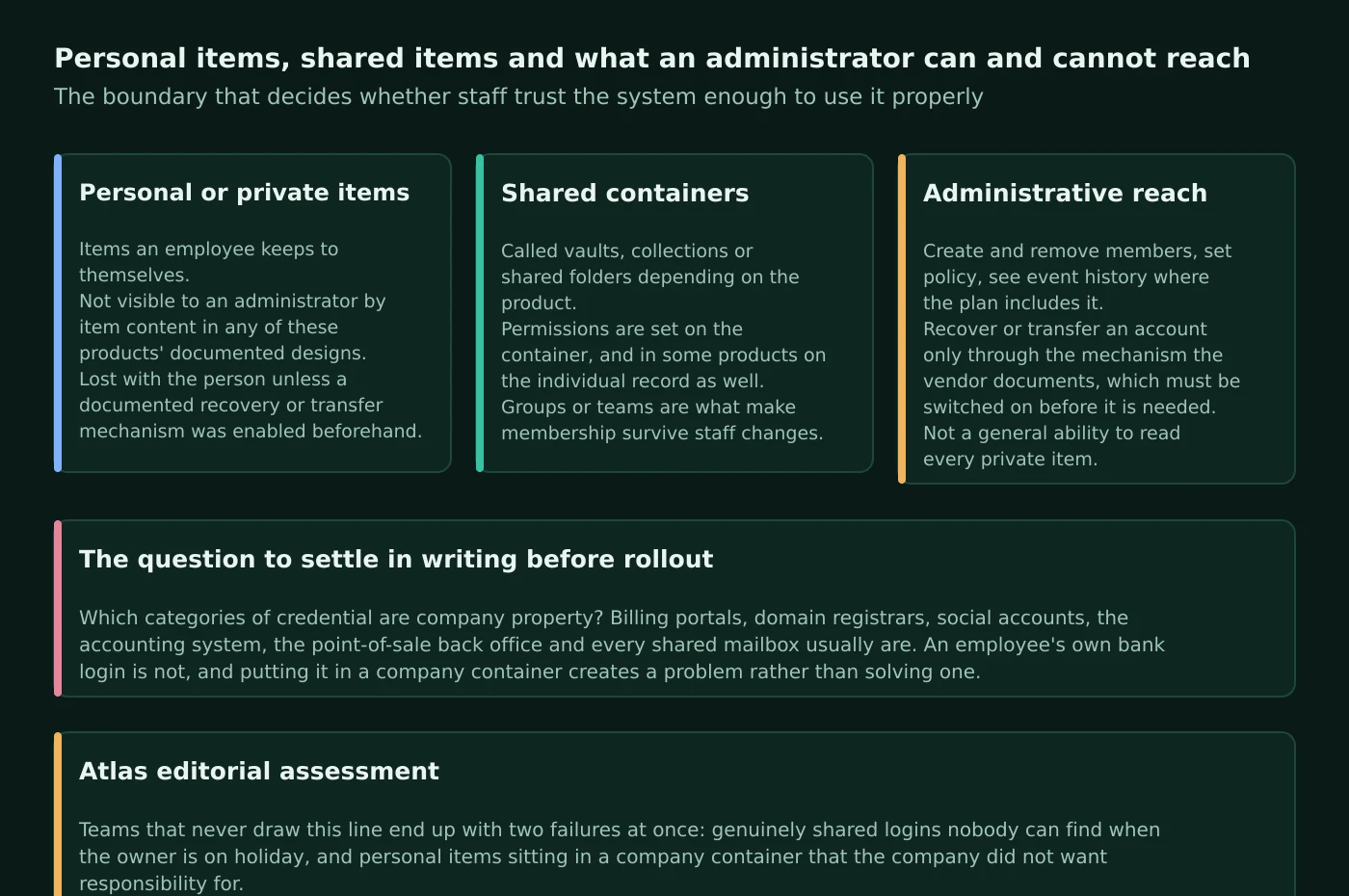
What unlocks the vault. 1Password’s design is distinctive because of the Secret Key: its documentation states the Secret Key works with your account password to encrypt and protect your data and that without it nobody, including the user, can reach the data. Bitwarden derives the key from the master password using PBKDF2 or Argon2id, and documents a default of 600,000 PBKDF2 iterations with an additional server-side step. Both 1Password and Bitwarden document a path that replaces the password entirely for signed-in members: 1Password’s Unlock with SSO and Bitwarden’s SSO with trusted devices. Keeper documents that for members who log in with SSO or passwordless technology, elliptic curve cryptography is used to encrypt and decrypt data at the device level.
Where the plan boundaries fall. This is the part that most often derails a purchase, because the feature a business assumed it was buying sits one tier higher. Bitwarden documents SSO as available to Enterprise organisations and admin-driven account recovery as an Enterprise feature, while SCIM and Directory Connector are documented for both Teams and Enterprise. 1Password documents that most reports are only available in 1Password Business and that Unlock with SSO requires 1Password Business. Keeper’s pricing page places advanced provisioning covering SCIM, AD/LDAP and SSO/SAML, plus role-based access control in its Enterprise tier. Dashlane’s documentation states that SSO and SCIM are only available to organisations with Password Management or Credential Protection plans.
1Password: what the documentation says
Documented 1Password facts
1Password’s business pricing page lists a Teams Starter Pack at $24.95 per month paid annually, including ten members, with additional seats available, and 1Password Business at $8.99 per user per month paid annually. Above those sits an Enterprise tier sold through sales contact, plus a separate MSP edition with consumption-based billing. Both self-serve plans are offered with a fourteen-day free trial, and the page states that 1Password Business gives every user a free Families plan for personal use. Guest accounts with access limited to specific vaults are supported, with different guest allowances on the two tiers.
Structurally, every team member automatically receives a private Employee vault for work-related items when they join the organisation, alongside any shared vaults they are granted. Access is granted through built-in or custom groups; with 1Password Business, custom groups can be created for projects, departments or locations and carry team-level permissions such as recovering accounts, creating vaults, viewing the administrative sidebar and managing people. The same page documents an important behaviour: where a member has permissions both individually and through a group, the more permissive of the two applies. Vault permissions themselves are granular — the documentation states that vaults have twelve permissions that can be set per member and per group, enforced cryptographically, by server policy or by client policy.
Administrators can invite people individually by email address or through a sign-up link, or provision them automatically. Automated provisioning runs through the 1Password SCIM Bridge or native integrations, documented for Google Workspace, JumpCloud, Microsoft Entra ID, Okta, OneLogin and Rippling, and that page carries a caveat worth reading twice: automated provisioning does not include single sign-on, which must be configured separately. SSO itself is documented as OpenID Connect only, using Authorization Code Flow with PKCE, requiring 1Password 8, with configuration guides such as Unlock with Okta; the same page states that members of the Owners group cannot unlock with SSO, deliberately, to avoid a total lockout.
Recovery is administrator-driven. Owners, administrators and holders of the Recover Accounts permission can begin recovery for a locked-out member, after which the documentation states the member receives a new Secret Key, creates a new account password, has two-factor authentication reset and must sign in again on all devices; the CLI supports bulk recovery. On the administrative side, policies let administrators set account password requirements, manage two-factor authentication and define where and how the organisation can sign in, with two-factor methods selectable and enforceable across the organisation on Business. Supported second factors include FIDO U2F security keys such as YubiKey and Titan, and the pricing page lists two-factor authentication, biometrics and passkeys as supported authentication methods. Platform support covers macOS, iOS, watchOS, Windows, Android and Linux apps plus extensions for Chrome, Safari, Edge, Firefox and Brave, with 1Password 8 requiring macOS Monterey 12 or later and iOS 18 or later and 1Password 7 documented as retiring in early 2027.
Atlas editorial assessment: 1Password
The Employee vault is the design decision most likely to shape how a small business experiences 1Password, and it cuts both ways. It gives every member a private work space, which reduces the temptation to keep work logins in a personal account. It also creates a container that administrators cannot read, which is exactly why the vendor’s own offboarding guidance puts moving its contents first. In a company where one person quietly owns half the supplier relationships, that vault becomes the single biggest offboarding risk, and it needs a habit — company credentials live in shared vaults, not personal ones — rather than a policy document.
Bitwarden: what the documentation says
Documented Bitwarden facts
Bitwarden publishes its business pricing openly: Teams at $4 per user per month billed annually and Enterprise at $6 per user per month billed annually, with larger organisations directed to sales and no published price for that tier. The Teams description lists basic business features, secure credential sharing, event-log auditing, directory synchronisation and SCIM provisioning; Enterprise adds granular access control, passwordless SSO integration, account recovery, the option to self-host, Access Intelligence risk remediation and a free Families plan for every user. Bitwarden also keeps a free tier: its plan documentation states that free organisations support up to two users and two collections, while Teams and Enterprise support an unlimited number of users priced per user, with unlimited collections and sharing.
The structural vocabulary is organisations, collections and groups. Organisations relate users and vault items together for secure sharing through an Admin Console covering items, members, reporting and settings. Collections group related logins, notes, cards and identities, and the documentation is precise about a limitation that surprises people: collections support nesting for display purposes, but nested collections do not inherit items, access or permissions from a parent. Groups, which provide a scalable way to assign collection access and permissions, are documented as available to Teams and Enterprise organisations.
Provisioning is where Bitwarden is generous relative to its price tier. SCIM v2 provisioning is documented for both Teams and Enterprise, with integration guides for JumpCloud, Microsoft Entra ID, Okta, OneLogin and Ping Identity, and Directory Connector supports LDAP, Active Directory, Entra ID, Google Workspace, Okta and OneLogin on the same two tiers. Its member management documentation notes that just-in-time provisioning is additionally available to Enterprise organisations. Login with SSO, covering SAML 2.0 and OIDC, is documented as Enterprise-only.
Offboarding has two distinct documented paths, and the difference matters. Revoking a member temporarily blocks access to organisation items, collections and SSO and frees a subscription seat, without requiring re-invitation to restore access. Removing a member permanently ends organisation access but, as the documentation states, does not delete their personal Bitwarden account or personally owned items; organisations using the centralised ownership policy have a removed member’s personal items converted into a new collection named after their email address. Recovery for a locked-out member sits behind the top tier: account recovery is available for Enterprise organisations and requires both the recovery policy and member enrolment.
On authentication, FIDO2 WebAuthn two-step login is documented as free to all Bitwarden users, and Bitwarden separately supports using passkeys to log in to and unlock the Bitwarden account itself. The plan table records that available second factors differ by tier, with Teams and Enterprise organisations covering authenticator apps, email, YubiKey, FIDO2 and Duo, including Duo for organisations. Visibility is likewise tiered: event logs are available for Teams and Enterprise organisations, retained indefinitely but viewable up to 367 days at a time and reachable through the public API, while vault health reports run locally on the client and are limited to premium users, including members of paid organisations. Self-hosting is documented as an Enterprise option among paid business plans, with deployment routes covering Linux and Windows, Docker and Kubernetes and a hosting FAQ that requires platforms under active mainstream vendor support. The desktop app supports up to five simultaneously signed-in accounts and shows both personal and organisation items, per its getting-started guide, with client and browser support policy published in the software release support article. Bitwarden also documents Secrets Manager as a separately subscribed add-on rather than part of the password manager plans.
Atlas editorial assessment: Bitwarden
Bitwarden’s plan structure produces an unusual pattern for small businesses: the provisioning features that are normally treated as enterprise concerns arrive on the cheaper Teams tier, while two features a growing company tends to want — SSO and administrator-driven account recovery — sit on Enterprise. A five-person business that will never run SAML gets a great deal on Teams. A twenty-person business that has just adopted an identity provider will find the upgrade decision is really about those two features, not about capacity.
Dashlane: what the documentation says
Documented Dashlane facts
Dashlane’s business line-up has been renamed around its Omnix platform, and the pricing page now lists Omnix Password Management at $8 per user per month billed annually and Omnix Credential Protection at $4 per user per month billed annually, plus an Omnix Enterprise tier priced custom and sold through sales. The pricing FAQ states that Omnix Enterprise is built for organisations with more than fifty users, which places the two self-serve packages as the small-business route. Password Management is described as including unlimited device access, SSO and SCIM integrations, dark web monitoring, password health scoring, secure sharing and 1GB of encrypted document storage; Credential Protection is described as adding credential risk detection, phishing alerts, in-browser nudges and phishing insights, monitoring logins whether or not employees actively use the vault. The support site still documents the older names alongside the new ones in its FAQ about renewal changes to the Dashlane Team, Omnix Password Management and Omnix Enterprise plans, and maintains a comparison of professional plans. Seat administration, billing and invoicing are handled by admins from the Admin Console, though the same article notes purchasing seats and updating billing are not available on every plan type.
Sharing works through three documented mechanisms: sharing individual logins, secure notes and secrets with other Dashlane users, sharing groups created and managed by admins and group managers, and Collections shared with members of professional plans. Administration runs through the Admin Console, where admins view and edit the settings of every member of the plan from the Users tab and onboard new members; the console’s own guide warns that some features are not available to all professional plans. Policy controls, including enforced two-factor authentication, live in a Policies tab restricted to admins.
Dashlane documents offboarding from both directions. The admin-side guide covers what to do when an employee leaves or is removed from a professional plan, including transferring and protecting data, while the member-side guide notes that an employee who leaves a professional plan must act before removal to avoid losing personal-space data. Recovery is documented as admin-assisted recovery for professional-plan members who forget their master password, with the explicit limitation that it is not available to members using single sign-on, and a separate article on turning admin-assisted recovery on or off for the organisation.
Identity integration is documented as Confidential SSO and SCIM provisioning, gated to organisations on Password Management or Credential Protection plans, with provider-specific guides including Okta, covering SSO, SCIM user provisioning and group provisioning with SAML. Auditing is provided by the Activity Log, which admins can search, filter and download as CSV. Monitoring covers a Password Health score out of 100 for anyone with at least five saved logins, an admin view of organisational password health over time, and Dark Web Insights in the Admin Console. On authentication, admins can enforce two-factor authentication for members in the policy settings tab, and Dashlane documents saving, using and deleting passkeys anywhere Dashlane is used, noting that not all sites support them yet. Its architecture documentation states that each credential is encrypted locally with AES-256-CBC plus HMAC-SHA256 before synchronisation, and that Dashlane extends its zero-knowledge model into the cloud using confidential computing and secure cloud enclaves. One platform decision stands out: Dashlane has consolidated all computer access through its browser extension, with the supported hardware and browsers catalogued in its supported devices and browsers article.
Atlas editorial assessment: Dashlane
Dashlane is the product in this comparison whose packaging has moved most, and that has a practical consequence: older reviews and even some support articles describe plan names that no longer match the pricing page. If you are evaluating Dashlane, price it from the live pricing page and confirm in writing which package includes SSO and SCIM for your seat count, because the documentation gates those on package rather than on size.
Keeper: what the documentation says
Documented Keeper facts
Keeper’s business pricing page lists four options. Read live in September 2026, Business Starter is shown at $2.00 per user per month billed annually, Business at $4.00 and Enterprise at $6.00, with Enterprise carried through a quote request and KeeperMSP sold through sales contact. Business Starter is described as protecting sole proprietors and small teams, states protection for five to ten users, and includes an encrypted vault and admin console plus credential sharing and autofill. Business adds shared team folders, delegated administration, advanced organisational structure and integrations, and a free family plan for every user. Enterprise adds advanced provisioning covering SCIM, AD/LDAP and SSO/SAML, advanced two-factor authentication, role-based access control and developer APIs. Keeper’s business overview page repeats the free family plan inclusion. Note that these figures are rendered by the page’s pricing component rather than being present in the static page source, so they should be re-checked at purchase.
Keeper’s structural model is the most layered of the four. Records sit in nested shared folders up to five levels deep, or classic shared folders. Teams are created by an administrator who sets team restrictions on editing, viewing and sharing and adds individual users, with options to disable record re-shares, disable record edits and apply privacy screens; teams can then be mapped to roles. Roles are the policy layer, documented as defining permissions, controlling which features and security settings apply, and carrying delegated administrative capabilities, and both sit within nodes that mirror organisational structure. Enforcement policies are extensive, with documented sections covering login settings, two-factor authentication, platform restriction, vault features, record passwords and types, creating and sharing, import and export, KeeperFill, account settings, an allowed IP list, privileged access and account transfer; the same page documents master password expiry configurable between ten and 150 days, and notes it does not affect members who sign in with SSO Connect Cloud.
Offboarding is where Keeper documents something the other three do not present in the same form. Its Account Transfer Policy exists to transfer a user’s vault when they are terminated or leave abruptly, is described as optional and best configured during initial deployment, and carries the condition that a successful transfer requires the user to have logged in at least once beforehand. The same page states that the policy is on by default for the All Users role, with the transfer permission enabled for the Keeper Administrator role by default.
Provisioning options are documented broadly: manual provisioning, SAML 2.0 via Keeper SSO Connect, Active Directory or LDAP via the AD Bridge, SCIM with Okta, Entra ID, Google Workspace, Ping and OneLogin, API provisioning, email auto-provisioning and CLI provisioning. Keeper’s SSO documentation states it integrates with any SAML 2.0 compatible identity provider and offers both a cloud and an on-premises implementation, recommending the cloud version for most customers. Multi-factor options are documented as SMS, TOTP apps, Duo Security, Keeper DNA using smartwatch devices, and FIDO2 WebAuthn keys such as YubiKey, configurable per role or by the end user, and the security page adds passkeys, biometric login and conditional access policies. For visibility, Keeper documents Advanced Reporting, Alerts and SIEM as an immutable, append-only audit system with no console or API route to change recorded events, compliance reports aligned to regulations including SOX, GDPR, PCI, HIPAA and others, and BreachWatch dark web monitoring of breached credentials. Its security page also lists FIPS 140-3 validation through the NIST CMVP programme, ISO 27001, 27017 and 27018 certification, and FedRAMP High authorisation, and states data is hosted on AWS in a customer’s preferred region. The encryption documentation adds that Keeper began rolling out quantum-resistant cryptography as an additional wrapper on the transmission key from the first quarter of 2026.
Atlas editorial assessment: Keeper
Keeper reads as the most policy-driven product in the group, and that is a genuine advantage for a business with a compliance obligation and a disadvantage for one without. A ten-person company that wants a shared vault by Friday will meet an enforcement-policy surface designed for organisations with a security team, and the layering of nodes, roles and teams takes longer to plan than a flat list of collections. A business already answering security questionnaires — for example while working through cyber insurance requirements — will find that same layering is why the audit story is strong.
Documented capability and decision matrix
| Documented dimension | 1Password | Bitwarden | Dashlane | Keeper |
|---|---|---|---|---|
| Shared container model | Shared vaults plus an automatic private Employee vault per member | Collections inside an organisation; nesting is presentational and does not inherit access | Sharing groups, shared individual items and Collections | Nested shared folders up to five levels, plus classic shared folders |
| Built-in roles | Team Members, Administrators, Owners, plus custom groups on Business | Owner, Admin, User, plus custom roles on Enterprise | Admins, group managers and billing contacts, with members excluded from the console | Roles with delegated administration, teams for sharing, nodes for structure |
| Vault-level permission granularity | Twelve documented vault permissions per member and per group | Collection access assigned per member or per group | Group and Collection sharing rights managed by admins and group managers | Team restrictions on edit, view and re-share, plus role enforcement policies |
| SSO documentation and gating | Unlock with SSO on Business, OIDC only, Owners group excluded | Login with SSO documented as Enterprise only | Confidential SSO gated to Password Management or Credential Protection | SAML 2.0 via SSO Connect Cloud or on-prem; advanced provisioning listed under Enterprise |
| Directory provisioning | SCIM Bridge and native integrations; documented as separate from SSO | SCIM and Directory Connector on Teams and Enterprise; JIT on Enterprise | SCIM provisioning documented alongside Confidential SSO | Manual, SAML, AD/LDAP bridge, SCIM, API, email auto and CLI provisioning |
| Account recovery mechanism | Administrator-initiated recovery issuing a new Secret Key and password | Account recovery documented as Enterprise, requiring policy plus enrolment | Admin-assisted recovery, not available to SSO members | Account Transfer Policy, requiring at least one prior login by the user |
| Second-factor options documented | Authenticator apps, security keys including FIDO U2F, biometrics and passkeys | FIDO2 WebAuthn free to all; Teams and Enterprise add YubiKey and Duo for organisations | Enforced 2FA via policy, per-login 2FA, and passkey support | SMS, TOTP, Duo, Keeper DNA and FIDO2 keys, plus passkeys and biometrics |
| Audit and event visibility | Most reports on Business; audit log via administrative sidebar permission | Event logs on Teams and Enterprise, viewable up to 367 days at a time | Activity Log with search, filter and CSV export | Append-only reporting with SIEM output, plus compliance reports |
| Self-hosting | Not documented as an option on the business plans reviewed | Documented as an Enterprise option, with Docker and Kubernetes routes | Not documented as an option on the plans reviewed | Cloud hosting on AWS in a chosen region; MSP tenancy documented separately |
| Notable platform constraint | 1Password 8 required for SSO and passkeys; 1Password 7 retiring in early 2027 | Desktop app supports up to five signed-in accounts; support policy published per release | Computer access consolidated into the browser extension | Supported device and browser list not located as a single published page |
The purchasing and pricing model
| Vendor | Entry business option | Higher tier | What the upgrade documents | Notes |
|---|---|---|---|---|
| 1Password | Teams Starter Pack at $24.95 per month paid annually, including ten members | 1Password Business at $8.99 per user per month paid annually | Identity provider integrations, role-based vault sharing and permissions, Watchtower alerts, and most reports | Fourteen-day trial; Business includes a free Families plan per user; guest allowances differ by tier |
| Bitwarden | Teams at $4 per user per month billed annually | Enterprise at $6 per user per month billed annually | Granular access control, passwordless SSO, account recovery, self-hosting and Access Intelligence | Free organisations limited to two users and two collections; Secrets Manager is a separate add-on |
| Dashlane | Omnix Credential Protection at $4 per user per month billed annually, sold through sales | Omnix Password Management at $8 per user per month billed annually | Vault-centred password management with SSO and SCIM, dark web monitoring and encrypted document storage | Omnix Enterprise is custom priced and described for organisations above fifty users |
| Keeper | Business Starter at $2.00 per user per month billed annually, stated for five to ten users | Business at $4.00 and Enterprise at $6.00 per user per month billed annually | Business adds shared team folders and delegated administration; Enterprise adds SCIM, AD/LDAP, SSO/SAML and RBAC | Prices are rendered dynamically on the pricing page; KeeperMSP is sold through sales contact |
| Common billing structure | Per user per month, billed annually across all four | Higher tier priced per user rather than as a platform fee | In every case the upgrade is bought for a control, not for capacity | Free family or personal plans for staff are documented by 1Password, Bitwarden and Keeper |
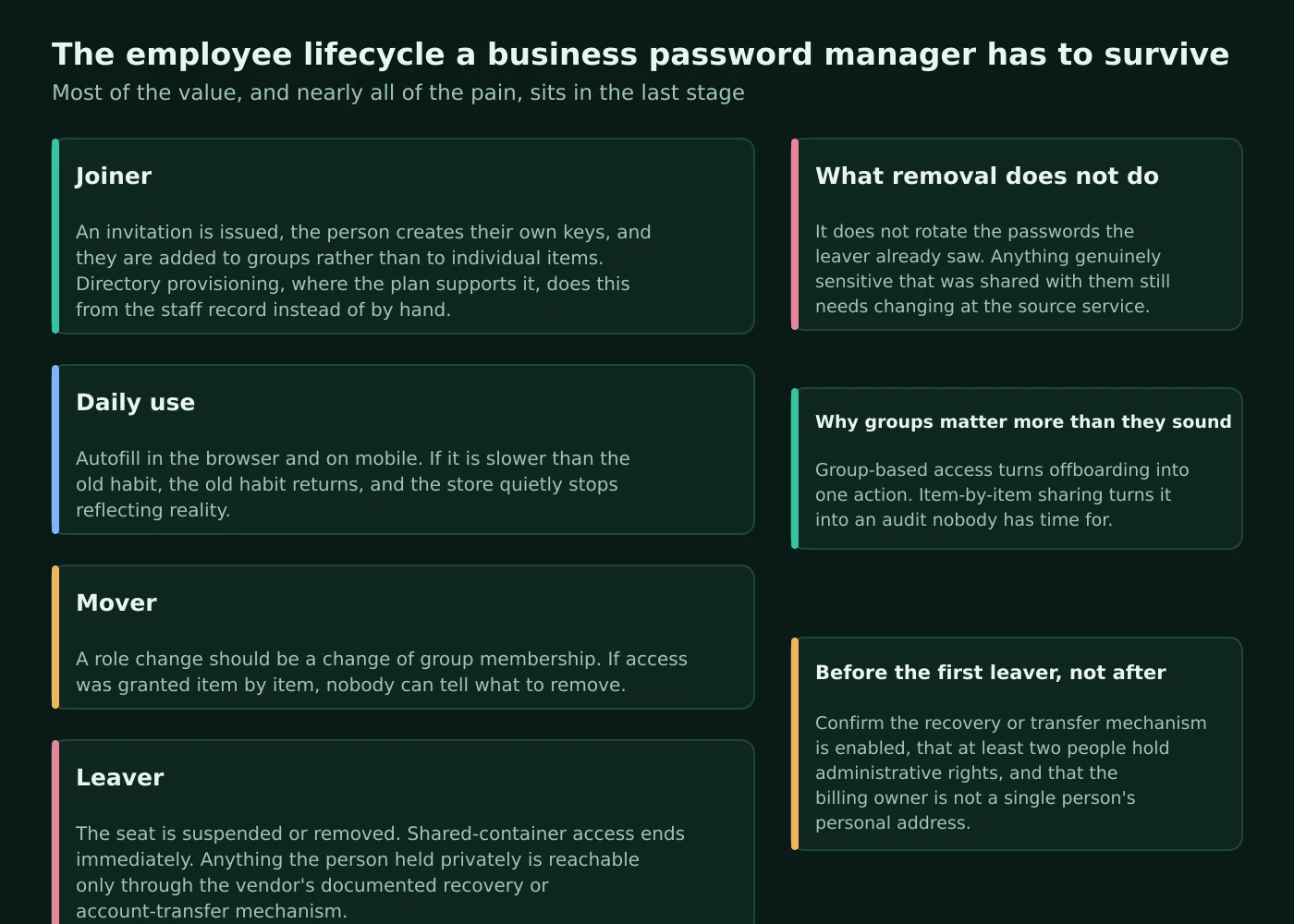
Atlas editorial assessment. Read those two tables together and a pattern appears that changes how you should budget. In this category you do not upgrade because you ran out of seats or storage; you upgrade because a single control you need — SSO, administrator recovery, role-based access or a report — lives one tier up. So the sound way to price a rollout is to write down the two or three controls you will genuinely use in year one, find the cheapest tier that documents all of them, and treat everything else in that tier as incidental. The corollary is that comparing entry prices across vendors tells you very little, because the entry tiers do not contain the same things.
Employee onboarding and offboarding
Offboarding is the most under-planned part of a rollout, and the part an insurer or a customer questionnaire will ask about. All four vendors document a procedure; they differ in what the procedure protects.
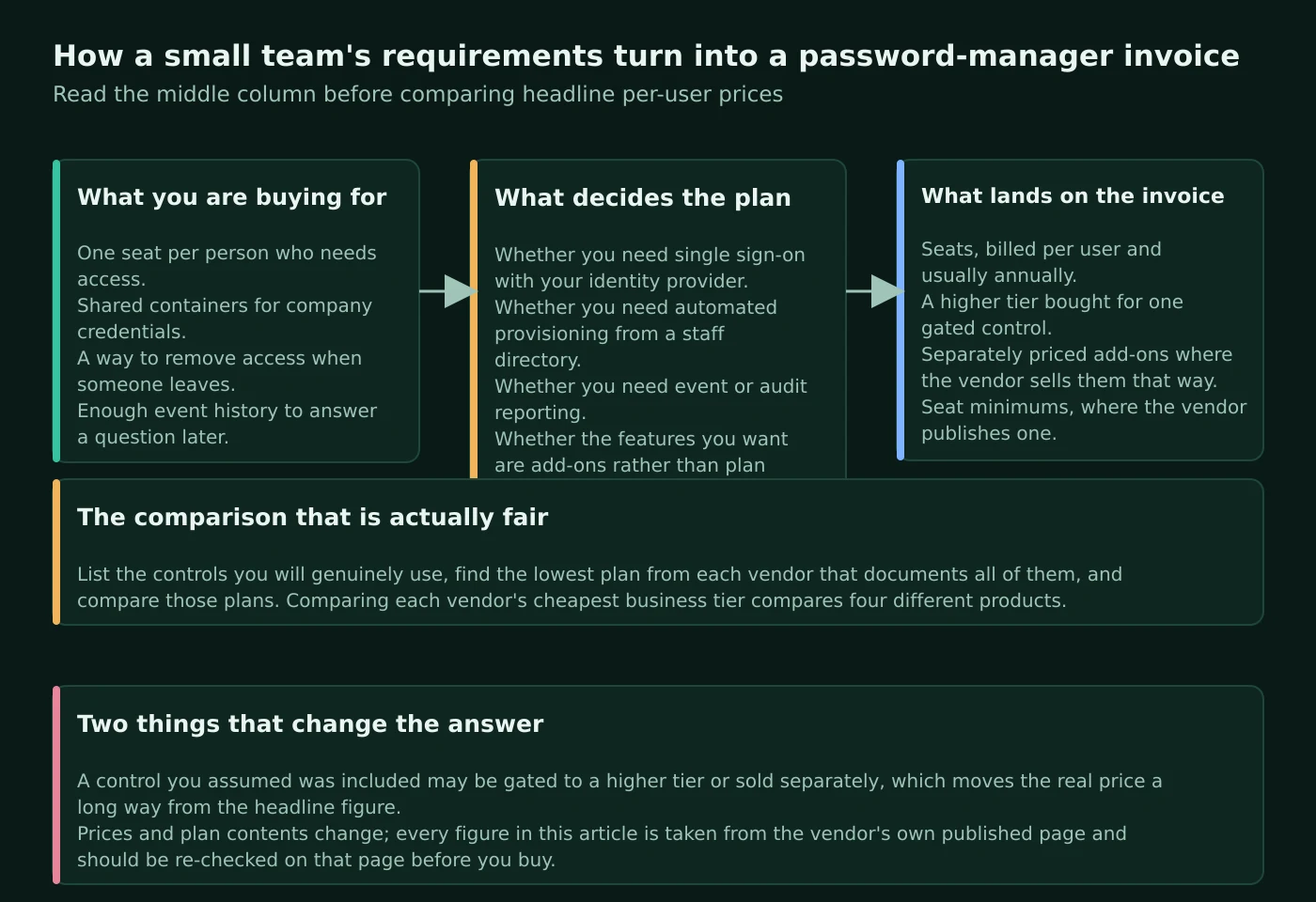
On the joining side, the documented options are broadly similar. 1Password supports individual email invitations, a shared sign-up link or automated provisioning. Bitwarden documents invitation, SCIM and Directory Connector on Teams and Enterprise with just-in-time provisioning on Enterprise. Dashlane’s member management guide covers onboarding from the Admin Console. Keeper documents the widest set of routes, including email auto-provisioning and CLI provisioning alongside SCIM and directory bridges. For a business under twenty people, invitations are usually sufficient; provisioning becomes worthwhile when an identity provider is already the source of truth for accounts.
On the leaving side the differences are real. 1Password’s offboarding guidance prescribes an order: move the departing member’s Employee vault data to a shared vault or their personal account, suspend their access, change shared passwords they had access to, then permanently delete the account — with the warning that deleting an account permanently removes items saved in an Employee vault with no recovery. The same page notes that a member provisioned through an identity provider must be deprovisioned there before their 1Password account can be deleted, and that a suspended member’s free Families membership becomes read-only. Bitwarden separates revoking, which frees a seat and is reversible from removing, which does not delete the person’s personal account or personally owned items. Dashlane documents transferring and protecting data when an employee leaves and separately warns members that leaving a plan can cost them personal-space data if they do not act first. Keeper’s Account Transfer Policy is the most explicit mechanism for the abrupt-departure case, subject to its prior-login condition.
Atlas editorial assessment. Notice what every one of those procedures has in common: withdrawing access from the password manager is not the same as securing the account. If a departing employee memorised, exported or bookmarked a shared password before leaving, removing them from a vault does not change that password. That is why the vendor-documented step of rotating shared credentials — the step 1Password writes down explicitly — is the one that actually reduces risk, and why services that support individual named accounts should use them rather than a shared login. It is also why offboarding belongs in the same checklist as revoking device access and mailbox access; our notes on mobile device management and endpoint security cover the adjacent steps.
Security, recovery and administrative control
The security question worth asking is not whose encryption is strongest but what happens in the two situations that actually occur: a member who cannot get in, and an administrator who leaves or loses access.
Each vendor documents a different answer to the lockout problem, and the differences carry real consequences. 1Password’s recovery process is administrator-initiated and results in a new Secret Key and password with two-factor authentication reset, so recovery capability is itself a permission to assign carefully. Bitwarden gates account recovery to Enterprise and requires both an organisation policy and per-member enrolment, which means a Teams organisation should understand that a forgotten master password may mean a lost personal vault. Dashlane’s admin-assisted recovery explicitly does not cover members signing in through SSO. Keeper approaches the same territory from the vault-continuity side with its Account Transfer Policy.
Administrative control divides along documented lines that a small business should mirror in its own arrangements. Bitwarden is the most explicit: only owners can access billing, assign owners, manage organisation two-step login, the API key and SCIM. 1Password separates administrators from owners in the same spirit, with billing and team deletion reserved to owners, and adds a deliberate safeguard by excluding the Owners group from SSO unlock. Dashlane’s console splits admins from billing contacts and keeps policies out of a billing contact’s reach. Keeper layers role-based delegated administration over nodes, with a large enforcement policy surface including platform restrictions and an allowed IP list.
Atlas editorial assessment. The most common failure at this size is not a broken product but a single-administrator organisation. If one person holds the only owner account and they lose their phone, leave, or simply go on holiday during an incident, no vendor feature saves the business. Every one of these products supports more than one owner or administrator, and configuring a second one on the day of rollout is the highest-value five minutes in the entire project. Public guidance points the same direction: the Information Commissioner’s Office guide to data security treats access management as an organisational control, the National Cyber Security Centre’s guidance on password managers recommends them while noting the importance of protecting the manager itself, and NIST’s digital identity guidelines frame authenticator and recovery design as a deliberate choice rather than a default. If you are building a broader access model, our zero-trust framework guide covers where a password manager sits inside it.
Implementation considerations
A rollout at this size fails for organisational reasons far more often than technical ones. What decides the outcome is agreeing what belongs in the tool and who maintains it.
Start by inventorying the credentials that are genuinely shared, rather than importing everything. Banking, payment processing, domain registrar, DNS, hosting, email administration, social accounts, key supplier portals and the accounting system are the ones whose loss hurts. For each, note whether the service supports individual named accounts; if it does, plan to move to them and keep the shared login only for the console that has no alternative. That single decision reduces the number of shared secrets you have to manage for years afterwards.
- Decide the container structure before inviting anyone. A flat, explainable set of shared containers — finance, marketing, infrastructure, suppliers — outlasts a hierarchy modelled on an org chart. Bitwarden’s documentation that nested collections do not inherit access is a reminder that visual structure and permission structure are different things.
- Appoint two administrators on day one. Both 1Password and Bitwarden document a distinction between owners and administrators; use it, and make sure at least two people can recover the organisation.
- Configure recovery before you need it. Keeper documents that its Account Transfer Policy should be configured during the initial deployment phase, and Bitwarden requires both a policy and member enrolment. Neither can be retrofitted at the moment of crisis.
- Turn on the second factor for the manager itself. Bitwarden documents FIDO2 WebAuthn as free to all users; 1Password documents security key support; Dashlane documents enforced two-factor authentication through policy; Keeper documents role-configurable multi-factor options.
- Roll out to a small group first. Two or three people for a week surfaces the browser and device issues — including Dashlane’s browser-extension-only computer access and 1Password’s version requirements — before the rest of the company forms an opinion.
- Write down the offboarding steps once. Take the vendor’s own sequence, add rotating the shared credentials the person could see, and keep it with your leaver checklist rather than in the password manager.
Limitations of this comparison
This article is a documentation comparison and nothing more, and it is worth being precise about what that excludes. Atlas did not run these products in a laboratory, time any operation, measure any performance characteristic, or conduct a security review of any vendor’s implementation. No figure in this guide is an Atlas measurement; every number is either a published price or a documented setting, attributed to the page it came from.
- Pricing and packaging move. Dashlane’s own support site documents renewal changes across its Team, Password Management and Enterprise plans, and Keeper renders its prices client-side. Confirm any price against the live page before you buy.
- Some pages are not published as we would like. Keeper does not publish a single consolidated supported-device page that we could locate, and Bitwarden’s plan comparison article carries an older update date than its live pricing page. Where documentation is missing, this guide says so rather than filling the gap.
- Documented capability is not the same as usability. A feature listed in a help centre may be awkward in practice, and a product with fewer documented controls may suit a five-person business better. Trials exist for this reason.
- Certifications describe scope, not guarantees. Where a vendor lists a certification or audit, that describes an assessed scope at a point in time. Nothing in this comparison should be read as a claim that any product is more secure than another, or that any product cannot be compromised.
Questions small businesses actually ask
Is a business plan really necessary, or can we each buy a personal subscription?
Personal subscriptions solve the personal problem and leave the business one untouched. The features a company needs — shared containers whose membership can be withdrawn, administrator visibility, a documented recovery or transfer path, provisioning — only exist in the business plans. Bitwarden’s plan documentation makes the boundary concrete: free organisations are limited to two users and two collections, and event logs, groups and SCIM start at Teams. If more than two people need the same login, a business plan is the honest starting point.
What actually happens when an employee leaves?
Mechanically, you withdraw their access and then decide what happens to the items they held. Bitwarden distinguishes revoking, which is reversible and frees a seat, from removing, which does not delete their personal account or personally owned items. 1Password’s offboarding sequence moves Employee vault data first, then suspends, then rotates shared passwords, then deletes — noting deletion of Employee vault items is irreversible. Keeper’s Account Transfer Policy exists for the abrupt case. In every product the step that genuinely closes the risk is rotating the shared credentials the person could see, because access removal cannot un-remember a password.
Do we need single sign-on, and which plans include it?
Only if you already have an identity provider that staff sign in to for other systems; without one, SSO adds a dependency rather than removing a password. Where it is wanted, the gating is documented: Bitwarden places Login with SSO on Enterprise, 1Password requires Business and supports OIDC only, Dashlane gates Confidential SSO to its Password Management or Credential Protection packages, and Keeper lists SSO/SAML under advanced provisioning in its Enterprise tier.
What if someone forgets their master password?
That depends entirely on which product and plan you are on, which is why it should be checked before purchase rather than after. 1Password documents administrator-initiated recovery that issues a new Secret Key and resets two-factor authentication. Bitwarden documents account recovery as an Enterprise feature requiring policy plus enrolment. Dashlane documents admin-assisted recovery but states it is unavailable to members using SSO. Keeper approaches continuity through account transfer, which requires the user to have logged in at least once.
Can staff keep personal passwords in the same tool?
All four separate personal from company items, and three document a free personal or family plan for staff: 1Password Business includes a Families plan per user, Bitwarden Enterprise lists a free Families plan for all users, and Keeper’s Business tier lists a free family plan for every user. The important detail is what happens on departure. 1Password notes a suspended member’s family account becomes read-only, Bitwarden notes removal leaves personally owned items with the individual, and Dashlane warns members to act before removal to avoid losing personal-space data. Tell staff this at rollout, not at exit.
Does a password manager replace multi-factor authentication?
No. It stores and shares credentials; it does not enable a second factor on your bank, your email tenancy or your payment processor, which must each be configured on their own. Some of these products help on the storage side — Dashlane documents saving and using passkeys and turning on 2FA for important logins stored in the vault — but public guidance such as CISA’s MFA guidance treats MFA on the underlying account as a separate, non-optional control. Protecting the manager itself with a second factor is equally necessary, and Bitwarden documents FIDO2 WebAuthn as free for all users.
Should we self-host?
Only if you have someone whose job includes maintaining it. Bitwarden is the vendor here that documents self-hosting for business use, listing it as an Enterprise capability with Linux, Windows, Docker and Kubernetes deployment routes. That means patching, backups, certificate renewal and upgrade testing become yours. For most businesses under twenty people the vendor-hosted option is the lower-risk choice, because an unpatched self-hosted vault is worse than a hosted one.
How to decide
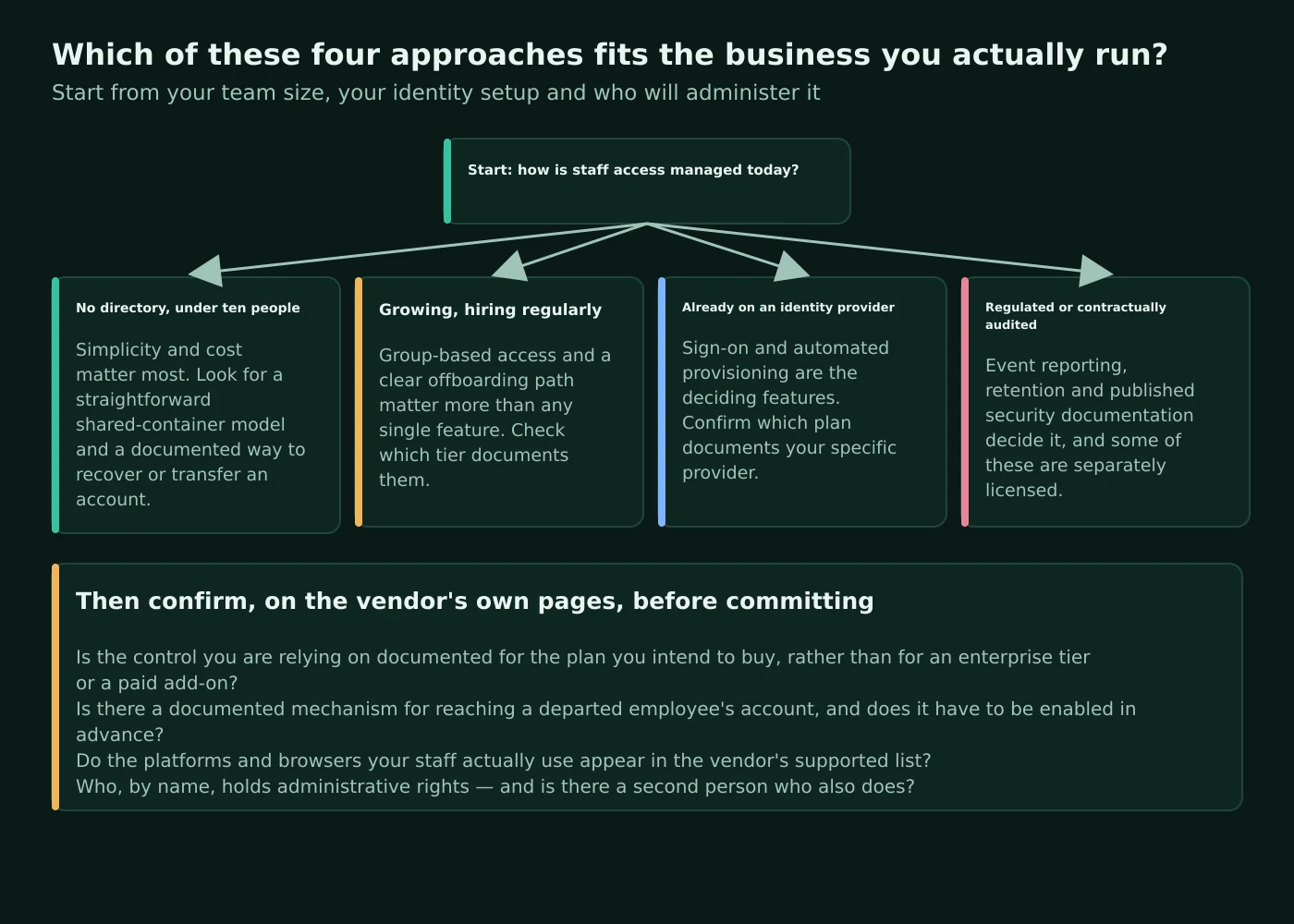
First, do you already have an identity provider? If staff already sign in to work systems through Microsoft Entra ID, Google Workspace or Okta, provisioning and SSO are worth having and the gating decides your tier: Bitwarden documents SCIM on Teams while placing SSO on Enterprise; 1Password documents provisioning integrations and requires Business for SSO; Keeper documents the widest set of provisioning routes with SSO listed under Enterprise; Dashlane gates both to its packages. If you have no identity provider, ignore this entire dimension — it is the most common way small businesses overbuy.
Second, who must be able to restore access? If the answer is “an administrator, without depending on the individual”, that requirement alone narrows the field, because Bitwarden documents account recovery as Enterprise, 1Password documents administrator-initiated recovery, Dashlane excludes SSO members from admin-assisted recovery, and Keeper’s transfer policy requires a prior login. Decide this before you compare prices, because it is the requirement most likely to move you up a tier.
Third, is a compliance or customer obligation driving this? If you are completing security questionnaires or meeting insurer conditions, the depth of the audit and policy surface matters more than the monthly price, and Keeper’s append-only reporting and compliance reports, or 1Password’s reporting on Business, are the relevant pages to read. If nothing external is driving it and the goal is simply to stop sharing passwords in chat, the cheapest tier that documents shared containers, event visibility and a second factor is a perfectly respectable answer.
Atlas editorial assessment. On documented facts alone, the four resolve into recognisable profiles. Bitwarden publishes the most business capability at the lowest published per-seat price and is the only one here documenting self-hosting for business use, at the cost of putting SSO and recovery on its top tier. 1Password’s per-member Employee vault and twelve documented vault permissions suit a company that wants clear personal and shared separation, provided it forms the habit of keeping company credentials in shared vaults. Dashlane suits browser-centred teams and is the one to price directly from the live page because its packaging has changed. Keeper’s roles, nodes and enforcement policies suit a business with an external obligation to evidence control, and its account transfer policy is the clearest documented answer to the abrupt-departure problem — provided it is configured at deployment. Whichever you choose, the decisions that determine the outcome are the ones no vendor makes: two administrators, a short list of shared containers, a rotation step in your leaver checklist, and a quarterly ten-minute review of who can still see what.
Sources
Every factual claim above is drawn from the first-party pages listed here, each read in September 2026. Pages behind vendor bot protection were opened in a browser rather than fetched programmatically. Prices and plan contents change; confirm them on the vendor’s own page before purchase.
- 1Password business pricing — Teams Starter Pack and Business prices, trial terms, guest allowances and per-tier feature comparison.
- 1Password security overview — account password, AES-GCM-256 and PBKDF2-HMAC-SHA256 key derivation.
- 1Password: about your Secret Key — the second factor in the two-key derivation model.
- 1Password: create and share vaults — vault creation and default administrator access.
- 1Password: about groups — the built-in Team Members, Administrators and Owners groups and their powers.
- 1Password: custom groups — Business-only custom groups, team-level permissions and the most-permissive rule.
- 1Password: permission enforcement — the twelve vault permissions and how each is enforced.
- 1Password: get started as a team administrator — the automatic Employee vault and initial administrative tasks.
- 1Password: team policies — password requirements, two-factor management and sign-in controls.
- 1Password: recover accounts — administrator-initiated recovery and its effects, including bulk recovery.
- 1Password: offboarding — the documented leaver sequence, deletion irreversibility and Families read-only behaviour.
- 1Password: add and remove team members — invitation routes and provisioning.
- 1Password: manage two-factor authentication — organisation-level enforcement on Business.
- 1Password: use a security key — FIDO U2F security key support.
- 1Password system requirements — platform versions, feature-specific requirements and the 1Password 7 retirement note.
- 1Password: Unlock with SSO — OIDC-only support, version requirement and the Owners group exclusion.
- 1Password: configure Unlock with Okta — a documented identity provider configuration.
- 1Password: automated provisioning — supported providers and the note that provisioning does not include SSO.
- 1Password: reports — which reporting is limited to 1Password Business.
- 1Password security — the published security programme and audit posture.
- Bitwarden pricing — Teams and Enterprise per-user prices and tier contents.
- Bitwarden: password manager plans — free organisation limits, per-tier gating, self-host availability and second-factor differences.
- Bitwarden: what encryption is used — AES-CBC 256-bit encryption of vault data.
- Bitwarden: KDF algorithms — PBKDF2 and Argon2id, default iteration counts and the enforced minimum.
- Bitwarden security white paper — the full zero-knowledge architecture description.
- Bitwarden: about organizations — the organisation model and Admin Console scope.
- Bitwarden: about collections — organisation ownership of items and non-inheriting nesting.
- Bitwarden: about groups — group-based collection access on Teams and Enterprise.
- Bitwarden: member roles and access control — owner, admin and user powers, and Enterprise-only custom roles.
- Bitwarden: managing users — SCIM, Directory Connector and Enterprise just-in-time provisioning.
- Bitwarden: revoke users — reversible access suspension that frees a seat.
- Bitwarden: remove users — what removal does and does not delete, and the centralised ownership behaviour.
- Bitwarden: account recovery — Enterprise gating, the policy and member enrolment requirement.
- Bitwarden: about trusted devices — SSO-based decryption using a device-stored key.
- Bitwarden: FIDO2 WebAuthn two-step login — availability to all users.
- Bitwarden: log in with passkeys — passkeys for the Bitwarden account itself.
- Bitwarden: about single sign-on — SAML 2.0 and OIDC support and Enterprise gating.
- Bitwarden: about SCIM — SCIM v2 availability and supported identity providers.
- Bitwarden: Directory Connector — supported directories and plan availability.
- Bitwarden: event logs — availability, retention and the API route.
- Bitwarden: vault health reports — local execution and premium or paid-organisation limitation.
- Bitwarden: self-host — documented deployment methods.
- Bitwarden hosting FAQs — platform support expectations for self-hosting.
- Bitwarden: getting started with the desktop app — multiple signed-in accounts and vault visibility.
- Bitwarden software release support — the published client and platform support policy.
- Bitwarden Secrets Manager plans — the separately subscribed add-on.
- Dashlane pricing — Omnix package names, per-user prices, the above-fifty-user framing and package contents.
- Dashlane security — zero-knowledge architecture and local encryption and decryption.
- Dashlane: compare professional plans — the professional plan line-up.
- Dashlane: create and manage sharing groups — group sharing for admins and group managers.
- Dashlane: share your saved items — individual item sharing.
- Dashlane: share Collections with members of professional plans — Collection-based sharing.
- Dashlane: manage members of professional plans — the Users tab and onboarding.
- Dashlane: open and navigate the Admin Console — console scope and per-plan availability.
- Dashlane: policies for professional plans — the admin-only Policies tab and role boundaries.
- Dashlane: offboard employees — the documented leaver procedure and data transfer.
- Dashlane: leave a professional plan — the member-side warning about personal-space data.
- Dashlane: admin-assisted recovery — how recovery works and the SSO exclusion.
- Dashlane: manage admin-assisted recovery — enabling and disabling recovery for the organisation.
- Dashlane: Confidential SSO and SCIM provisioning — package gating for identity integration.
- Dashlane: set up Confidential SSO and provisioning with Okta — a documented provider integration.
- Dashlane: explore the Activity Log — searching, filtering and CSV export.
- Dashlane: Password Health — the score and its minimum-login condition.
- Dashlane: manage the Password Health of your professional plan — the administrator view.
- Dashlane: explore Dark Web Insights — Admin Console monitoring.
- Dashlane: use two-factor authentication — policy-based enforcement for members.
- Dashlane: passkeys — saving, using and deleting passkeys.
- Dashlane: desktop access restricted to the browser extension — the consolidated computer access model.
- Dashlane: supported devices and browsers — the published support catalogue.
- Dashlane: manage billing for your professional plan — seat, billing and invoicing administration.
- Dashlane: FAQ about plan renewal updates — the mapping between older and current plan names.
- Keeper business and enterprise pricing — tier names, per-user prices, seat framing and per-tier contents.
- Keeper security — zero-knowledge statement, certifications and hosting regions.
- Keeper for business — the business overview and family plan inclusion.
- Keeper encryption model — per-record AES-256 GCM keys, elliptic curve use for SSO and sharing, and the quantum-resistant wrapper.
- Keeper: sharing — record and file sharing, nested shared folders and classic shared folders.
- Keeper: teams — team restrictions, privacy screens and team-role mapping.
- Keeper: roles, RBAC and permissions — the distinction between roles and teams and delegated administration.
- Keeper: enforcement policies — the full policy surface and master password expiry range.
- Keeper: Account Transfer Policy — vault transfer on termination, default roles and the prior-login condition.
- Keeper: user and team provisioning — the documented provisioning methods.
- Keeper: SSO and SAML authentication — SAML 2.0 support and the cloud versus on-premises implementations.
- Keeper: multi-factor authentication — supported second factors and per-role configuration.
- Keeper: advanced reporting, alerts and SIEM — the append-only audit design.
- Keeper: compliance reports — the regulations these reports address.
- Keeper: BreachWatch — dark web monitoring of breached credentials.
- Keeper: nodes and organisational structure — the organisational layer beneath roles and teams.
- Information Commissioner’s Office: a guide to data security — expectations for access management and protecting personal data.
- National Cyber Security Centre: managing your passwords — public guidance on using password managers safely.
- NIST SP 800-63B: digital identity guidelines — authenticator and recovery design considerations.
- CISA: turn on multi-factor authentication — why MFA on the underlying account remains a separate control.