Most small businesses do not buy bookkeeping software and payroll software as one decision, and that is where the pain starts. The accounting product is chosen first, usually because an accountant asked for it. Payroll arrives later, often from a different vendor, and someone then discovers that every pay run has to be entered into the ledger by hand, that contractor payments land in the wrong account, or that the two systems disagree about which month a wage cost should sit in.
This comparison treats the pairing as the product. It looks at five accounting-and-payroll combinations a small business can realistically run, and it judges each one on what the vendor documents in public: how the bank feed reaches the ledger, which categorisation rules the software can apply on its own, what a payroll run actually writes back to the accounts, how contractors and second entities are handled, who can see which numbers, and what an outside accountant is able to do inside the file.
Nothing here is financial, tax, legal or payroll compliance advice, and nothing describes what your business ought to file or owe. The subject is software behaviour and software purchasing. Where a vendor publishes no answer, this article says so rather than filling the gap with an estimate.
How this comparison was built
Each statement about a product comes from that vendor’s own help centre, developer documentation or product pages, read in September 2026 and linked in the Sources section. Vendor material is reported as vendor material. Where a judgement is ours, it is introduced as an Atlas editorial assessment so you can discount it if your situation differs.
Five pairings were included because each one is a complete route from a bank transaction to a posted wage cost, and because each publishes enough documentation to be checked. The five are QuickBooks Online with QuickBooks Payroll, Xero with Gusto, Zoho Books with Zoho Payroll, Wave with Wave Payroll, and Rippling paired with a separate ledger.
Sage was considered and left out. Its United States cloud accounting product and its Sage 50 desktop payroll documentation live in different portals, and the current public reconciliation guidance we could reach describes the United Kingdom product rather than the United States one, so a like-for-like reading was not possible. The two Sage pages that were reachable are cited for completeness: the Sage 50 payroll setup overview and the Sage bank reconciliation guidance.
What this comparison deliberately does not contain
- No scores, weights or rankings. There is no single winner in this category, and a numeric score invented by a publisher tells you nothing about your ledger.
- No efficiency, saving or automation-rate figures. No vendor publishes an auditable measurement of how much of a real small business ledger it categorises correctly, so no such figure is quoted.
- No implementation duration. How long a migration takes depends on how many months of history you carry and how clean the opening balances are, which is knowledge only you and your accountant hold.
- No claim of hands-on benchmarking. This is a documentation review, not a laboratory trial, and it is labelled as one.
- No advice on tax treatment, worker classification, filings or employment obligations. Those belong to your accountant and to the relevant authority, not to a software comparison.
One more boundary is worth stating plainly. The phrase artificial intelligence appears on most of these vendors’ marketing pages, but the documented behaviour underneath it is narrower and more useful than the label: matching an incoming bank line to a rule, suggesting a category from previous coding, reading a receipt into a draft transaction, and flagging a reconciliation difference. Those are the features this article compares, because those are the features the documentation actually describes.
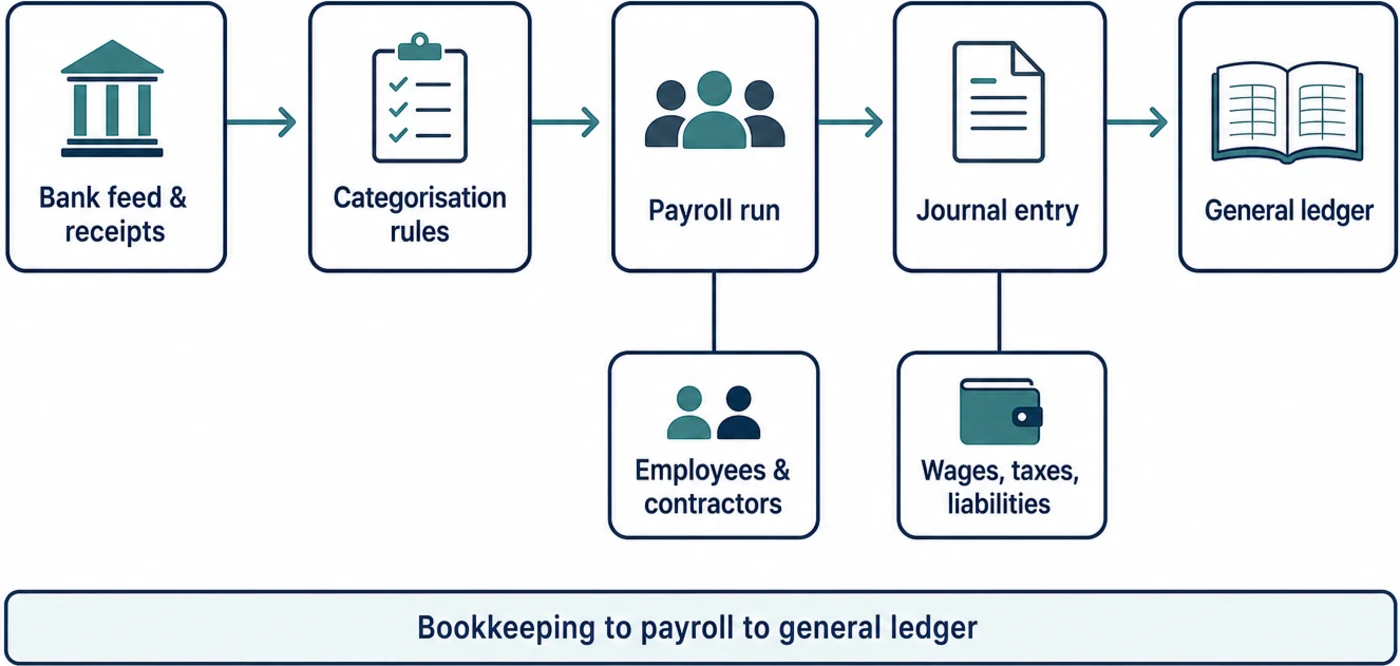
The five pairings in detail
Each pairing below separates what the vendor documents from what we think of it. Read the documented facts as the vendor’s position and the assessment as ours.
QuickBooks Online with QuickBooks Payroll
Documented vendor facts. QuickBooks Online lets you define bank rules that apply automatically to transactions arriving from a connected bank or card feed, setting payee, category, class and location, with the option to have matching transactions added to the register without review, as described in Intuit’s bank rules help article. Month-end reconciliation is documented as a distinct workflow against a bank statement in Intuit’s reconcile an account guidance.
On the payroll side, Intuit documents an in-product setup path for QuickBooks Online Payroll in its payroll setup guide and a separate procedure for creating a paycheque for an employee in its run payroll help article. Because payroll sits inside the same product, the ledger entries are created by the same system that holds the accounts rather than by an integration. Contractors are handled as their own record type, with a documented setup path for tracking contractor payments in the contractor setup article and a separate explanation of how the product distinguishes employees from independent contractors in Intuit’s worker type reference.
For control and oversight, Intuit documents predefined user roles and access rights in its user roles reference, and an audit log that records who changed what inside the company file in its audit log guidance. A second business needs its own subscription rather than a second set of books inside the first, which Intuit states in its add another company guidance. Programmatic access is documented publicly through the Intuit developer documentation, and Intuit publishes its security and compliance posture through the Intuit trust centre.
Atlas editorial assessment. This is the pairing that removes the most moving parts, because the payroll data never crosses a vendor boundary before it reaches the ledger. The trade is breadth of ecosystem for depth of control: the rule engine is generous, and the audit log is the strongest reason to prefer a single-vendor stack when more than one person touches the books. The weak point for a growing owner is the second entity, since each company is a separate subscription and a separate login context, and nothing consolidates them for you.
Xero with Gusto
Documented vendor facts. Xero documents bank rules that pre-fill the contact, account and tax treatment for transactions matching conditions you define, in its bank rules overview, and a separate reconciliation workflow in its reconcile your bank account guidance. Sales-side documentation covers raising and sending an invoice from the same ledger in its invoicing guidance. Xero publishes its plan structure openly on its United States pricing page, describes its platform controls on its security page, and documents its accounting API in the Xero developer documentation.
Gusto supplies payroll and writes the result back. Gusto documents its accounting integrations and the products it connects to in its accounting integrations directory, and documents the integration setup itself for QuickBooks Online in its integration guide. The detail that matters for a clean ledger is account mapping: Gusto documents the mapping types available for accounting integrations, so each payroll component can be pointed at a chosen ledger account, in its account mapping reference. Contractor payment is documented as a first-class path in Gusto’s contractor payment guidance, and an administrator running more than one business can hold several companies under one login according to Gusto’s multiple company guidance. Developer access is documented at Gusto’s documentation site.
Atlas editorial assessment. This pairing rewards businesses that expect the payroll side to grow in complexity faster than the accounting side, because the payroll product is the specialist rather than a module. The account mapping documentation is the reason to take it seriously: mapping is the step that most often produces an unusable wage account, and here it is an explicit, documented configuration rather than a fixed behaviour. The cost is that you now own an integration, which means a mapping review whenever you add a pay component or change your chart of accounts. If you are weighing the payroll side on its own merits, our comparison of Gusto and ADP for small business payroll covers that decision in more depth.
Zoho Books with Zoho Payroll
Documented vendor facts. Zoho Books documents automatic bank and card feeds in its banking feeds help and transaction rules that categorise incoming lines by conditions you set, with reconciliation documented separately in its reconciliation help. Multiple locations of one business are handled inside a single organisation through branches, documented in Zoho’s branches help, and access is governed by users and roles as described in its users and roles help.
Zoho Payroll documents its own employer setup sequence in its setup guide, and answers the multi-state question directly in a knowledge base article on operating from several states of the United States, which is unusual candour for a product at this end of the market. Purchasing information is published for both halves separately, on the Zoho Books pricing page and the Zoho Payroll plan comparison, and the vendor’s security posture is published at Zoho’s trust page.
Atlas editorial assessment. The branch model is the distinguishing feature here, and it is the reason this pairing suits a business with several trading locations under one legal entity rather than several separate companies. It is also the pairing most likely to appeal to an owner already using other tools from the same vendor, because the identity and permission model is shared. The caution is availability: payroll coverage and feature depth vary by country in a way the accounting product does not, so the multi-state and regional documentation is worth reading before the accounting decision is locked.
Wave with Wave Payroll
Documented vendor facts. Wave documents reconciliation as a structured monthly review in its reconcile your books guidance. Payroll is a separate paid addition to the same account, with a documented setup path in Wave’s United States payroll setup guide. The bookkeeping consequence of a pay run is documented explicitly, including how an approved payroll appears in the accounts, in Wave’s payroll bookkeeping article. Purchasing terms for both the accounting features and the payroll addition are published on the Wave pricing page.
Atlas editorial assessment. Wave is the pairing to consider when the ledger is genuinely simple and the payroll population is small and stable, because the documentation is written for an owner doing the work rather than for a bookkeeper. Two limits shape the decision. The rule and automation layer is thinner than the other four, so more coding happens by hand as volume grows, and the platform is narrower in the surrounding areas, which means fewer options when a payroll or reporting need arrives that the product does not cover. We could not locate a published security or compliance trust page for the vendor, which is worth asking about directly if that documentation matters to your review.
Rippling paired with a separate general ledger
Documented vendor facts. Rippling is a workforce platform rather than an accounting product, and it documents payroll as one module among employment, device and access management on its payroll product page. Because the ledger is somebody else’s, the integration is the whole story: the Rippling listing in the Xero App Store documents the accounting connection from the ledger vendor’s own directory, and Rippling publishes developer documentation for programmatic access at its developer portal. Purchasing is quote-based, and the vendor’s pricing page directs buyers to a quote rather than publishing a list price. Security and compliance documentation is published at Rippling’s trust centre.
Two documentation gaps should be stated rather than papered over. Rippling’s help centre requires a sign-in, so there is no public deep link to a step-by-step pay-run walkthrough that a prospective buyer can read before purchase, and we found no first-party article describing general ledger mapping into a specific accounting product. Both were confirmed as absent rather than assumed, and neither is a claim about product capability.
Atlas editorial assessment. This is the only pairing on the list that answers a question larger than bookkeeping, which is what makes it either the right choice or the wrong one. If hiring, device provisioning and access removal are already consuming an owner’s week, consolidating them alongside payroll is a defensible reason to accept a quote-based purchase and a mapped integration into an outside ledger. If the actual problem is a messy chart of accounts and an unreconciled bank feed, this is a heavier platform than the problem requires. Owners in the first camp usually also care about the surrounding controls, which our notes on single sign-on for small businesses and on human resources compliance software address separately.
Decision matrix
The matrix records documented behaviour side by side. There is no scoring column, because a number invented here would carry no information about your ledger.
| Stack | Automatic categorisation model | Payroll to ledger path | Contractor handling | Several businesses or locations | Access control documented |
|---|---|---|---|---|---|
| QuickBooks Online and QuickBooks Payroll | Bank rules with optional automatic posting of matching feed transactions | Payroll module inside the same product, so entries are created natively | Documented contractor record type with a separate setup path | A second business needs its own subscription and company file | Predefined user roles plus a change-level audit log |
| Xero and Gusto | Bank rules that pre-fill contact, account and tax treatment on matching lines | Integration writes the pay run using account mappings you configure | Documented contractor payment path in the payroll product | Multiple companies under one payroll administrator login | Ledger user roles documented, with platform controls published separately |
| Zoho Books and Zoho Payroll | Bank feeds with condition-based transaction rules | Payroll from the same vendor, configured against the same organisation | Handled through the payroll product; coverage varies by region | Branches inside one organisation for several locations | Users and roles documented at organisation level |
| Wave and Wave Payroll | Categorisation with a documented monthly reconciliation review, lighter rule layer | Payroll addition in the same account, with documented bookkeeping output | Contractor payments documented within the payroll addition | Not publicly documented as a multi-entity or branch model | Not documented at role-matrix level in the public help centre |
| Rippling with a separate ledger | Not applicable; categorisation belongs to the ledger you choose | Integration into the chosen ledger, listed in the ledger vendor’s directory | Handled inside the workforce platform alongside employees | Built for multiple entities as a workforce platform | Trust centre published; help centre requires sign-in |
Purchasing and pricing information each vendor publishes
Rates change often enough that reproducing them would mislead, so the table records the purchasing model instead and points to the published page where one exists. Where a vendor does not disclose a list price, the table says so.
| Stack | Accounting purchasing model | Payroll purchasing model | Published price page | Trial or free tier |
|---|---|---|---|---|
| QuickBooks Online and QuickBooks Payroll | Tiered subscription per company file, published list pricing | Separate payroll subscription with a per-employee component | Published on the vendor site; the page did not respond to automated checks, so it is not linked here | Trial and promotional terms published on the vendor site |
| Xero and Gusto | Tiered subscription, published list pricing | Priced separately by the payroll vendor with a per-person component | Xero pricing published and linked in Sources; Gusto pricing page did not respond to automated checks | Xero publishes trial terms on its pricing page |
| Zoho Books and Zoho Payroll | Tiered subscription, published list pricing per organisation | Separate payroll plan comparison published by the same vendor | Both pages published and linked in Sources | Free tier and trial terms stated on the published pricing pages |
| Wave and Wave Payroll | Published pricing covering the accounting features | Payroll sold as a paid addition with a per-person component | Single pricing page published and linked in Sources | Free accounting tier described on the pricing page |
| Rippling with a separate ledger | Contact sales; the ledger is purchased separately from its own vendor | Contact sales, quote-based per module and per person | Pricing page published, list price not disclosed | Not publicly documented |
What a pay run actually does to your accounts
This is the part of the decision that most comparisons skip, and it is the part owners feel every month. A pay run produces several distinct facts: gross pay by employee, the employer’s own costs, the amounts withheld and held for later payment, the money that leaves the bank account, and the timing difference between the pay date and the period in which the work was done. A pairing that handles those cleanly produces a wage account you can read. One that does not produces a suspense account nobody wants to open.
In a single-vendor stack the entries are produced by the system that owns the ledger, so the accounts are consistent by construction and your influence over them is limited to the settings the vendor exposes. In a two-vendor stack the payroll product decides what to send and the mapping decides where it lands, which gives you more control and more responsibility. Wave is a useful reference point here, because the vendor documents in plain terms what an approved payroll looks like once it reaches the books, and reading that page is the fastest way to understand the general shape of the problem.
The practical test to apply before you buy is simple. Ask the vendor, or read in the documentation, exactly which accounts a single pay run touches, and whether the bank payment appears as one line to be matched against the feed or as several. If nobody can answer that from documentation, you are buying a reconciliation puzzle along with the payroll.
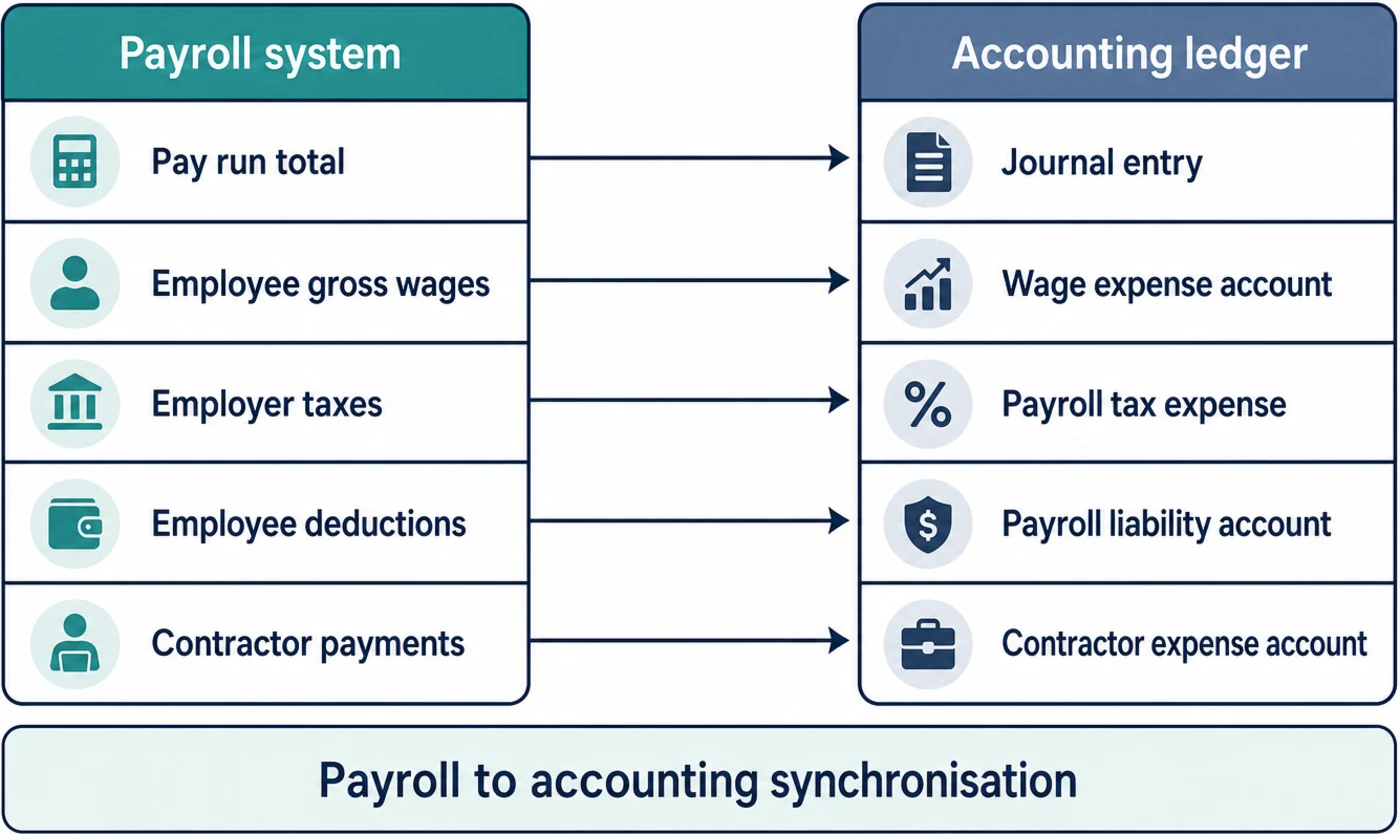
Which pairing fits which situation
One entity, one bank account, an accountant who wants access
The deciding factor is not the automation layer, it is who has to live in the file. A single-vendor stack keeps the payroll entries and the ledger under one audit trail, which is the shortest path to an accountant being able to answer a question without a reconciliation exercise first. QuickBooks Online with its own payroll module and Zoho Books with Zoho Payroll both satisfy that, and the choice between them usually comes down to which one your accountant already works in daily.
Payroll is the complicated half
When the workforce mixes employees and contractors, or spans states, the payroll product should be chosen first and the ledger second. Xero with Gusto is built this way round: the payroll specialist owns the hard part, and account mapping is a documented configuration rather than an assumption. Read the mapping documentation before committing, because a mapping decision made carelessly at setup is the single most common reason wage costs later have to be unpicked line by line.
Several locations under one company
This is a data-model question, not a feature question. A branch structure inside one organisation keeps a consolidated view without duplicating the chart of accounts, which is why Zoho Books deserves a look here. If instead you run separate legal entities, expect to pay per entity in every option on this list, and expect consolidation to be a reporting exercise rather than a setting.
The ledger is simple and the priority is doing it yourself
A small, stable payroll population with straightforward banking does not need a rule engine to justify its cost. Wave earns consideration because its documentation is written for the owner, and because the bookkeeping consequence of a pay run is spelled out plainly. Accept the trade knowingly: fewer automated rules means more manual coding as volume climbs.
The real problem is employment operations, not bookkeeping
If onboarding, access and equipment are the recurring drain, a workforce platform paired with a ledger addresses the actual bottleneck, and Rippling is the option on this list built for that shape. Ask for the pay-run walkthrough and the ledger mapping documentation during the sales process, since neither is published for prospective buyers to read beforehand.
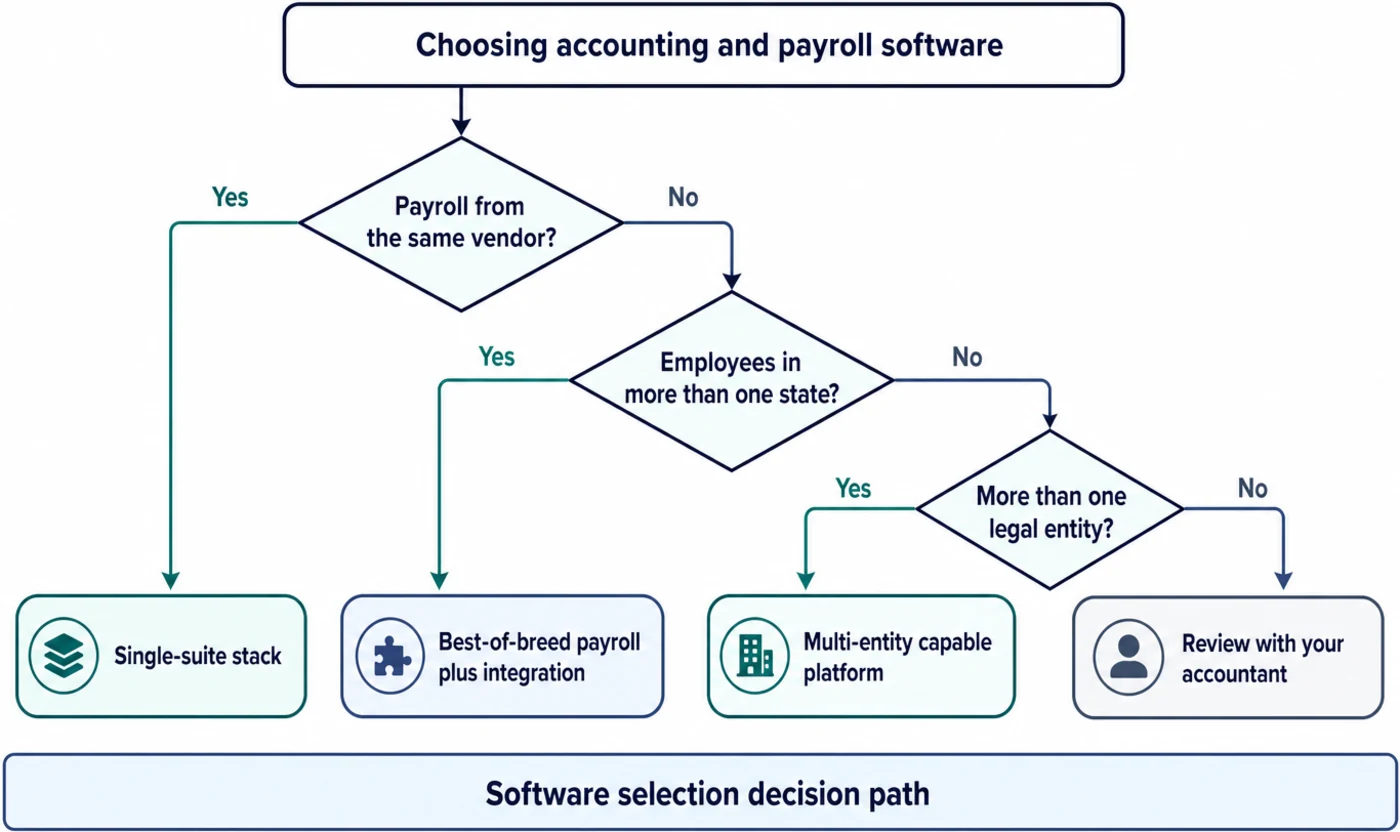
Implementation considerations that decide whether the pairing works
The difference between a pairing that settles down and one that generates monthly cleanup is almost never the feature list. It is four setup decisions, and all four are documented by the vendors rather than left to guesswork.
Decide the chart of accounts before the first pay run
Every payroll integration on this list writes into accounts that already exist, and mapping is only as good as the accounts it can point at. Where the vendor documents mapping types explicitly, as Gusto does, treat that page as a setup checklist and agree the destination for each pay component with whoever reconciles the accounts. In a single-vendor stack the mapping is largely made for you, which is a benefit at setup and a constraint later if your reporting needs diverge from the default.
Write bank rules narrowly, then widen them
Rule engines in these products can post matching transactions without human review, which is useful and unforgiving in equal measure. A rule that is too broad quietly miscodes a whole category of spend, and the error surfaces at reconciliation or, worse, at year end. Start with rules that match a specific payee and description, confirm the coding survives a full month, and only then relax the conditions.
Treat reconciliation as the control, not the chore
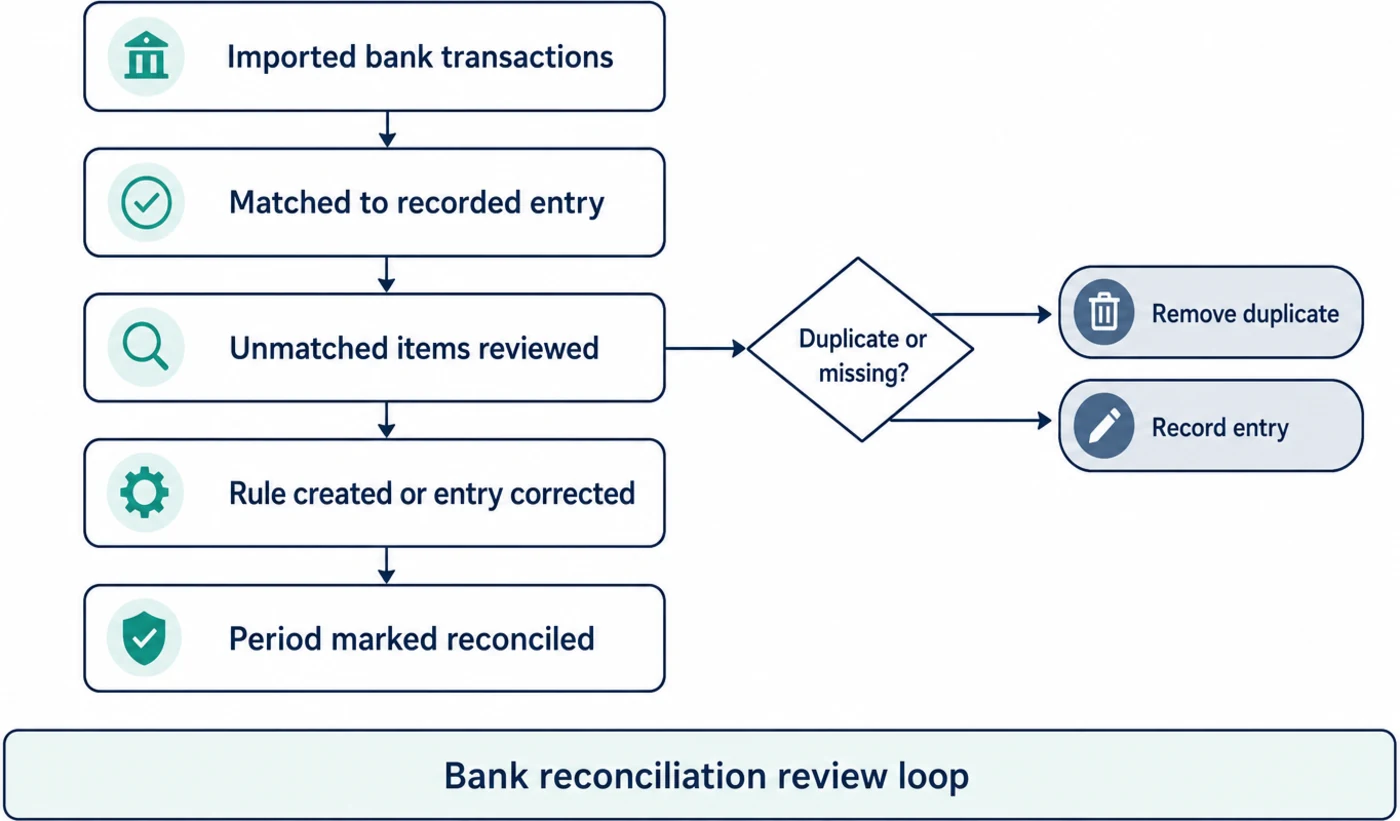
Each vendor documents reconciliation as a distinct workflow for a reason: it is the step that proves the automated coding was right. The practical implication for an owner is that the automation layer changes what reconciliation costs, not whether it happens. Any pairing that appears to remove the reconciliation step is being misread.
Set permissions and know where the change history lives
Once a bookkeeper, an accountant or a business partner has access, the question is no longer who can log in but who can change a posted number and whether that change is visible afterwards. A documented role matrix and a change-level history are the difference between a disagreement resolved in minutes and one resolved by rebuilding a month. This is also where a pairing with a published trust centre is easier to defend if a lender or an acquirer ever asks how the records are controlled.
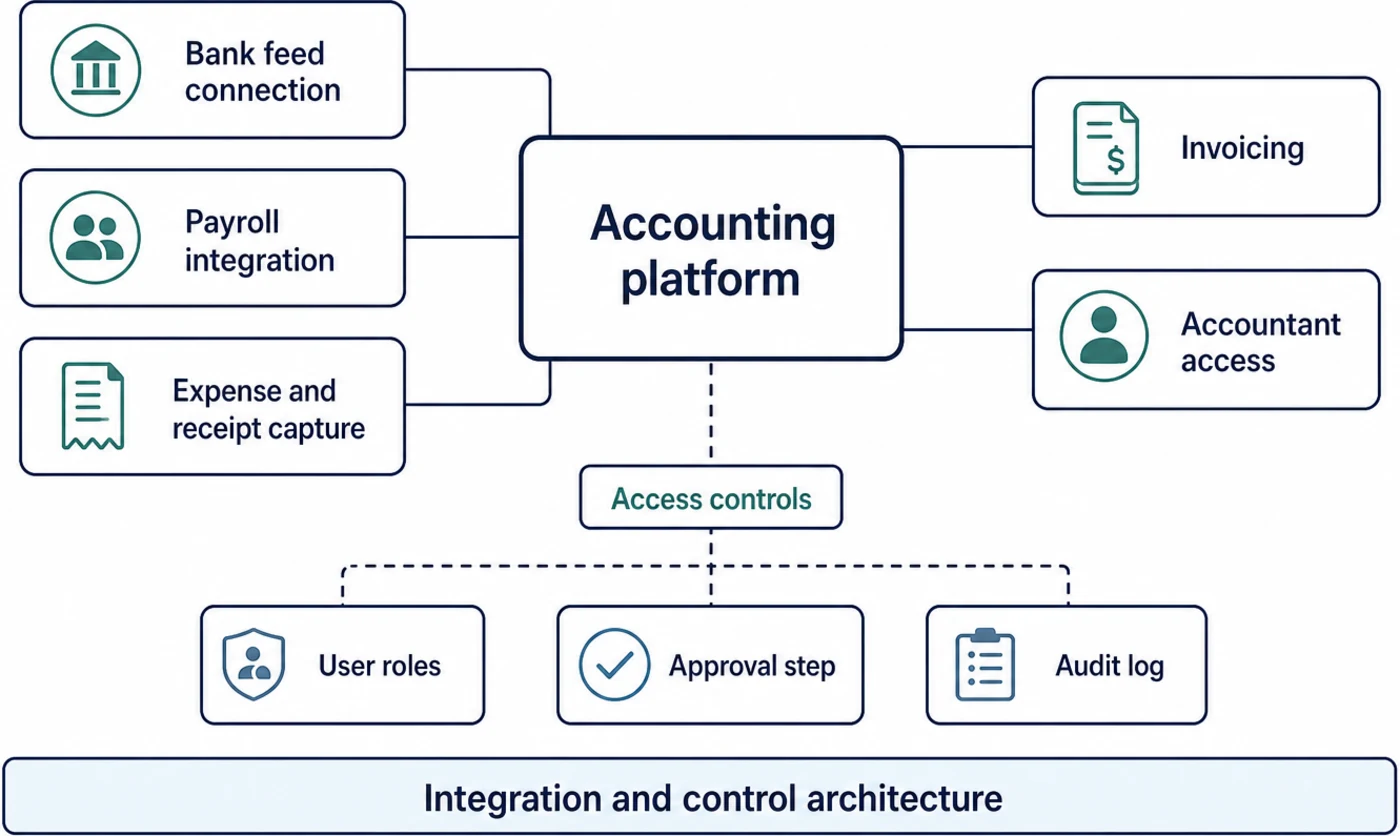
Move history deliberately, not opportunistically
The migration decision that causes the most avoidable pain is how much past activity to carry across. Bringing several years of detail into a new file imports every historical coding error with it, and those errors then sit inside reports that look authoritative. Bringing nothing across leaves you without comparatives at the first year end. The middle path most accountants ask for is a clean set of opening balances plus the current year in detail, with the older years left readable in the system that produced them. Whichever route you take, agree it with the person who will sign off the accounts before any data moves, because reversing the choice later means reconciling two versions of the same period.
There is a second migration question that only appears once payroll is involved. Part-year payroll history usually stays where it was processed, which means the new ledger will show wage costs beginning mid-year unless someone posts summary entries for the earlier months. None of these vendors can decide that for you, and none of them present it prominently during setup, so put it on the checklist yourself and ask the payroll vendor what it can and cannot bring forward.
Expect to own the connection, not just the products
Whenever payroll and accounting come from different vendors, something has to keep the mapping honest as the business changes. Some teams handle that with a scheduled review, others push additional data between systems with a general automation layer, which is a reasonable use of the tools covered in our comparison of Zapier and Make for small business automation. Either way, the connection is a maintained asset. Our broader notes on implementing automation without breaking existing processes apply directly here, and the same discipline that makes client onboarding automation durable is what keeps a finance integration from drifting.
Limitations of this comparison
- It reads documentation, not live accounts. A vendor can document a rule engine well and still behave awkwardly against your particular bank feed, and only a trial with your own transactions will show that.
- Documentation ages. Pages were read in September 2026, and any of these vendors can change a plan boundary, rename a feature or move a help article without notice.
- Some vendor pages could not be reached by automated checking, including two published pricing pages, so purchasing detail for those products is described by model rather than linked.
- Regional coverage is uneven. Payroll capability in particular varies by country and by state in ways a global comparison cannot resolve for you.
- Two documentation gaps were found rather than filled: a public step-by-step pay-run walkthrough and a first-party ledger mapping article for the workforce platform, and no published trust page for one accounting vendor.
- Your accountant’s preference is a legitimate deciding factor this article cannot weigh. If they work faster in one product, that advantage is real and it is yours.
Frequently asked questions
Does any of this software do the bookkeeping on its own?
No, and none of the vendors claim it in their documentation. What is documented is narrower: matching a bank line to a rule you wrote, suggesting a category from earlier coding, reading a receipt into a draft entry, and flagging a difference at reconciliation. A human still decides what the ambiguous items are, and a human still closes the period.
Is a single-vendor stack always the safer choice?
It is the simpler choice, which is not the same thing. A single vendor removes the mapping layer and keeps one audit trail, and that is genuinely valuable when several people touch the books. A two-vendor stack is better when the payroll side is the complicated half, because you get a specialist and explicit control over where each component posts. Choose on which half of your problem is harder.
Can I keep my accounting product and change only payroll?
Often yes, and the documentation to check first is the payroll vendor’s integration directory and its account mapping reference. The questions to answer before switching are whether your ledger is a supported destination, whether the mapping can reach the accounts you already use, and what happens to part-year history that stays in the old system.
How should I compare pricing when the pages keep changing?
Compare the shape rather than the number. Ask whether the charge is per company file or per organisation, whether payroll adds a per-person component, whether contractors are billed like employees, and whether a second entity means a second subscription. Those structural answers are stable, and they determine the cost as you grow far more than a promotional rate does.
What actually breaks when a business adds a second company?
Usually the assumption that consolidation is a setting. Branches inside one organisation are a documented feature in one of these products, but separate legal entities are separate files almost everywhere, with separate subscriptions and separate reconciliations. Plan for a reporting process rather than a switch, and confirm before you buy whether your payroll administrator can hold both companies under one login.
Does the vendor’s artificial intelligence labelling mean anything here?
Read past the label and look for the mechanism. In the documentation for these products the useful behaviours are described concretely: a rule that matches a payee and applies a category, a suggestion drawn from how similar transactions were coded before, a receipt read into a draft transaction, and a difference surfaced at reconciliation. Those behaviours are worth paying for, and each one can be checked in the documentation before you buy. A marketing page that promises intelligence without naming the mechanism is not evidence of a capability, and the gap between the two is where disappointed expectations come from.
What should I ask a vendor that a comparison cannot answer?
Ask which accounts one pay run touches, ask to see the role matrix and the change history, ask whether your outside accountant can be given access without consuming a paid seat, and ask what an export looks like if you leave. Answers to those four questions predict how the pairing will feel in the second year far better than any feature list, including this one.
Where this leaves you
There is no correct answer in this category, only a correct order of operations. Identify which half of your problem is harder, choose the specialist for that half, and then confirm three things in the vendor’s own documentation before you pay: how bank lines become coded transactions, exactly which accounts a pay run writes to, and who can change a posted number without leaving a trace. Every pairing on this list can be made to work by an owner who settles those three points at setup, and every one of them will generate monthly cleanup for an owner who does not.
If your next decision is administrative rather than financial, our notes on registered agent and virtual mailbox options cover the other paperwork layer a new entity runs into.
Sources
Every source below is the vendor’s own documentation or product page, read in September 2026. No paywalled analyst material and no third-party review sites are cited.
- Intuit — set up bank rules to categorise online banking transactions
- Intuit — reconcile an account in QuickBooks Online
- Intuit — get started with QuickBooks Online Payroll
- Intuit — create a paycheque for an employee
- Intuit — set up contractors and track payments for 1099 reporting
- Intuit — difference between employees and independent contractors
- Intuit — create or add another company
- Intuit — user roles and access rights in QuickBooks Online
- Intuit — use the audit log
- Intuit — QuickBooks Online developer documentation
- Intuit — trust and compliance centre
- Xero — about bank rules
- Xero — reconcile your bank account
- Xero — invoice a customer
- Xero — United States pricing plans
- Xero — security at Xero
- Xero — accounting API overview
- Xero App Store — Rippling integration listing
- Gusto — integrate with QuickBooks Online
- Gusto — account mapping types for accounting integrations
- Gusto — add and pay United States contractors
- Gusto — manage multiple companies with one login
- Gusto — accounting integrations directory
- Gusto — developer documentation
- Zoho Books — banking feeds
- Zoho Books — reconciliation
- Zoho Books — branches
- Zoho Books — users and roles
- Zoho Payroll — setting up Zoho Payroll
- Zoho Payroll — operating from more than one state of the United States
- Zoho — Zoho Books pricing
- Zoho — Zoho Payroll plan comparison
- Zoho — security and trust
- Wave — reconcile your books
- Wave — set up payroll in Wave for United States businesses
- Wave — view and understand approved payroll bookkeeping
- Wave — pricing
- Rippling — payroll product documentation
- Rippling — pricing page
- Rippling — trust centre
- Rippling — developer portal
- Sage — Sage 50 payroll setup overview
- Sage — bank reconciliation guidance