Replacing office keys with a cloud-managed access control system is one of the few security projects a small business can finish in a matter of weeks and then benefit from every single day. It is also one of the easiest projects to buy badly. Access control is a hardware purchase, a software subscription, a wiring job and an identity-management decision wrapped into a single quote, and the part that determines your five-year cost is rarely the part the sales page talks about.
This comparison covers nine cloud access control platforms that a business with roughly two to fifty doors and one to a handful of locations can realistically deploy: Kisi, Brivo, Verkada Access, Avigilon Alta Access, Salto KS, Genea, Paxton10, ButterflyMX and Ubiquiti UniFi Access. It is written for the person who has to sign the contract and then live with the system: an owner, an operations manager, or the one IT-capable person in a company that does not have a security department.
Every product statement below comes from vendor-owned documentation — product pages, admin guides, support articles, hardware datasheets and store listings — and each claim is linked in the single Sources section at the end. Where a vendor does not publish something, this article says so rather than filling the gap with an estimate.
Pricing and product information verified September 2026 from vendor-owned documentation. Vendors may change pricing, packaging, hardware requirements, or availability.
How this comparison was built
AtlasProfitAI selected nine platforms that publish enough first-party documentation to support a factual comparison and that are plausibly deployable at small-business scale. There is no scoring model behind this article, no paid placement, and no ranking. Vendors are not ordered best-to-worst; they are grouped by the kind of buyer their own documentation describes.
- Vendor-documented fact — a capability, hardware detail, integration, licensing arrangement or price stated on a page the vendor owns. These are cited.
- Atlas assessment — our reading of what those documented facts mean for a small business. Clearly labelled everywhere it appears.
- Not publicly documented — the vendor does not publish the detail. We do not estimate it and we do not borrow a competitor’s figure to stand in for it.
- Contact sales — the vendor explicitly routes that item to a quote, a partner or a reseller.
What this comparison is not: AtlasProfitAI did not install, wire, commission or laboratory-test any of these systems. No door was opened, no controller was bench-tested, and no support line was called. Nothing here should be read as a security certification or as evidence that one platform resists attack better than another. The comparison is a documentation review, and its limits are set out explicitly in Limitations of this comparison below.
What cloud-based access control actually includes
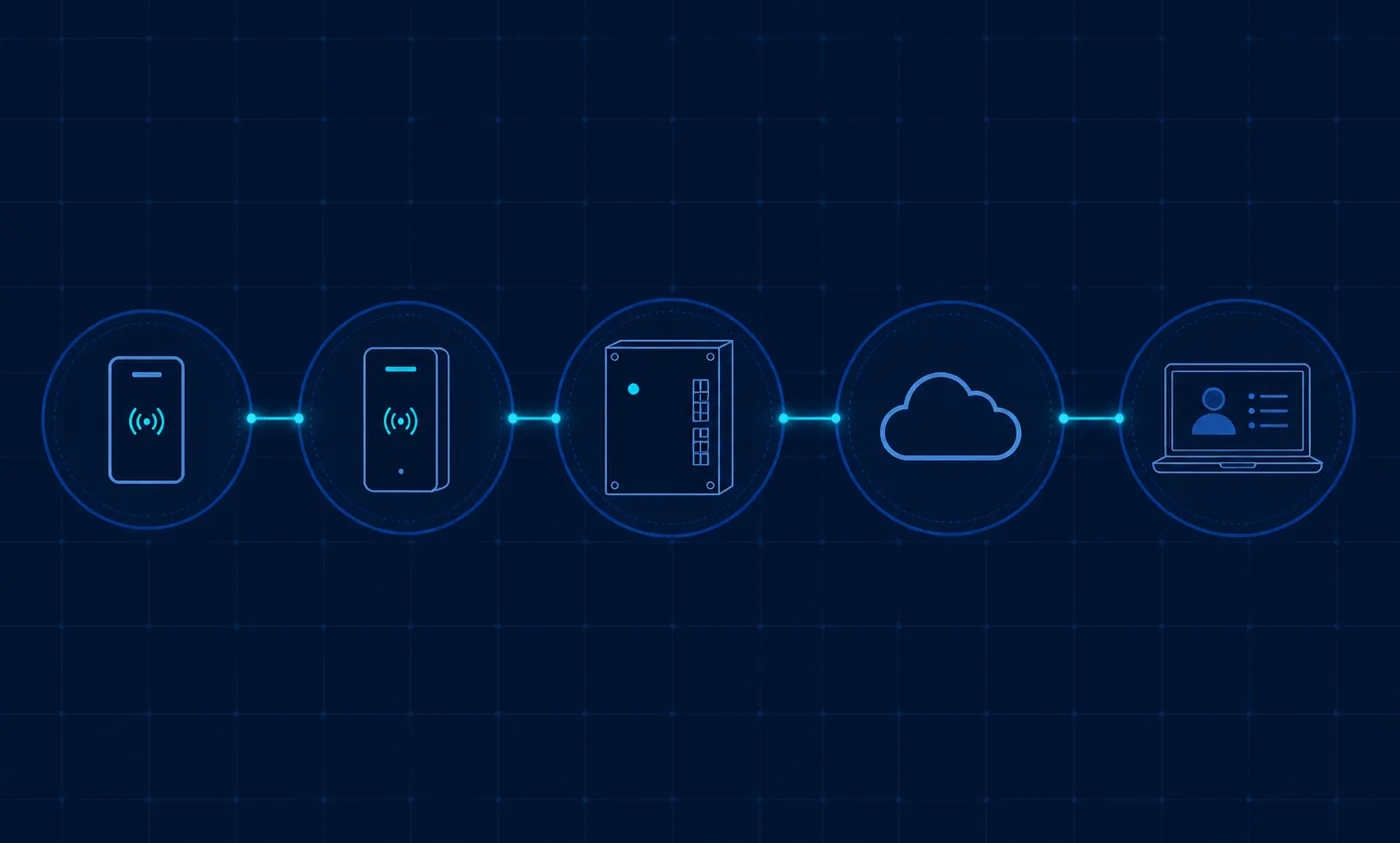
A cloud access control system is not a single product. It is a chain of five components, and a quote that only prices some of them is not a complete quote.
The credential
The credential is what a person carries: a plastic card, a fob, a phone, a watch or a PIN. Vendor documentation matters here more than marketing. Brivo’s single-door controller datasheet states that its readers support multiple credential types including Brivo Mobile Pass, smart cards, proximity cards, Brivo Wallet Pass and PINs. Ubiquiti’s reader technical specifications list NFC card and key-fob access alongside mobile unlock and Apple or Google Wallet support. Verkada documents mobile NFC credentials managed through Command as well as Bluetooth-based unlocking at the reader. Salto’s JustIN Mobile documentation describes the phone itself as the digital key, delivered online.
The controller
The controller is the box in the closet or above the ceiling tile that actually energises the lock, monitors the door contact and enforces access decisions. It is where the difference between vendors becomes physical. Kisi sells its own Controller Pro 2 and documents an add-on Wiegand board for connecting legacy hardware devices and third-party RFID credentials. Brivo publishes a single-door Ethernet controller datasheet describing support for Wiegand and OSDP-compatible readers. Avigilon Alta documents both Wiegand wiring and Mercury device installation. Verkada’s AC42 is a four-door controller that its product page says supports existing door hardware and card readers. Salto KS replaces the controller concept with wireless locks reporting to IQ hubs.
Cloud management and identity
The cloud layer holds users, groups, schedules, door policies and event history, and it is what you are subscribing to. Kisi documents real-time remote management, potentially unlimited users and locations, scheduled reports and event history. Genea documents a Global Dashboard for enterprise-wide events and alerts plus a customisable dashboard. Paxton documents web-based software with remote access and states that Paxton10 carries zero licence fees. Verkada documents Command as a web and mobile platform with no servers to run.
Audit records and administration
Finally, the system has to tell you what happened. Kisi documents event history that separates access events from audit events. Verkada documents audit logs at organisation level and a roles-and-permissions model with organisation, user-management and site scopes. Genea documents an events webhook and API keys so that door events can be pushed into other systems. Atlas assessment: for a small business, the audit trail is often the feature that pays for the system — during an incident, an insurance question or a dispute over who was in the building.
Decision matrix: nine cloud access control platforms
Every cell below reflects vendor documentation as of September 2026, or states plainly that the vendor does not publish it. No cell contains a score, a rating or an estimated price.
| Platform | Typical SMB fit (Atlas assessment) | Cloud management | Mobile credentials | Card / fob support | Multi-site management | Visitor capability | Identity integrations | Hardware model | Installer / channel requirement | Public pricing status | Key documented limitation |
|---|---|---|---|---|---|---|---|---|---|---|---|
| Kisi | IT-led single or few locations wanting direct purchase | Real-time remote management, event history, scheduled reports | Mobile unlock, Apple Wallet badges, touchless unlock, QR links | NFC cards; legacy prox and third-party RFID via Wiegand board | Documented as potentially unlimited users and locations | Native Kisi Visitor Management, separately priced per location | SCIM plus Microsoft Entra ID and Okta directory sync | Own Controller Pro 2 and Reader Pro, plus Wiegand add-on for legacy devices | Direct purchase from vendor; no dealer requirement stated | Published: plan starting at $99, hardware and add-ons may be required | Report availability varies by subscription plan |
| Brivo | Businesses buying through a security dealer who want a mature cloud suite | Security Suite Editions unifying access, video, visitor and intrusion | Brivo Mobile Pass and Wallet Pass, tracked as a licensed pool | Smart cards, proximity cards and PINs per controller datasheet | Editions positioned for buildings of all sizes | Native, unified within Access Editions | Identity Connector with SCIM 2.0 for Okta and Microsoft Entra ID | Own controllers and smart readers supporting Wiegand and OSDP readers | Certified dealer and reseller channel; project registration from $10,000 | Not publicly documented; purchased from the Brivo price list | No self-serve purchase path published; buying runs through dealers |
| Verkada Access | Businesses wanting access control and cameras in one platform | Verkada Command web and mobile platform, described as zero servers | Mobile NFC via Apple Wallet plus Bluetooth intent unlock | Readers documented as compatible with a wide array of credentials | Command directories for scoped user and group management | Native Verkada Guest with kiosks and badge printing | OIDC, SAML and SCIM with Okta and Microsoft Entra ID | Own AC42 and AX11 controllers; AC42 supports existing hardware and readers | Authorised partner programme and partner directory | Not publicly documented; pricing page lists categories only | Purchasing routed primarily through authorised partners |
| Avigilon Alta Access | Businesses migrating from legacy Mercury or Wiegand infrastructure | Alta Access admin platform with documented licence management | Mobile credentials on a restructured standardised licensing model | Cards and fobs purchased through the Alta Access Store | Organisation-level administration with licence terms per site | Native Alta Visitor module, compatibility documented with Access | SCIM sync with Okta and Microsoft Entra ID, directory sync at 15 or 60 minutes | Own ACU control units and readers; Mercury and Wiegand support documented | Certified Alta partners; licences at MSRP through the Access Store | Contact sales; quote request page published instead of prices | Mobile credential licensing was reworked after documented billing confusion |
| Salto KS | Wireless retrofit where cabling doors is impractical | Salto KS web app for sites, roles, events and subscriptions | JustIN Mobile digital keys delivered online | Tags and RF-based locks; specific card standards not itemised | Site-based management and subscription ownership per site | Not confirmed as a native module in first-party documentation | Not documented; no first-party SCIM or Okta integration page found | Own wireless locks, IQ hubs and repeaters | Vouchers bought through a supplier or installer; installer accounts documented | Not publicly documented; subscriptions purchased as vouchers | Each IQ hub holds up to 16 locks and up to 6 repeaters |
| Genea | Businesses standardising on non-proprietary hardware with strong identity sync | Global Dashboard for enterprise-wide events plus custom dashboards | Mobile keys assignable from any device via the portal | Not detailed by standard name in reviewed documentation | Yes, Global Dashboard documented as enterprise-wide | Native Genea Visitor Management with guest pre-registration and QR | Okta, Microsoft Entra ID, Google Workspace, OneLogin, on-premise AD | Runs on non-proprietary third-party access control hardware | Sales-assisted; demo request rather than published checkout | Not publicly documented; educational cost article only | Automated deprovisioning depends on an identity-provider integration |
| Paxton10 | Cost-controlled deployments wanting access and video without licence fees | Web-based software with remote access and stated zero licence fees | Paxton Key Bluetooth credentials, documented as free with Paxton10 | Tokens and fobs documented generically; Bluetooth confirmed | Dedicated multi-site management documented | Not found as a distinct native module | Not documented on first-party pages | Own controllers, readers, PaxLock and Entry range | Installer and dealer channel with accreditation programme | Partly published: Paxton10 Server listed at $1,844.00; software licence-free | System capacity documented at 1,000 doors and 1,000 cameras |
| ButterflyMX | Multi-tenant or mixed-use buildings needing lobby entry plus doors | One cloud platform for doors, gates, garages and elevators | App-based unlock with Bluetooth, NFC and QR credentials | Fob and PIN entry documented alongside smartphone access | Not documented as a named feature; framed per property | Native visitor passes with time-limited QR and PIN codes | Google Workspace directory integration and an open API documented | Own video intercom and reader hardware | Direct, sales-led quote process | Not publicly documented; quote requested on the cost page | Visitor passes rely on trusted sharing rather than guest identity proofing |
| Ubiquiti UniFi Access | Technical teams already running UniFi networking that want published prices | UniFi application suite dashboard, cloud-manageable with local hubs | NFC and Bluetooth mobile unlock plus Touch Pass in Apple or Google Wallet | NFC card and key-fob access confirmed on reader specifications | Supported, with documented complexity for users not linked to an IdP | Native visitor scheduling and kiosk check-in documented | SAML SSO with Google, Microsoft and custom identity providers | Own Access hubs, readers and intercoms | Direct from the Ubiquiti store; no certified installer requirement | Published hardware prices: Access Door Hub $199.00, Access Ultra reader $129.00 | Touch Pass support limited to specific reader generations |
Vendor-by-vendor analysis
Each section below states what the platform is, what its documentation supports, and what a small business should confirm in writing before purchase. Nothing here is a recommendation to buy.
Kisi
Kisi is a cloud access control platform sold directly to end customers. Vendor documentation states that the Controller Pro 2 is Kisi’s own controller and that a Wiegand board add-on lets it drive up to four legacy hardware devices and accept third-party RFID credentials, which is the mechanism most relevant to a business that already has readers on the wall. Credential options documented on the access methods page include mobile unlock, Apple Wallet badges, touchless unlock and QR or link-based access for guests and contractors.
On the software side, Kisi’s plans and features documentation lists real-time remote management and potentially unlimited users and locations, with event history separating access events from administrative audit events and role-based access rights scoped at group, place and organisation level. Identity integration is documented through SCIM provisioning and a Microsoft Entra ID directory integration. Kisi also documents three offline fallbacks: cached credentials on the reader, cached credentials on the controller for legacy readers, and a phone-side cache that can unlock over cellular data when Kisi devices are offline. Visitor management exists as a separately priced product with a free Basic plan priced per location.
Pricing is one of the few genuinely public data points in this category: the Kisi pricing page lists a platform plan starting at $99 and states that hardware and add-ons might be required. Atlas assessment: that is a starting point, not a budget — the door hardware and controller count will dominate a first installation. A documented limitation to weigh: Kisi states that report availability varies by subscription plan, so confirm that the reporting you need is in the tier you are quoted.
Brivo
Brivo is a long-established cloud access control vendor whose Security Suite Editions bundle access control with video, visitor management and intrusion in Standard and Professional tiers. Hardware documentation is unusually clear: the ACS-SDC single-door controller datasheet describes an Ethernet controller supporting Wiegand and OSDP-compatible readers, and states support for multiple credential types including Brivo Mobile Pass, smart cards, proximity cards, Brivo Wallet Pass and PINs. Brivo also documents Brivo Onsite, an on-premise appliance for single-site deployments with local capacity for up to 30 readers, which matters if you have a site where a cloud dependency is unacceptable.
Identity handling is a documented strength. The Brivo Identity Connector uses SCIM 2.0 to provision and deprovision users in line with employment status, with configuration guides published for Okta and Microsoft Entra ID. Mobile credentials are documented as an issued, counted resource: Brivo publishes support articles on issuing a Mobile Pass or Wallet Pass and on checking how many Mobile Passes remain, which implies a licensed pool rather than unlimited issuance.
Purchasing is channel-based. Brivo publishes dealer certification material referencing purchase from the Brivo price list, and a partner deal registration programme with a $10,000 project threshold. Public pricing is therefore Not publicly documented. Atlas assessment: Brivo suits a business that already has, or wants, a security integrator relationship and values breadth of edition features over price transparency.
Verkada Access
Verkada describes its access control product as hybrid cloud, managed through Command as a web and mobile platform with no servers to maintain. The AC42 four-door controller is documented as supporting existing door hardware and card readers, which makes a partial retrofit plausible, and Verkada’s door readers are documented as compatible with a wide array of credentials. Mobile credentials are documented in two forms: mobile NFC credentials managed in Command via Apple Wallet, and Bluetooth-based intent unlock at the reader.
Administrative security is better documented here than almost anywhere else in this comparison. Verkada publishes material on two-factor authentication — including configurations where organisation admins are required to enable it — on viewing audit logs, and on a roles and permissions model with organisation, user-management and site scopes. Multi-site administration uses directories for user and group management. Offline behaviour is explicitly documented: if a controller loses internet connectivity, events are stored locally until connectivity returns. Visitor management is a native companion product, Verkada Guest, with self-service kiosks, digital sign-in and badge printing.
Pricing is Not publicly documented: the pricing page lists product categories without figures, and Verkada operates a formal partner programme with an authorised-partner directory. Atlas assessment: Verkada is a strong fit where cameras and doors are being bought together and the buyer wants one console; it is a weaker fit where the buyer needs to compare list prices before engaging a salesperson.
Avigilon Alta Access (formerly Openpath)
Avigilon Alta Access — the platform previously sold as Openpath, now part of Motorola Solutions — is the most explicitly retrofit-oriented option here. Documentation covers wiring to Wiegand devices and Mercury controller support, which together mean an existing panel-and-reader estate can often be brought under cloud management rather than ripped out. Credentials are ordered through the Access Store per Avigilon’s credential purchasing article, and licence administration is documented in the Alta Access admin guide.
Mobile credential licensing deserves specific attention, because Avigilon documents having changed it: a support article announces a new licensing structure for mobile credentials, describing a move to a simplified and standardised model that replaces prior user-based billing. Identity integration is documented with Okta SCIM sync and Microsoft Entra ID, including automatic import and sync of users and access groups. Outage behaviour is documented in a dedicated article on what happens during an internet or power outage. Visitor workflows are handled by the native Alta Visitor module.
Purchasing runs through certified partners: Avigilon documents that licences and hardware are ordered via the partner Access Store, and public pricing is Contact sales — the quote page is the published route. Atlas assessment: Alta is worth shortlisting specifically when you have legacy infrastructure worth preserving, and worth scrutinising specifically on credential licensing, since the vendor itself acknowledged the previous model caused confusion.
Salto KS
Salto KS takes a different architectural route: instead of controllers wired to readers, it uses IQ hubs communicating wirelessly with electronic locks, with hardware managed from the KS web application. Mobile access is documented as JustIN Mobile, which turns the phone into a digital key delivered online. Offline behaviour is explicitly documented and unusual: offline access stores a user’s access rights locally in the lock so doors still work if the lock loses its connection to the IQ, and Salto publishes further material on how KS and Space handle connectivity disruptions.
The tradeoffs are also documented. Salto publishes an explicit capacity constraint: an IQ hub holds up to 16 locks, and up to six repeaters can be added per IQ — so door count drives hub count in a way that wired systems do not. Purchasing is installer-mediated: Salto’s subscription and vouchers documentation directs buyers to contact their supplier, installer or Salto support to buy a voucher, and the subscription model announcement describes the same voucher-based commercial structure. Public pricing is therefore Not publicly documented. First-party SCIM, Okta or Entra integration pages were not found for KS, so identity-provider provisioning should be treated as Not publicly documented until the vendor confirms it for your configuration.
Atlas assessment. Salto KS is most interesting where wiring is the obstacle: heritage buildings, leased premises with restrictive alteration clauses, or interior doors that were never cabled. It is least interesting where you need directory-driven user provisioning, because that is the part its public documentation does not cover.
Genea
Genea’s differentiator is stated on its own product page: the platform runs on non-proprietary hardware. For a business that already owns panels, that is a meaningful architectural claim, because it decouples the software subscription from a single hardware vendor. Administration is documented through the Global Dashboard for enterprise-wide alerts and events plus a customisable dashboard, and mobile keys can be assigned from any device through the access control portal.
Identity coverage is the broadest documented set in this comparison: Genea publishes integration pages for Okta and Microsoft Entra ID and a directory services collection covering Google Workspace, OneLogin and on-premise Active Directory, plus an events webhook for pushing door activity into other systems. Visitor workflows are handled by Genea Visitor Management with pre-registration and QR check-in.
Pricing is Not publicly documented; Genea publishes an educational article about access control system cost rather than a price list, and its buying path is a demo request. A documented limitation worth reading carefully: Genea’s own Okta integration page frames automated deprovisioning as the problem the integration solves, which implies that without an identity-provider integration, removing access is a manual administrative task. Atlas assessment: Genea fits businesses whose identity stack is already the source of truth for employment status.
Paxton10
Paxton10 combines access control and video management in a single system, documented on the Paxton10 system page, with web-based software providing remote access and, per Paxton’s own wording, zero licence fees. Mobile credentials follow the same commercial logic: Paxton’s Paxton Key application note documents Bluetooth smart credentials for iOS, Android, Apple Watch and Wear OS and describes them as free with Paxton10. Multi-site management is documented as a specific capability.
Paxton is also the only vendor here that publishes hardware list prices alongside a licence-free software model: the Paxton10 Server product page lists $1,844.00. Capacity is documented rather than implied — Paxton’s system capacity note caps a system at 1,000 doors and 1,000 cameras, which is far beyond small-business needs but useful to know in writing. Purchasing is installer-led: Paxton publishes an installer guide and operates an accredited partner programme.
Two gaps matter for this audience. First, no first-party identity-provider integration documentation was found, so SSO or SCIM provisioning should be treated as Not publicly documented. Second, no distinct native visitor-management module was found in Paxton’s documentation. Atlas assessment: Paxton10 is a strong candidate where the priority is predictable ongoing cost and combined door-and-camera management through a trusted local installer, and a weak candidate where directory-driven provisioning is a requirement.
ButterflyMX
ButterflyMX approaches the category from the entry-intercom side rather than the badge-reader side. Its access control product page documents management of doors, gates, garages and elevators from one cloud platform, which reflects its origins in multi-tenant residential and mixed-use buildings. Visitor handling is native and well documented at the API level: virtual keys cover time-limited and recurring visitor credentials with QR or PIN delivery, and ButterflyMX publishes developer API documentation for integrating those workflows.
Pricing is Not publicly documented: the cost page routes to a free quote rather than publishing figures. Multi-site management is not documented as a named feature — the product is framed per property — and no first-party Okta, Entra or SCIM integration page was found, so enterprise identity provisioning should be treated as Not publicly documented. A documented limitation sits in the visitor model itself: ButterflyMX’s own guidance on visitor passes stresses sharing them only with trusted individuals, which is a reasonable acknowledgement that a shared code is not identity proofing.
Atlas assessment. ButterflyMX is the right shortlist entry when the hard problem is the front door of a shared building — deliveries, tenants, buzzers, elevators — and the wrong one when the hard problem is credential lifecycle across employees at several offices.
Ubiquiti UniFi Access
UniFi Access is the most price-transparent option in this comparison because Ubiquiti sells hardware from its own storefront with published figures: the Access Door Hub is listed at $199.00 and the Access Ultra reader at $129.00, with the full range on the door access store category. The product page documents hubs, readers and intercoms managed through the UniFi application suite, and reader specifications confirm NFC card and key-fob access alongside mobile unlock and Apple or Google Wallet support.
The nuance is credentials. Ubiquiti documents Touch Pass — its wallet-based credential — with reader support limited to specific reader models, so credential capability is tied to which hardware generation you buy. Touch Pass is purchased as a credential product rather than being implicitly included, and per-line-item subscription figures for it are Not publicly documented. Identity integration is documented as SAML single sign-on with Google, Microsoft and custom providers through Ubiquiti’s organisation and identity management features.
Atlas assessment. UniFi Access suits a business with genuine in-house technical capability — ideally one already running UniFi networking — that wants to model hardware cost precisely from public prices and does not need a vendor-managed support relationship. It suits a business with no IT resource considerably less well, because the same self-service model that makes it cheap to buy makes it your responsibility to run.
Pricing and total-cost considerations
The single most common budgeting mistake in this category is treating the software subscription as the cost of the system. It is usually the smallest recurring line and rarely the largest first-year line. A realistic access control budget has to account for the following, and only some of them appear in a vendor quote.
- Controllers and readers — driven by door count, not user count. A four-door controller changes the arithmetic at door five.
- Locks and door hardware — electrified strikes, maglocks, electrified levers, exit devices, door contacts and request-to-exit devices. Frequently the largest single component on a first installation.
- Credentials — cards and fobs are consumables, and mobile credentials may be licensed. Avigilon documents a standardised mobile credential licensing model, HID documents mobile identities as a subscription with per-user-licence ordering, and Ubiquiti sells Touch Pass as a purchased credential — while Paxton documents Paxton Key as free with Paxton10.
- Software subscription — the recurring platform fee. Kisi publishes a starting figure; Brivo, Verkada, Avigilon Alta, Genea, ButterflyMX and Salto KS route to quotes, dealers or vouchers; Paxton states zero licence fees for Paxton10 software.
- Visitor management — often a separate product line. Kisi prices visitor management separately per location; Brivo includes visitor management within its Editions; Verkada, Avigilon Alta and Genea document dedicated visitor modules.
The table below records only what vendors publish. It contains no estimates, no ranges we invented and no tiers. Atlas assessment: the pattern in this table is itself the most useful finding — public pricing correlates with a direct sales model, and quote-based pricing correlates with an installer channel.
| Platform | Published price data on vendor-owned pages | How software is licensed (per documentation) | How mobile credentials are handled commercially | Purchasing route | What you must get quoted separately |
|---|---|---|---|---|---|
| Kisi | Plan starting at $99; visitor management Basic plan listed as free, priced per location | Subscription plan, with features and report availability varying by plan | Included in platform access methods; hardware and add-ons may be required | Direct from vendor | Controllers, readers, Wiegand add-on, door hardware, installation |
| Brivo | Not publicly documented | Security Suite Editions (Standard and Professional) | Mobile Pass and Wallet Pass issued from a tracked licence pool | Certified dealer or reseller, from the Brivo price list | Edition tier, hardware, installation, mobile pass quantity |
| Verkada Access | Not publicly documented | Organisation-level product licences, documented as co-termed | Mobile NFC and Bluetooth unlock managed in Command | Authorised partner | Licence term, controllers, readers, cameras if bundled, installation |
| Avigilon Alta Access | Contact sales | Software licences at MSRP ordered through the partner Access Store | Separately licensed under a restructured standardised model | Certified Alta partner | Licence term, mobile credential licensing, ACU hardware, installation |
| Salto KS | Not publicly documented | Subscription purchased as vouchers | JustIN Mobile keys issued within the KS subscription | Supplier or installer voucher | Locks, IQ hubs, repeaters, voucher term, installation |
| Genea | Not publicly documented | Subscription; cost guidance published as editorial content only | Mobile keys assigned from the portal | Sales-assisted after demo request | Panel compatibility, subscription, visitor module, installation |
| Paxton10 | Paxton10 Server listed at $1,844.00; software stated as zero licence fees | No recurring software licence fee documented for Paxton10 | Paxton Key documented as free with Paxton10 | Accredited installer or dealer | Controllers, readers, PaxLock units, door hardware, installation |
| ButterflyMX | Not publicly documented | Subscription quoted per property | App-based credentials plus visitor passes | Direct, sales-led quote | Intercom hardware, interior door hardware, subscription, installation |
| Ubiquiti UniFi Access | Access Door Hub $199.00; Access Ultra reader $129.00 | Hardware purchase; SSO features documented within UniFi identity management | Touch Pass purchased as a credential; per-item figures not publicly documented | Direct from the Ubiquiti store | Touch Pass costs, door hardware, cabling, installation labour |
Atlas assessment. Two practical rules follow from this. First, never compare a published software price against a quoted all-in system price; they are different objects. Second, ask every vendor and installer for a quote broken into hardware, labour, credentials and subscription, because that is the only format in which nine platforms with four different commercial models become comparable at all.
Cloud vs hybrid vs traditional access control
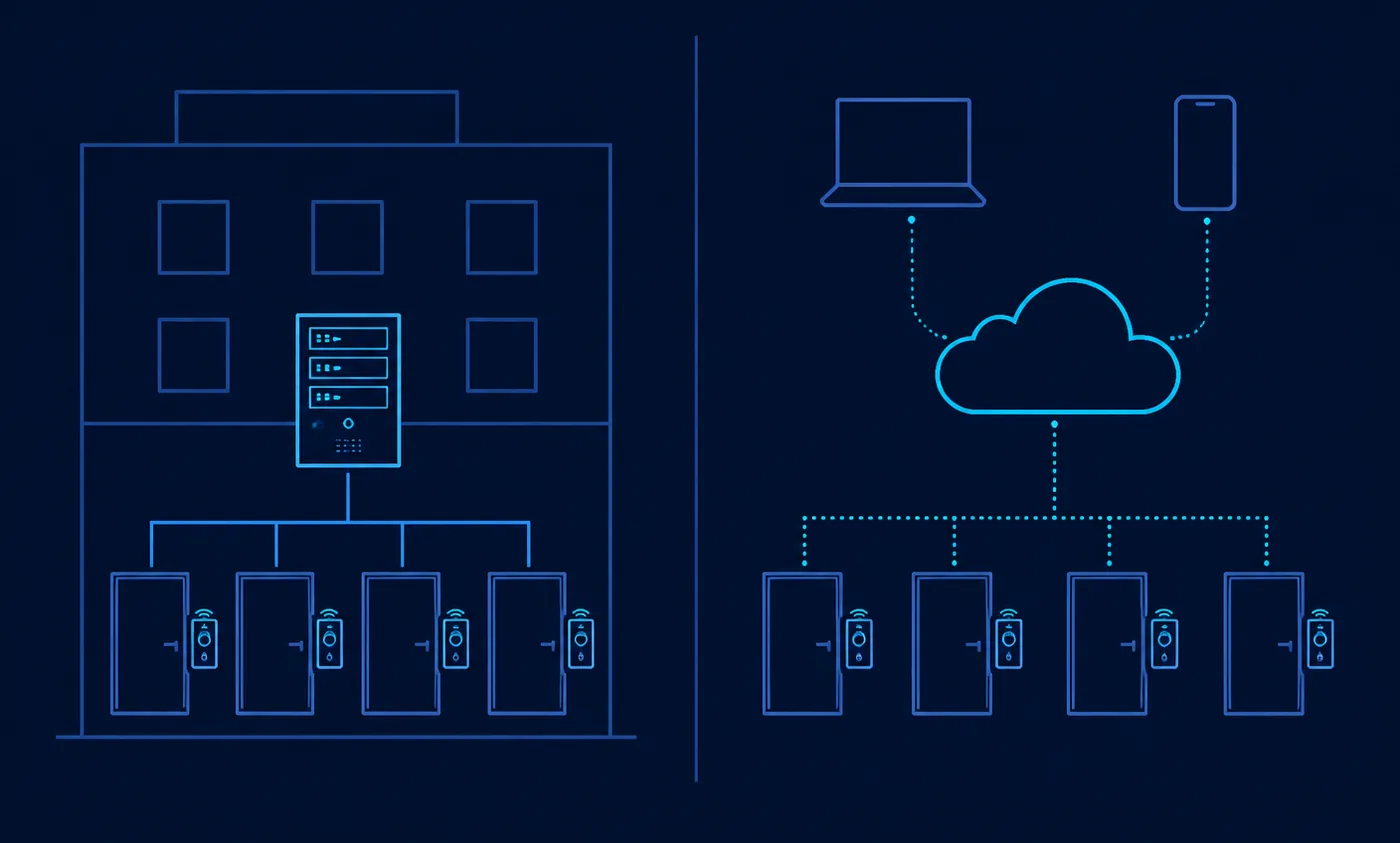
The word “cloud” in this category describes where administration happens, not where access decisions happen. In almost every system here, the controller at the door still makes the decision; the cloud holds the policy and the history. That distinction is what makes the architectures comparable at all.
Cloud-managed
Administration lives in a browser, there is no server to patch, and remote unlocking, user changes and event review work from anywhere. The tradeoffs are a recurring subscription and a dependency on the vendor remaining in business and in support. Verkada states plainly that Command requires zero servers; Paxton documents remote access through its web-based software; Kisi documents real-time remote management.
Hybrid
Hybrid designs keep meaningful capability on site while managing centrally. Verkada describes its access product as hybrid cloud and documents local event storage when a controller loses internet connectivity. Salto KS stores access rights in the lock itself so doors keep working when a lock loses its link to the IQ hub. Kisi documents caches on the reader, the controller and the phone. Atlas assessment: for a small business, documented offline behaviour is more valuable than almost any feature on a comparison chart, because internet outages are ordinary and locked-out staff are expensive.
Traditional on-premise
A local server or embedded appliance runs everything inside the building. Brivo still documents this pattern with Brivo Onsite, an embedded single-site system with local capacity for up to 30 readers. The advantages are independence from a subscription and from external connectivity; the costs are patching, backups, on-site failure risk and, usually, no straightforward remote administration.
Security and identity considerations
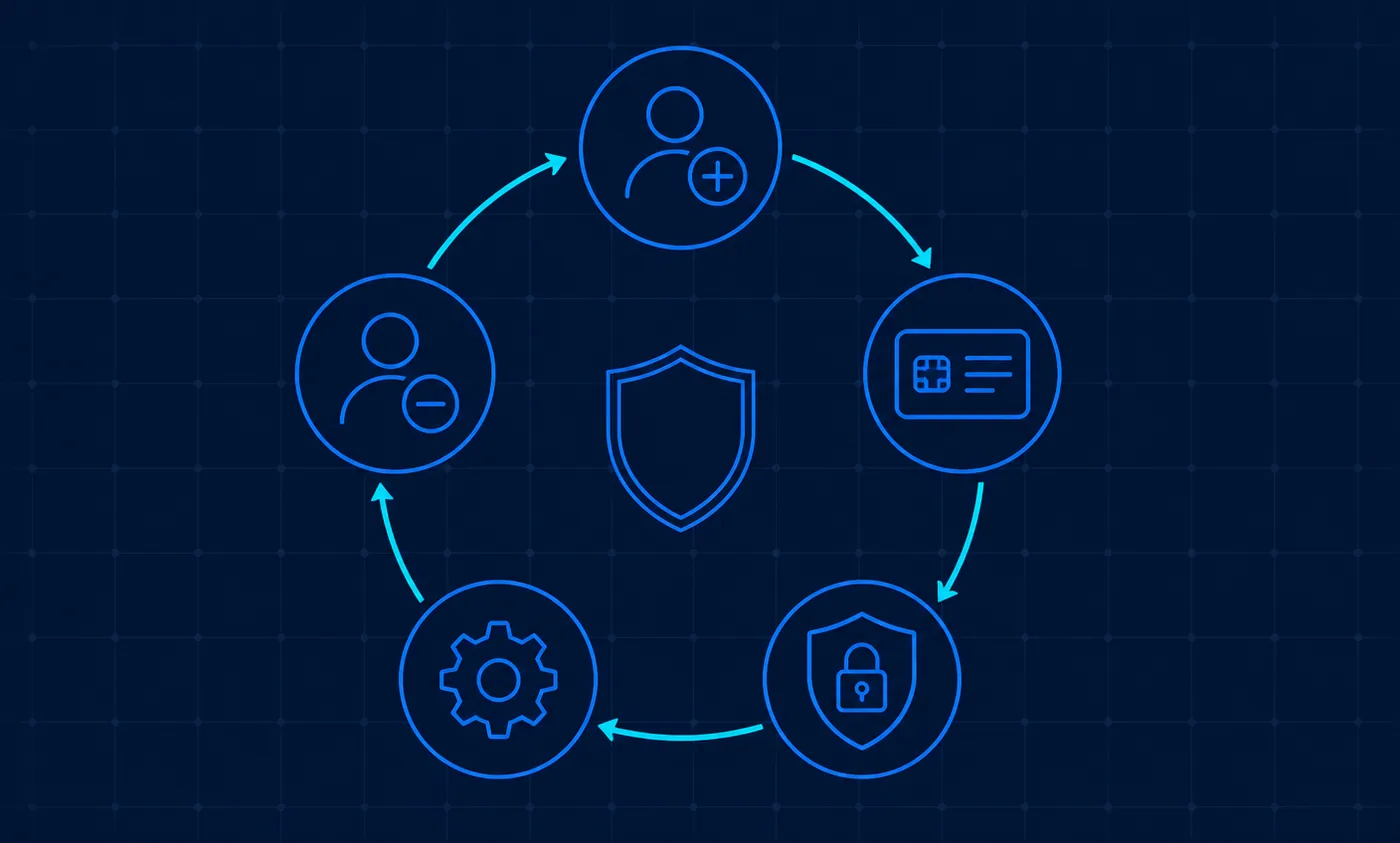
The security of an access control system in practice is mostly the security of its administration. A platform with strong hardware and sloppy account hygiene is not secure; the reverse is often survivable. The following areas deserve explicit answers before signing.
Administrator accounts and multi-factor authentication
Every administrator account is a master key. Verkada documents two-factor authentication for Command, including configurations where organisation administrators are required to enable it. Several other vendors in this comparison do not publish comparable admin-authentication documentation, which is worth asking about directly rather than assuming. Broader authentication guidance is set out in NIST SP 800-63-4.
Identity-provider integration and provisioning
Connecting access control to the directory that already knows who works for you is the single highest-leverage configuration decision available. Brivo documents SCIM 2.0 provisioning through its Identity Connector for Okta and Entra ID, tied to employment status. Avigilon Alta documents Okta SCIM sync with directory sync intervals of 15 or 60 minutes. Verkada documents OIDC, SAML and SCIM with Okta and Entra ID. Kisi documents SCIM and Entra ID. Genea documents Okta, Entra ID, Google Workspace, OneLogin and on-premise Active Directory. Salto KS, Paxton10 and ButterflyMX do not publish equivalent SCIM integration documentation, so treat that capability as Not publicly documented for those platforms.
Credential lifecycle and offboarding
Offboarding is where physical access control usually fails, and it fails quietly. Genea’s own integration material frames automated deprovisioning as the problem its identity integrations solve — an implicit acknowledgement that manual deprovisioning drifts. Whatever platform you choose, decide who is accountable for revoking access on the last working day, and test the revocation once with a real credential. NIST SP 800-116 Rev. 1 is useful background on credential use in facility access.
Network dependency and failure modes
Confirm three behaviours specifically: what happens on internet loss, what happens on local network loss, and what happens on power loss. Kisi documents offline caches on the reader, controller and phone. Verkada documents local event storage during connectivity loss. Salto documents locally stored access rights in the lock. Avigilon publishes a dedicated article on internet and power outage behaviour. Where a vendor does not document this, it is a question for the quote, not an assumption.
Physical override and life safety
Electronic access control does not remove building code obligations. Free egress, fire alarm interfaces, delayed-egress rules and accessible operating force are determined by local codes and inspectors, and they are the installer’s responsibility to satisfy. Keep a documented mechanical override plan for every controlled door, and treat CISA’s physical security guidance and the CISA Security Planning Workbook as planning input rather than compliance advice. Atlas assessment: no cloud platform in this comparison should be evaluated on life-safety grounds — that conversation belongs with your installer and local authority having jurisdiction.
How to shortlist a system
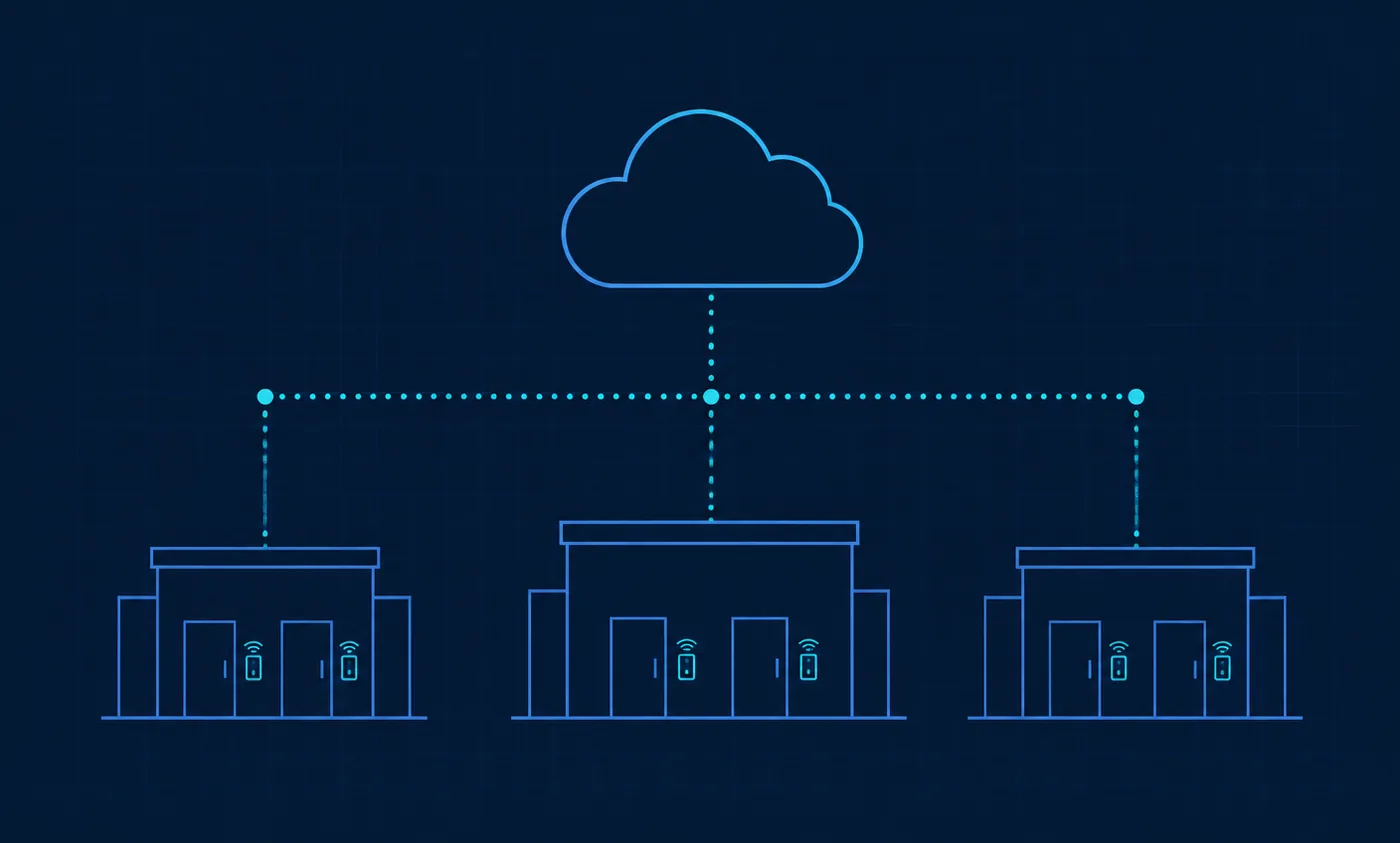
A defensible shortlist comes from writing down constraints before looking at products. The following eleven inputs are enough to reduce nine platforms to two or three in an afternoon.
- Number of doors, today and in two years. Door count drives controller count, and controller granularity differs — a four-door controller such as Verkada’s AC42 prices differently from single-door controllers, and Salto’s documented limit of 16 locks per IQ hub is a hard planning input.
- Credential type. Decide between cards, fobs, phone-based credentials and wallet credentials before choosing hardware, because reader generation constrains credential type — Ubiquiti documents Touch Pass support limited to specific readers.
- Existing hardware. If you have readers and panels worth keeping, prioritise the platforms that document Wiegand, OSDP or Mercury support: Kisi’s Wiegand board, Brivo’s Wiegand and OSDP reader support, Avigilon Alta’s Wiegand and Mercury documentation, Verkada’s stated support for existing hardware on the AC42, or Genea’s non-proprietary hardware model.
- Identity provider. If you run Entra ID, Okta or Google Workspace and want it to govern door access, filter on documented SCIM or SSO support immediately.
- Budget structure. Capital-heavy with low recurring cost, or lower upfront with a subscription? Paxton’s licence-free software and Kisi’s published subscription sit at opposite ends of that spectrum.
Atlas assessment. A workable process: write those eleven answers on one page; eliminate any platform whose documentation contradicts a hard requirement; ask the surviving two or three vendors and one installer for quotes broken into hardware, labour, credentials and subscription; then choose. Resist the temptation to shortlist on brand familiarity — in this category, brand recognition mostly reflects marketing spend in adjacent markets such as video surveillance.
What deployment actually involves
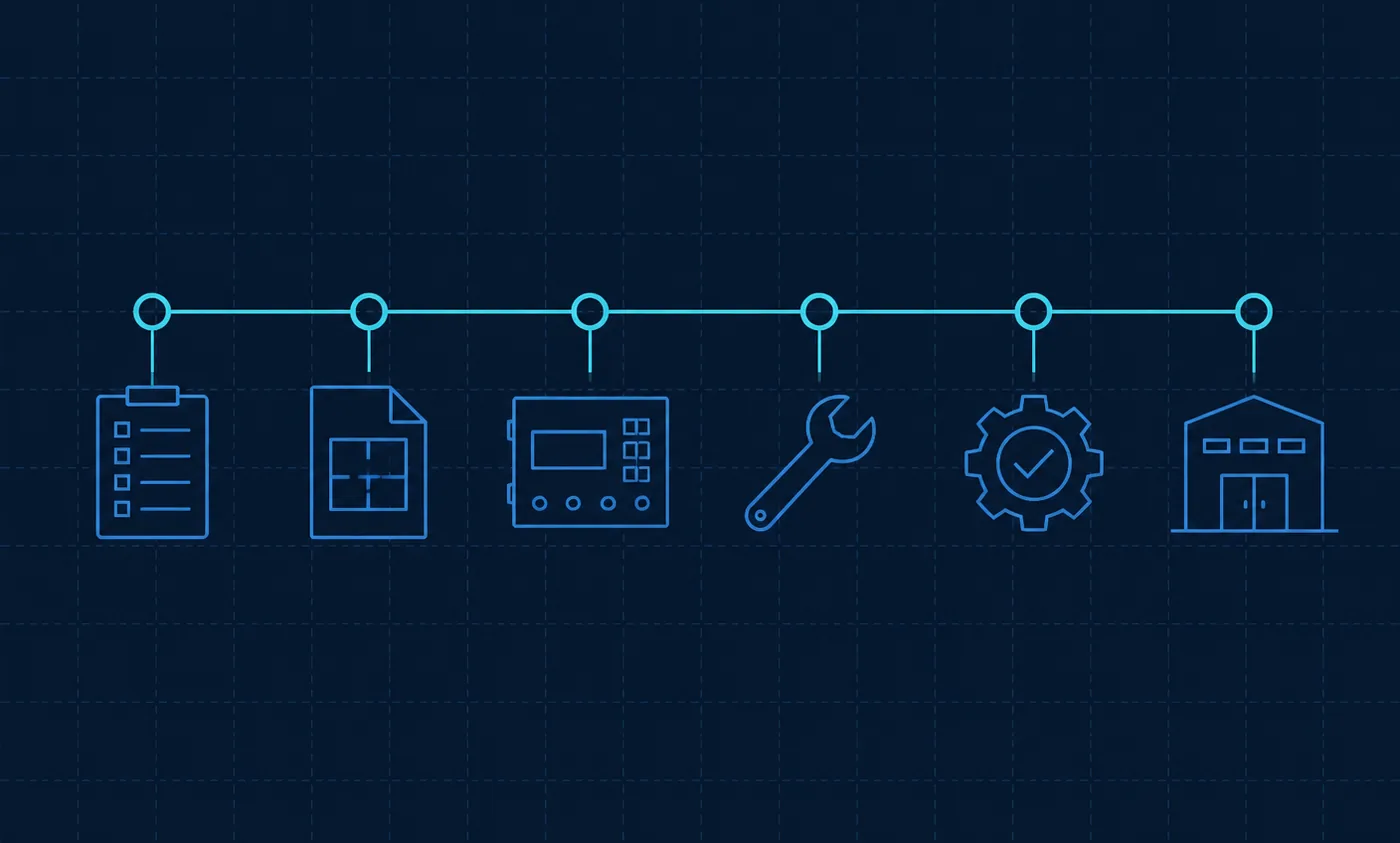
Deployment timelines vary far too much with building age, door condition, electrical access and installer availability for any honest article to publish a duration. What can be described is the sequence, because it is consistent across every platform here.
- Requirements. Doors to control, who needs access to what and when, credential type, visitor needs, retention expectations and the identity source of truth.
- Site survey. Conducted by the installer: door and frame condition, existing hardware, cable paths, power and network availability, and code constraints on each door.
- Installation. Mounting, cabling, lock fitting, controller termination and power. This is a trade job with electrical implications.
- Configuration and testing. Users, groups, schedules, holidays, identity integration, alert routing, and explicit tests of internet-loss, network-loss and power-loss behaviour.
- Rollout. Remaining doors, staff enrolment, a written administration procedure, and a named owner for adding and removing credentials.
Atlas assessment. Do not skip the pilot to save a week, and do not let the go-live day be the first time anyone tests what happens when the internet drops. Both mistakes are cheap to avoid before installation and expensive to fix afterwards.
Questions to ask before signing
Take this list to every vendor and installer conversation, and record the answers next to the quote. Where this article can already point to documentation, the relevant vendor evidence is noted; everything else has to come from the supplier in writing.
- Which of my existing doors, locks and readers must be replaced, and why? Ask for it door by door after the survey.
- Who installs it, and are they certified on this platform? Brivo, Paxton, Salto, Verkada and Avigilon Alta all publish partner, dealer or installer programmes.
- What happens if internet connectivity fails? Kisi, Verkada, Salto and Avigilon publish documentation on this; ask the others to answer in writing.
- Are mobile credentials charged separately, and on what basis? Avigilon documents a restructured mobile credential licensing model, HID documents subscription-based mobile identities, Ubiquiti sells Touch Pass as a credential, and Paxton documents Paxton Key as free with Paxton10.
- What is the contract term, what is the renewal basis, and are licences co-termed? Verkada documents co-termed licensing.
- What happens commercially and technically when I add another door or another location?
- If I stop paying the subscription, what continues to work? Ask for this answer in writing; it is rarely on a web page.
Limitations of this comparison
- No physical testing was performed. AtlasProfitAI did not install, wire, commission or laboratory-test any system in this comparison. There is no bench data, no field trial and no support-response measurement behind it.
- Inclusion is not an endorsement or a security claim. Presence in this article means a vendor publishes enough documentation to compare, not that its product resists attack better than an omitted product.
- Public pricing is incomplete by nature. Most vendors here publish no prices at all. The figures quoted — Kisi’s starting plan price, Paxton’s server listing, Ubiquiti’s hardware listings — are single data points on vendor pages, not system quotes, and they exclude door hardware and labour.
- Installation cost varies enormously. Two identical door counts in two buildings can differ by a wide margin on labour and cabling alone. No figure in this article should be read as an installed cost.
- Vendor documentation changes. Everything here was read in September 2026. Plans, hardware compatibility, credential licensing and integration support all change, sometimes without a public announcement.
- Absence of documentation is not absence of capability. Where this article says a capability is “Not publicly documented”, it means we could not verify it on a vendor-owned page — the vendor may still support it and should be asked directly.
- Local codes govern deployment. Fire, building, egress and accessibility requirements are set locally and can override design preferences at any door. They must be resolved with your installer and local authority.
- Atlas judgements are separate from vendor claims. Every passage labelled “Atlas assessment” is our editorial opinion based on the documented facts cited nearby. It is not a vendor statement and should not be quoted as one.
- Regional variation. Product availability, hardware ranges and pricing pages differ by country; the pages reviewed were predominantly the vendors’ United States or international editions.
Final decision guidance
There is no universal winner in cloud access control, and any article that names one is describing its own affiliate economics rather than your building. What the documentation does support is a set of clear conditional statements.
Atlas assessment. If price transparency and self-service matter most, the platforms that publish figures — Kisi’s starting plan price, Ubiquiti’s hardware listings, Paxton’s licence-free software and published server price — let you model a budget before you talk to anyone. If you are preserving legacy panels and readers, the documented Wiegand, OSDP and Mercury paths at Kisi, Brivo, Avigilon Alta and Verkada, along with Genea’s non-proprietary hardware model, are the shortlist. If your directory should govern the door, filter hard on documented SCIM and SSO support and accept that this eliminates several otherwise capable platforms. If cabling is the obstacle, Salto KS’s wireless architecture changes the project, provided you plan around its documented hub capacity. If the hard problem is a shared building entrance, ButterflyMX is designed for that problem rather than adapted to it. And if you want doors and cameras in one console with a partner-led implementation, Verkada and Paxton10 both document that combination.
The strongest predictor of satisfaction in this category is not the platform. It is whether the buyer wrote down their door count, credential choice, identity source of truth and offboarding owner before accepting a quote — and whether the quote separated hardware, labour, credentials and subscription so that it could be compared with another one. Do that, ask the questions above, and any of these nine platforms is a defensible choice for the business it fits.
Sources
All vendor documentation below was read in September 2026. Vendors may change pricing, packaging, hardware requirements or availability at any time.
Kisi
- Kisi — Pricing
- Kisi — Visitor management pricing
- Kisi — Controller Pro 2
- Kisi — Access methods
- Kisi documentation — Wiegand board
- Kisi documentation — Plans and features
- Kisi documentation — Event history
- Kisi documentation — Reports
- Kisi documentation — Access rights and roles
- Kisi documentation — SCIM provisioning
- Kisi documentation — Microsoft Entra ID directory
- Kisi documentation — Offline support
Brivo
- Brivo — Security Suite Editions
- Brivo — Access Editions sale sheet (PDF)
- Brivo — ACS-SDC single-door controller datasheet (PDF)
- Brivo — Brivo Onsite datasheet (PDF)
- Brivo — Identity Connector
- Brivo support — Identity Connector for Okta
- Brivo support — Identity Connector for Microsoft Entra ID
- Brivo support — Issuing a Mobile Pass or Wallet Pass
- Brivo support — Checking remaining Mobile Passes
- Brivo — Dealer certification (PDF)
- Brivo — Partner deal registration
Verkada
- Verkada — Access control
- Verkada — AC42 access controller
- Verkada — Door readers
- Verkada help — Mobile NFC credential management
- Verkada help — Directories for user and group management
- Verkada — Guest visitor management
- Verkada help — Identity providers
- Verkada help — Two-factor authentication
- Verkada help — Audit logs
- Verkada help — Roles and permissions
- Verkada help — Offline operation
- Verkada — Partner programme
- Verkada — Pricing
Avigilon Alta Access
- Avigilon documentation — Wiring to Wiegand devices
- Avigilon documentation — Mercury device overview
- Avigilon documentation — Alta Access licences
- Avigilon support — New mobile credential licensing structure
- Avigilon support — Purchasing Alta Access credentials
- Avigilon documentation — Alta Visitor
- Avigilon documentation — Okta SCIM sync
- Avigilon documentation — Microsoft Entra ID integration
- Avigilon documentation — Partner Access Store
- Avigilon support — Internet and power outage behaviour
- Avigilon — Request a quote
Salto KS
- Salto — IQ hardware
- Salto KS support — Manage hardware
- Salto — JustIN Mobile
- Salto KS support — Offline access
- Salto — Handling connectivity disruptions
- Salto KS support — Subscriptions and vouchers
- Salto — KS subscription model announcement
Genea
- Genea — Security platform
- Genea — Global Dashboard
- Genea — Access control portal
- Genea — Visitor management
- Genea — Okta integration
- Genea — Microsoft Entra ID integration
- Genea help — Directory services
- Genea help — Events webhook
- Genea — Access control system cost article
Paxton10
- Paxton — Paxton10 system
- Paxton — Paxton10 web-based software
- Paxton — Multi-site management
- Paxton — Paxton10 Server product page
- Paxton — Paxton Key application note (PDF)
- Paxton — Paxton10 installer guide (PDF)
- Paxton — Paxton10 system capacity (PDF)
ButterflyMX
- ButterflyMX — Access control system
- ButterflyMX — Cost and pricing
- ButterflyMX API documentation — Virtual keys
- ButterflyMX API documentation — FAQ
Ubiquiti UniFi Access
- Ubiquiti — UniFi door access
- Ubiquiti — Touch Pass
- Ubiquiti store — Access Door Hub
- Ubiquiti store — Access Ultra reader
- Ubiquiti store — Door access category
HID (mobile credential layer referenced in this article)
Standards and government guidance
- NIST SP 800-116 Rev. 1 — Use of PIV credentials in facility access
- NIST SP 800-63-4 — Digital identity guidelines
- CISA — Physical security
- CISA — Security Planning Workbook (PDF)