Most small businesses do not buy email security because they read a threat report. They buy it because something happened: an invoice was paid to a changed bank account, a supplier’s mailbox started sending convincing requests, a member of staff typed credentials into a page that looked exactly like the sign-in screen, or a customer asked what protections are in place before signing a contract. At that point the question is narrow and practical — is the protection already included in the mail platform, or is something else needed on top of it?
This guide answers that question using four documented approaches: Microsoft Defender for Office 365, the protections built into Google Workspace, Proofpoint Essentials and Barracuda Email Protection. Everything below is drawn from each vendor’s own documentation and published material read in September 2026, plus public guidance from national security bodies. There is no ranking, no crowned product and no laboratory testing behind it — Atlas did not detonate malware samples or measure catch rates, and nothing here pretends otherwise. Where a vendor does not publish a figure or a capability, this article says so rather than filling the gap with an estimate.
Two things are worth settling before any comparison starts. First, a large part of email security is configuration rather than purchase: domain authentication, policy strength and reporting habits do more than the logo on the invoice. Second, the products differ less in whether they filter spam and more in what happens after a message slips through — who can see it, who can pull it back, and what evidence is left behind.
What email protection actually has to stop
Unsolicited bulk mail is the least interesting part of the problem. Every product in this comparison filters it, and none of the vendors treat it as a differentiator. The harder categories are the ones that arrive looking legitimate.
- Credential phishing. A message that leads to a convincing sign-in page. Microsoft documents impersonation protection and mailbox intelligence as part of its anti-phishing policies, and Google documents settings for unauthenticated senders and spoofing under advanced phishing and malware protection.
- Malicious links that turn hostile later. A link can be harmless when the filter sees it and weaponised when the reader clicks. Microsoft’s Safe Links documentation describes URL rewriting and time-of-click checking; Barracuda’s plan material describes link protection across its Email Protection plans.
- Malicious attachments. Microsoft documents opening attachments in an isolated environment through Safe Attachments; Google documents equivalent isolated scanning through Gmail Security Sandbox; Proofpoint’s package material describes attachment defence and sandboxing tiers in its package overview.
- Impersonation of people and domains. Look-alike domains and display-name tricks aimed at finance and leadership. Microsoft documents priority-account tagging through user tags; Barracuda documents an application-connected Impersonation Protection service for Microsoft 365.
- Account takeover of your own mailboxes. Once an attacker is inside a mailbox, inbound filtering is no longer the control that matters; authentication strength, session control and internal message handling are. Google documents 2-Step Verification for administrators and businesses, and Microsoft’s security operations guide describes the investigation surfaces used after a compromise.
- Messages that were already delivered. Verdicts change. Microsoft documents zero-hour auto purge for retroactively moving mail that has already landed, and Barracuda documents an Incident Response capability for removing delivered messages across mailboxes.
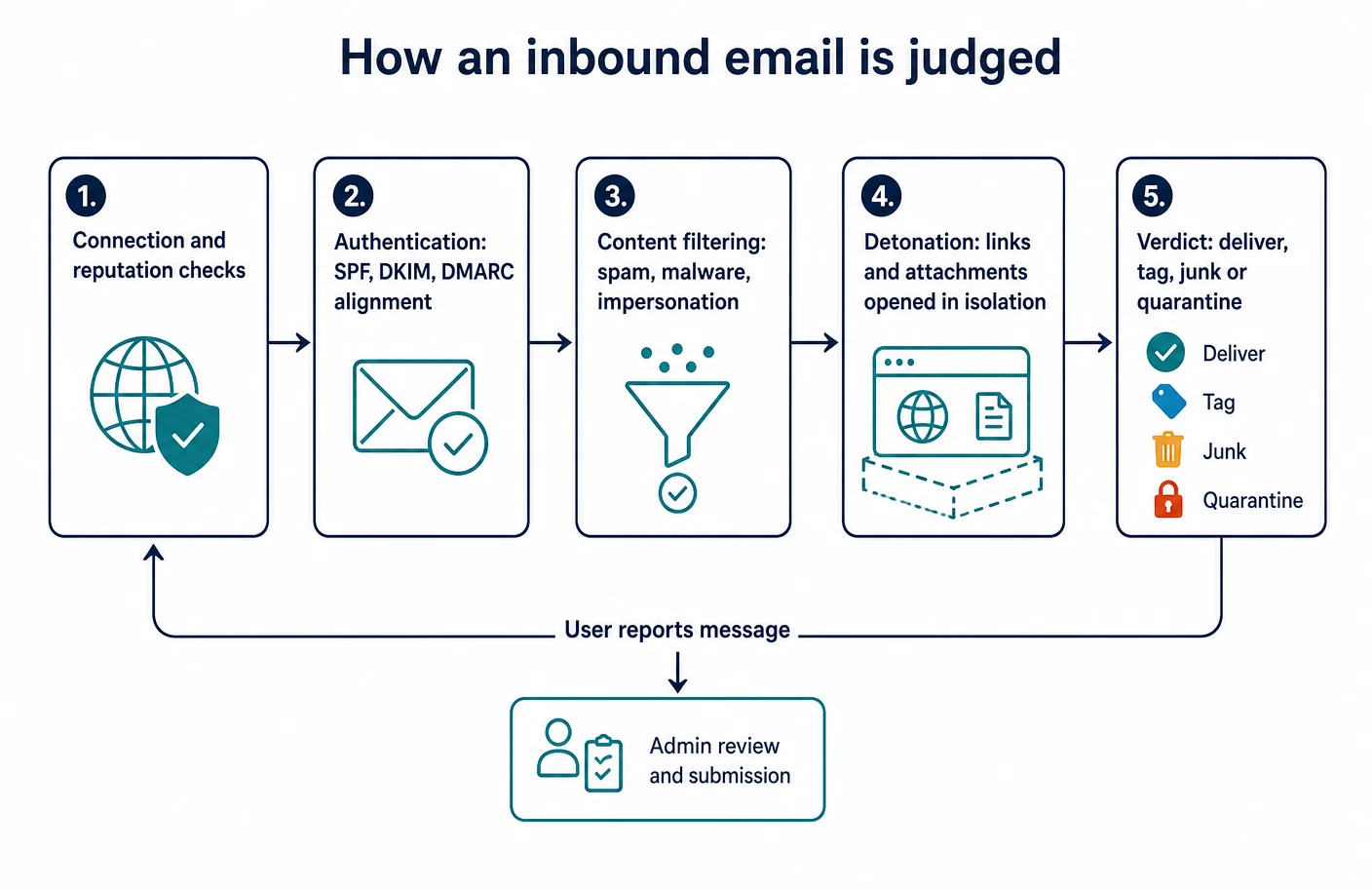
National guidance frames the same problem in layers rather than products. The UK National Cyber Security Centre’s guidance on defending an organisation against phishing argues for multiple mitigations rather than one, on the basis that no single measure catches everything. Joint guidance published by CISA and partner agencies on stopping the phishing attack cycle sets out common techniques and the defences that address them. NIST’s Trustworthy Email publication is written for administrators and covers the protocol-level measures that support the rest.
Atlas editorial assessment. For a company under roughly fifty mailboxes, the practical order of work is authentication, then policy strength inside whatever platform is already paid for, then a decision about whether a separate product is genuinely adding a control that is missing. Buying a third product before the first two are done is how businesses end up paying twice for the same filtering and still failing an insurer’s questionnaire. The reporting habits of staff matter here too, because every vendor’s improvement loop starts with a reported message.
The part that costs nothing: domain authentication
Three published standards govern whether mail claiming to come from your domain can be trusted. Sender Policy Framework, defined in RFC 7208, lets a domain owner publish which servers may send on its behalf. DomainKeys Identified Mail, defined in RFC 6376, attaches a signature that can be checked against a public key in DNS. DMARC, originally published as RFC 7489 and since superseded by later documents on the standards track, ties those results to the address a reader actually sees and tells receiving systems what to do when the check fails.
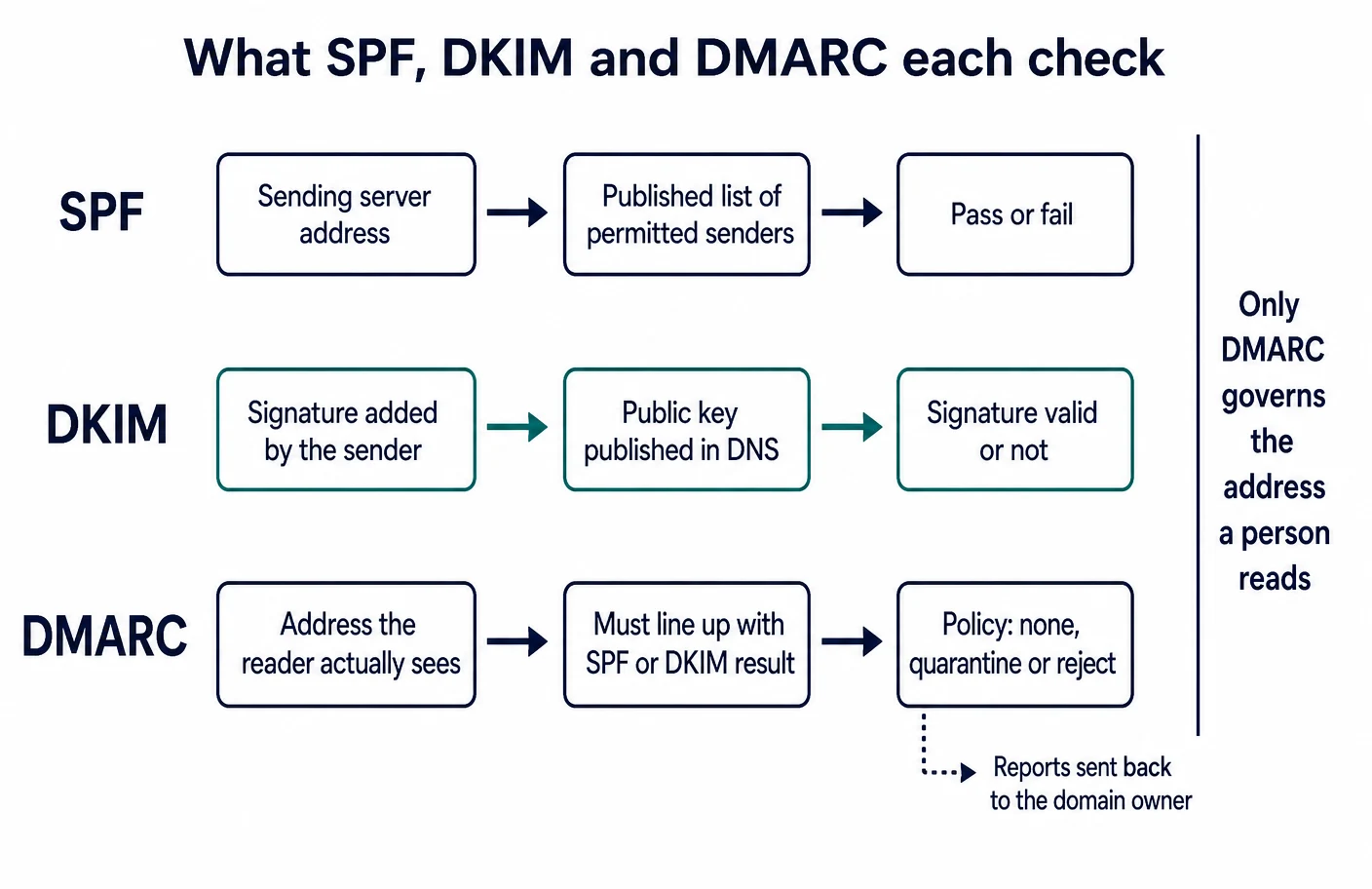
Both major platforms document the setup end to end. Microsoft publishes an overview of email authentication and a dedicated guide to configuring DMARC for a Microsoft 365 domain. Google documents SPF setup, DKIM setup and DMARC setup separately, and adds a recommended rollout sequence that has DKIM and SPF in place before a DMARC policy is tightened. Google’s email sender guidelines describe the authentication expectations for mail sent to personal Gmail accounts, which matters for any small business that sends invoices, newsletters or booking confirmations to consumers.
The NCSC’s email security and anti-spoofing collection explains the same controls from the defender’s side: the point is to make it difficult for someone to send convincing mail that appears to come from your domain. That protects your customers and suppliers, not your own inbox — a distinction that is regularly missed when a business assumes DMARC will stop the mail arriving at reception.
Atlas editorial assessment. Authentication is the only part of this subject where a small business can materially improve its position in an afternoon with no new licence. Two failure modes are common. The first is publishing a monitoring-only policy and leaving it there for years, which produces reports nobody reads. The second is tightening a policy before every legitimate sending service — accounting software, booking tools, marketing platforms, the print shop that sends statements — has been enumerated and authorised, which quietly breaks business mail. Enumerate senders first, then tighten.
Three places email protection can sit
The four options in this guide are not four versions of the same architecture. They differ in where filtering happens relative to the mailbox, and that difference drives the implementation work, the failure modes and the renewal conversation.
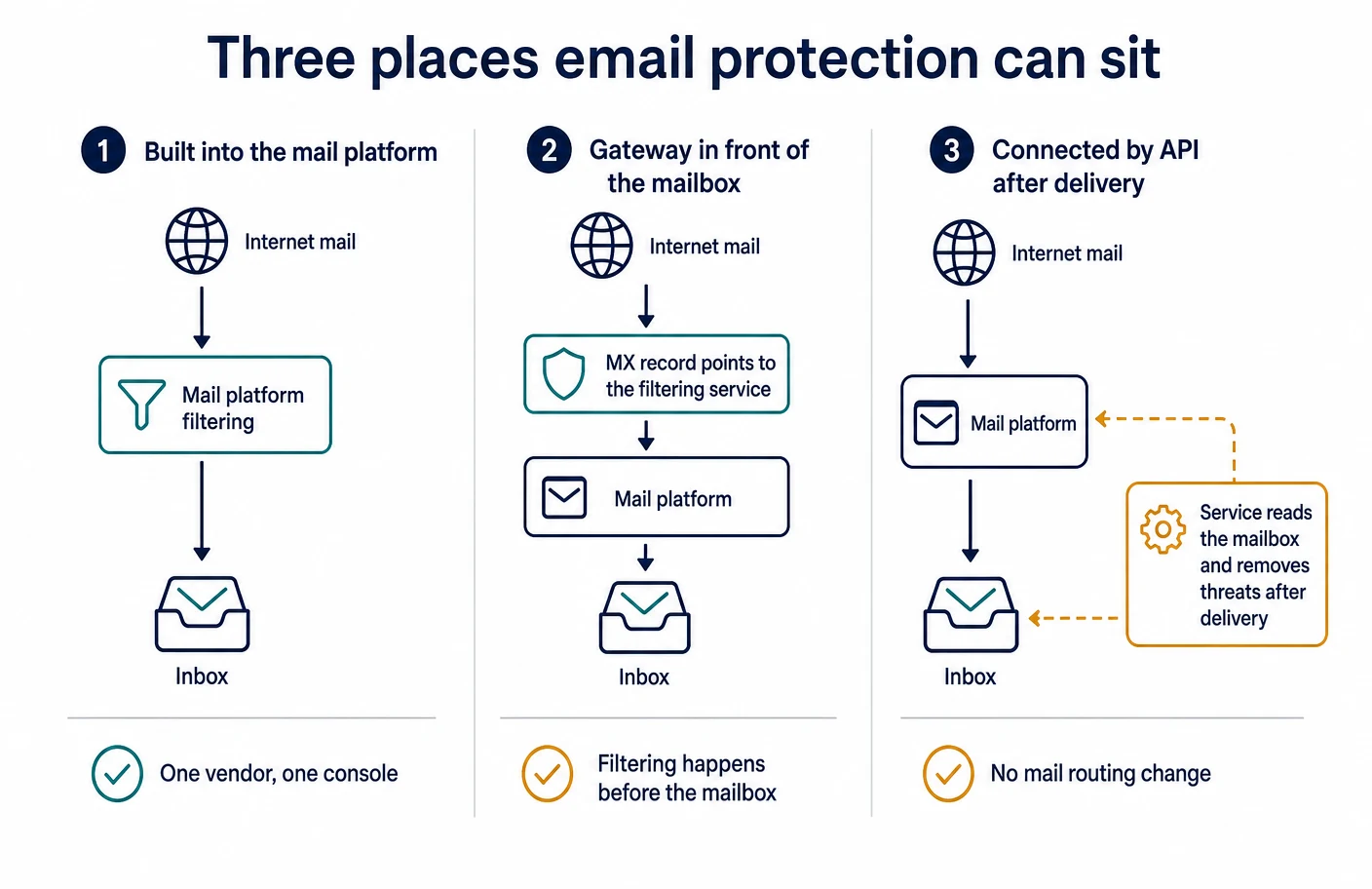
- Built into the platform. Microsoft’s documentation describes Exchange Online Protection as the filtering that applies to cloud mailboxes, with Defender for Office 365 layering additional controls on top, as set out in the Defender for Office 365 overview. Google documents its protections as Gmail administrator settings rather than a separate product, starting from the Gmail settings overview in the admin console.
- In front of the mailbox. Proofpoint Essentials is documented as a service that mail is routed through, with host details in its package material. Barracuda documents pointing MX records at Email Gateway Defense and a matching Microsoft 365 mail flow configuration.
- Connected to the mailbox after delivery. Proofpoint documents an integrated deployment for Microsoft 365 that does not require an MX change. Barracuda’s Email Protection overview describes its offering as gateway defences combined with application-connected inbox defence, and its Impersonation Protection service connects to Microsoft 365 directly.
Atlas editorial assessment. The deployment shape is the single most under-weighted factor in small-business email security purchases. Routing mail through an additional service adds a component that has to be understood by whoever handles a delivery complaint at nine on a Monday morning; connecting a service to the mailbox instead avoids that but means threats are removed after a reader could already have seen them. Neither is wrong. What is wrong is choosing one without knowing which of the two you bought.
Microsoft Defender for Office 365
What Microsoft documents about Defender for Office 365
Microsoft splits its email protection into a baseline and two added plans. The product overview lists the protections that apply to cloud mailboxes without an added plan: anti-malware, anti-spam including bulk mail handling, anti-phishing and spoof protection, outbound spam controls, connection filtering, quarantine, the tenant allow and block list, zero-hour auto purge, and audit and message-trace visibility. Those baseline components have their own documentation, including anti-spam protection, anti-malware protection and the tenant allow and block list.
Plan 1 is documented as adding user and domain impersonation protection, mailbox intelligence, Safe Attachments for mail and for files in SharePoint, OneDrive and Teams, Safe Links in mail, Office clients and Teams, real-time detections, the email entity page, priority account tags and integration with a security event platform. Plan 2 is documented as adding Threat Explorer and advanced hunting, Attack Simulation Training, automated investigation and response, and further operations tooling, as described in the service description.
On licensing, the service description states that Plan 1 is included in Microsoft 365 Business Premium, and that Plan 2 is included in the larger enterprise subscriptions. Standalone per-user prices for Plan 1 and Plan 2 could not be read on a Microsoft page that responded to an ordinary request during this research, so this guide does not quote them; the licensing terms and current rates should be confirmed with Microsoft or a reseller at the point of purchase. Operationally, Microsoft documents preset security policies for applying standard or strict protection without hand-building every rule, and a configuration analyzer that compares current settings against those baselines. Administrators manage held mail through quarantine management, users can be given access to their own held messages through end-user quarantine, and disputed verdicts go back to Microsoft through admin submissions or a user report. Reporting is documented under email security reports, with message trace and audit log search available for individual investigations, and a published deployment guide covering rollout order. Protection for files shared in Teams is documented separately in Defender for Office 365 support for Teams.
Atlas editorial assessment of the Microsoft approach
The strength here is consolidation. A business already paying for Business Premium is entitled to Plan 1 controls it may never have switched on, and the preset policies plus configuration analyzer mean a competent administrator can reach a defensible configuration without designing policy from scratch. The weakness is the same consolidation seen from the other side: the deeper investigation tooling, simulated phishing exercises and automated response sit in Plan 2, which is bundled with subscriptions most small businesses do not buy. The practical risk is a company assuming it has the full product because it has the brand.
Two further judgements. First, quarantine access for end users is worth enabling early, because the alternative is administrators becoming a message-release helpdesk. Second, the value of this approach rises sharply if identity is already managed centrally — the same tenant that holds the mail policy also holds sign-on and conditional access and device management, and treating those as one project is more effective than treating email as an isolated purchase.
Google Workspace’s built-in Gmail protections
What Google documents for Business editions
Google does not sell a separate email security product for small businesses; the controls are administrator settings inside Workspace. The Business editions overview confirms Business Starter, Standard and Plus as the small-business tiers. Filtering, compliance and routing settings start from the Gmail settings area of the admin console. The advanced phishing and malware protection page documents settings for attachment types, spoofing and authentication, unauthenticated-sender warnings, and the action taken for each threat category. Enhanced pre-delivery message scanning is documented as accepting a small delivery delay in exchange for deeper phishing analysis.
Isolated attachment analysis is edition-gated. Google’s Security Sandbox documentation lists Business Standard and Business Plus among the supported editions, and the companion page on rules to detect harmful attachments states the same restriction — which means Business Starter does not include it. Held mail is handled through email quarantine setup and quarantine management, with broader content handling documented under the moderation tool.
Visibility is where the Business editions are most clearly bounded. Email Log Search is documented as available to Business Starter, Standard and Plus. The security investigation tool, investigations launched from the alert center and the security dashboard and health page all publish supported-edition lists that do not include the Business editions. The alert center itself is documented separately. On account protection, Google documents 2-Step Verification for businesses, a deployment path that can enforce methods per group and an administrator policy to allow sign-in without a password using a passkey. Google’s own pricing page presents rates that vary by region and current promotion, so this guide does not restate per-user figures for the Business editions; read them for your own region before budgeting.
Atlas editorial assessment of the Google approach
Google’s filtering defaults are strong and the administrator settings are unusually approachable — a non-specialist can raise protection meaningfully in one session, which is not true of every product in this comparison. The honest limitation is investigative depth. Email Log Search answers “what happened to this message”; it does not give the cross-signal investigation surface that the restricted editions provide, and a business that expects to reconstruct an incident across mail, files and accounts on a Business edition will find the tooling thinner than the marketing impression suggests.
The second judgement concerns the sandbox gate. If isolated attachment analysis matters for the way your business receives documents — accounts payable, recruitment, legal, anything where unknown attachments arrive daily — the edition choice is a security decision rather than a storage decision, and Starter should be ruled out on that basis alone.
Proofpoint Essentials
What Proofpoint documents for its Essentials packages
Proofpoint Essentials is packaged in tiers, and unusually for this market the company publishes a list-price document. Its published price list sets out three paid packages with list rates per active user per month: Business at $2.75, Advanced at $3.75 and Professional at $5.33. The same document describes what each package contains: Business covers inbound and outbound filtering, data loss controls, attachment defence reputation, URL defence and thirty days of emergency inbox and instant replay; Advanced adds full attachment sandboxing, email encryption and social media protection; Professional adds email archiving, which also has its own archiving datasheet.
Filtering detail is documented in the packages overview and the Business package datasheet: signature-based anti-virus, spam and content filtering, outbound controls, zero-hour threat detection, URL defence and attachment defence. Held mail is surfaced to users through an automated digest, and Proofpoint’s help site documents how to check when that digest was last sent. On deployment, Essentials is documented as a service mail is routed through, with a newer integrated deployment option for Microsoft 365 tenants that does not require an MX record change.
Two limits are worth stating plainly. Package contents have changed over time — the older overview document shows a four-package structure against the three in the current price list — so any quote should be checked against the package table in force on the day. And security awareness training appears in Proofpoint’s own Essentials material as part of the wider offering rather than as a line item this guide can pin to a specific package, so treat its inclusion as something to confirm in writing.
Atlas editorial assessment of the Proofpoint approach
Published list pricing is a genuine advantage for a small business, because it makes a quote checkable instead of mysterious. The packaging is also honest about where the deeper analysis sits: full attachment sandboxing is in a higher package than the cheapest one, which is at least visible before signing rather than discovered during an incident.
The trade-off is that this is a separate service with its own console, its own quarantine and its own digest that staff must learn to read. For a business with no internal administrator, that is a second place to look when mail goes missing, and it competes for the same limited attention as endpoint protection and cloud access control. Essentials makes most sense where a business either wants continuity if the mail platform is unavailable, needs archiving as a contractual obligation, or is deliberately keeping filtering independent of the mailbox vendor.
Barracuda Email Protection
What Barracuda documents across its Email Protection plans
Barracuda packages email protection into three plans — Advanced, Premium and Premium Plus — described on its plans page and in a published plan comparison table. According to that comparison, all three plans include spam and malware protection, attachment protection with sandboxing, link protection, email continuity, encryption, data loss controls, phishing and impersonation protection, account takeover protection and automatic remediation. Premium and Premium Plus add domain fraud protection using DMARC reporting, DNS filtering, threat hunting and response, automated workflows and integration with security operations platforms. Premium Plus alone adds cloud archiving, cloud-to-cloud backup and data inspection.
Architecturally, Barracuda’s Email Protection overview describes the offering in its own words as gateway defences combined with application-connected inbox defence. The gateway side is documented as a service mail is routed through, with instructions for pointing MX records at it and for the matching Microsoft 365 mail flow configuration. The application-connected side includes Impersonation Protection, documented as a service that connects to Microsoft 365 and analyses behaviour rather than sitting in the mail path, and Incident Response, which Barracuda documents as available with its Email Protection plans other than the legacy Advanced plan. The company’s Email Protection datasheet summarises the same components, and its getting-started page explains how earlier product names now map onto these plans.
Pricing is the notable gap. Barracuda’s own pages present plan names and included capabilities without stating per-user rates, so no figures are quoted here; the numbers circulating on third-party pricing trackers are not first-party documentation and are excluded on that basis. Expect a quote, and expect term length and seat count to shape it.
Atlas editorial assessment of the Barracuda approach
The hybrid shape is the interesting part. Filtering in the mail path plus a connected service that can act on messages already sitting in mailboxes covers the two situations that hurt small businesses most: a bad message arriving, and a bad message that was already delivered to fourteen people before anyone noticed. The plan structure is also legible, with the compliance-flavoured items concentrated in the highest plan rather than scattered.
Against that, the unpublished pricing makes budgeting harder and comparison slower, and the breadth invites over-buying: archiving, backup and data inspection are real capabilities, but a business that has not been asked for retention or evidence is paying for a control with no use it can yet describe. Buy the plan that matches an obligation you can name — often one recorded in a customer contract or an insurance questionnaire — rather than the one that looks most complete.
Documented capability comparison
The table below records what each vendor documents, not how well any of it performs. A blank capability is not a criticism; it means the vendor’s published material available for this research did not state it for the small-business packages described above.
| Consideration | Microsoft Defender for Office 365 | Google Workspace Business editions | Proofpoint Essentials | Barracuda Email Protection |
|---|---|---|---|---|
| Where filtering happens | Inside the mail platform | Inside the mail platform | Mail routed through the service, or connected to Microsoft 365 without an MX change | Gateway in the mail path plus application-connected inbox defence |
| Isolated analysis of attachments | Safe Attachments, documented in Plan 1 | Security Sandbox, documented for Business Standard and Plus, not Starter | Attachment defence reputation in the lowest package; full sandboxing documented in higher packages | Attachment protection with sandboxing documented across all three plans |
| Link checking at the moment of clicking | Safe Links, documented in Plan 1 | Link and external-reply safety settings in Gmail administrator controls | URL defence documented in all paid packages | Link protection documented across all three plans |
| Impersonation and look-alike domain controls | Impersonation protection and mailbox intelligence in Plan 1; priority account tags | Spoofing and unauthenticated-sender settings in advanced phishing and malware protection | Documented within the package filtering description | Phishing and impersonation protection in all plans; connected Impersonation Protection service for Microsoft 365 |
| Removing mail after delivery | Zero-hour auto purge | Not documented as an administrator-triggered removal feature in the pages reviewed | Not documented in the package material reviewed | Incident Response, documented for plans other than the legacy Advanced plan |
| Quarantine visible to the employee | End-user quarantine, with administrator management | Administrator quarantine through the moderation tool | Automated end-user digest | Documented as part of the plans; user-facing message handling described in plan material |
| Investigation depth for an incident | Message trace and audit search at the baseline; Threat Explorer in the added plans | Email Log Search on Business editions; investigation tool and security dashboard not listed for Business editions | Console reporting within the service | Threat hunting and response documented for Premium and Premium Plus |
| Simulated phishing exercises | Attack Simulation Training, documented as requiring Plan 2 | Not documented as a Workspace administrator feature in the pages reviewed | Awareness training appears in Essentials material without a package it can be pinned to here | Not documented in the plan comparison reviewed |
| Domain authentication guidance from the vendor | Published SPF, DKIM and DMARC configuration guides | Published SPF, DKIM, DMARC guides plus a rollout sequence | Setup covered in service documentation | Domain fraud protection using DMARC reporting in Premium and Premium Plus |
| Archiving or retention | Handled through separate Microsoft compliance tooling rather than these plans | Handled through Workspace retention features rather than these security settings | Archiving documented in the highest package | Cloud archiving and cloud-to-cloud backup documented in Premium Plus |
| Published per-user price | Plan 1 documented as included in Microsoft 365 Business Premium; standalone rates not confirmed here | Rates shown on the pricing page vary by region and promotion | List prices published per active user per month for three packages | Not published on the vendor’s own pages |
What you are actually paying for
Email security invoices are rarely a single number multiplied by headcount. Four things move the total: how many mailboxes count as billable, which plan contains the specific control you need, what is sold separately, and what length of commitment the term imposes.
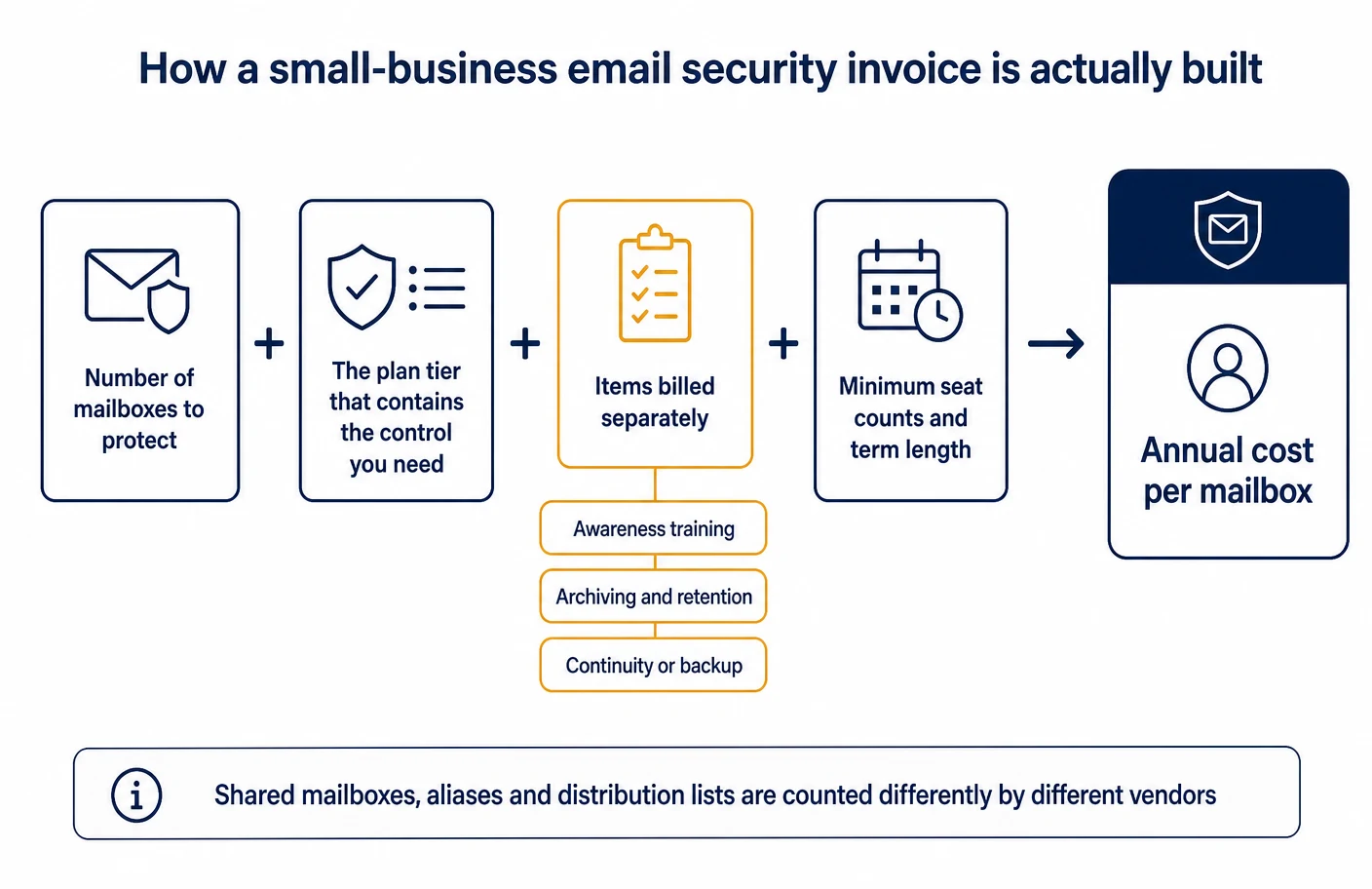
| Approach | How it is packaged | What is published about price | Common extra line items |
|---|---|---|---|
| Microsoft Defender for Office 365 | Baseline protection for cloud mailboxes, with Plan 1 and Plan 2 adding controls | The service description documents Plan 1 as included in Microsoft 365 Business Premium and Plan 2 in larger enterprise subscriptions; standalone rates were not confirmed for this article | Simulated phishing and automated response sit in Plan 2; archiving and retention come from separate compliance tooling |
| Google Workspace Business editions | Security controls are administrator settings inside the edition you already buy | The pricing page shows rates that vary by region and current promotion, so no fixed figure is quoted here | Security Sandbox requires Standard or Plus; deeper investigation tooling is documented only for editions outside the Business range |
| Proofpoint Essentials | Three paid packages, each a superset of the one below it | List prices published per active user per month: $2.75, $3.75 and $5.33 | Full attachment sandboxing and encryption sit above the cheapest package; archiving sits in the highest |
| Barracuda Email Protection | Three plans, with compliance and data capabilities concentrated in the highest | Plan contents are published; per-user rates are not published on the vendor’s own pages | Archiving, cloud-to-cloud backup and data inspection are Premium Plus items |
Atlas editorial assessment. Two costs are routinely left out of the comparison. The first is administration: any product that adds a console adds recurring minutes for released messages, allow-list requests and delivery complaints, and those minutes are real even when they are unbilled. The second is the cost of the control you did not buy. A business that skips a plan containing isolated attachment analysis has not saved money; it has moved the risk onto whoever opens unfamiliar documents for a living. Price the plan against a named obligation or a named threat, and the choice becomes defensible in a way a feature count never is.
Quarantine, reporting and the human loop
Every product in this comparison holds suspicious mail somewhere, and every one of them depends on people to correct its mistakes. This is the part of an email security rollout that determines whether the product is trusted a month later.
Microsoft documents both halves of the loop: administrators work through quarantine management, employees can be given access to their own held messages, and disagreements are sent to Microsoft as an admin submission or a user report. Google documents quarantine setup and management of held messages as administrator functions, with the moderation tool covering content rules. Proofpoint documents an automated end-user digest of held mail. Barracuda’s plan comparison lists message handling within each plan.
Reporting depth then decides what you can prove afterwards. Microsoft publishes email security reports plus message trace and audit log search, and its security operations guide describes how those surfaces are used together. Google’s Email Log Search is available to Business editions, while the security investigation tool and security dashboard document supported editions outside that range. Barracuda documents threat hunting and response in its higher plans, and Incident Response for removing delivered mail.
Atlas editorial assessment. Three habits separate businesses that get value from this spend from those that quietly stop looking. Give employees a one-click way to report a suspicious message and never punish a false alarm; review held mail on a fixed rhythm so that legitimate messages are not sitting unseen; and submit disputed verdicts back to the vendor rather than adding a permanent allow entry, because allow entries accumulate into the largest hole in the configuration. The UK ICO’s data security advice for small organisations and its broader security guidance both frame these as organisational measures rather than product features, which is exactly right.
Implementation without breaking business mail
The failure that damages a small business is not a missed spam message; it is a customer order that never arrived or a policy change that stopped invoices going out. A sequence that avoids both looks like this.
- Inventory every sending service first. Accounting and invoicing tools, booking systems, marketing platforms, form notifications, the practice-management or point-of-sale system, anything that mails on your behalf. This list is what makes an authentication policy safe to tighten, following the sequence in Google’s DMARC rollout guidance or Microsoft’s DMARC configuration guide.
- Publish and check authentication before buying anything. SPF, DKIM and a monitoring policy, then read the reports before enforcing. The NCSC’s anti-spoofing collection explains what you are protecting and for whom.
- Switch on the protection the current platform already includes. With Microsoft, that means applying preset security policies and running the configuration analyzer. With Google, it means the advanced phishing and malware settings and, on a supporting edition, enhanced pre-delivery scanning.
- Only then decide whether a separate product adds a missing control. Write the missing control down as a sentence. If the sentence is “we need mail to keep flowing when the platform is unavailable” or “we must retain mail for a contractual period”, a separate product is justified; if it is “we want better filtering”, strengthen the policy first.
- Change mail routing carefully, or avoid changing it. If a gateway is chosen, follow the vendor’s own steps for MX changes and platform mail flow; if routing change is unacceptable, the integrated deployment option and application-connected services exist precisely for that case.
- Fix the account layer at the same time. Filtering does not help once credentials are stolen. Google documents 2-Step Verification deployment and passkey sign-in; NIST’s digital identity guidelines set out the authentication requirements this work is measured against. Pair it with a business password manager so shared credentials stop living in inboxes.
- Tell staff what changed, in one short message. What quarantine looks like, how to report a suspicious message, and who to contact when something legitimate is held. This is the cheapest step and the one most often skipped.
Atlas editorial assessment. Sequencing matters more than product choice for a company of this size. A business that authenticates its domain, raises its platform policy, enables end-user quarantine and trains people to report will be in a stronger position than one that buys a well-regarded gateway and leaves the defaults alone. Email is also only one entry route, which is why this work belongs alongside endpoint protection and a broader access model rather than in place of them.
Limits of this comparison
- No testing was performed. Atlas did not send test phishing messages, submit malware samples or measure catch rates. Nothing here should be read as a detection-quality comparison, and any claim about one product catching more than another would be invented.
- Documentation is a snapshot. Packages, edition gates and plan names change. Proofpoint’s own material already shows an older four-package structure alongside a current three-package price list, and Barracuda documents how legacy product names map onto today’s plans. Verify against the vendor’s current page before signing.
- Prices are quoted only where a vendor publishes them. Standalone Microsoft plan rates could not be confirmed on a page that responded to ordinary requests during this research; Google’s published rates vary by region and promotion; Barracuda does not publish per-user rates. Third-party pricing trackers were excluded deliberately.
- Some pages are rendered by script. Several Google administrator help pages load their content dynamically, so edition lists were cross-checked against Google’s mirrored knowledge site rather than read from a single static response.
- Scope is inbound and outbound business email. Archiving, retention, backup, awareness training and identity are touched only where they sit inside these packages. Each deserves its own assessment.
- A blank in the table is not a verdict. It records that the reviewed documentation did not state the capability for the packages described, not that the capability is absent.
Questions small businesses actually ask
Do we need extra email security if we already pay for Microsoft 365 or Google Workspace?
Not automatically. Both platforms document substantial protection in the subscription you already hold: Microsoft’s baseline is described in its Exchange Online Protection documentation, with Plan 1 controls documented as included in Microsoft 365 Business Premium, and Google’s filtering and advanced phishing and malware settings are administrator options rather than add-ons. The honest test is whether you can name a control you need that the platform does not provide — continuity if the platform is down, archiving for a contractual retention period, isolated attachment analysis on an edition that lacks it, or removal of mail already delivered. If you can name one, a separate product is justified. If you cannot, the money is better spent switching on what you own.
Will DMARC stop phishing from reaching our staff?
No, and this is the most common misunderstanding in the subject. DMARC, described in RFC 7489 and superseded by later standards-track documents, governs what receiving systems do with mail that claims to be from your domain. It protects your customers and suppliers from convincing forgeries of you. Inbound phishing typically arrives from domains the attacker controls or from a genuinely compromised mailbox at a real supplier, and those messages can pass authentication perfectly. Publish and enforce a policy because it protects your name and improves deliverability, as the NCSC’s anti-spoofing guidance sets out — but keep inbound filtering as a separate control.
Does a gateway in front of the mailbox protect against a compromised supplier account?
Partly, and less than people expect. A message from a genuinely compromised supplier mailbox is authenticated, comes from a domain with good history, and often continues a real conversation. That is why vendors document behavioural and impersonation controls separately from filtering — Microsoft through impersonation protection and mailbox intelligence in its anti-phishing policies, Barracuda through a connected Impersonation Protection service. The organisational control matters as much as the technical one: verify changes to payment details through a channel that was not the email thread.
What happens to legitimate mail that gets held by mistake?
It sits in a quarantine until somebody looks. Microsoft documents administrator quarantine management and optional end-user access; Google documents quarantine management for administrators; Proofpoint documents an automated user digest of held messages. Decide before rollout who reviews held mail and how often, and give employees a way to see their own. The alternative — a business that discovers a fortnight of held customer enquiries — does more commercial damage than the spam ever would.
Is the cheapest tier of any of these products enough?
It depends entirely on one question: does the cheapest tier contain the control you actually need? Google documents Security Sandbox for Business Standard and Plus but not Starter. Proofpoint’s price list places full attachment sandboxing above its cheapest package. Microsoft documents Attack Simulation Training as requiring Plan 2. If your business receives unfamiliar attachments daily, the cheapest option is the wrong economy; if it barely receives attachments from strangers, it may be entirely reasonable.
Can we remove a bad message that has already been delivered?
With some of these approaches, yes. Microsoft documents zero-hour auto purge for moving mail whose verdict changes after delivery, and Barracuda documents Incident Response for locating and removing delivered messages across mailboxes, stating it is available with its plans other than the legacy Advanced plan. This capability matters more than it sounds: the realistic scenario is not a message being blocked, but a message being read by several people before anyone reports it.
Do we have to change our MX records?
Only if you choose a gateway deployment. Barracuda documents pointing MX records at Email Gateway Defense for its gateway product, while Proofpoint documents an integrated deployment for Microsoft 365 that requires no MX change, and application-connected services such as Barracuda’s Impersonation Protection sit outside the mail path entirely. If nobody in the business is comfortable editing DNS or diagnosing mail flow, prefer an option that leaves routing alone.
Does any of this replace training staff?
No. Every vendor’s improvement loop begins with a human reporting something, and both Microsoft and Google document user reporting as a first-class function — Microsoft through user reported messages, Google through its alert center workflow for administrators. National guidance is explicit that no single mitigation suffices, which is the argument the NCSC makes in its phishing guidance and CISA and partners make in their joint phishing guidance. Simulated exercises are documented by Microsoft as a Plan 2 capability; a separate awareness training programme is the usual route for smaller businesses.
How does email security relate to what our insurer or customers ask for?
Questionnaires tend to ask about controls and evidence rather than brands: whether multi-factor authentication is enforced, whether mail is filtered, whether an anti-spoofing policy is published, whether messages can be retained and retrieved. That maps onto the surfaces in this article — authentication guides from both platforms, published reporting features, archiving in the higher packages of the third-party products. Keep the answers documented as you go; assembling them retrospectively is the expensive way. Our cyber insurance requirements checklist covers the wider set of questions these forms ask.
What should a business with no technical staff do first?
Three things, in order. Enforce strong sign-in on every mailbox, using the platform’s own documentation such as Google’s 2-Step Verification guidance. Publish authentication records for the domain and read the reports before enforcing a strict policy. Then apply the platform’s recommended protection baseline — Microsoft’s preset security policies exist for exactly this situation. Those three steps require no new vendor, and they resolve most of what a small business is actually exposed to in practice.
How to decide
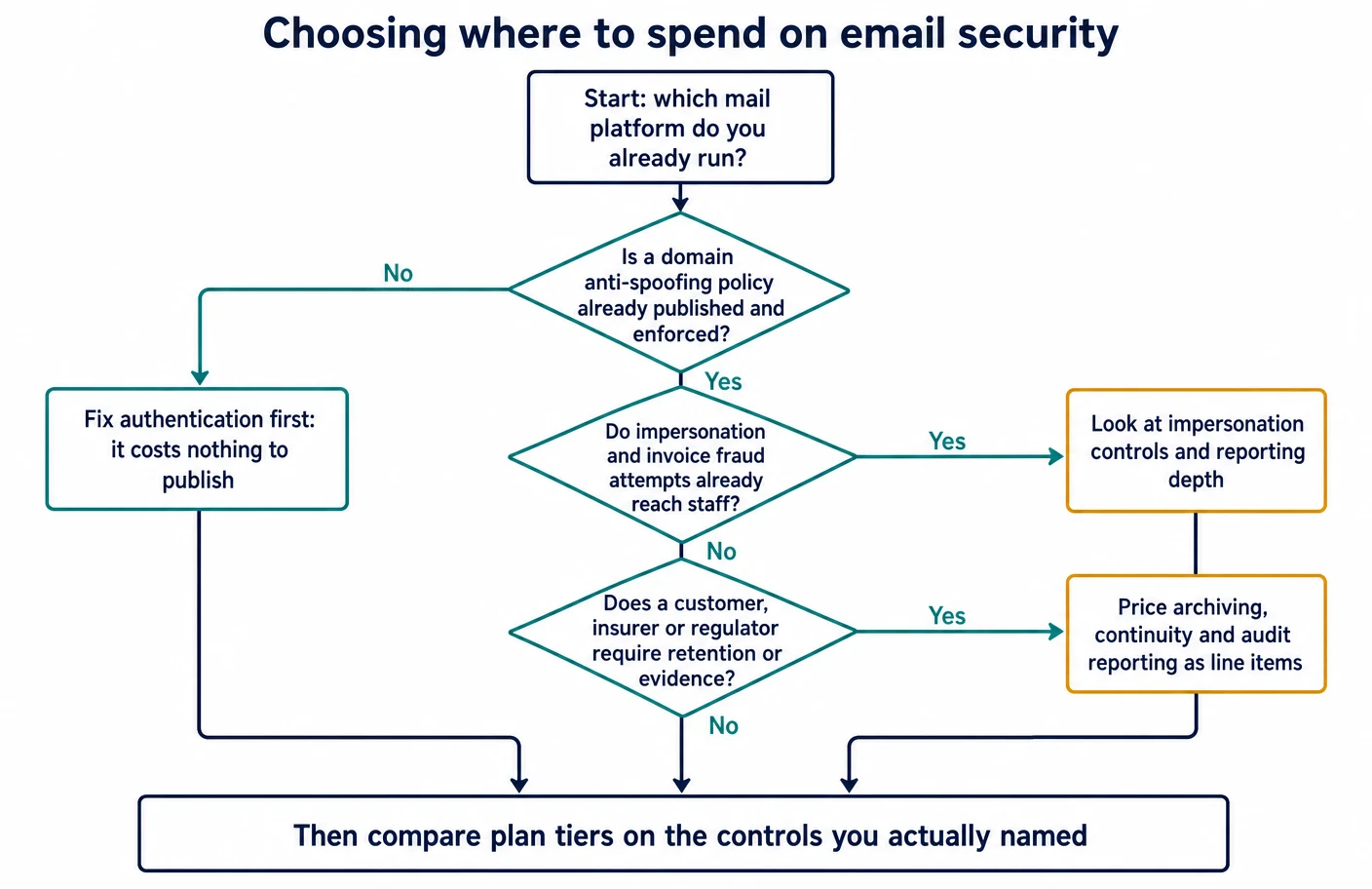
Start from the platform you already run, because it decides which options are even available and which controls come with the subscription already held. Then work through four questions in order.
- Is domain authentication published and enforced? If not, do that first. It costs nothing but attention, and both platforms document the steps.
- Is the platform’s own protection actually switched on at a defensible level? Microsoft’s configuration analyzer will tell you against its own baselines; Google’s advanced phishing settings have to be reviewed item by item.
- Can you name the control you are missing? Continuity, archiving, isolated attachment analysis on an edition that lacks it, removal of delivered mail, or deeper investigation. A named gap justifies a purchase; a vague sense of exposure does not.
- Who will operate it on a Monday morning? If the answer is nobody, prefer the option that adds no second console, and put the money into training and stronger sign-in instead.
Atlas editorial assessment. On the documentation reviewed here, a business standardised on Microsoft 365 with Business Premium already holds a substantial set of Plan 1 controls and should exhaust them before buying anything; a business on Google Workspace should treat the Security Sandbox edition gate as a security decision and accept that deep investigation tooling is documented outside the Business range; a business that needs published pricing, continuity or archiving as contractual items has a clear reason to look at Proofpoint Essentials; and a business that specifically wants both mail-path filtering and the ability to clean up delivered messages has a clear reason to look at Barracuda’s plans. None of those is a ranking. They are four different shapes of requirement, and the right answer is the one that matches a requirement you can write down.
Sources
- Microsoft — Microsoft Defender for Office 365 overview, service description, Exchange Online Protection, anti-spam protection, anti-malware protection, anti-phishing policies.
- Microsoft — Safe Links, Safe Attachments, zero-hour auto purge, tenant allow and block list, user tags, protection for Teams.
- Microsoft — preset security policies, configuration analyzer, deployment guide, security operations guide.
- Microsoft — quarantine management, end-user quarantine, admin submissions, user reported messages, email security reports, message trace, audit log search, Threat Explorer, Attack Simulation Training.
- Microsoft — email authentication overview and DMARC configuration.
- Google — Business editions overview, Workspace pricing, Gmail administrator settings, advanced phishing and malware protection, enhanced pre-delivery message scanning.
- Google — Security Sandbox, rules to detect harmful attachments, email quarantine setup, managing quarantined messages, moderation tool.
- Google — authentication methods, SPF setup, DKIM setup, DMARC setup, recommended DMARC rollout, email sender guidelines.
- Google — alert center, investigations from the alert center, security investigation tool, security dashboard and health page, Email Log Search.
- Google — 2-Step Verification for business, deploying 2-Step Verification, passkey sign-in policy.
- Proofpoint — Essentials list price document, Essentials packages overview, Business package datasheet, email archiving datasheet, integrated deployment with Microsoft 365, end-user digest support article.
- Barracuda — Email Protection plans, full plan comparison table, Email Protection documentation overview, Email Protection datasheet, getting started with the plans.
- Barracuda — configuring MX records for Email Gateway Defense, Microsoft 365 mail flow configuration, Impersonation Protection, Incident Response, Cloud-to-Cloud Backup.
- Public guidance — NCSC email security and anti-spoofing and phishing guidance; CISA and partners, phishing guidance; NIST SP 800-177 Rev. 1, Trustworthy Email and SP 800-63B-4 digital identity guidelines; ICO security guidance and data security advice for small organisations.
- Standards — RFC 7208 (SPF), RFC 6376 (DKIM), RFC 7489 (DMARC).