Zero Trust is a security architecture and an operating model. It is not a product, a licence tier or a box that can be ticked at purchase. NIST Special Publication 800-207 defines it as a set of principles for designing access decisions, and the CISA Zero Trust Maturity Model describes it as a progression across identity, devices, networks, applications and data. Buying multi-factor authentication, single sign-on, mobile device management, endpoint detection or a Zero Trust network access product does not, on its own, mean an organisation has implemented Zero Trust.
That distinction matters most for small businesses, because the vendor market talks about Zero Trust as though it ships in a box. This guide explains what the architecture actually asks for, which parts a small business can usually reach with the platforms it already pays for, which parts genuinely require another tool, and which parts are honest work that no purchase removes. All standards references and product documentation were checked in September 2026. Atlas assessment: the most common Zero Trust failure we see described in small-business terms is not a missing product but a missing owner.
Nothing in this guide promises a completion date, a risk reduction figure or a service level for patching. Those numbers are the easiest thing to publish and the hardest thing to support, so the implementation sequence below advances on evidence rather than on a calendar.
What Zero Trust actually means
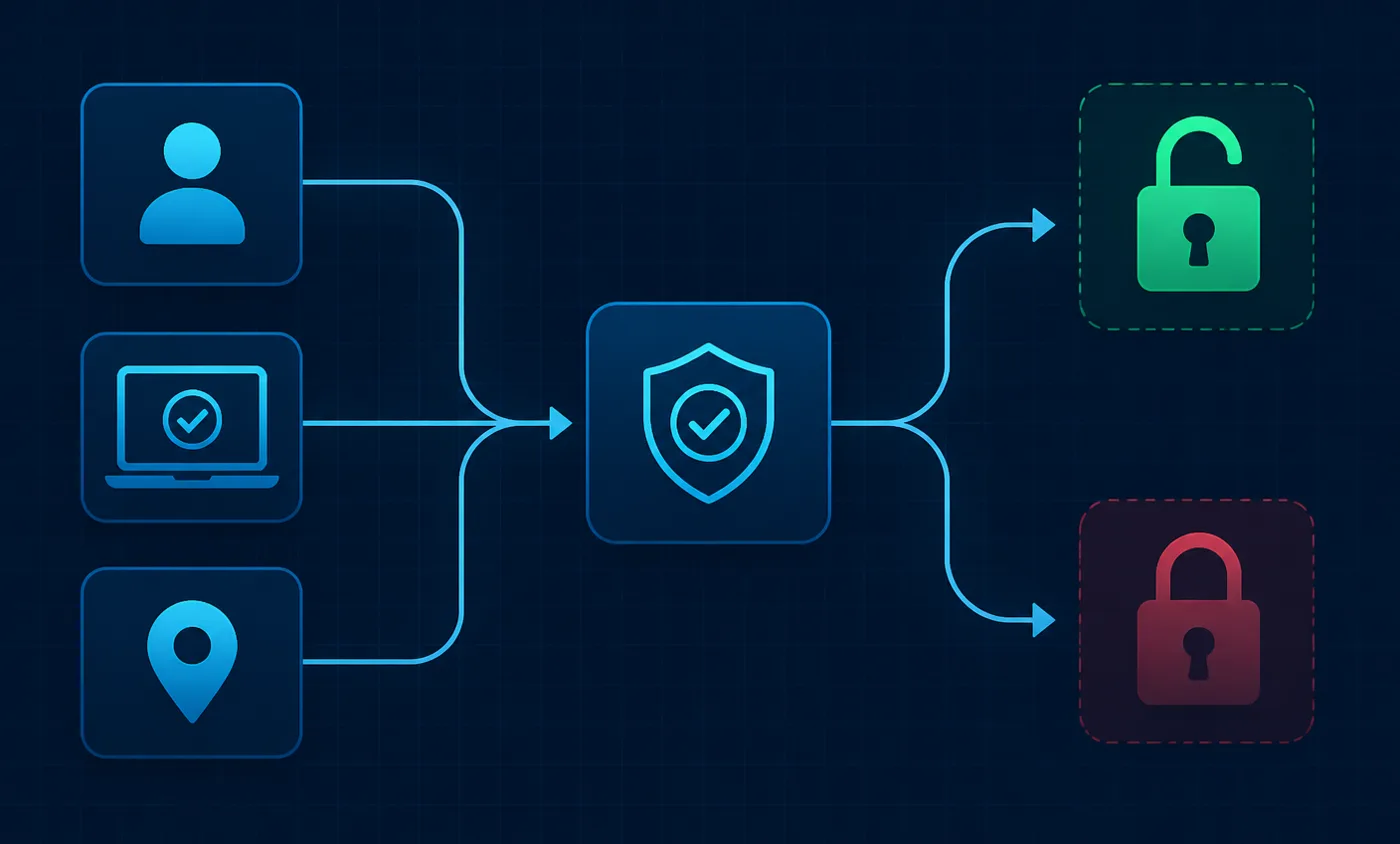
The core premise of NIST SP 800-207 is that the location of a request tells you almost nothing about whether it should be allowed. A request from inside the office network is not trusted because it came from inside the office network. Instead, each access request is evaluated against what is known about the account making it, the device it comes from, the resource being requested and the context of the request, and the resulting authorisation applies to that session rather than to the network as a whole.
The publication frames this as tenets rather than as a product architecture. All data sources and computing services are treated as resources. All communication is secured regardless of network location. Access to individual resources is granted on a per-session basis. Access is determined by a dynamic policy that considers the identity of the client, the state of the requesting asset and other behavioural attributes. The organisation monitors and measures the integrity and security posture of the assets it owns and associated assets. Authentication and authorisation are dynamic and strictly enforced before access is allowed. The organisation collects information about the current state of assets and network infrastructure and uses it to improve its security posture.
Read those tenets carefully and you notice that most of them describe behaviour rather than technology. Collecting information and using it to improve policy is an operating habit. Granting access per session is a design choice. Monitoring posture is a staffing question before it is a licensing question. The technology matters, but it is the means by which the behaviour becomes enforceable.
Atlas assessment: a small business that has strong authentication, an authoritative directory, enrolled devices and one person who genuinely reviews access is further along than a business that owns four Zero Trust branded products and reviews nothing. That is an editorial judgement about priorities, not a claim found in the standard.
Policy Decision Point and Policy Enforcement Point, explained plainly

NIST SP 800-207 splits the machinery of an access decision into two logical parts. The Policy Decision Point is the component that decides. It takes in what is known about the subject, the device, the resource and the current context, applies policy, and returns an answer. The Policy Enforcement Point is the component that sits in the request path and either establishes the connection or refuses it, based on the decision it receives. The decision point in the publication is further divided into a policy engine, which makes the determination, and a policy administrator, which establishes or tears down the session.
The practical value of the split is that it tells you what to look for in real products. In a Microsoft 365 tenant, Conditional Access performs the decision function: Microsoft documents the conditions it can evaluate, including user, target resource, network, device platform, client application and risk, and the grant controls it can require, such as multi-factor authentication or a compliant device. The enforcement happens where the session is issued or refused. In Google Workspace, context-aware access performs the equivalent decision role for supported applications. In an identity-aware access broker such as Cloudflare Access, the policy is defined centrally and enforced at the point where the request reaches the protected application.
Two consequences follow, and both are frequently missed. First, a decision point is only as good as the signals it receives, which is why device state and identity quality matter more than the sophistication of the policy language. Second, a decision made once and never revisited is a perimeter with extra steps. Microsoft documents continuous access evaluation precisely because a token issued under acceptable conditions may need to be challenged again when those conditions change.
For a business without a network engineer, the useful reading of the decision and enforcement model is architectural rather than procurement-driven. You are not shopping for a decision point. You are asking which system in your environment already makes access decisions, what it can see when it makes them, and what happens when the answer should change.
Why the perimeter model stopped working
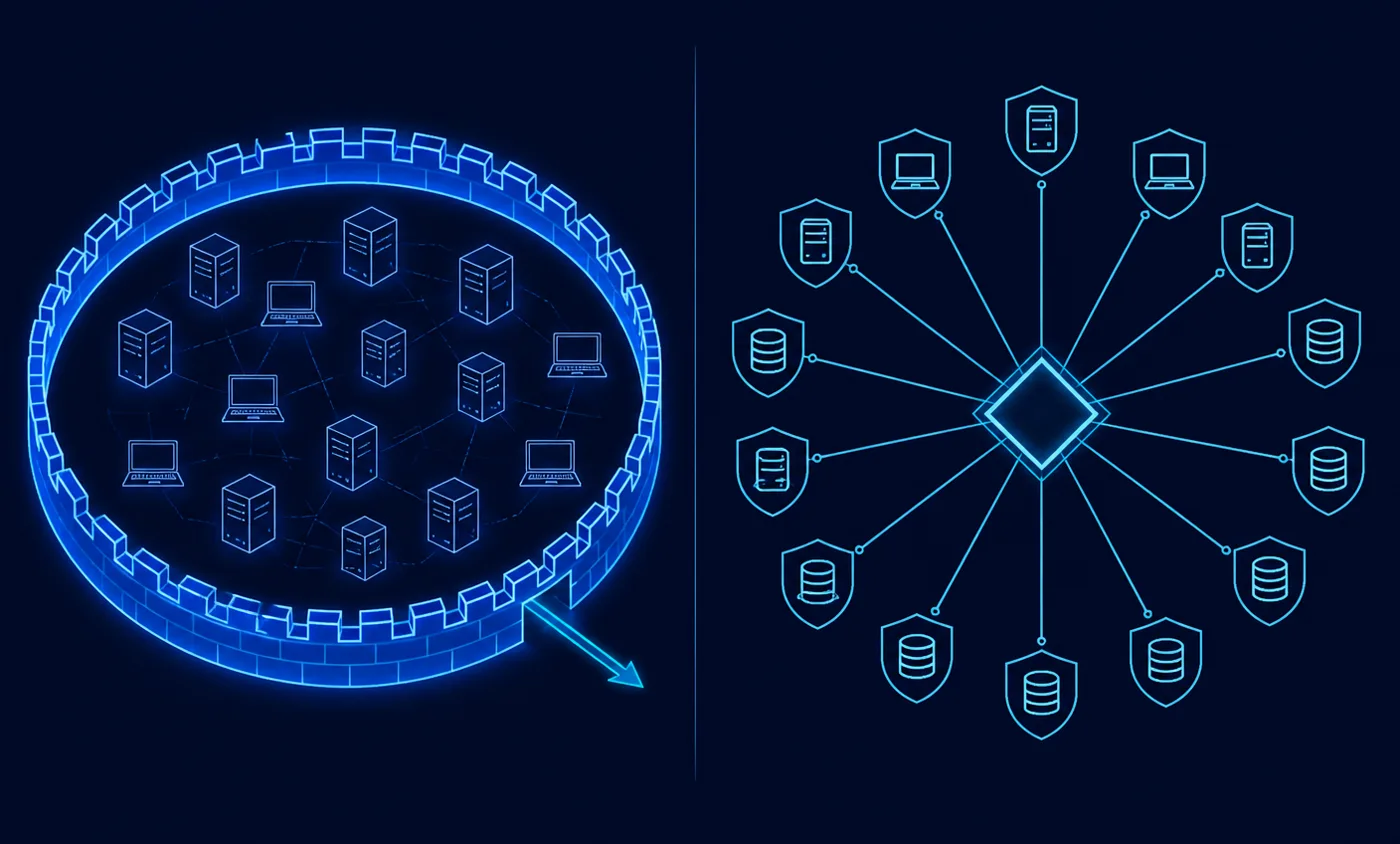
The traditional model built a strong boundary and treated everything inside it as broadly trustworthy. Remote staff were brought inside that boundary through a virtual private network, which admitted the device to the network and, in most small deployments, to a great deal more than the one application the person needed. The model was coherent while applications lived in one building and staff worked in it.
Small businesses now run the opposite arrangement. Email, files, accounting, payroll, customer records and support tooling are hosted by vendors. Staff work from home, from personal devices and from contractor laptops the business does not own. There is no boundary left to defend, and the practical consequence is that a stolen credential or a compromised laptop reaches a great deal from anywhere.
The Zero Trust response is not to abandon network controls but to stop using network position as the deciding factor. The CISA maturity model describes this in its Networks pillar as a move away from broad, flat access toward access defined per resource, with segmentation applied according to need rather than uniformly. That is a different claim from the one vendors usually make, which is that internal networks should be divided into as many enforcement zones as possible.
Atlas assessment: for most small businesses the highest-leverage change is not network segmentation at all. It is removing standing broad access — the shared administrator login, the file share everyone can reach, the remote-access tunnel that grants the whole subnet. Those are identity and access problems wearing network clothing.
The building blocks, and what each one really does
The capabilities below are the ones a small business is realistically choosing between. Each is described in terms of what it does rather than what it is called in a product catalogue, because the same function appears under many names.
Identity verification and multi-factor authentication
Everything else depends on the identity layer being trustworthy. That means one authoritative directory, an account per person, no shared logins, and a second authenticator on every account. Microsoft documents how its multi-factor authentication works and publishes a policy template requiring authentication strength for all users; Google documents 2-Step Verification for Workspace tenants. Both are available inside the platforms most small businesses already run.
Not all second factors are equal, and the difference is documented rather than a matter of opinion. NIST SP 800-63B sets out authenticator types and their properties, and the published guidance explains why some methods resist interception better than others. Where a platform supports hardware or platform authenticators, they are the stronger option for administrative accounts. Where a business is still on codes delivered by message, moving administrators first is a reasonable order of operations.
The uncomfortable part of the identity layer is not enrolment but recovery. Every business needs a documented way to restore access when an authenticator is lost, and that path is exactly where attackers aim. Write it down, decide who is allowed to execute it, and keep at least one break-glass administrator account excluded from conditional policies and stored securely.
Single sign-on
Single sign-on moves application authentication to the identity provider. Its security value is not convenience; it is that accounts, session policy and revocation live in one place, so disabling one directory account can close many doors. Microsoft describes how single sign-on works in Entra ID, and Google documents single sign-on for Workspace.
The obstacle is commercial rather than technical. Many software vendors place federation on a higher plan, so a business can find that consolidating logins costs more per application than the security benefit appears to justify. That is a real trade-off and worth documenting per application rather than assuming. Our comparison of single sign-on options for small businesses works through where the feature usually sits and what the alternatives are when it is out of reach.
Conditional access
Conditional access is the decision function made configurable. Rather than a single yes or no per account, policy evaluates the combination of who is asking, what they are asking for, from what device and in what circumstances, and then requires more assurance or refuses. Microsoft publishes both the signals available as conditions and the controls that can be required; Okta documents how its policies are evaluated and the policy concepts behind them; JumpCloud documents conditional access policies driven by device posture.
Two cautions apply. Conditional access features are licence-gated, and entitlement differs by plan: Microsoft publishes its licensing documentation for exactly this reason, and vendors including Okta, JumpCloud, Cloudflare and Tailscale publish their own plan pages. Check entitlement before designing policy. The second caution is operational: a policy that locks out the only administrator is a self-inflicted outage, which is why break-glass exclusions come before enforcement.
Device enrolment is not device compliance
This is the distinction most often blurred in small-business security conversations. Enrolment means a device is registered with a management service and can receive configuration. Compliance means the device currently meets stated rules. Microsoft documents device registration and device join planning separately from compliance policies, and Apple documents enrolment and management, automated device enrolment and declarative device management as distinct mechanisms.
A registered device that has encryption switched off, a stale operating system and no screen lock is registered and non-compliant at the same time. Access policy should consume the compliance signal, not the enrolment fact. Google documents advanced mobile management for the equivalent Workspace capability, and access brokers including Cloudflare and Tailscale document posture checks that can be required before access is granted.
Keep the initial compliance baseline small enough to enforce. Disk encryption, a screen lock, a supported operating-system version and the presence of the endpoint security agent cover the failures that matter most and produce few arguments. Long baselines written before anyone has handled a non-compliant laptop tend to be quietly disabled. Our guide to mobile device management for small businesses covers the enrolment mechanics in more depth.
Endpoint protection
If the network is not trusted, the device carries more of the assurance burden. Endpoint detection and response tooling exists to spot malicious behaviour on the device and to leave enough telemetry behind that an incident can be reconstructed. Microsoft documents Defender for Endpoint, and CrowdStrike documents its endpoint platform.
The purchase is the easy part. Detection produces alerts, and alerts require a human decision, which is why endpoint tooling so often becomes an expensive log generator in businesses with no assigned reviewer. Decide who looks, when, and what happens out of hours before you deploy. Our comparison of endpoint security for small and remote teams sets out the options, including managed alternatives for businesses that cannot staff triage.
Network and resource access
The Zero Trust replacement for a broad remote-access tunnel is a broker that authenticates the user, checks device posture and connects that session to one application. Cloudflare Access policies, Tailscale access control lists, Microsoft Entra Global Secure Access and Chrome Enterprise Premium all document this per-application model in their own words.
Web-based internal applications convert cleanly. Anything speaking an older protocol, or any device that cannot run an agent, converts less cleanly and sometimes not at all. Tailscale additionally documents tailnet lock for controlling which devices may join, which is the kind of control that matters when contractors come and go.
Segmentation compared with microsegmentation
Segmentation means separating networks so that a compromise in one area does not reach everything else: a separate guest wireless network, a separate network for cameras, printers and other appliances, and administrative interfaces that are not reachable from the general staff network. Microsegmentation means enforcing policy between individual workloads, and it requires an accurate map of internal traffic plus somebody to maintain the policy as applications change.
Atlas assessment: microsegmentation is not automatically practical for a small business, and presenting it as a standard step is one of the reasons Zero Trust reads as unattainable. Both NIST SP 800-207 and the CISA model treat granular network enforcement as an advanced capability rather than a starting point. Coarse segmentation of appliances and guests, combined with identity-aware access to internal applications, delivers much of the containment benefit without a policy set nobody can maintain.
Continuous evaluation
Per-session authorisation implies that conditions are re-checked rather than assumed to hold forever. Microsoft documents continuous access evaluation as the mechanism for challenging a session when relevant conditions change. Where a platform does not offer that, session lifetime settings and prompt account disablement carry the same intent in a blunter form.
The organisational equivalent is scheduled reassessment: access reviews, administrative-rights checks and offboarding verification. Microsoft documents access reviews where the licence includes them, and Google documents administrator roles for the equivalent scoping decisions. Where automation is not licensed, the manual version is entirely legitimate at small headcount, provided it is dated and someone signs it.
Logging and monitoring
Logs are what make an access decision reviewable and an incident explicable. Retention is the trap: platforms keep events for a documented period that depends on the plan, and Google publishes retention and lag times per log type for exactly this reason. Microsoft documents sign-in logs and Google documents user log events. Check the window you actually have before assuming an investigation can look back as far as you would like.
Ownership matters more than tooling. A log that nobody reads is a record for a future investigator rather than a control. Assign a named reviewer for authentication anomalies and endpoint alerts, or contract that responsibility out and confirm in writing what the provider covers.
Privileged access
Administrative accounts deserve separate treatment because they are the shortest path to everything else. The baseline available to every business is separation: administrators hold a normal account for daily work and a distinct account for administrative tasks, with the strongest available authenticator on the latter. Microsoft documents time-bound privileged elevation where the licence includes it, and documents account deletion and recovery behaviour that matters when staff leave.
Least privilege in SP 800-207 is not a slogan about tightening permissions until people complain. It is the position that access should match the current task rather than the broadest job description someone once had. In practice, that means checking who holds administrative rights, removing rights that were granted for a project that ended, and making elevation deliberate.
Data protection
Access to a system is not the same as access to everything inside it. The CISA model treats data as its own pillar, and NIST treats data sources as protected resources. For a small business the useful starting question is narrow: where does regulated, contractual or otherwise sensitive information actually live, and who can currently reach it. Microsoft documents data loss prevention in Purview, and the CIS Controls include data protection safeguards written for organisations without a dedicated security team.
Classification is the hard part, and it is human work. Rules applied to data nobody has categorised produce false positives, and false positives that nobody adjudicates get switched off. Start with the smallest set of genuinely sensitive locations and keep sharing controls simple enough to survive a busy month.
The Zero Trust capability matrix
The matrix below sets out each capability, what it does, how it relates to the two governing documents, where a small business usually gets it, what has to exist first, an Atlas feasibility assessment, the ongoing administrative burden, and the documentation supporting the capability description. Feasibility and burden columns are editorial judgements and are labelled as such; capability descriptions come from vendor documentation. Where a vendor does not publish a figure for a configuration, the honest entry is Not publicly documented or Contact sales, and pricing that depends on a quote is marked that way rather than estimated.
| Capability | What it actually does | NIST SP 800-207 / CISA ZTMM relationship | Typical SMB source | Prerequisite | SMB feasibility | Ongoing administrative burden | Evidence/source |
|---|---|---|---|---|---|---|---|
| Identity and multi-factor authentication | Establishes that a request comes from a known account and requires a second authenticator before a session is issued | SP 800-207 treats the subject as an explicit input to every access decision; ZTMM places authentication under the Identity pillar | Included with Microsoft 365 and Google Workspace tenants | A single authoritative user directory | High — configurable inside the identity console already in use | Low once enrolment is complete; recovery and lost-authenticator handling remain manual | Microsoft Entra MFA · Google 2-Step Verification |
| Single sign-on | Moves application authentication to the identity provider so accounts, sessions and revocation are managed in one place | Supports the SP 800-207 principle of per-session authorisation and the ZTMM Identity pillar move away from siloed local accounts | Microsoft Entra ID, Google Workspace, Okta or JumpCloud | Applications that support a federation protocol; some plans gate this feature | High for major applications, lower for small vendors that charge separately for federation | Moderate — each application onboarding is its own project | Entra SSO · Google SSO · Okta policies |
| Conditional access | Evaluates signals such as user, application, device state, location and risk, then grants, blocks or requires additional controls | This is the policy decision function described in SP 800-207 and the automation the ZTMM associates with higher maturity | Microsoft Entra Conditional Access, Google context-aware access, Okta, JumpCloud | Licence entitlement plus reliable device and user data | Moderate — the feature is licence-gated, so check entitlement before designing policy | Moderate — policies need exclusions, break-glass accounts and testing | Entra Conditional Access · Google context-aware access |
| Device enrolment | Registers a device with a management service so it can receive configuration and be identified in later access decisions | Creates the device identity that SP 800-207 expects as an input; ZTMM Devices pillar begins with a complete inventory | Microsoft Intune, Apple Business Manager with an MDM, Google endpoint management | Company-owned hardware or an accepted personal-device agreement | High for new company hardware, harder for existing personal machines | Moderate — enrolment, replacement and retirement are recurring tasks | Microsoft Intune · Apple Automated Device Enrollment |
| Device compliance signals | Reports whether an enrolled device currently meets defined rules, for example disk encryption, screen lock, operating-system version and security agent presence | Supplies the continuous device input SP 800-207 requires; enrolment alone does not satisfy it | Intune compliance policies, Google mobile management, Cloudflare or Tailscale posture checks | Enrolment first, then a policy definition | Moderate — the signals are only as good as the rules you write | Moderate — non-compliant devices generate real support work | Intune compliance · Cloudflare posture · Tailscale posture |
| Endpoint detection and protection | Detects and responds to malicious behaviour on the device itself, and provides the telemetry that makes an incident reconstructable | SP 800-207 assumes the network is hostile, so endpoint assurance carries weight; ZTMM Devices pillar includes threat detection | Microsoft Defender for Endpoint, CrowdStrike, or another endpoint vendor | Supported operating systems and an agent rollout | Moderate — deployment is straightforward, alert handling is not | High if nobody is assigned to triage; alerts arrive whether or not you read them | Defender for Endpoint · CrowdStrike platform |
| Network and resource access | Brokers access to a specific internal application or host per request rather than admitting the device to a whole network | This is the enforcement function in SP 800-207 and the ZTMM Networks pillar shift from flat access to per-resource access | Cloudflare Access, Tailscale, Microsoft Entra Global Secure Access, Chrome Enterprise Premium | An identity provider the broker can trust | Moderate — practical for web and internal applications, harder for legacy protocols | Moderate — access rules follow team changes and need review | Cloudflare Access policies · Tailscale ACLs · Entra Global Secure Access |
| Logging and monitoring | Retains sign-in, administrative and device events so access decisions can be reviewed and incidents investigated | SP 800-207 depends on collected telemetry to improve policy; ZTMM treats visibility and analytics as a cross-cutting capability | Native tenant audit logs, optionally exported to longer-term storage | Knowing which logs exist and how long the platform keeps them | High to enable, lower to actually use | High — retention windows differ by platform and plan, and someone has to read the logs | Entra sign-in logs · Google log events · Google retention windows |
| Privileged access | Separates everyday accounts from administrative ones and limits how long elevated rights are held | Directly supports the SP 800-207 least-privilege tenet and ZTMM governance expectations | Separate admin accounts in any tenant; time-bound elevation where licensing allows | An inventory of who currently holds administrative rights | High for account separation, licence-dependent for time-bound elevation | Low once established, but reviews cannot be skipped | Entra Privileged Identity Management · Google admin roles |
| Data protection | Classifies and restricts sensitive content so that access to a system does not automatically mean access to everything inside it | SP 800-207 treats data as a protected resource in its own right; ZTMM has a dedicated Data pillar | Microsoft Purview data loss prevention, Google Workspace controls, application-level sharing settings | Knowing where regulated or sensitive data actually lives | Moderate — technically available, but classification is the hard part | Moderate to high — rules produce false positives that need adjudication | Microsoft Purview DLP · CIS Controls data protection |
| Review and reassessment | Re-checks who holds access, which devices are enrolled and whether policies still match the business | Encodes the SP 800-207 position that authorisation is continuous rather than permanent; ZTMM ties higher maturity to routine reassessment | Entra access reviews where licensed, otherwise a scheduled manual review | Named owners for each application and each administrative role | High — the manual version works at small headcount | Moderate — the work is small individually and easy to abandon | Entra access reviews · CISA ZTMM |
| Microsegmentation of internal networks | Divides internal networks into small enforcement zones with policy between them | Named in SP 800-207 and the ZTMM Networks pillar as an advanced network control | Network hardware and firewall platforms; specific licensing varies by vendor | An accurate map of internal traffic flows | Low for most small businesses without a dedicated network owner | High — every application change can become a firewall change | NIST SP 800-207 · CISA ZTMM v2 |
Using the CISA maturity model instead of inventing deadlines
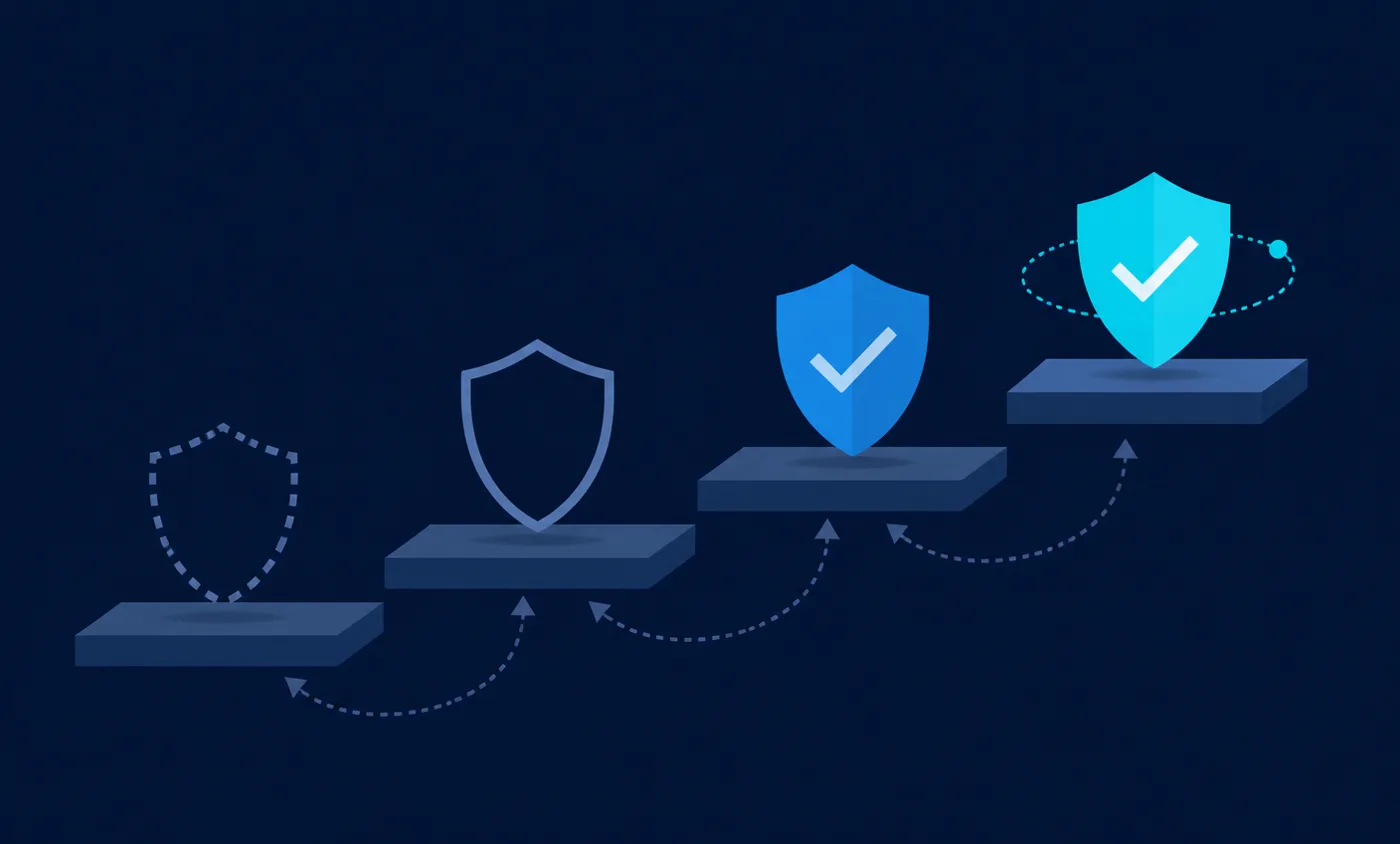
The CISA Zero Trust Maturity Model describes four stages — Traditional, Initial, Advanced and Optimal — across five pillars, with visibility and analytics, automation and orchestration, and governance running across all of them. Its value for a small business is that it gives a vocabulary for partial progress. A business can be Initial on identity, Traditional on networks and Advanced on devices at the same time, and that mixed picture is a normal state rather than a failure.
What the model does not do is promise that any organisation reaches a particular stage within a particular period. It was written for federal agencies as a maturity framework, and the published version describes characteristics of each stage rather than schedules. Any article that converts those stages into a fixed number of days has added something the source does not contain.
Atlas assessment: use the stage names to describe where each pillar stands today and what specifically would move it, and let the timeline follow the business. A five-person firm with one part-time administrator and a fifty-person firm with a managed provider will move at genuinely different rates, and neither rate is a compliance failure.
A sequence-based implementation plan
The table below is ordered by dependency rather than by date. Each phase states its objective, the concrete actions, who owns it, what must already exist, the maturity stage it corresponds to, the evidence it produces, and the failure mode we see described most often. The evidence column is the important one: a phase is complete when it has produced something a third party could inspect, not when it feels finished.
| Phase | Objective | Actions | Owner | Prerequisite | CISA ZTMM stage | Verification/evidence produced | Common failure mode |
|---|---|---|---|---|---|---|---|
| Phase 1 — Establish the record | Know which accounts, applications and devices exist | Export the user list from the identity provider, list every application holding company data, list every device that touches it, and record an owner for each | Owner or office manager, with outside help if there is no internal administrator | Administrative access to the identity tenant | Traditional moving toward Initial | A dated inventory of accounts, applications, devices and owners | Treating the inventory as a one-time document rather than a maintained record |
| Phase 2 — Make identity authoritative | One directory, strong authentication, no shared logins | Enable phishing-resistant or app-based second factors, remove shared accounts, separate administrator accounts from daily accounts, and register break-glass accounts | Whoever holds tenant administrative rights | Phase 1 account list | Initial | Sign-in logs showing second-factor use and a documented break-glass procedure | Leaving legacy authentication paths or service accounts exempt indefinitely |
| Phase 3 — Consolidate application access | Reduce the number of independent local logins | Move the highest-value applications behind single sign-on, disable local passwords where the application allows it, and document applications that cannot federate | Administrator plus each application owner | Phase 2 identity work | Initial moving toward Advanced | A list of federated applications and an explicit exception list | Assuming every vendor includes federation in the plan the business already pays for |
| Phase 4 — Bring devices into the decision | Access decisions can see device state, not only credentials | Enrol company devices, define a small compliance baseline such as encryption, screen lock and supported operating-system version, then require compliance for sensitive applications | Administrator, with a written policy agreed by the owner | Enrolment capability and an agreed personal-device position | Advanced for enrolled fleets | Compliance reporting per device and a documented exception path | Confusing enrolment with compliance, and reporting a device as trusted because it is merely registered |
| Phase 5 — Replace flat network access | Access is granted per resource rather than per network | Publish internal applications through an identity-aware access broker, keep the legacy remote-access path open for named exceptions, then retire it once nothing depends on it | Administrator or managed provider | Phases 2 and 4, plus knowledge of what the remote-access path is used for | Advanced | Access policy per application and a shrinking list of legacy tunnel users | Switching off the old remote-access path before finding the applications nobody documented |
| Phase 6 — Own the telemetry | Events are retained and someone reads them | Confirm the retention window of each platform, export what the plan does not keep long enough, and assign a named reviewer for alerts and unusual sign-in activity | Named internal reviewer, or a monitoring provider under contract | Logging enabled in every platform from Phase 1 | Advanced moving toward Optimal | A retention record per platform and a review log with names and dates | Buying detection tooling without deciding who answers the alerts it produces |
| Phase 7 — Make reassessment routine | Access, devices and policies are re-examined as the business changes | Run access reviews per application, re-check administrative rights, verify offboarding actually removed access, and revisit policies after any staffing or vendor change | Owner, with the administrator producing the evidence | Named application and role owners from Phase 1 | Optimal for the controls in scope | Signed review records showing what was removed or retained and why | Reviewing only when an auditor, insurer or customer asks |
Two ordering points are worth stating explicitly. Identity comes before device work because a device signal attached to an untrustworthy account adds little. Retiring the old remote-access path comes last within the network phase, because the applications nobody documented always surface at exactly that moment.
What this looks like in a real small business
Start with what you already pay for
Before evaluating any new product, establish what the current tenant includes. A Microsoft 365 or Google Workspace subscription typically already provides the directory, strong authentication, administrative role separation, audit logging and some device management, and higher plans add conditional access or context-aware access. Microsoft’s licensing documentation and Google’s context-aware access documentation are the places to confirm entitlement, because feature availability by plan changes and secondhand summaries age badly.
This step is unglamorous and it is where the most value sits. Atlas assessment: a business that has not yet enabled the identity and logging capabilities included in its existing subscription is not short of security products. Reviewing subscriptions for exactly this kind of unused entitlement is one of the by-products of a structured software spend audit.
When another tool is genuinely necessary
There are four situations where an additional purchase is usually justified rather than optional. The first is mixed-platform device management that the current tenant cannot cover. The second is internal applications that must be reachable remotely, where an identity-aware access broker replaces a broad tunnel. The third is endpoint detection with somebody actually watching it, which for many businesses means a managed service rather than a licence. The fourth is federation for a critical application that the identity provider cannot reach on the current plan.
Outside those cases, the honest answer is often that the gap is procedural. No product supplies the decision about who reviews access, and none supplies the record that the review happened.
Staffing and administrative burden
Zero Trust redistributes work rather than removing it. Enrolment, exception handling, access review, offboarding verification and alert triage are recurring tasks with names attached. A business with no internal administrator should assume the burden lands either on the owner or on a provider, and should say which in writing. Where the answer is a provider, the contract needs to state whether alert review is included, what the response expectation is, and who holds administrative credentials.
Training belongs in this budget too. Conditional access prompts, device compliance messages and enrolment steps all generate questions, and staff who do not understand a prompt route around it. Structured security awareness training reduces the volume of avoidable support work; CISA publishes free public awareness material for businesses that cannot fund a platform.
Access reviews, offboarding and privileged accounts
Offboarding is where architecture meets reality. If application access is federated, disabling the directory account closes most of it, which is the strongest practical argument for consolidation. Applications with local accounts must be handled individually, which is why the exception list from the consolidation phase is an operational document rather than paperwork. Verification is part of the task: a checklist that says access was removed is weaker than a screenshot or log entry showing it.
Administrative rights need their own review, separate from ordinary access. Rights granted for a migration, an integration or a departed contractor persist quietly, and they are what makes a single credential compromise severe. Where time-bound elevation is licensed, use it. Where it is not, a dated review of who holds which role achieves much of the same result.
Unmanaged devices, contractors and personal hardware
Most small businesses cannot enrol every device that touches company data, and pretending otherwise produces policy nobody follows. There are three workable positions. Require enrolment for access to sensitive applications, and accept a narrower browser-only path for unmanaged devices. Require posture checks through the access broker where enrolment is not possible, using documented checks such as those published by Cloudflare and Tailscale. Or restrict the data available to unmanaged devices so that the device state matters less.
Contractors need explicit treatment. They should hold their own accounts in the directory rather than borrowing someone else’s, they should have an end date recorded when the account is created, and their device situation should be decided before the engagement starts. The NCSC device security guidance is a useful non-commercial reference for what to ask of a device that the business does not own.
Legacy applications and the staged move away from broad remote access
Legacy applications are the most common reason a Zero Trust project stalls. An application that cannot federate, cannot sit behind a broker, or depends on a protocol that assumes a flat network is a genuine constraint. The workable approach is containment rather than denial: isolate the application, restrict which accounts can reach it, log access to it separately, and record it as a known exception with a named owner.
The move away from a broad remote-access tunnel should be staged. Publish the applications that convert cleanly through the broker, keep the tunnel available to a shrinking named group, watch what still uses it, and retire it when the list is empty. Cutting the tunnel first is how businesses discover an undocumented dependency at the worst possible moment. Where physical access systems are also part of the estate, our guide to cloud-based access control covers the same identity-first principle applied to doors.
What Zero Trust does not do
Zero Trust does not remove the need for backups, patching or recovery planning. It constrains how far a compromise reaches; it does not make compromise impossible, and NIST is explicit that a Zero Trust architecture reduces certain classes of risk rather than eliminating threat. Neither governing document promises immunity, and any vendor claim that a product delivers it should be read as marketing.
It also does not resolve compliance obligations by itself. Contractual, insurance and regulatory requirements have their own control lists and evidence expectations. The CIS Controls and CISA Cyber Essentials are more directly useful than SP 800-207 when a customer questionnaire or insurer asks what is in place, and SBA guidance on staying legally compliant is a starting point for the obligations attached to the business itself. Watching CISA advisories covers the patching side that architecture alone does not address.
Finally, it does not convert a part-time administrator into a security operations function. Detection without response is a record of things that already happened. Deciding who responds, and accepting that this may mean a paid service, is part of the architecture rather than an afterthought.
Limitations of this Zero Trust guide
This guide is built from published documentation, and its limits should be stated plainly rather than buried. Atlas did not run these products in a laboratory and makes no testing claim. Every capability description above traces to the vendor’s own documentation or to NIST and CISA publications listed in the single Sources section below, and each is dated to September 2026.
- Documented facts: what NIST SP 800-207 and the CISA Zero Trust Maturity Model say, and what each vendor documents its product as doing. These are cited inline and in the Sources section.
- Atlas editorial assessment: the feasibility and administrative burden ratings in the matrix, the ordering of the implementation phases, the position that microsegmentation is rarely the right early step for a small business, and the judgement that ownership matters more than tooling. These are labelled as assessments wherever they appear.
- Not covered: vendor performance in production, detection efficacy, support quality, and negotiated pricing. Plan availability and feature entitlement change, and quoted arrangements are not published, so the guide points at vendor pricing pages instead of repeating figures.
- Deliberately absent: completion timelines, risk-reduction figures, patching service levels and any percentage. No authoritative source supports a general figure of that kind for small businesses, so none is published here, and no substitute number has been invented in its place.
- Where information is unavailable: the matrix says Not publicly documented or Contact sales. Those entries are accurate statements about the public record and are not estimates.
Regulatory, insurance and contractual requirements vary by jurisdiction and industry, and this guide is not legal or compliance advice. Where an obligation is specific, the controlling document is the contract, policy or statute, not an architecture publication.
Where to begin, and why there is no universal answer
There is no universal answer to what a small business should do first, because the right first step depends on which layer is currently weakest. A business with shared logins should fix identity before considering an access broker. A business with strong authentication and unmanaged laptops should work on devices. A business with both in reasonable shape and a broad remote-access tunnel should look at per-resource access next. Ranking products in the abstract cannot answer that question, which is why this guide names no overall pick.
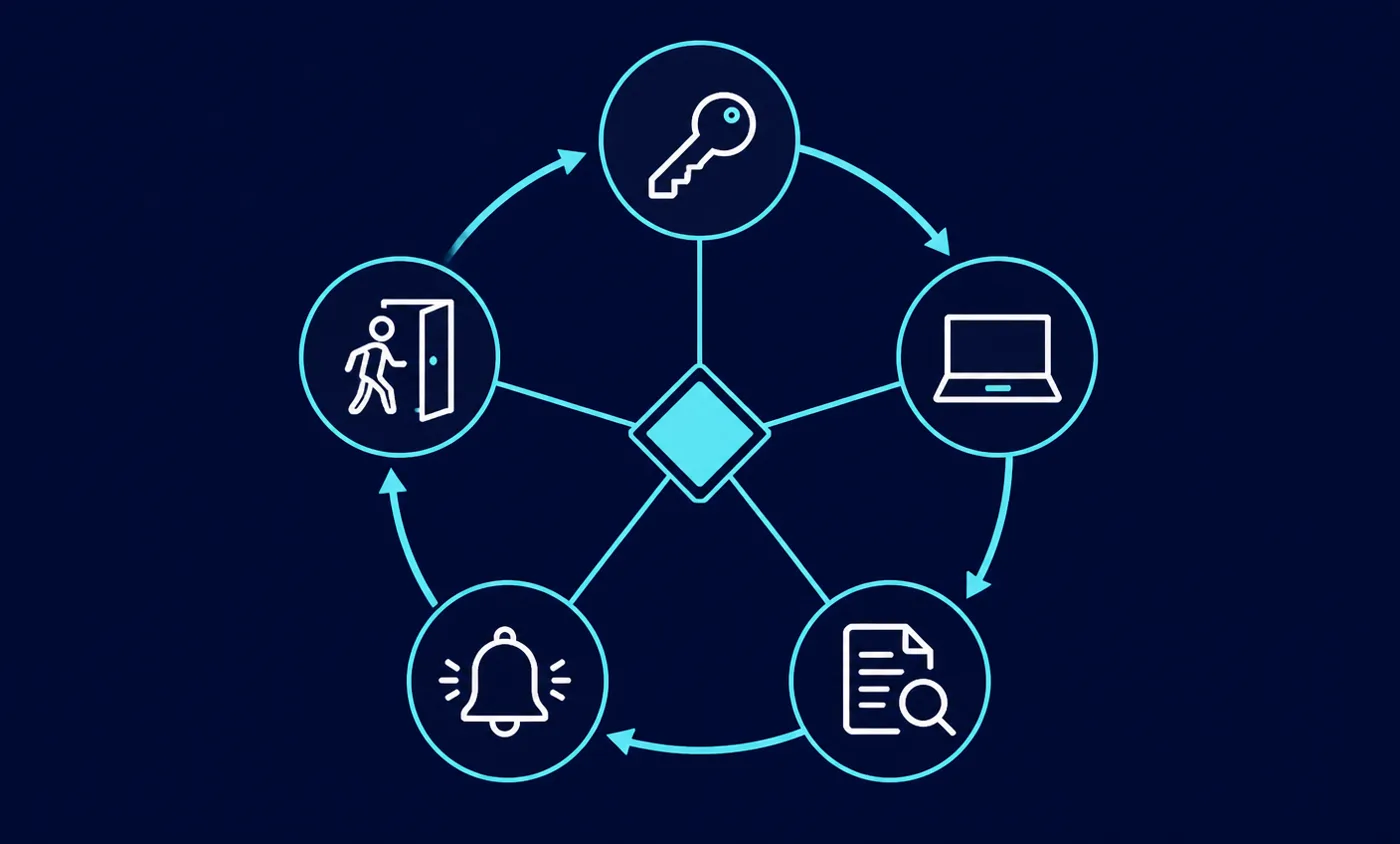
What is consistent is the shape of the work. Establish the record of accounts, applications and devices. Make identity authoritative and strongly authenticated. Consolidate application access where the economics allow. Bring device state into the access decision. Replace flat network access with per-resource access. Own the telemetry and name a reviewer. Make reassessment routine. Every one of those steps produces evidence, and evidence is what distinguishes an implemented architecture from a purchased one.
Atlas assessment: if only one change is possible this quarter, make it the one that removes standing broad access from your environment — the shared administrator account, the everyone-can-reach file share, or the tunnel that admits a device to the whole network. That is the change most consistent with the architecture and least dependent on a purchase.
Sources
All sources below are primary standards documents or first-party vendor documentation, checked in September 2026.
- NIST SP 800-207, Zero Trust Architecture (publication record)
- NIST SP 800-207 full text (PDF)
- NIST, Zero Trust Architecture publication page
- NIST SP 800-63B, Digital Identity Guidelines: Authentication
- NIST SP 800-63B published guidance (HTML)
- CISA, Zero Trust Maturity Model
- CISA, Zero Trust Maturity Model version 2 (PDF)
- CISA, Cyber Essentials
- CISA, Cybersecurity Advisories
- CISA, Secure Our World awareness material
- CIS Critical Security Controls list
- CIS Controls version 8.1
- NCSC, Device Security Guidance
- US Small Business Administration, staying legally compliant
- Microsoft, Conditional Access overview
- Microsoft, Conditional Access conditions
- Microsoft, Conditional Access grant controls
- Microsoft, continuous access evaluation
- Microsoft, require authentication strength for all users
- Microsoft, how Entra multifactor authentication works
- Microsoft, single sign-on in Entra ID
- Microsoft, device registration
- Microsoft, planning device join
- Microsoft, Entra sign-in logs
- Microsoft, access reviews overview
- Microsoft, Privileged Identity Management configuration
- Microsoft, Entra licensing fundamentals
- Microsoft, deleting and restoring directory accounts
- Microsoft, Global Secure Access overview
- Microsoft, what Intune is
- Microsoft, getting started with device compliance
- Microsoft, Defender for Endpoint
- Microsoft, learn about data loss prevention
- Google Workspace, context-aware access
- Google Workspace, 2-Step Verification
- Google Workspace, advanced mobile management
- Google Workspace, single sign-on
- Google Workspace, user log events
- Google Workspace, data retention and lag times
- Google Workspace, administrator roles
- Google, Chrome Enterprise Premium overview
- Apple, device enrollment and MDM
- Apple, Automated Device Enrollment
- Apple, declarative device management
- Okta, about policies
- Okta, policy concepts
- Okta, adaptive multi-factor authentication
- Okta pricing
- JumpCloud, conditional access policies
- JumpCloud pricing
- Cloudflare, Access policies
- Cloudflare, device posture
- Cloudflare Zero Trust plans
- Tailscale, access control lists
- Tailscale, device posture
- Tailscale, tailnet lock
- Tailscale pricing
- CrowdStrike, endpoint security platform