A no-code chatbot is the cheapest way to stop losing the visitors who arrive on a small business website, read a page, and leave without saying anything. The promise is simple enough to be believed too easily: a widget in the corner asks a question, the visitor answers, and a contact record appears in whatever system the business already uses. The reality is that the tools differ far less in the widget than in everything behind it — who answers when the bot cannot, where the conversation is stored, what happens to the contact next, and how much work the thing needs once it is live.
This guide covers ten tools a small business can install and configure without a developer, drawn only from what each vendor documents in its own help centre. Every claim below is sourced to vendor documentation or to published standards and guidance, and each product section separates what the vendor documents from an Atlas editorial assessment. No conversion figures, capture rates, satisfaction scores or rankings appear anywhere in this article, because none of the vendors publish comparable measurements and inventing them would be worse than saying nothing.
Read it as a shortlist-building exercise rather than a league table. The right tool depends on which system already holds your customer records, whether a human is available to reply during working hours, and how much question-and-answer content you have that an AI agent could draw on. Those three facts eliminate most of this list for any given business before pricing is even discussed.
What a no-code chatbot can and cannot do for lead generation
A website chatbot performs a narrow job well. It opens a conversation with someone who was not going to fill in a form, asks a small number of questions, records the answers against a contact, and then either hands the conversation to a person or books time in a calendar. Vendors describe this in almost identical terms: Tidio documents lead collection through a pre-chat survey, through flows and through the chat itself in its guide to collecting leads, while HubSpot documents the same functions as bot actions that ask questions, set contact properties and book meetings in its rule-based chatbot actions reference.
What a chatbot cannot do is manufacture demand. It intercepts intent that already exists on the page, which is why placement matters more than personality. A widget on a pricing page, a service page or a quote request page meets someone with a question; the same widget on a home page usually meets someone who is still orienting themselves. Vendors give you targeting controls for exactly this reason — Landbot documents setting the conversation flow according to the URL path of the embedded page, and HubSpot documents targeting rules when you create a live chat.
The second limit is human availability. Every tool on this list can answer out of hours in some form, but the answer quality depends on what the tool has been given to work with, and the follow-up still lands on a person. Our earlier analysis of where automated chat helps and where humans still matter applies directly here: automation is a routing and qualifying layer, not a replacement for the conversation that closes the work.
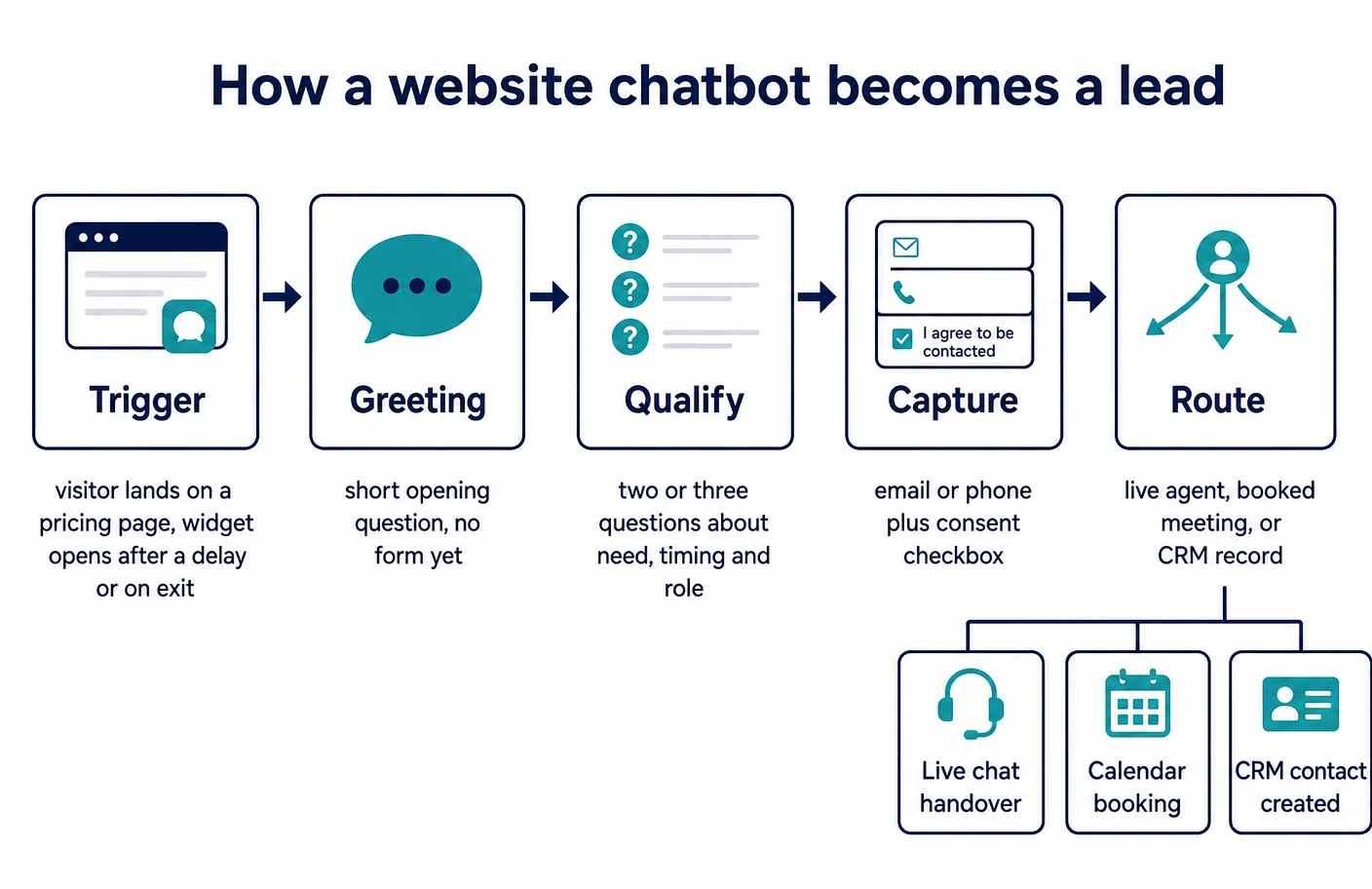
The stages in the diagram above are worth naming because they are also the places implementations fail. A trigger that fires too early annoys people, a greeting that asks for an email address before offering anything useful gets closed, a qualifying sequence with too many questions gets abandoned halfway, and a routing step with nobody behind it produces contacts that go stale. Each of the ten tools below gives you controls at every one of those stages; none of them make the decisions for you.
How the ten tools on this list were selected
The selection rule was deliberately mechanical, because a list of chatbot tools can otherwise be filled endlessly. Each tool had to satisfy four conditions, all verifiable in the vendor’s own documentation rather than on its marketing pages.
- Installable without a developer. The vendor documents a copy-and-paste script or a platform plugin, as Tidio does for website installation and Crisp does for installing on a custom website.
- Configurable without code. There is a visual builder or a settings-driven bot, such as the Zoho SalesIQ codeless bot builder or the Freshworks Freddy self-service bot builder.
- Capable of capturing and routing a lead. The documentation shows contact capture plus at least one onward action: assignment, handover, a booked meeting, or a record in a CRM.
- Documented well enough to compare. Tools whose help centres describe outcomes rather than mechanics were left out, because there is nothing to verify.
Two categories were excluded on purpose. Developer frameworks that require hosting or code were out of scope, and so were bots that only run inside social messaging apps, since the subject here is capture on your own website. Where a vendor’s website widget is part of a larger suite, the assessment covers the widget and the bot rather than the suite.
The three answering models behind every tool on this list
Underneath the branding there are only three ways these products answer a visitor, and the choice between them determines how much ongoing work the tool creates. Confusing them is the single most common reason a chatbot project disappoints the business that paid for it.
The first model is the rule-based flow: a branching conversation you draw yourself. HubSpot documents if/then branches that skip to a specific action based on the visitor’s answer, and Landbot documents both condition blocks and the broader distinction between conditions and formulas in its flow logic guide. Rule-based flows are predictable, auditable and entirely dependent on you having anticipated the question.
The second model is an AI agent answering from content you connect. Tidio documents enabling its Lyro agent and adding data sources in the conversational AI agent guide, tawk.to documents that its AI relies on the data sources you supply in its data sources article, and Crisp documents combining a supported model with your support content and routing rules in its AI agent setup guide. Coverage is far wider than a flow, and the maintenance burden moves from drawing branches to curating source content.
The third model is a hybrid, and most lead-generation deployments settle there eventually. The AI answers the open question, then a deterministic sequence takes over to qualify and hand off. Intercom documents this explicitly by allowing Fin to be placed inside a workflow with configurable handover behaviour in its Fin in Workflows documentation, and Chatfuel documents choosing between AI and manual flows per widget in its widget modes article.
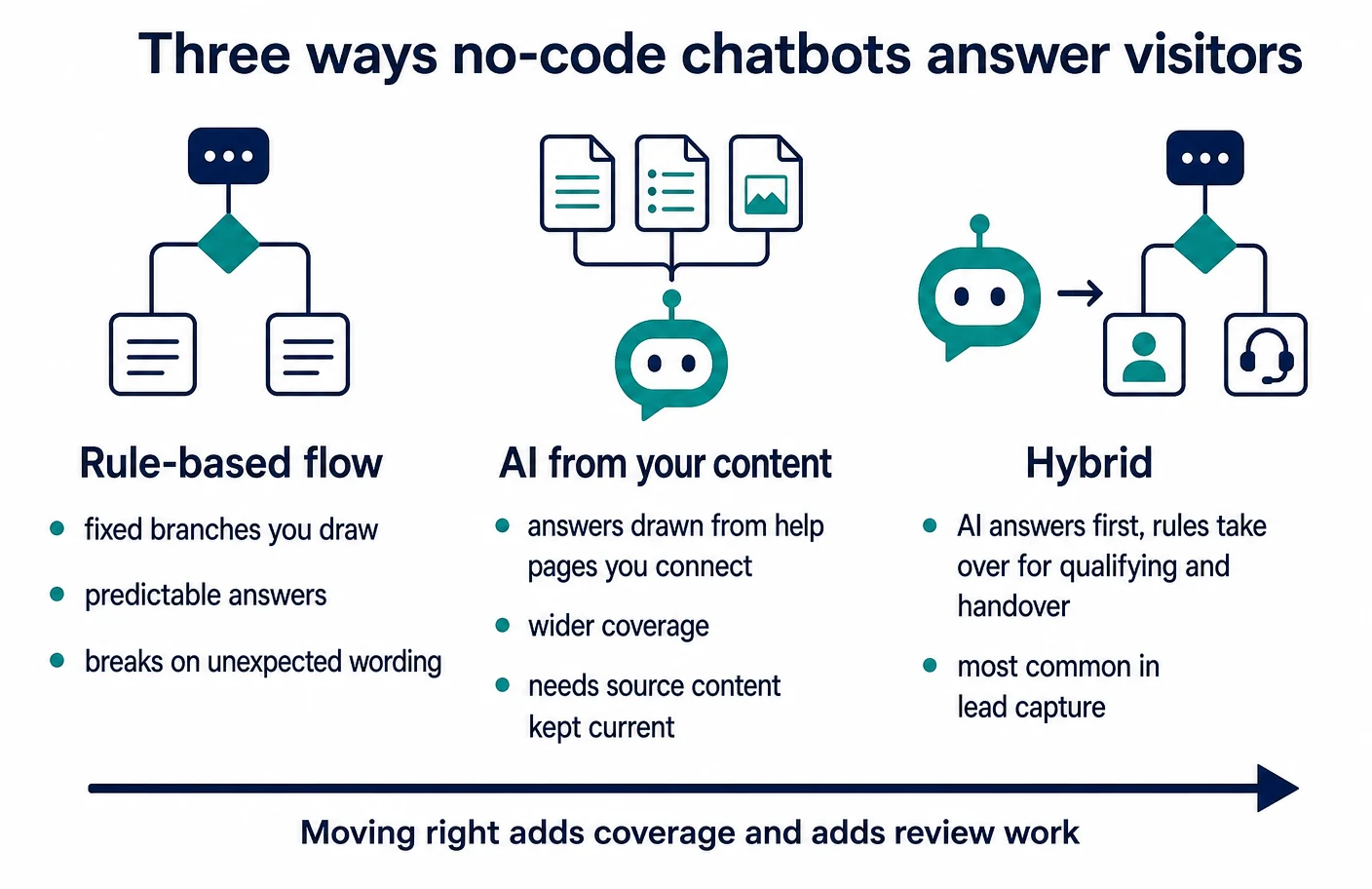
Atlas assessment: for lead generation specifically, the hybrid arrangement is usually the right target and the wrong starting point. Beginning with a short rule-based flow on two or three high-intent pages gives you real transcripts, and those transcripts tell you what an AI agent would need to answer. Starting with an AI agent and no source content produces vague answers that a visitor correctly reads as evasion.
1. Tidio
Tidio is a live chat and automation product aimed at small teams, and it is one of the few on this list where the lead-capture path is documented as a first-class use case rather than inferred from generic bot features. Its lead collection guide describes three distinct mechanisms: a pre-chat survey that asks for details before a conversation starts, flows that capture details mid-conversation, and manual capture by an operator during a chat.
The flow builder is the part worth examining before buying. Tidio documents adding a flow from a template or from a blank canvas in its flow creation article, and documents the available starting conditions separately in its triggers reference — the trigger list is what determines whether you can target a widget at a pricing page visit or an exit attempt rather than every page load. Onward delivery is documented too: a Send to Zapier action can be added to any flow according to the Zapier integration article, which is how contacts reach a CRM the vendor does not integrate with natively.
On the AI side, Tidio documents its Lyro agent with data sources you attach, together with controls for the agent’s name and company information, in the Lyro guide. List prices are published on the Tidio pricing page, which is more transparency than several vendors here offer.
Atlas assessment: Tidio suits a business that wants the flow builder and the live chat inbox to be the same product, and whose CRM requirement is satisfied by a connector rather than by native residence in a sales platform. The trigger and flow documentation is specific enough to plan a deployment before paying, which is a meaningful practical advantage when nobody on the team has done this before.
2. Intercom (Fin AI Agent)
Intercom is the most support-centric product on this list, and its lead-generation value comes from the machinery around the messenger rather than from a simple capture form. Installation for logged-out traffic is documented separately from installation for signed-in users in its visitors and leads install guide, which matters because the two produce different record types inside the product.
Automation is documented at two levels. Fin can be deployed directly over live chat with configuration and pre-launch testing described in the deployment article, and it can be embedded inside a workflow with customised handover and channel-specific settings according to the workflows article. The second arrangement is the one to model if the goal is qualification: the agent handles the open question, the workflow controls what is asked and where the conversation goes next.
Data location is unusually well documented, which is helpful during a procurement review. Intercom describes hosting in United States, European and Australian facilities and explains how to identify your own region from the workspace URL in its hosting article, with programme conditions set out in the regional data hosting documentation.
Atlas assessment: Intercom is a strong fit where the same widget must serve support and sales, and a poor fit where the only requirement is capture on a brochure site. The regional hosting documentation and the workflow-level control over Fin are the two things that justify the operational weight for a small team; if neither is needed, lighter tools do the capture job with less configuration.
3. HubSpot chatflows
HubSpot’s chat is the option to evaluate first if the business already keeps its contacts in HubSpot, because the capture path ends inside the CRM by default rather than through a connector. The documentation splits cleanly: creating a live chat covers the human-answered widget with its targeting rules, and creating a rule-based chatbot covers the automated variant that can qualify leads, book meetings or create tickets.
The action reference is where a plan becomes concrete. HubSpot documents each bot action — asking a question, setting a contact property, booking a meeting, handing off — in its bot actions guide, and documents conditional routing through if/then branches whose availability depends on subscription level. Handover to an AI agent is documented as its own action, with control over exactly when the agent takes over, in the customer agent handoff article.
The caveat is that feature availability is tied to tiers and, in places, to credits, which the documentation states at the top of each article rather than burying. Anyone comparing must read those availability notes rather than the feature list, because branch logic and agent handoff are not present on every plan.
Atlas assessment: for a business already paying for HubSpot, configuring the chat you own is almost always the correct first move, and this list exists mainly for businesses that are not. The qualification-to-contact-property path removes an entire class of integration problem, at the cost of tying your capture layer to one vendor’s subscription structure.
4. Landbot
Landbot approaches the problem from the conversational-form direction rather than the live chat direction, which makes it the most interesting option for campaign landing pages. Its documentation is builder-first: the flow logic guide explains when to use conditions against formulas, and the conditions block reference sets out operators, multiple rules and numeric range checks in detail.
Embedding is documented for several arrangements, including behaviour that changes according to the page. Landbot documents setting the flow depending on the URL path for embedded bots, controlling the widget from the parent page through its JavaScript integration, and a platform-specific route in its Webflow guide for teams building on a visual site builder.
The trade-off is that a conversational form is not a support inbox. Where the visitor’s question falls outside the flow you drew, the graceful exit has to be designed deliberately, and that design work is yours rather than the product’s.
Atlas assessment: Landbot is the pick when the conversation is the form — quote requests, eligibility questions, service configurators — and the weakest choice when visitors arrive with unpredictable support questions. Teams that already run structured intake work, of the kind we covered when writing about automating client onboarding in service businesses, will recognise the pattern immediately.
5. Chatfuel
Chatfuel began on social messaging channels and now documents a website widget alongside them, which shapes how it should be judged. Setup is documented in three deliberate steps — widget settings, adding the code, then choosing how chats are handled — in its widget setup guide, with the code placement itself covered separately in the installation article.
The mode decision is the substantive one. Chatfuel documents choosing between its Fuely AI assistant and manual flows in the automation tab in its widget modes article, and lists the widget’s building blocks, including content blocks and interactive buttons, in the widget features reference. Appearance and domain configuration are documented in the widget settings article.
Where Chatfuel differs from most of this list is that it documents a lightweight pipeline of its own: the Leads board is described as a built-in place where each chat becomes a card that moves through stages, with automatic qualification by the AI assistant and teammate assignment per stage.
Atlas assessment: Chatfuel earns its place for businesses whose enquiries genuinely arrive across both a website and messaging apps, and whose sales process is informal enough that a built-in board is preferable to a CRM. A business with an established CRM should treat the Leads board as a duplicate system to avoid rather than a feature to use.
6. Zoho SalesIQ
Zoho SalesIQ is the option to shortlist when the business already runs Zoho applications, and its documentation is refreshingly explicit about the fact that there is more than one way to build the bot. The Zobot introduction describes the bot platform and the channels it can be deployed to, while the platforms reference names the native builders, including the codeless builder, a scripting option and skills-based automation.
The build path is documented step by step. The bot creation guide walks through naming the bot, choosing the platform and configuring the profile, and the broader setup sequence for the widget itself is covered in the getting started guide with an implementation sequence available from the SalesIQ help home.
The trade-off is scope. SalesIQ documentation assumes you are configuring a visitor-engagement product with tracking, routing and departments, and a business that only wants a capture widget will meet configuration surface it does not need.
Atlas assessment: existing Zoho customers should compare SalesIQ against nothing else until it has been ruled out, because the record ends up where the rest of the customer data lives. For everyone else the multiple builder platforms are a genuine advantage only if the team expects to outgrow codeless logic; otherwise they are a decision to be made needlessly.
7. Freshchat
Freshchat sits inside the Freshworks suite, and its bot documentation is unusually process-oriented, which suits teams that want to plan before they build. The bot-building walkthrough sets out how to construct a flow without custom development, and the first chatbot guide lists the sequence in order: create the agent, create the bot, create flows, set conditions, trigger actions, preview and deploy.
Deployment onto the website widget is documented as a distinct step rather than assumed, in the widget deployment article, and the vocabulary of the builder — dialogs, conditions, actions, custom parameters, default flows — is defined in the builder glossary. That glossary is genuinely useful during evaluation, because it exposes where logic lives before you have licence access.
The complication is naming and structure across the suite: documentation for the same builder appears under several Freshworks product portals, and older articles sit alongside current ones. Anyone evaluating should check the article dates and the applicable-plan notes rather than assuming a single canonical guide.
Atlas assessment: Freshchat is a reasonable fit for teams already using Freshworks products or planning a support desk alongside capture, and a harder sell for a two-person business that needs one widget on one site. The explicit preview and unpublish steps in the documented sequence are a small but real advantage for teams nervous about testing on a live site.
8. Crisp
Crisp is the option that documents the compliance side of chat most directly, which is why it belongs on a list aimed at businesses that will face a privacy question from a customer or a partner. Installation on a hand-built site is documented in its custom website guide, with platform-specific routes indexed from the knowledge base home.
Automation is documented as an agent that combines a supported model with your own support content, business instructions, routing rules and human handoff, in the AI agent article. The documentation is candid that the agent’s usefulness follows the content you connect, which is the same dependency every AI answering model on this list carries.
The distinguishing material is legal. Crisp publishes a GDPR compliance status page covering data processing and privacy rights, and a practical compliance guide that enumerates the personal data a chat tool processes: names, email addresses, addresses used for network identification, conversation content, files and custom attributes.
Atlas assessment: Crisp suits a small business that wants a capable widget and a documentation trail it can hand to a client’s procurement team without writing anything itself. That trail is worth more than it sounds when the sales cycle involves larger organisations, because the alternative is answering the same privacy questionnaire from scratch every quarter.
9. tawk.to
tawk.to is the lowest-commitment entry point on this list, and it is included for that reason rather than despite it. Adding the widget is documented as a paste-the-snippet operation in its installation article, and the product’s own documentation frames the widget as the primary way visitors start conversations.
Automation is documented as an add-on capability. The AI Assist introduction describes answering outside staffed hours and assisted replies for agents, the data sources article states plainly that answer accuracy follows the quality of the sources you provide, and the training guide recommends adding as much relevant organisational content as possible before relying on it.
What tawk.to does not document to the same depth is structured qualification and CRM residence. The tool is strongest as a conversation channel; turning conversations into a managed pipeline is work you do elsewhere, whether in a CRM or through an automation layer of the sort we compared in our review of workflow automation tools for small businesses.
Atlas assessment: this is the sensible first widget for a business testing whether website conversations happen at all. Treat it as an experiment that answers one question — do visitors engage on these pages — and expect to reassess once there is a transcript history worth qualifying against.
10. LiveChat
LiveChat is the most conventional product here: a human-first chat platform with structured data collection built around the conversation rather than instead of it. Pre-chat and post-chat forms are documented in its chat forms guide, which is the mechanism most directly aimed at capture, and installation routes for websites and tag managers are indexed in the install documentation.
Automation is documented as an integration rather than a native builder: the ChatBot integration guide describes adding a no-code bot that can answer around the clock and hand rich messages back into LiveChat. Operational setup for a small team — widget configuration, agent onboarding, traffic monitoring — is collected in the manager’s handbook, and the visitor information available to an agent during a chat is documented in the customer details overview.
The consequence of that architecture is a two-product decision. The chat and the bot are licensed and configured separately, so the evaluation has to cover both, and a business that wants one bill and one console will find that friction irritating.
Atlas assessment: LiveChat is the right shape where humans answer during business hours and automation covers the gaps, which describes a large number of service businesses honestly. Where nobody is available to reply live, the bot is doing the real work and one of the AI-first tools above will cost less attention to run.
Documented capability comparison
The table below records only what each vendor documents in the pages cited in this article. Blank or qualified cells mean the vendor does not document the capability in the material reviewed, not that the capability is absent from every plan; feature availability is tied to subscription level for several of these products, and the vendor’s own availability notes remain authoritative.
| Tool | Documented answering model | Documented lead capture | Documented onward routing | Documented data or compliance detail |
|---|---|---|---|---|
| Tidio | Flow builder plus an AI agent with attached data sources | Pre-chat survey, in-flow capture and manual capture | Flow actions including a send-to-Zapier step | List prices published on the vendor pricing page |
| Intercom | AI agent over chat, optionally inside a workflow | Separate install path for logged-out visitors and leads | Workflow-controlled handover and channel settings | Hosting regions documented with workspace URL indicators |
| HubSpot chatflows | Rule-based bot, live chat, and an AI agent handoff action | Bot actions that ask questions and set contact properties | Meeting booking, ticket creation and agent handoff | Plan and credit availability stated per documented feature |
| Landbot | Rule-based conversational flows with conditions and formulas | Conversational form blocks inside the flow | Parent-page control and per-URL flow selection | Platform-specific embedding guidance published |
| Chatfuel | Selectable per widget between AI assistant and manual flows | Widget blocks and buttons within the chosen mode | Built-in Leads board with stages and assignment | Widget domain and appearance configuration documented |
| Zoho SalesIQ | Codeless builder, scripting and skills-based platforms | Bot-driven capture within the visitor engagement product | Departments and routing configured during setup | Implementation sequence published in the help centre |
| Freshchat | No-code bot builder with dialogs, conditions and actions | Flow-level questions and custom parameters | Documented deployment onto the chat widget | Applicable-plan notes published per article |
| Crisp | AI agent combining a supported model with your content | Widget conversations with contact and custom attributes | Routing rules and documented human handoff | GDPR status page and a published compliance guide |
| tawk.to | AI answering from supplied data sources, plus agent assistance | Widget conversations, capture handled in the chat | Not documented as structured pipeline routing | Guidance that answer quality follows source quality |
| LiveChat | Human-first chat with a bot added by integration | Pre-chat and post-chat forms | Agent assignment with visitor detail visible in chat | Separate licensing of chat and bot documented |
Read the table by column rather than by row. The answering column decides how much content work the tool creates, the capture column decides how invasive the conversation feels, and the routing column decides whether a captured contact ever reaches a person. A tool that looks weak in one column and strong in another is not worse; it is aimed at a different business.
Where the lead data actually goes
A chat widget looks like part of your website and behaves like part of someone else’s. The conversation, the contact details, the consent record and the routing rules live with the vendor, and your site holds a script that renders a panel. That distinction drives most of the questions a cautious buyer should ask before installing anything.
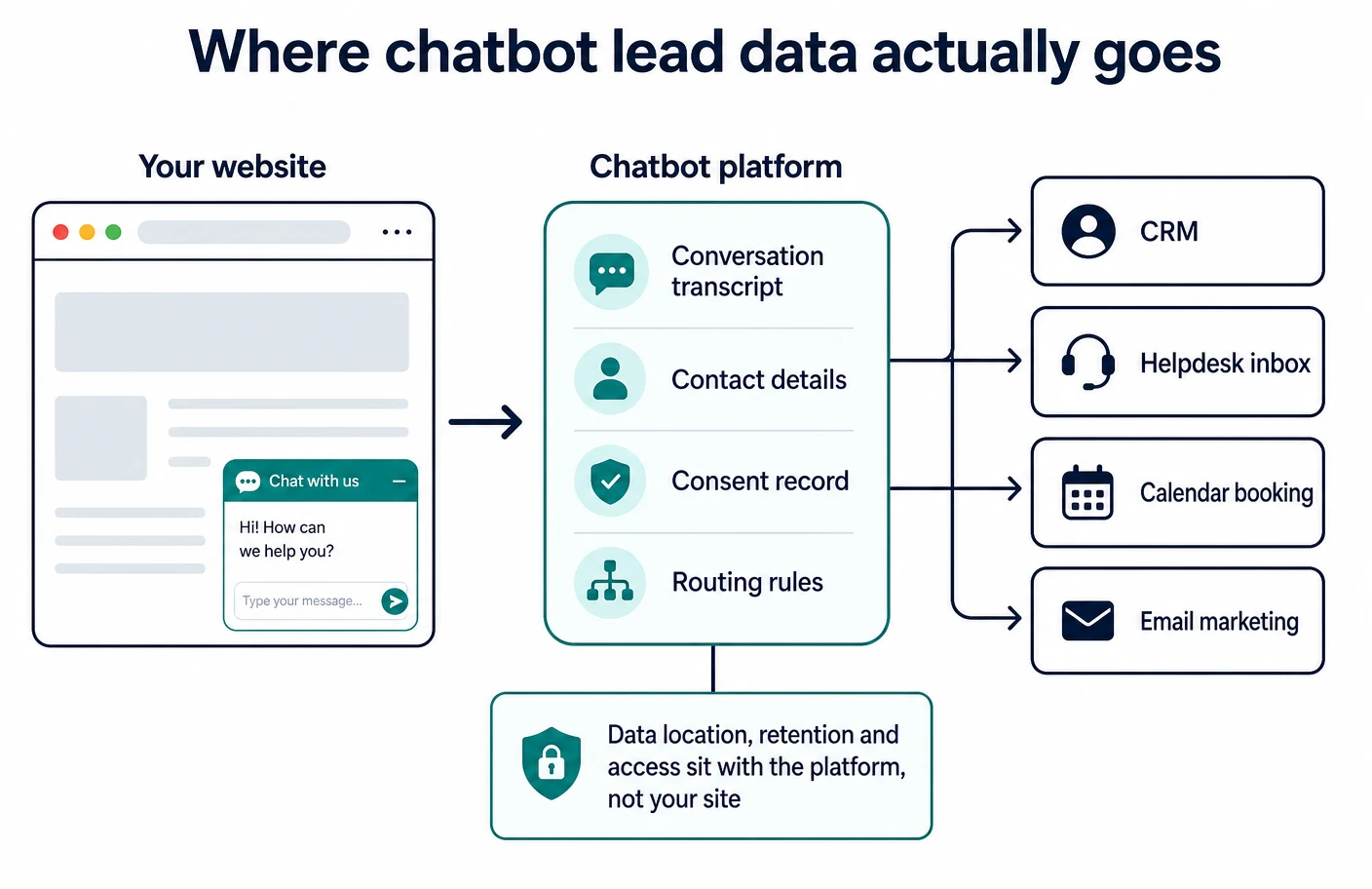
Two vendors document the location question directly, which makes them easier to review. Intercom names the hosting facilities it operates in and explains how to identify your own region from the workspace address in its data hosting article. Crisp documents its processing position and the categories of personal data involved in its GDPR status page. Where a vendor does not publish this, the answer has to be requested in writing rather than assumed.
The onward path matters just as much as the resting place. A contact that stops inside the chat tool is a contact nobody will follow up, which is why the routing documentation deserves as much attention as the builder: HubSpot’s bot actions write directly to contact properties, Tidio’s flows can push to other systems through the Zapier action, and Chatfuel keeps the record in its own Leads board. Those are three different operating models, and mixing them accidentally is how small businesses end up with three partial contact lists.
Under data protection law the business running the site is answerable for this arrangement regardless of which vendor is involved. Processing personal data requires a lawful basis under Article 6 of the GDPR, the visitor must be told what is happening under Article 13, and the relationship with the vendor needs a processor agreement satisfying Article 28. None of that is exotic; it is a contract, a privacy notice line and a retention decision.
Designing the qualifying conversation
Once a tool is chosen, the work that decides whether it produces useful leads is conversation design, and it is almost entirely independent of the product. The main decision is the order of two things: the questions that tell you whether the enquiry is worth pursuing, and the contact detail that lets you pursue it.
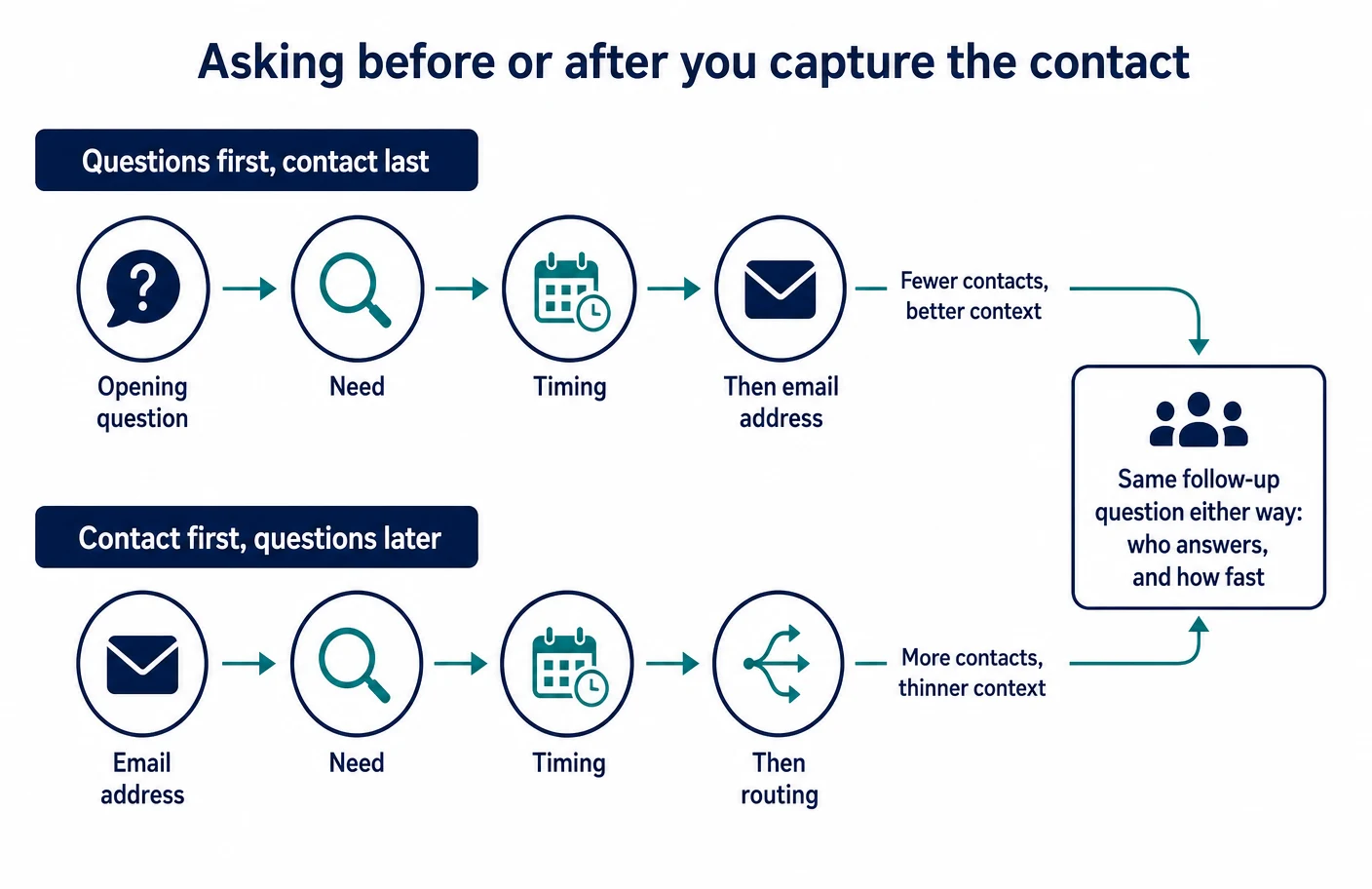
Asking first produces fewer contacts with more context; asking later produces more contacts with less. Neither ordering is correct in the abstract, and neither ordering saves you from the question underneath it: who replies, and how quickly. Vendors give you the mechanics for both — LiveChat documents pre-chat and post-chat forms in its forms guide, and Tidio documents the same choice between a pre-chat survey and in-flow capture in its lead collection guide.
A short practical list keeps most implementations honest, whichever tool is underneath.
- Ask no more than three qualifying questions before offering something the visitor wants, such as a price range, an availability window or a document.
- Make every question answerable with a tap where possible; free-text questions belong at the end, not the beginning.
- Record the answers as structured fields rather than in the transcript alone, so follow-up does not require reading the conversation.
- Name the next step explicitly in the bot’s last message, including who will reply and roughly when.
- Give the visitor an exit that does not feel like failure, such as a plain contact route, and test it yourself on a phone.
Atlas assessment: the most common design fault we see in live deployments is a qualifying sequence built for the seller’s reporting rather than the buyer’s question. If a visitor cannot get one useful answer without surrendering a contact detail, the widget is a form with extra steps, and it will be treated as one. Businesses running outbound follow-up alongside capture should also read our notes on B2B data enrichment tools, because enrichment removes the temptation to ask questions a database can answer.
Purchasing models and what changes the bill
Pricing for these products is structured in genuinely different ways, and the structure matters more than any single published rate. Some vendors charge per seat, some charge for automated resolutions or conversations, and some gate the branch logic and handover features behind higher tiers or credit consumption. The table records the purchasing model each vendor documents, and no figures are reproduced here — published rates change and only the vendor’s own page is authoritative.
| Tool | What you are buying | What tends to increase the bill | Where the vendor documents it |
|---|---|---|---|
| Tidio | Chat product with flow automation and an optional AI agent | Adding AI conversations and additional operator seats | Published pricing page |
| Intercom | Support platform with an AI agent layer | Seats plus AI resolution volume and contract-level options | Product documentation and pricing pages |
| HubSpot chatflows | Chat included with the CRM subscription | Higher tiers for branch logic, seats and credit-based features | Availability notes at the top of each documentation article |
| Landbot | Conversational flow builder and hosted bots | Conversation volume and advanced integration blocks | Vendor pricing page |
| Chatfuel | Multi-channel automation including a website widget | Conversation or contact volume across channels | Vendor pricing and billing documentation |
| Zoho SalesIQ | Visitor engagement product inside the Zoho suite | Operator count and bot platform capabilities | Vendor pricing page and implementation sequence |
| Freshchat | Suite messaging product with a bot builder | Agent seats and bot session volume | Applicable-plan notes in the support documentation |
| Crisp | Chat inbox with an AI agent add-on | Seats and AI usage | Vendor pricing page with compliance documentation alongside |
| tawk.to | Free chat widget with paid add-ons | AI assistance and hired-agent add-ons | Add-on documentation in the help centre |
| LiveChat | Human chat licences, with the bot licensed separately | Agent seats plus a second product for automation | Install and integration documentation |
The practical lesson from the right-hand column is that a chat budget is rarely a single line. Where automation is metered, the bill follows traffic, which means a successful campaign raises the cost of the tool that supported it. Ask each shortlisted vendor, in writing, which of your intended features sit behind a higher tier and what happens when the metered allowance runs out mid-month.
Page weight, accessibility and search considerations
Every tool here installs a third-party script, and that script competes with your page for the browser’s attention. Responsiveness to visitor input is a measured part of page experience: Google documents Interaction to Next Paint in its INP reference and sets out remediation approaches, including breaking up long tasks and deferring non-critical work, in its optimisation guide. A widget that loads eagerly on every page is the sort of non-critical work that guidance describes.
Content rendered inside a chat widget is not a substitute for content on the page. Google’s JavaScript SEO basics explains how rendered content is discovered, and the practical implication is straightforward: answers that matter for search belong in the page body, with the widget as a conversational shortcut. Where you publish question-and-answer content on the page itself, the eligibility rules for FAQ structured data are worth reading before marking it up.
Accessibility is the part most often skipped. A chat widget is an interactive overlay, and the applicable expectations are set out in WCAG 2.2, with keyboard and focus behaviour for overlay panels described in the modal dialog pattern. Test the widget with the keyboard alone and at a large zoom level before launch; vendors vary considerably, and a widget that traps focus or covers the page controls on a small screen costs more enquiries than it captures.
Atlas assessment: load the widget on the pages where conversations are wanted rather than site-wide, and delay initialisation until the visitor shows intent. Both decisions are configurable in the tools here through targeting rules and per-page embedding, and both protect the pages that earn the traffic in the first place.
Consent, privacy and the security review
Two separate obligations get conflated in chat projects. The first concerns the storage or reading of information on the visitor’s device, which in the United Kingdom is governed by the rules the ICO explains in its guidance on cookies and similar technologies. Chat widgets commonly set identifiers to maintain a conversation, and that is exactly the territory that guidance covers.
The second concerns the personal data in the conversation itself. A lawful basis under Article 6 has to be identified, the visitor informed under Article 13, and the vendor engaged under a processor agreement meeting Article 28. Crisp’s compliance guide is a useful worked example of what a chat tool actually processes, and it applies conceptually whichever vendor you pick.
The security review is usually shorter than teams fear. Who on your side can read transcripts, how access is removed when someone leaves, whether the vendor supports multi-factor authentication for the inbox, and how long conversations are retained: four questions, all answerable from documentation and a settings screen. The UK National Cyber Security Centre’s small business guide covers the surrounding basics for teams without a security function.
- Record which contact fields the bot may collect, and remove the ones nobody uses in follow-up.
- Set a retention period for transcripts deliberately rather than accepting an indefinite default.
- Restrict inbox access to the people who answer, and review the list when staff change.
- Keep the privacy notice line about chat accurate when you change tools or add an AI agent.
Implementation guidance for a small team
The implementations that succeed are narrow at the start. One or two pages, one short flow, one named person answering, and a fixed review point before anything is expanded. That sequence produces the transcripts that make every later decision — AI agent or flow, more questions or fewer, which pages next — an evidence-based one rather than a guess.
Begin by choosing the pages, not the tool. High-intent pages are those where a visitor is comparing, pricing or arranging: service detail pages, pricing pages, quote forms and booking pages. Install the widget there, using the per-page controls the vendors document, such as Landbot’s URL-path flow selection or the targeting rules in HubSpot’s live chat setup.
Then write the conversation as words before building it as a flow. Draft the opening line, the qualifying questions and the closing message in a document, read them aloud, and cut anything that exists for internal reporting. Building the flow afterwards takes minutes in every tool on this list; rewriting a badly conceived one costs a week of small edits nobody planned.
Connect one destination only. A contact that lands in a CRM your team already opens every morning beats a contact in a purpose-built board nobody checks. Where a native integration exists, prefer it; where it does not, an automation layer is the pragmatic bridge, and our comparison of workflow automation tools covers the trade-offs between the main options. Our general notes on implementing AI automation apply to the sequencing question as well.
Finally, staff the follow-up before launching. Decide who answers during working hours, what the out-of-hours message promises, and how quickly a captured contact gets a human reply. Teams that already coordinate follow-up calls, of the kind discussed in our review of AI power dialers for small businesses, should wire the chat contacts into that same rhythm rather than treating them as a separate queue.
Limitations of this comparison
This article compares documentation, not outcomes. Every statement about a product describes what the vendor publishes about its own behaviour, read in September 2026 at the pages listed at the end. Documentation can lag the product in both directions, and features move between tiers without an announcement, so treat the capability table as a shortlisting aid and confirm the two or three features you actually depend on during a trial.
No performance comparison is offered because none can be made honestly. Capture and conversion outcomes depend on traffic quality, page intent, offer, response speed and industry, and no vendor publishes measurements that could be compared across products on equal terms. Any article that ranks these tools by conversion is presenting a preference as a measurement.
Pricing is described structurally rather than numerically for the same reason. Rates change, regional differences exist, and metered allowances are quoted differently by different vendors. The purchasing-model column tells you what to ask about; the vendor’s own page tells you the number on the day you buy.
How to decide
The decision collapses quickly once three facts are on the table: what system already holds your customer records, whether a human can reply during business hours, and how much answerable content you have written down. Those three answers usually reduce ten options to two.
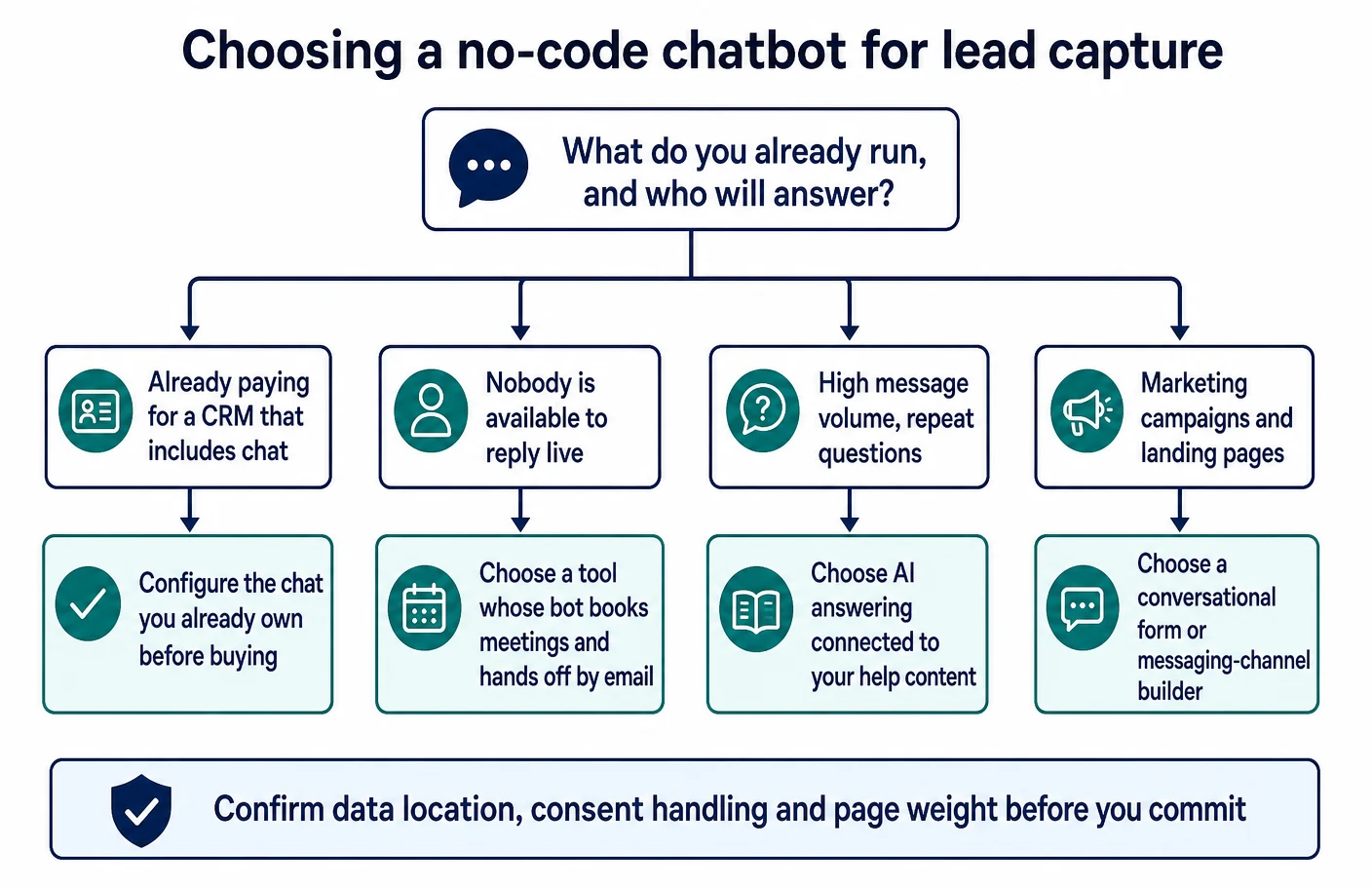
If a CRM subscription you already pay for includes chat, configure that first and treat this list as the fallback. If nobody can answer live, prefer a tool whose documented strength is answering and booking rather than routing to a person. If your enquiries repeat and you have help content written, an AI agent connected to that content will earn its keep; if you have no such content, a short flow will outperform an agent with nothing to read.
Whichever tool wins, the follow-up discipline decides the result. A captured contact with a reply the same working day beats a cleverer conversation followed by silence, and no product on this list can supply that part. Businesses evaluating chat alongside other conversational tooling may also find our comparison of AI chatbots for B2B SaaS lead capture and our review of AI meeting assistants useful for the stages that come after the first message.
Frequently asked questions
Do I need a developer to install any of these tools?
No. Every tool in this article documents a copy-and-paste script or a platform plugin as the standard installation route, as Tidio does in its installation guide and Chatfuel does in its widget code article. A developer becomes useful only for single-page applications, custom event triggers or passing signed-in user data into the widget.
Will a chat widget slow my website down?
It adds a third-party script, so it can. Google’s guidance on improving interaction responsiveness recommends deferring non-critical work, which is exactly what a chat widget is on most pages. Loading it only on the pages where conversations are wanted, and delaying initialisation until the visitor interacts, keeps the effect small and measurable.
Should the bot ask for an email address before or after qualifying?
Both orderings are documented as options by the vendors, so the choice is editorial rather than technical. Asking questions first yields fewer contacts with better context; capturing the address first yields more contacts with thinner context. Choose according to whether your follow-up capacity is the constraint or your enquiry volume is.
Do I need consent before a chat widget loads?
That depends on what the widget stores on the visitor’s device and where you operate. The ICO’s cookies guidance explains the rules for storing or accessing information on a device, and chat widgets commonly set identifiers to keep a conversation together. Treat the widget as part of your consent and privacy notice review, not as an exception to it.
Can an AI chatbot answer questions about my prices and services accurately?
Only as accurately as the content you connect to it. Vendors say so themselves: tawk.to documents that answer quality follows the data sources you supply, and Crisp documents its agent as a combination of a model with your own support content in its agent guide. Publish the answers on your site first, then connect them.
What happens to the conversation when nobody is available to reply?
That behaviour is configurable in every tool here, and the honest options are a documented AI answer, a booked meeting, or a clear message about when a person will respond. The failure mode to avoid is an open-ended promise: a widget that implies an immediate reply out of hours creates a worse impression than one that states the next working day.
Where do captured leads end up if I do not have a CRM?
Inside the chat tool, which is workable only while volume is low. Chatfuel documents a built-in leads board for exactly this situation, and other tools rely on their inbox. Plan the move to a CRM before the inbox becomes the record of truth, because migrating conversation history later is rarely clean.
How many qualifying questions is too many?
As a working rule, more than three before the visitor receives anything useful. The purpose of the conversation is to establish whether there is a fit and to get a reply moving, not to complete an intake form. Extra fields can be gathered by the person who follows up, or supplied by enrichment against the contact you already captured.
Can I run the same bot on my website and on messaging apps?
Some vendors document that arrangement and others do not. Chatfuel and Zoho SalesIQ both document multi-channel deployment of the same automation, as SalesIQ describes in its bot introduction, while others treat the website widget as the only surface. If messaging channels matter, verify the channel list in the documentation before committing.
Is a free chat widget good enough to start with?
For answering the question of whether visitors engage at all, yes. A free widget on two high-intent pages produces transcripts, and transcripts are what make the next decision informed. Reassess once you can see what people actually ask, because that evidence changes the shortlist more than any feature comparison will.
Sources
- Tidio — Install Tidio on your website
- Tidio — Lyro, the conversational AI agent
- Tidio — Start collecting leads
- Tidio — Adding a new flow
- Tidio — Flow editor triggers
- Tidio — Zapier integration
- Tidio — Pricing
- Intercom — Deploy Fin AI Agent over chat
- Intercom — Use Fin AI Agent in Workflows
- Intercom — Install Intercom for visitors and leads on web
- Intercom — Regional data hosting
- Intercom — How data is hosted and processed
- HubSpot — Create a live chat
- HubSpot — Create a rule-based chatbot
- HubSpot — Choose your rule-based chatbot actions
- HubSpot — Use if/then branches in bots
- HubSpot — Send a rule-based chatbot to the customer agent
- Landbot — Conditions block
- Landbot — Using flow logic
- Landbot — Set the flow depending on the URL path
- Landbot — JavaScript integration
- Landbot — Landbot in Webflow
- Chatfuel — Set up chat widget for website
- Chatfuel — Chat widget modes
- Chatfuel — Chat widget features
- Chatfuel — Adding the chat widget to your site
- Chatfuel — Leads
- Chatfuel — Chat widget settings
- Zoho SalesIQ — Introduction to Zobot
- Zoho SalesIQ — Platforms to build the Zobot
- Zoho SalesIQ — Create a Zobot for your website
- Zoho SalesIQ — Getting started
- Zoho SalesIQ — Help centre
- Freshworks — Build your first bot with the self-service bot builder
- Freshworks — Deploy a self-service bot on the Freshchat widget
- Freshworks — Build your first chatbot with the Freshchat builder
- Freshworks — The A to Z of the bot builder
- Crisp — Install Crisp on a custom website
- Crisp — EU GDPR compliance status
- Crisp — How to be legally compliant to your customers
- Crisp — Create an AI chatbot for customer service
- Crisp — Knowledge base
- tawk.to — Adding the widget to your website
- tawk.to — Getting started with AI Assist
- tawk.to — Understanding AI Assist data sources
- tawk.to — Training the AI chatbot to respond to your chats
- LiveChat — Chat forms and customer data collection surveys
- LiveChat — Install the widget
- LiveChat — Add a bot with the ChatBot integration
- LiveChat — Manager’s handbook
- LiveChat — Customer details overview
- GDPR — Article 6, lawfulness of processing
- GDPR — Article 13, information to be provided
- GDPR — Article 28, processor
- ICO — Cookies and similar technologies
- Google — Interaction to Next Paint
- Google — Optimise Interaction to Next Paint
- Google — FAQ structured data
- Google — JavaScript SEO basics
- NCSC — Small business guide
- W3C — Web Content Accessibility Guidelines 2.2
- W3C — Modal dialog pattern