The question small businesses usually ask about support automation is which side wins: the chatbot or the person. It is the wrong question, and answering it honestly is impossible. Customer satisfaction is produced by the whole handling of a request, and that includes how a request was classified, whether the answer already existed in writing, how long the customer waited, whether the automated attempt blocked the route to a person, and how the transfer felt when it happened. No vendor documents a figure that isolates the chatbot from the rest of that chain, and neither can we.
The useful question is narrower and answerable from documentation: which parts of a support conversation are safe to automate for a small team, which parts have to stay with a person, and how the two should be joined so a failed automated answer does not become a lost customer. That is what this guide covers, using the published documentation of four platforms a small business realistically buys: Zendesk, Intercom, Freshdesk from Freshworks, and HubSpot. It also covers a fifth approach that gets ignored in these comparisons: a human-staffed help desk running deterministic rules and no generative answering at all.
Two rules govern everything below. First, any statement about a product comes from that vendor’s own help centre, product documentation or pricing page, and each source is linked in the Sources section. Second, where the judgement is ours, it is labelled as an Atlas editorial assessment, so you can discard it and keep the documented facts. There are no satisfaction benchmarks, containment bands, staffing figures or savings claims in this article, because no reachable authoritative source establishes them for a business the size of yours.
What AI support tools actually automate
Support automation is not one capability. It is a set of distinct jobs, and each one carries a different amount of risk. Separating them is the single most useful thing you can do before looking at a product, because most disappointing deployments come from automating the wrong job rather than from choosing the wrong vendor.
- Intake. Collecting the details a person would otherwise have to request. Freshdesk documents an option to collect customer details before a conversation is transferred to a human agent, configured in its handover settings.
- Classification and routing. Deciding what a request is about and where it should go. Zendesk documents intelligent triage for predicting fields such as intent, language and sentiment on incoming requests, and omnichannel routing for assigning work from a queue, described in its intelligent triage overview and its omnichannel routing documentation.
- Answering from published knowledge. Generative answers are produced from sources you connect. Zendesk states that connecting at least one knowledge source is required for an AI agent to produce an AI-generated answer, per its knowledge sources documentation.
- Retrieval and action. Looking something up, or carrying out a defined step. Zendesk documents that its agentic AI agents can call your existing API descriptions as part of a procedure in its overview of AI agents with agentic AI.
- Escalation and handoff. Moving the conversation to a person, with context. All four vendors document this as a configured behaviour rather than an accident.
- Assisting the human agent. Drafting or summarising for a person who stays responsible for the reply. Zendesk describes this category in its agent copilot documentation.
The important line runs between answering the customer and helping your team answer the customer. Assistance changes what your agents see; autonomous answering changes what your customers see. Intercom is explicit that its AI agent is designed to resolve questions autonomously while escalating to a human teammate at the right moment, and that escalation behaviour is something you configure, as set out in its escalation guidance and rules documentation.
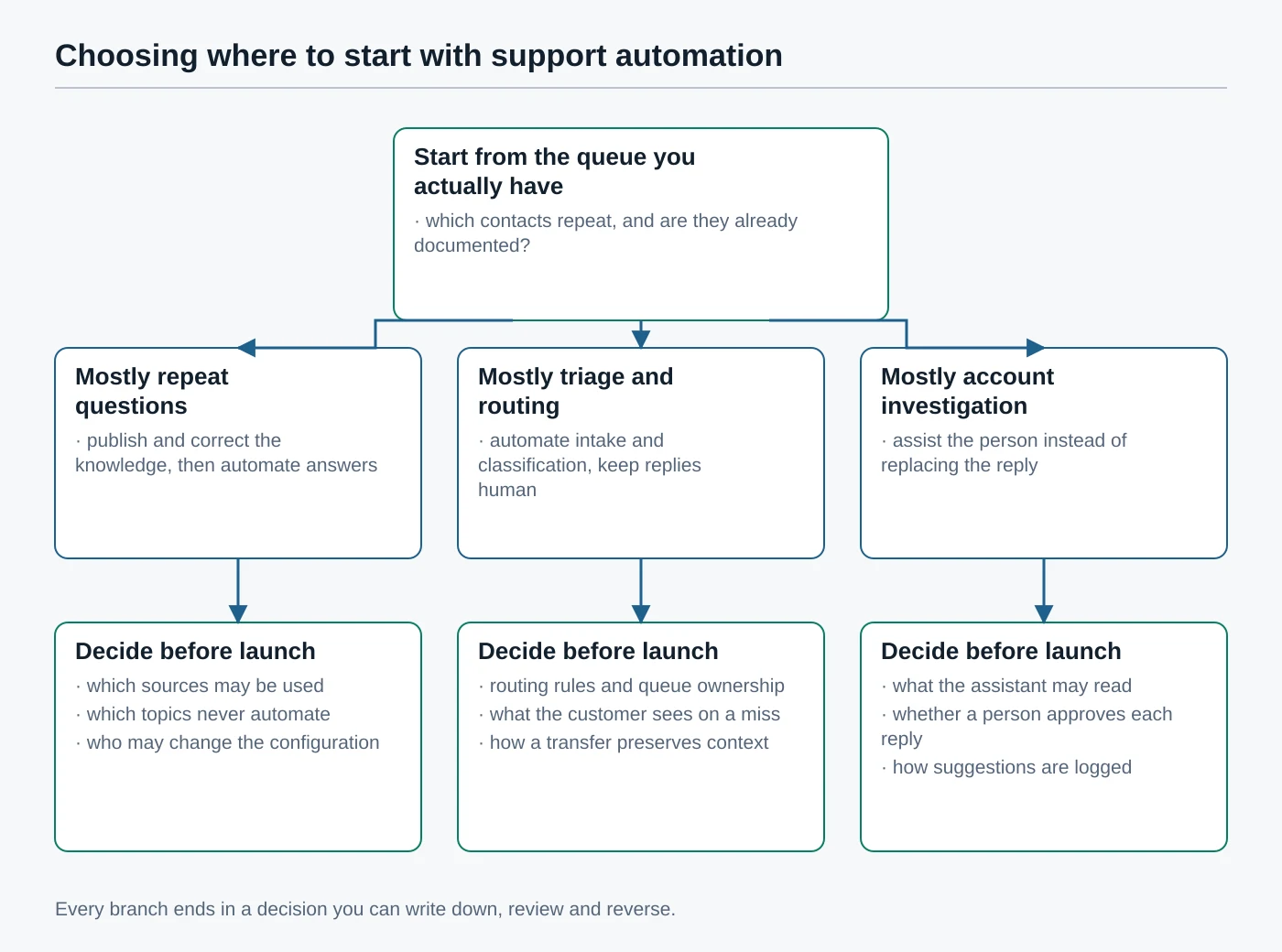
Atlas editorial assessment: for a small team, automated intake, classification and routing are usually the lowest-risk starting points, because a mistake produces a delay you can see in your queue rather than a wrong answer the customer acts on. Automated answering is worth it only where the answer is already written down and correct.
What should stay with a person
Some conversations should never be handled by automation, and the reason is rarely that the question is hard. It is that the request is ambiguous, that it needs an exception to your own policy, or that acting on it cannot be undone. Vendor documentation reflects the same instinct. Freshdesk’s handover article names sensitive topics such as billing, refunds and account access as typical triggers for transferring to a human agent, alongside an explicit customer request and anything outside the configured scope of the AI agent.
- Ambiguity. A request with more than one plausible reading. Zendesk documents disambiguation, where the AI agent asks for specifics before answering, but a clarifying question is not the same as resolving a genuinely unclear request.
- Exceptions. Anything that departs from your published policy is a judgement about your business, not a lookup.
- Emotional or sensitive conversations. Intercom documents that its AI agent escalates by default when a customer clearly asks for a human, when strong frustration or anger is detected, and when the customer is stuck in a repetitive loop.
- Account-specific investigation. Reconstructing what happened to one customer’s order or subscription usually needs several systems and a person who can read between them.
- Irreversible or high-impact actions. Refunds, cancellations, deletions and anything with a legal or contractual consequence belong with someone accountable for the outcome.
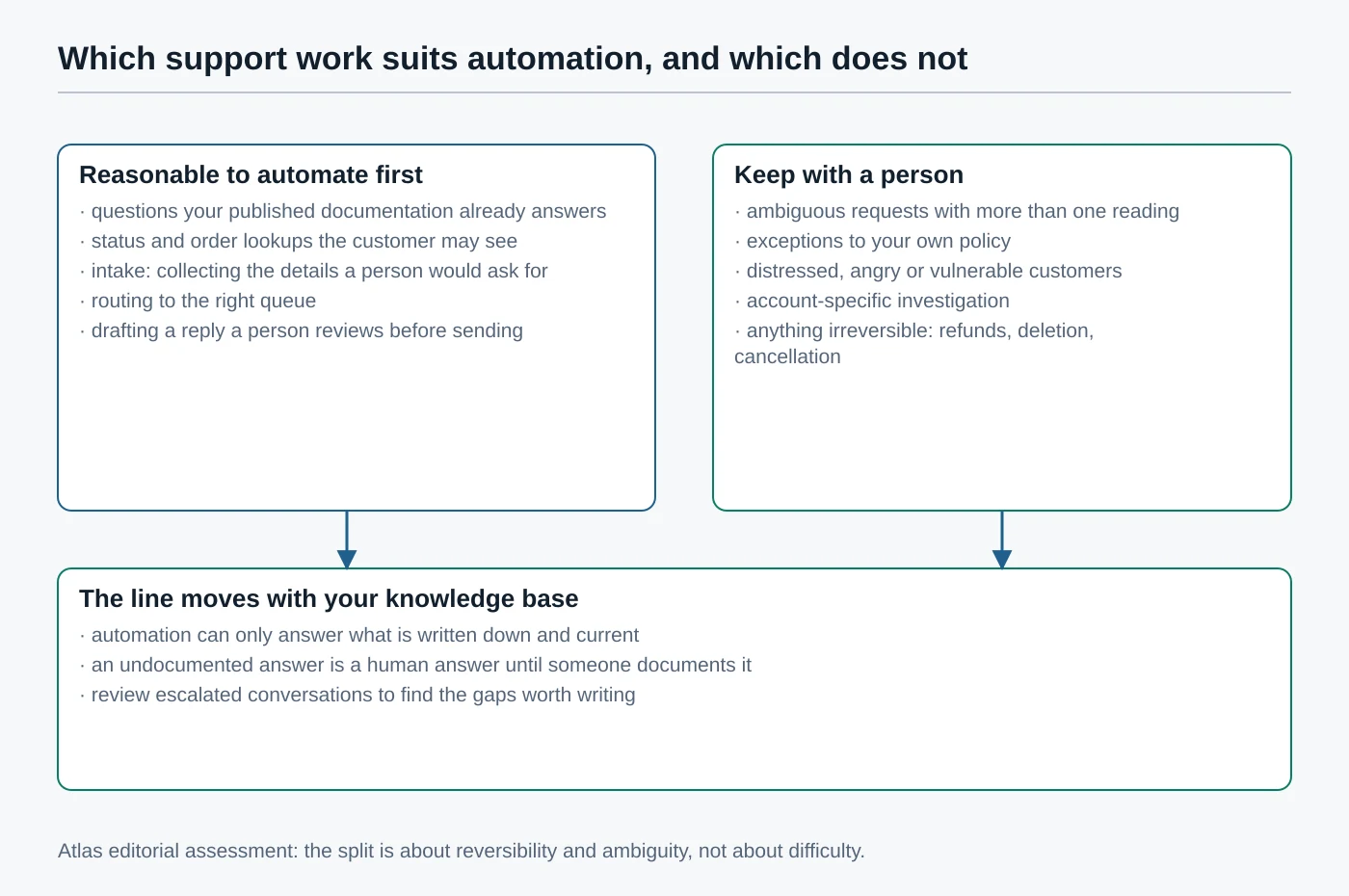
One boundary is worth stating plainly because it is the one small businesses cross by accident: automation can only answer what is written down in a source the tool can actually reach. Freshdesk documents that its AI agents learn from URLs, uploaded files, solution articles, custom question-and-answer pairs and connected apps, with published limits on each type, and that private or restricted knowledge base articles are excluded, in its guide to building and curating knowledge. If the answer lives only in a colleague’s head, it is a human answer until somebody writes it down.
Nothing in this article is advice about medical, legal, insurance or tax matters, and Atlas does not recommend automating conversations of that kind. Where your sector is regulated, the obligations sit with you regardless of which tool sent the message. The UK regulator publishes guidance on artificial intelligence and data protection and advice aimed at small organisations, and the EU’s Artificial Intelligence Act as published in the Official Journal sets out transparency duties that apply to systems interacting directly with people.
Define your measurements before you compare systems
Most comparisons of automated and human support collapse because the two paths are measured differently. A rating collected from customers who reached a person cannot be read against a rate calculated by the platform on conversations that never reached one. Before you compare anything, write down what each measurement means in your business.
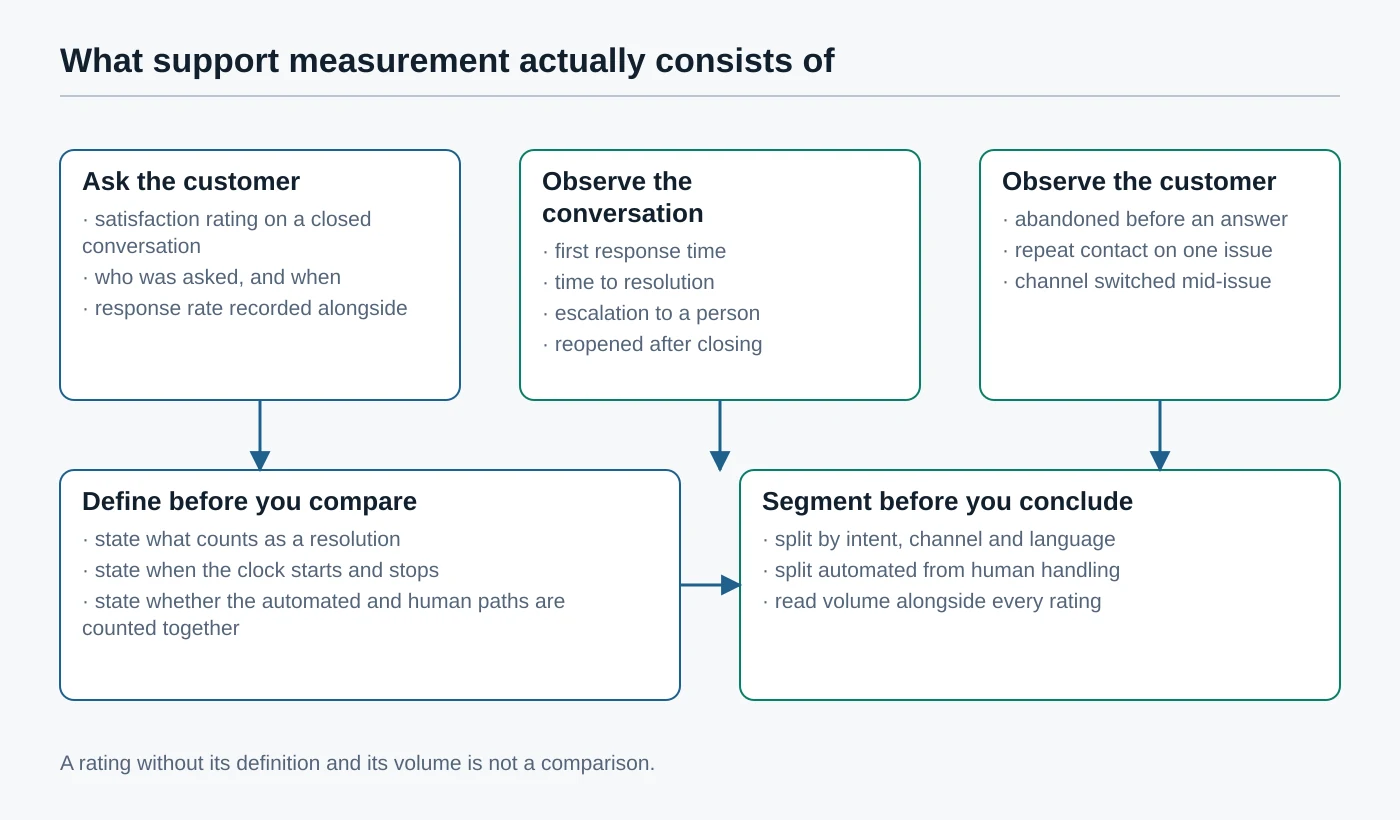
- Satisfaction rating. A rating given by a customer on a conversation, with the timing and the audience decided by configuration. Zendesk describes the customer experience of its satisfaction survey for email and messaging in its CSAT documentation; Intercom documents conversation ratings in its customer satisfaction article; Freshdesk documents survey setup and sending in its CSAT module article; HubSpot documents survey creation in its customer satisfaction survey guide. Always record the response rate next to the rating.
- First response time and resolution time. State when the clock starts and stops, and whether an automated reply counts as a first response. If it does, the number stops being comparable with your previous year.
- Escalation. The share of conversations that moved from automation to a person. Intercom’s reporting template includes escalation rate among its AI agent metrics, per its AI agent reporting documentation.
- Automated resolution. Vendor-specific and worth reading closely. Zendesk defines an automated resolution as a customer request resolved without escalation to a human agent, verified by a large language model, and uses it as the billing unit, in its automated resolutions documentation.
- Reopened conversations. A closed case that comes back is the cheapest available signal that an answer was wrong.
- Abandonment and repeat contact. Customers who leave without an answer, or who contact you twice about one issue, rarely appear in a satisfaction score at all.
Atlas editorial assessment: read escalation and abandonment together, and treat a fall in escalation with a rise in repeat contact as a warning rather than an improvement. Every vendor reports its own automation metric with its own definition, so those metrics belong inside one platform over time and not in a comparison across platforms. We publish no satisfaction or containment figures here because none of the four vendors documents a figure that would be valid for your queue.
Five support approaches, judged only on what is documented
These five are presented in no order of merit. Each entry separates what the vendor documents from the Atlas editorial assessment, and none of them is scored, ranked or labelled a winner. Where documentation does not establish something, the entry says so instead of guessing.
Zendesk AI agents inside Zendesk Suite
Documented vendor facts. Zendesk documents AI agents that use agentic AI across messaging, email and voice channels, describing generative procedures written as business policies, adaptive reasoning that asks follow-up questions for missing information, disambiguation of vague requests, and conversation logs that show the reasons behind the agent’s actions. The same page lists current limitations, including no rich-text formatting in generative procedures and no support for knowledge-source search rules within them, and describes channel differences such as escalations on the email channel being triggered by customer request, procedures or unsupported scenarios. Knowledge sources are connected help centres or external content brought in by crawler or connector, and Zendesk notes that external sources are searched as of the last sync, usually every day, whereas a connected help centre is searched live. Restricted help centre content is respected by permission, so an unauthenticated customer receives answers built only from public articles. Zendesk documents intelligent triage for intent, language and sentiment prediction, omnichannel routing for assignment, business rules through triggers, administration of messaging AI agents in its management article, and a public API reference.
Atlas editorial assessment. This is the most explicit documentation of the four about how automation is metered and audited, which matters more than feature lists once real conversations start flowing. The live-versus-synced distinction for knowledge sources is the detail we would design around: if your answers change often, keep them where they are read live.
Intercom with Fin AI Agent
Documented vendor facts. Intercom documents Fin as an AI agent that resolves questions autonomously and escalates to a human teammate, with default escalation when a customer clearly asks for a human, when frustration or anger is detected, and when a customer repeats themselves in a loop. It documents an offer-to-escalate behaviour, and states that escalation guidance and escalation rules override the default behaviour, and that Fin will not offer escalation twice in a row. Knowledge is managed from a sources page covering native articles and snippets, synced or imported website content, PDFs and third-party knowledge tools, with a table showing which source types Fin, Copilot and the help centre can each use; Intercom recommends maintaining content natively because native articles are ingested almost immediately while external public URLs update weekly. Routing after escalation is handled through workflows, documented in its Fin in workflows article and its team inbox routing article. Reporting includes deflection rate, resolution rate, involvement rate, answer rate, escalation rate and a customer experience score, and there is a separate surveyed CSAT report. Access is controlled through teammate permissions, and a REST API reference is published, along with guidance on adding content for Fin and a general explanation of the product.
Atlas editorial assessment. The escalation documentation is the most specific we reviewed, and specificity here is worth paying for: knowing exactly when a product hands over lets you write a policy your team can rehearse. The recommendation to keep content native is a real constraint if your documentation currently lives elsewhere.
Freshdesk with Freddy AI agents
Documented vendor facts. Freshdesk documents its AI capabilities for ticketing in a Freddy AI overview and configures automated conversations in AI Agent Studio. Handover settings include transfer to a human agent, with sample queries or topics that trigger escalation, a message displayed before the transfer, translations for that message, optional collection of customer details first, automatic resolution of conversations after a defined period of customer inactivity, and separate handling for conversations that arrive outside business hours. Knowledge types are documented with explicit limits: web URLs, uploaded files, published solution articles, custom question-and-answer pairs, and content in connected apps such as Google Drive or SharePoint, with private or restricted articles excluded and non-text elements ignored. Freshworks also publishes guidance on writing knowledge content for AI answering, advanced automatic routing, an automation rules overview, role-based access through agent roles and custom roles, conversational insights, satisfaction reporting in analytics and an API reference.
Atlas editorial assessment. The handover configuration is the most operationally minded of the four, particularly the out-of-hours branch and the published knowledge limits, which let you check in advance whether your documentation even fits. Automatic resolution after inactivity keeps queues tidy but will flatter any measurement that counts resolutions, so exclude it deliberately when you review.
HubSpot with the Breeze customer agent
Documented vendor facts. HubSpot documents a customer agent that answers customer questions from your content, with an overview and a setup guide. Its handoff process is documented separately: you manage how and when the agent hands conversations to a person across channels from one place, create custom handoff guidelines, and can choose to transfer immediately to a live human agent. The customer agent is available on professional and enterprise editions of its hubs and requires HubSpot credits, which the handoff documentation states on the page itself. A rule-based chatbot can pass a conversation to the customer agent, documented in its chatbot handoff article, and rule-based bots themselves are documented in its bot creation guide. Ticket routing, broader automation, permissions and reporting are documented in its help desk routing article, workflow documentation, user permissions guide, help desk analysis article and service analytics guide, with a developer API reference for the rest.
Atlas editorial assessment. The case for this option is rarely the automation itself; it is that support conversations, tickets and the customer record stay in the system your sales and marketing already use. If you are not already on HubSpot, that argument mostly disappears. The credit requirement and the edition floor are the two facts to confirm against your own subscription before planning anything.
A human help desk with deterministic rules and no generative answering
Documented vendor facts. Every platform above documents automation that involves no generative answering at all. Zendesk documents triggers as event-based business rules and omnichannel routing as queue-based assignment. Freshdesk documents automation rules and advanced automatic routing. HubSpot documents workflows and help desk routing, and rule-based chatflows that follow a scripted path. None of these needs a knowledge source, none produces a generated answer, and each behaves the same way every time it runs.
Atlas editorial assessment. This is the option most small teams should price first. Deterministic routing, business-hours messaging, macros and a well-maintained help centre remove a large part of the avoidable waiting in a small queue without introducing a system that can be confidently wrong. It is also the honest baseline for judging automation later: if you have never measured your queue under clean rules, you will not be able to attribute any change to the AI agent you add next. Our guide to implementing AI automation without breaking what already works takes the same position, and the same reasoning applies to automating client onboarding, where the deterministic steps are the ones worth doing first.
Decision matrix
The columns are documented characteristics, not judgements, and there are no scores, stars or winner column. Read the best-fit column as an Atlas editorial assessment of the situation each option suits, and read everything else as a summary of the vendor documentation linked in the Sources section.
| Approach | Automation surface | Knowledge model | Human handoff | Admin control | Measurement | Best-fit situation |
|---|---|---|---|---|---|---|
| Zendesk AI agents | Messaging, email and voice, plus triage and routing | Connected help centres searched live; external sources searched as of the last sync | Escalation by customer request, dialogue or procedure; unsupported scenarios escalate on email | AI agent administration per channel, plus triggers and routing rules | Automated resolutions verified by a language model, plus satisfaction surveys | A team that wants automation metering and conversation logs it can audit |
| Intercom with Fin | Messenger, email and voice, with workflows after escalation | Native articles and snippets ingested almost immediately; external public URLs update weekly | Default escalation on human request, detected frustration or repetition; rules and guidance override defaults | Teammate permissions and workflow configuration | Deflection, resolution, answer, escalation and involvement rates, plus surveyed satisfaction | A team whose priority is a tightly specified escalation policy |
| Freshdesk with Freddy | Chat and email AI agents configured in AI Agent Studio | URLs, files, published solution articles, custom question pairs and connected apps, with documented limits | Transfer on named triggers, with a displayed message and optional detail collection first | Agent roles and custom roles, automation rules and routing | Conversational insights and satisfaction reporting in analytics | A team that needs out-of-hours behaviour and knowledge limits stated up front |
| HubSpot Breeze customer agent | Chat and email channels inside the HubSpot help desk | Your HubSpot content, with the agent requiring credits and a professional or enterprise edition | Centralised handoff guidelines, with immediate transfer to a live agent available | HubSpot user permissions, workflows and help desk routing | Help desk analysis and the service analytics suite, plus feedback surveys | A business already running sales and marketing in HubSpot |
| Human help desk with deterministic rules | Triggers, automation rules, workflows and scripted chatflows only | A maintained public help centre, with no generative answering | Not applicable, because every reply is written by a person | Rule and role administration in whichever help desk you already pay for | Your own definitions, measured on one consistent path | A small queue that has never been measured under clean rules |
How each option is actually purchased
Support automation is rarely priced like the rest of your software, because two meters run at once: seats for the people, and something usage-based for the automation. We deliberately publish no figures here. List prices change, they vary by region and billing term, and a frozen number is worse than no number. The table records the shape of each commercial model and points to the page where the current terms are published.
| Approach | Subscription | Seat component | Usage component | Where terms are published |
|---|---|---|---|---|
| Zendesk AI agents | Suite or Support plan tiers | Charged per agent | Automated resolutions, allocated per plan with the option to add more or pause AI agents to avoid overage | Zendesk pricing and the automated resolutions article |
| Intercom with Fin | Essential, Advanced or Expert plans | Charged per seat, with Lite seats included on higher plans | Charged per Fin outcome, with add-ons priced separately | Intercom pricing |
| Freshdesk with Freddy | Freshdesk or Freshdesk Omni plan tiers | Charged per agent | AI agent capability depends on plan, with sessions and add-ons documented on the pricing page | Freshworks pricing |
| HubSpot Breeze customer agent | Service Hub professional or enterprise editions | Charged per seat, with seat types differing by access | HubSpot credits consumed by the customer agent | HubSpot service pricing and the handoff documentation |
| Human help desk with deterministic rules | Whichever help desk plan you already hold | Charged per agent on every platform reviewed here | None, because no generative answering is metered | The same vendor pricing pages listed above |
Two habits keep this affordable. Model the usage meter against your real conversation volume rather than an optimistic automation rate, and check whether the vendor documents a way to cap it: Zendesk documents both adding automated resolutions and pausing AI agent functionality to prevent overage. Then review the whole subscription on a cycle, which is the same discipline as a periodic software spend audit.
Design the handoff before you deploy anything
The handoff, not the answer quality, is what customers remember about automated support. A confident wrong answer is annoying; being trapped in a loop with no visible way to reach a person is what turns a support contact into a complaint. Decide the following before the automation goes live, and write each decision down where your team can see it.
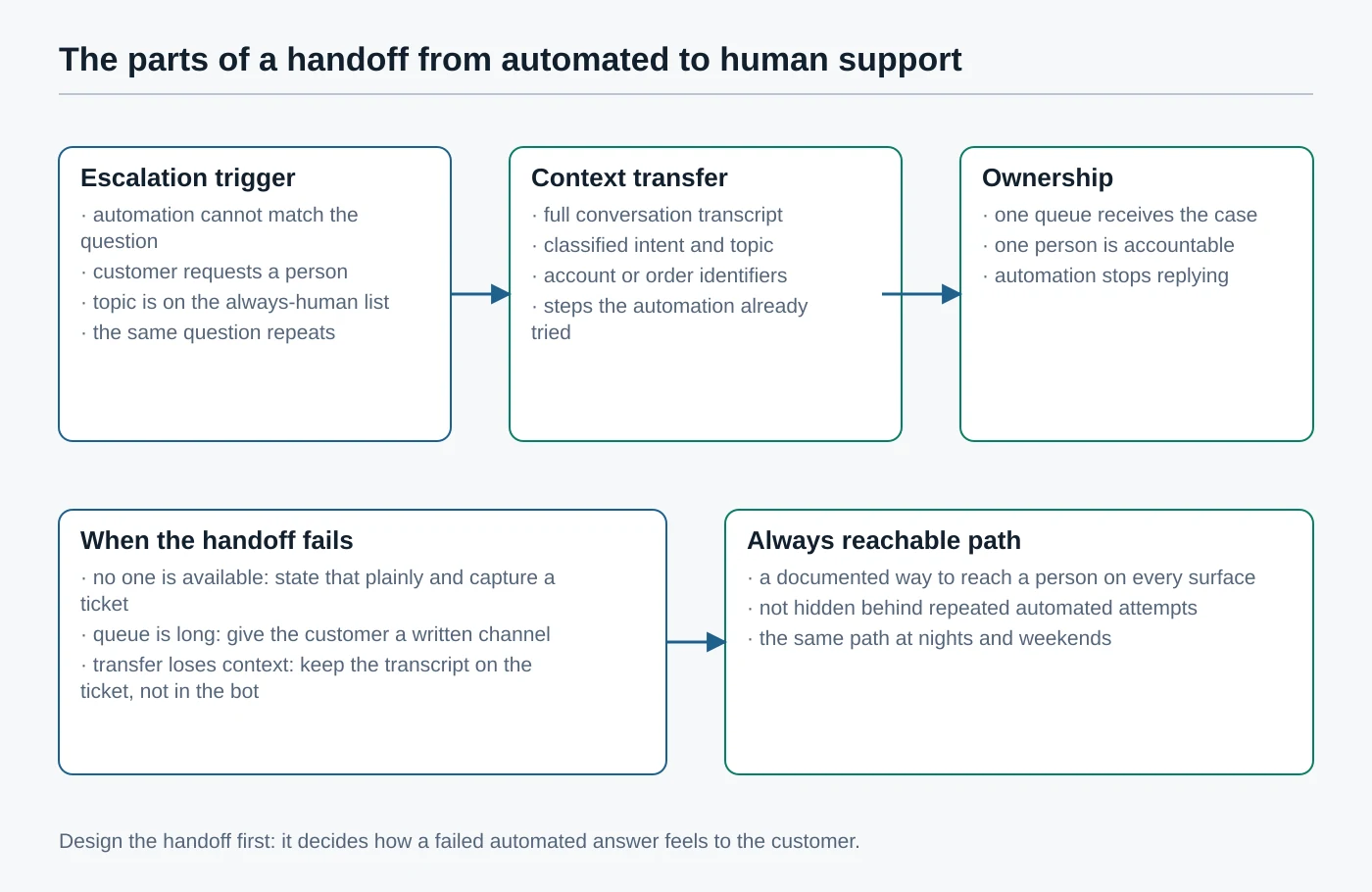
- When escalation happens. Name the triggers explicitly, including the topics that always go to a person. Freshdesk implements this as sample queries or topics the AI agent should skip; Intercom implements it as escalation rules and natural-language escalation guidance that override the default behaviour.
- What context travels. The transcript, the classification, the customer’s identifiers and the steps automation already tried. Freshdesk documents optionally collecting customer details before the transfer, which is only useful if the person receiving the conversation can see them.
- Who owns the conversation next. One queue and one person. Intercom documents workflow-based routing to a team inbox after escalation, and both Zendesk and HubSpot document routing rules for assignment.
- What the customer is told. Freshdesk documents a message displayed before transfer, with translations. Say plainly that a person is joining, and never imply an automated reply came from a colleague.
- What happens when the handoff cannot complete. Outside business hours, or with nobody available, the customer needs a written channel and an honest statement rather than a queue that looks live. Freshdesk documents a separate out-of-hours branch for exactly this.
- How a person is reached without a fight. Keep one documented route to a human on every surface, and do not hide it behind repeated automated attempts.
Atlas editorial assessment: test the handoff before you test the answers. Send five real requests through the automation, including one deliberately ambiguous one and one angry one, and watch what a colleague receives at the other end. If the transcript does not arrive, or arrives without the customer’s identifiers, fix that before tuning a single knowledge article.
A hybrid operating model that survives contact with customers
Once the boundary and the handoff are decided, the operating model is straightforward. A request arrives and is classified. Automation handles it only if the request falls inside the safe set. An exception check runs before anything is sent. Anything failing that check goes to a person with full context, and everything is recorded so the review has something to read.
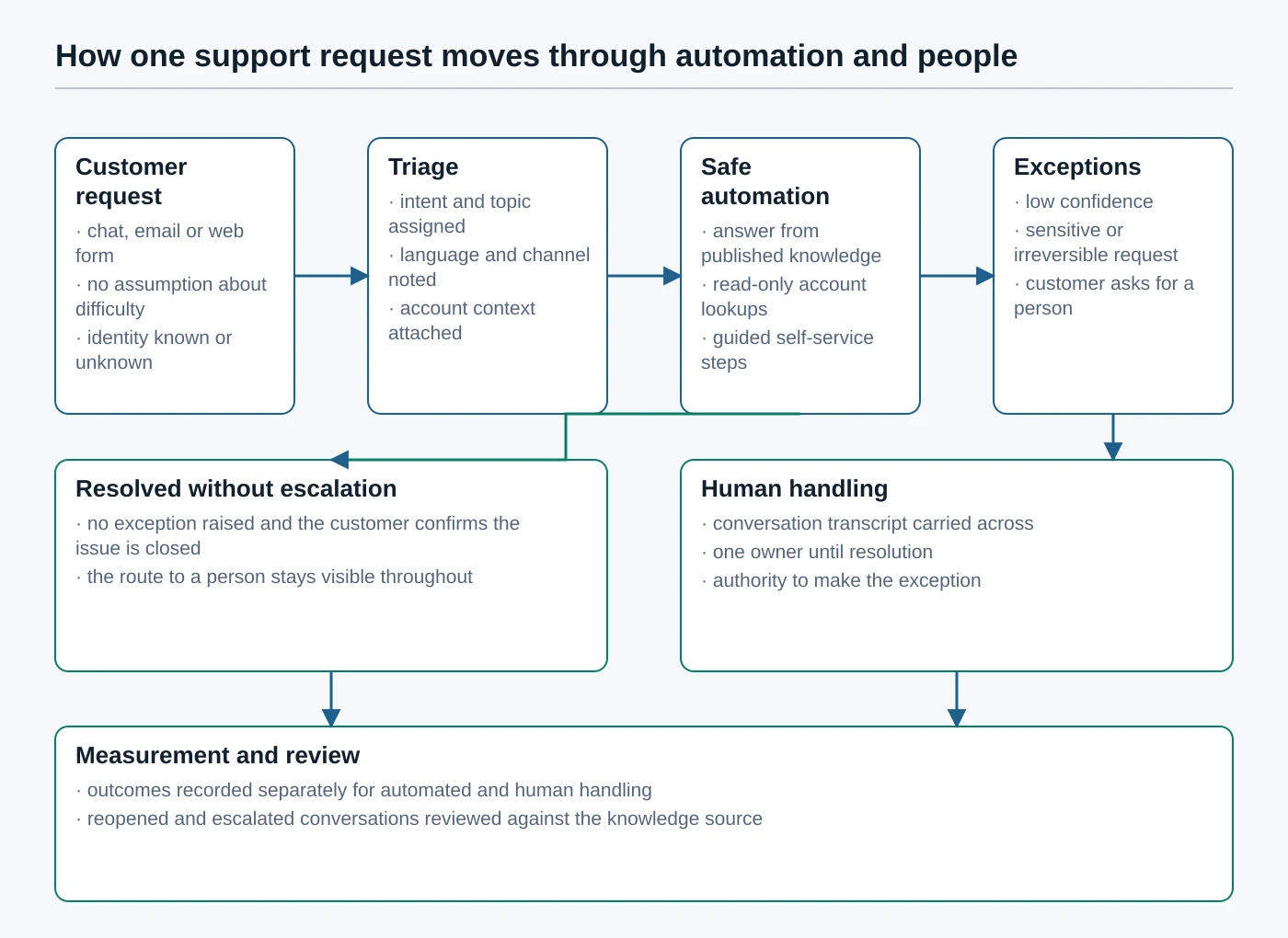
The exception check is the part teams skip, and it is the part that keeps the model honest. It asks three questions before an automated reply is sent: is the confidence adequate, is the topic on the always-human list, and has the customer asked for a person? A negative answer to any of them ends the automated path. Vendor documentation supports each of these as a configured behaviour rather than something you have to invent, and Intercom’s default behaviour of escalating on a repeated loop is a good template for the third.
The review loop closes the model. Read escalated and reopened conversations weekly, and treat every one as a question about your knowledge rather than about the model: was the answer written down, was it current, and was it reachable by the automation? Zendesk’s conversation logs, Intercom’s content performance reporting and Freshdesk’s conversational insights are all documented for this purpose. Atlas editorial assessment: the review is the compounding part of the work, and a small team that skips it ends up maintaining a system nobody trusts.
Implementation considerations, without invented timelines
We publish no implementation schedule, because the honest variable is your documentation rather than the software, and no vendor documents a schedule that would apply to your business. What we can list are the decisions that have to be made regardless of which product you choose.
- Knowledge quality first. Automated answering inherits whatever is wrong in your help centre. Freshworks publishes guidance on writing knowledge content for AI answering, and both Freshdesk and Zendesk document that restricted or private content is treated differently from public content.
- Permissions and ownership. Decide who may change the automation. Freshdesk documents agent roles and custom roles, Intercom documents teammate permissions, and HubSpot documents its permissions model in detail.
- Escalation policy in writing. The list of always-human topics should be a document your team agrees on, not a setting one person remembers configuring.
- Logging. Keep the automated turns, the classification and the reason for escalation. Zendesk documents conversation logs that expose the reasoning behind an agent’s actions.
- Measurement definitions. Write down what you count as a resolution and when the clock stops, before the first report is produced.
- Change review. Treat a knowledge edit as a change to a live customer-facing system, which is exactly how you would treat a change to a workflow automation between your business tools.
- Failure handling and human override. Any person on the team should be able to take a conversation away from automation, and it should be obvious how.
- Access and identity hygiene. Support tooling reaches customer data, so it belongs inside the same access controls as everything else, including single sign-on where you have it.
Limitations of this comparison
- This is a documentation review, not a live test. Nothing here should be read as a measurement of how any product behaves in your queue.
- Vendor capabilities, plan boundaries and pricing change, and several of the pages cited were themselves updated during 2026. Confirm anything that affects a purchase on the vendor’s current page.
- Implementation quality dominates outcomes. The same product, given clean documentation and a written escalation policy, is a different system from the same product given neither.
- Customer satisfaction cannot be attributed to automation or to people alone. Channel, wait time, expectation, the underlying problem and your own policy all move it.
- Public documentation does not expose every operational detail, and where a vendor does not document something we have said so rather than inferred it.
- The five approaches are not the whole market. They were selected because each publishes documentation detailed enough to compare honestly.
Frequently asked questions
Should a small business replace human support with AI?
No, and none of the four vendors reviewed here documents its product as a replacement. All four document escalation to a person as a core, configurable behaviour, which tells you how they expect the system to be run. The realistic goal is to remove avoidable waiting and repetitive answering so the people you have can spend their time on the conversations that need judgement.
What should an AI chatbot handle first?
Start with the questions your published documentation already answers correctly, and with intake and routing. Both have a visible failure mode and no irreversible consequences. Anything that would change money, access or a contract is not a starting point.
When should a conversation be escalated?
On an explicit request for a person, on detected frustration, on a repeated loop, on any topic you have placed on the always-human list, and whenever the request needs an exception to your own policy. Intercom documents the first three as default behaviour, and Freshdesk documents the topic list as a configurable trigger.
How should a satisfaction score be interpreted?
As a survey result with a response rate, not as a measurement of the whole queue. Record who was asked, when they were asked and how many replied, and segment automated from human handling before drawing a conclusion. A score that moves while the response rate also moves has told you very little.
Can automation rates be compared across vendors?
Not reliably. Each vendor defines its own metric: Zendesk counts automated resolutions verified by a language model and uses them for billing, while Intercom reports separate deflection, resolution, answer and escalation rates. Those numbers are useful for tracking one platform over time and misleading when placed side by side.
How should pricing be evaluated when the automation is metered?
Model the seat cost and the usage meter separately, then run the usage meter against your actual conversation volume and your worst month rather than your average one. Check what the vendor documents about limits and caps, and confirm which edition or plan the automation requires before comparing anything.
Do customers have to be told they are talking to a machine?
Transparency obligations exist and depend on your jurisdiction and use case, so treat this as a question for your own adviser rather than for a vendor help centre. The EU Artificial Intelligence Act in the Official Journal and the UK regulator’s artificial intelligence guidance are the primary references to start from. Atlas editorial assessment: say plainly that the customer is talking to an automated assistant, whatever the minimum requirement turns out to be.
How to decide
There is no winner between automation and people, and any article that names one is selling something. What exists is a sequence. Write down which topics may never be automated. Fix and publish the answers you expect automation to give. Design the handoff, including what happens when nobody is available. Define your measurements before the first report. Then automate the narrow set of jobs that are safe, meter what they cost, and review the escalations every week.
Choose the platform that documents the parts you will have to operate. If auditable metering matters most, Zendesk documents it most fully. If a precise escalation policy matters most, Intercom’s documentation is the most specific. If out-of-hours behaviour and knowledge limits matter most, Freshdesk states them plainly. If your customer record already lives in HubSpot, the integration argument usually outweighs the feature comparison. And if your queue has never run under clean deterministic rules, do that first, because it is the only baseline that will let you judge anything you add later. The same principle runs through our work on choosing data tools on documented behaviour rather than marketing claims and on AI assistants inside tools your team already uses.
Sources
Every product statement above traces to one of the following pages, each reachable when this article was verified in September 2026. Regulator and legislative pages are listed for the transparency and data-protection points.
- Zendesk — AI agents with agentic AI, connecting knowledge sources, automated resolutions platform, intelligent triage, omnichannel routing, triggers, agent copilot, managing messaging AI agents, satisfaction ratings, pricing, API reference.
- Intercom — Fin AI Agent explained, knowledge sources, adding content for Fin, escalation guidance and rules, Fin in workflows, routing to a team inbox, teammate permissions, AI agent reporting, conversation ratings, surveyed satisfaction reporting, pricing, REST API reference.
- Freshworks and Freshdesk — Freddy AI for ticketing, building and curating knowledge, writing knowledge content for AI, handover settings, advanced automatic routing, automation rules, agent roles, custom roles, conversational insights, satisfaction survey setup, satisfaction reporting, pricing, API reference.
- HubSpot — understanding the customer agent, setting up the customer agent, the handoff process, passing a rule-based bot to the customer agent, creating a bot, help desk routing, workflows, user permissions, help desk analysis, service analytics, satisfaction surveys, service pricing, API reference.
- Regulators and legislation — EU Artificial Intelligence Act, Official Journal, ICO guidance on artificial intelligence and data protection, ICO advice for small organisations.