Workflow automation platforms are usually compared on two things that matter least: how many apps they claim to connect, and the headline price of their cheapest paid plan. Neither predicts what a small business will actually experience. What predicts that is narrower and duller — how the platform counts the work you give it, what it does when a step fails at three in the morning, who is allowed to build something that writes to your customer records, and whether the answer to a problem is a support ticket or a server you now own.
This guide compares four approaches: Zapier, Make, n8n and Microsoft Power Automate. Everything factual below was read on the vendor’s own documentation or pricing pages in September 2026, and every source is linked at the end. Where a vendor does not document something, this article says so rather than filling the gap with an estimate. There is no overall winner, because the four differ less in capability than in the kind of company they suit, and that depends on software you have already bought and maintenance capacity you may not have.
What a workflow automation platform actually does
Every platform here does the same mechanical thing. It watches for an event, decides whether that event matters, performs one or more actions in other systems, and records what happened. Zapier’s own vocabulary describes this as a trigger followed by one or more actions in a Zap workflow; Make calls the same construct a scenario built from modules; n8n calls it a workflow built from nodes; Microsoft calls it a cloud flow. The naming differs, the shape does not.
The first fork is how the event reaches the platform. Zapier documents exactly two kinds of trigger — polling and instant — and states plainly that the trigger type is fixed and cannot be changed, because it is a property of the integration rather than a setting you control. A polling trigger asks the source application whether anything new has appeared; Zapier’s help centre notes that the polling interval varies between one and fifteen minutes and depends on your plan, and its pricing page publishes the interval for each tier. An instant trigger is a webhook: the source application pushes the event, which Zapier’s platform documentation describes as a REST hook trigger with subscribe and unsubscribe endpoints, in contrast to polling triggers on a check interval.
Make documents the same distinction from the scheduling side. A scenario can run at regular intervals, once daily, on weekdays, weekly, monthly, on specified dates, or on demand, with a fifteen-minute interval as the default and the minimum interval dependent on the plan. Where a scenario uses an instant trigger, Make documents a default limit of one hundred runs per minute, which is configurable. Microsoft’s documentation splits cloud flows into automated, instant and scheduled trigger types. n8n’s Webhook node documents something the other three do not expose so bluntly: separate test and production webhook URLs, where the production URL only registers once the workflow is active — a detail that explains a large share of first-week confusion for new n8n users.
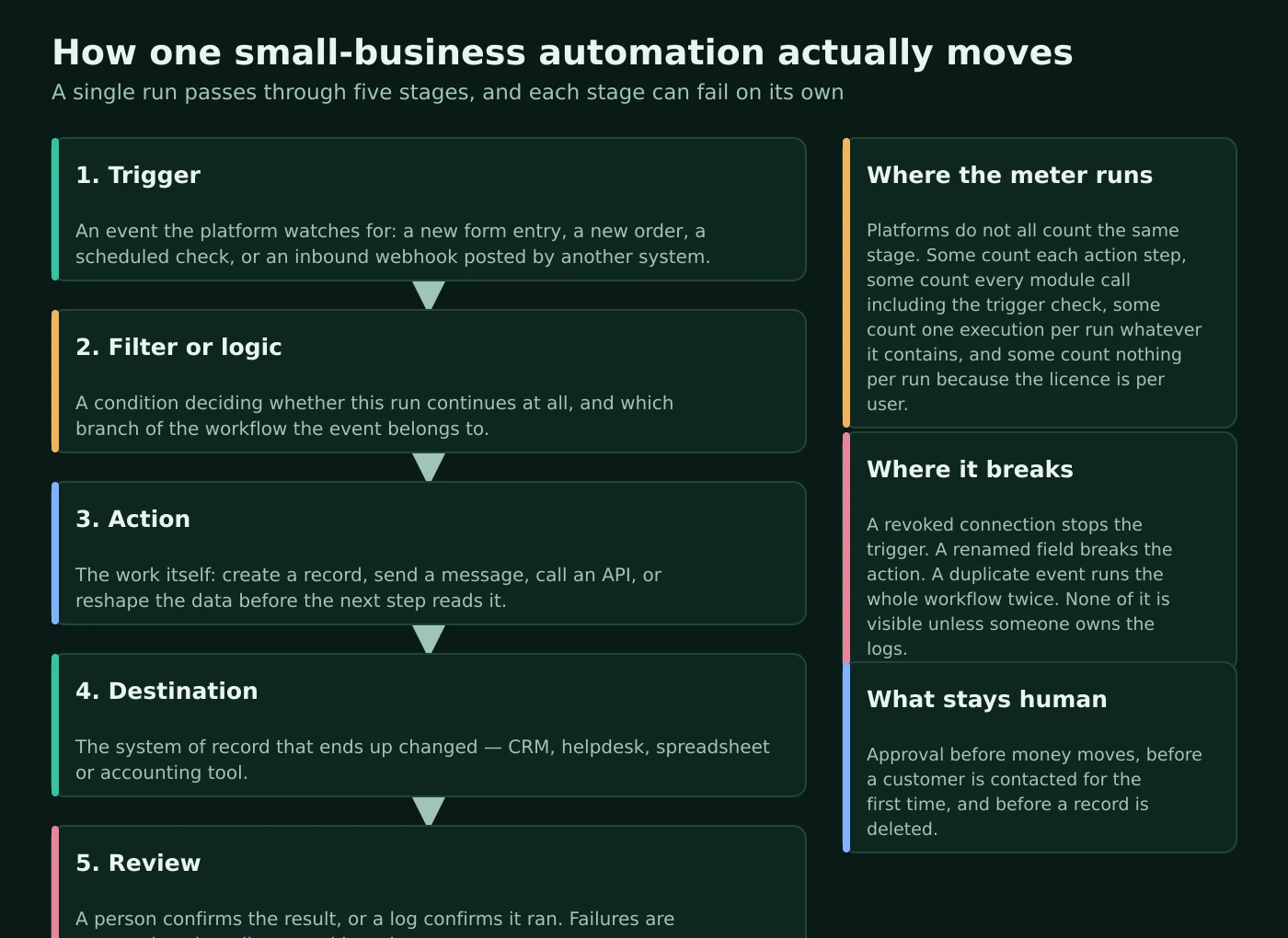
Atlas editorial assessment. The stage that decides whether an automation is worth building is the last one, and no vendor sells it. An automation that nobody owns is a liability rather than an asset: it writes to your systems, it fails silently, and the first person to notice is usually a customer. Before comparing platforms, decide who reads the failure notices. Our guide to implementing automation across small-business workflows treats that ownership question as the first design decision rather than an afterthought.
How each platform counts your usage, and why the bills differ so much
This is the single largest source of unpleasant surprises, because all four platforms sell “runs” and none of them means the same thing by it.
Zapier counts tasks. Its pricing page publishes an explicit exclusion list: steps that do not count as a task include Zapier Tables, Zapier Forms, Filter by Zapier, Formatter by Zapier, Path by Zapier, Delay, Looping, Sub-Zap, Digest, Zapier Manager and Storage. The Paths documentation restates the important half of that: paths and filter steps do not count toward task usage, and only action steps inside a running branch consume tasks. Zapier also states on its pricing page that its newer capabilities follow the same model, noting that AI steps, code and its SDK now all follow the same task-based pricing, and that one Zapier MCP tool call uses two tasks from the plan quota rather than being billed separately.
Make counts operations, then converts them to credits. Make defines an operation as one module run to process or check data, with the count depending on how many bundles a module processes — so a module acting on many records can consume many operations in a single scenario run. Trigger modules are documented as an exception that runs once per scenario execution regardless of how many bundles it returns. Credits are the billing unit layered on top: for non-AI apps, Make documents that one operation equals one credit by default, and it distinguishes fixed usage from dynamic, token-based usage for AI features. Its help centre also separates the two ideas deliberately, explaining that operations show platform activity while credits show spend. Helpfully, Make documents that its five error handlers do not themselves consume operations.
n8n counts whole executions. Its pricing page states that pricing is based on monthly workflow executions regardless of complexity, that plans include unlimited users and workflows and every integration, and — in its own words — that you pay for full executions rather than for each step. A workflow with forty nodes and a workflow with three nodes cost the same to run once.
Power Automate counts licences, then applies request limits. Microsoft’s pricing is per user or per flow rather than per run, and the constraint appears instead as platform request limits. Microsoft’s limits documentation describes four performance profiles tied to licence type, publishing Power Platform requests per twenty-four hours of 10,000 for the lowest profile, 200,000 and 500,000 for the middle profiles and 10,000,000 for the highest, alongside a documented ceiling of 100,000 platform requests per five minutes. Its licensing FAQ adds that assigning a Process licence to a cloud flow grants premium connector access and a dedicated daily entitlement of 250,000 actions per licence, and that the flow uses that licence’s limits regardless of who runs it.
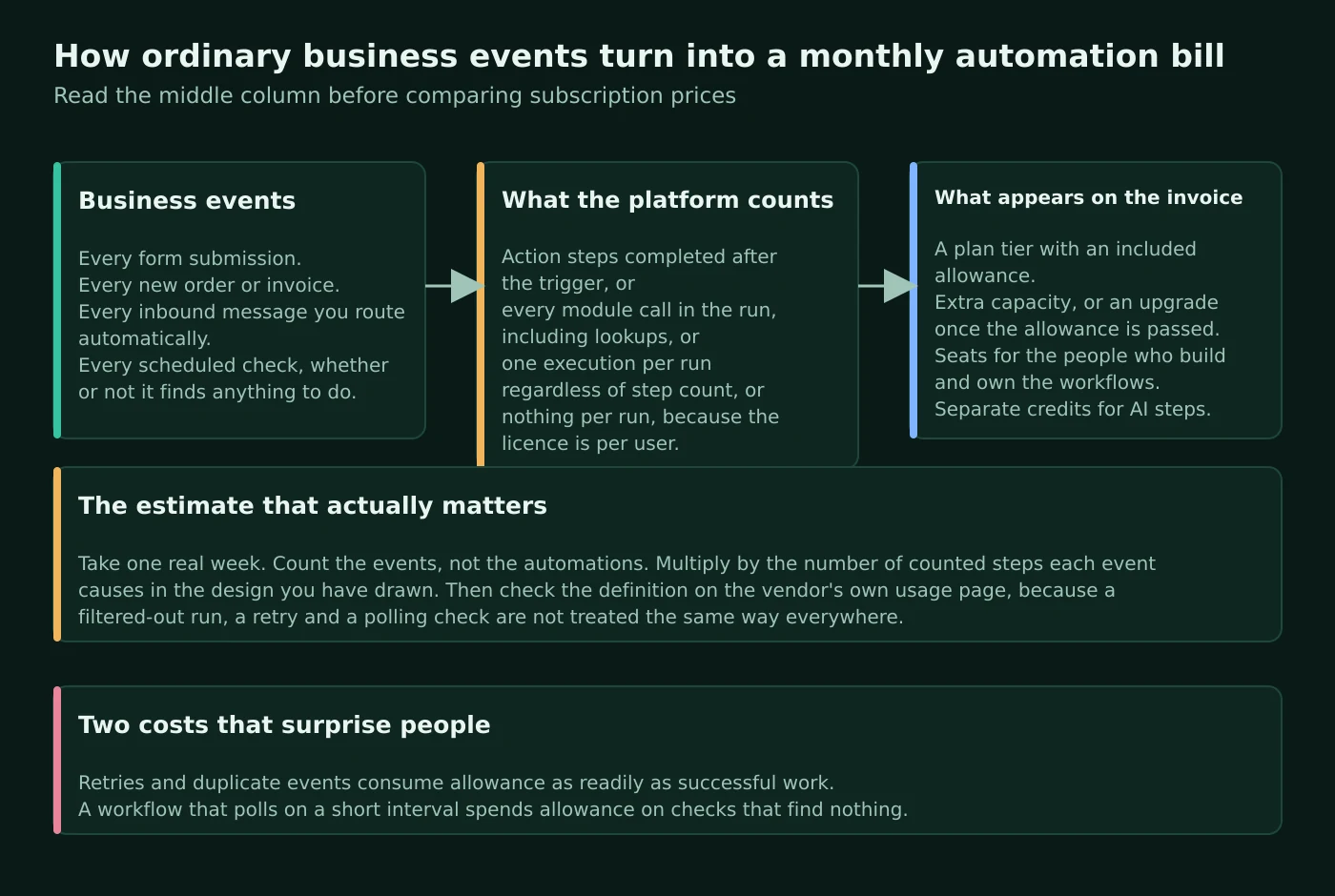
Atlas editorial assessment. Do the arithmetic on events rather than on automations. Take one ordinary week, count the real events — form submissions, orders, inbound messages, scheduled checks — and then multiply by the number of metered steps your intended design causes on the platform you are considering. Under Zapier’s model a design with heavy filtering and formatting is cheap relative to its step count; under Make’s model a module that iterates over many records is expensive relative to how simple it looks on the canvas; under n8n’s model complexity is nearly free but each trigger event costs the same as any other; under Microsoft’s model the question is not volume at all but who is licensed. A disciplined software spend audit is the right place to hold that conversation, because automation licences behave like every other subscription that nobody re-reads after the first renewal.
Zapier: breadth of integrations and the smallest amount of engineering
What Zapier’s documentation establishes
Zapier’s published plan structure is Free at $0 per month, Professional starting at $19.99 per month, Team starting at $69 per month, and Enterprise on request, with monthly or yearly billing and a selectable task tier that its pricing page shows running from one hundred tasks a month up to two million or more. Seats are part of the tier: the pricing page lists one seat on Free, one on Professional, twenty-five on Team and unlimited on Enterprise. The Free plan is documented as including Zap workflows, Tables and Forms with one hundred tasks per month, unlimited Zap workflows, two-step workflows and Zapier Copilot, while multi-step workflows are a paid-plan feature.
Integration breadth is Zapier’s central claim and it publishes numbers in more than one place: its app directory states that Zapier connects more than ten thousand apps, while its pricing page and its help-centre introduction to apps both describe more than nine thousand. Building blocks documented on the pricing page include Filter, Paths, Formatter, Delay, Looping, Sub-Zap, Digest, Storage, webhooks and Code by Zapier, with included code runtime per step rising by plan from one second on Free to thirty seconds on Professional and Team and two minutes on Enterprise. Branching is documented as conditional logic that filters and splits a workflow and is listed as available on every plan including Free.
Operationally, Zapier documents a run-status vocabulary that is unusually explicit — delayed, errored, filtered, handled error, on hold, needs review, running, safely halted, scheduled and skipped — and a Zap history view for filtering runs by date, name, app, folder, owner and status. Failures can be replayed manually, and its documentation notes that on the Free plan manual replay is limited to errored runs while other statuses require a paid plan. Automatic retry of failed steps is documented as an account-wide setting for Professional plans and higher, alongside a default behaviour of automatically pausing a Zap that errors persistently over a rolling seven-day window. Zap history retention is documented as between twenty-nine and sixty-nine days, with Enterprise administrators able to shorten retention to a customised window and delete history.
Atlas editorial assessment: Zapier
Zapier is the correct default for a company whose software estate is a long tail of separate cloud tools and whose automation work will be done by an operations person rather than a developer. The reason is not the app count, and few businesses ever use more than a small share of that catalogue. What matters is that the fiddly parts — filtering, reformatting, delaying, deduplicating — are documented as not consuming tasks, which means careful design is rewarded rather than penalised. The constraint to plan around is the seat structure. One seat on Professional is fine until the person holding it goes on holiday, and the jump to a plan with twenty-five seats is a real budget decision rather than a rounding error. Our earlier comparison of Zapier and Make for small-business automation looks at that trade-off with fewer platforms in the frame.
Make: visual data handling for workflows that are genuinely complicated
What Make’s documentation establishes
Make’s differentiator is documented in its flow-control modules rather than in its app list. A router splits a scenario into multiple routes — documented as running sequentially rather than in parallel, with configurable ordering and a fallback route for events matching nothing else. Filters sit between modules and test each bundle with operators covering existence, text, numbers, dates and arrays. An iterator converts an array into a series of separate bundles, and an aggregator combines bundles back together. Make also documents app-specific and custom webhooks with a queue of up to ten thousand items, webhook logs retained for three days on standard plans and thirty days on Enterprise, and automatic deactivation of a webhook left inactive for five days.
Error handling is where Make’s documentation is the most precise of the four. It documents exactly five error handlers — Skip, Retry, Resume, Commit and Rollback — drawn as dotted routes on the canvas, and states that Rollback is the default when incomplete executions are disabled, stopping the scenario, reverting transactional changes and deactivating the scenario after repeated errors. Enabling incomplete executions — off by default — stores failed runs for later resolution instead, with the maximum stored count tied to your usage allowance. Make documents automatic retries with exponential backoff for rate-limit, connection and module-timeout errors specifically, and gives incomplete executions their own lifecycle of unresolved, pending, in progress and resolved, with resolved items deleted after a documented period.
Two documentation gaps are worth stating plainly. Make’s help centre does not publish plan prices — pages that mention plans link out to its main pricing site instead — and it does not document a self-hosted version of the platform. What it does document is an on-premises agent, an Enterprise feature that lets the cloud service reach applications and databases inside your own network. That is data access, not self-hosting: the engine still runs in Make’s cloud.
Atlas editorial assessment: Make
Make earns its place when the difficulty in your workflow is the data rather than the connection. Anyone who has tried to split a multi-line order into per-item records and then recombine the results will recognise the value of documented iterators, aggregators and a fallback route. The cost of that power is arithmetic: because operations scale with bundles processed, a scenario that looks small on screen can be expensive in a month with heavy volume, and Make’s own separation of operations from credits exists precisely because that relationship is not obvious. Read the operations documentation before designing anything that loops. The immutable data-centre choice at organisation creation is also worth a moment’s thought before the first click, particularly for companies with customers who ask where their data is processed.
n8n: the option that can run on your own infrastructure
What n8n’s documentation establishes
n8n’s published cloud plans are Starter at 20€ per month billed annually, Pro at 50€ per month, Business at 667€ per month, and Enterprise on request. The differences are documented in execution allowance and governance rather than in feature access at the node level: 2.5K executions a month on Starter, 10K on Pro and 40K on Business, with concurrency of five, twenty and higher respectively, and its pricing page stating that all plans include unlimited users and workflows and every integration. Saved executions and retention are also published per tier, with execution log retention documented as seven days, thirty days and unlimited across the range, and a free trial documented as one thousand executions with a three-minute timeout. Its integrations directory publishes a live count that stood at 2,147 integrations when this article was written, filterable by regular nodes, trigger nodes and core nodes.
Construction is node-based with documented flow-logic groups: branching with IF, merging with Merge or Compare Datasets, looping with Loop Over Items, waiting with Wait, sub-workflows via Execute Workflow, and error handling with Stop And Error and the Error Trigger. The Code node runs JavaScript in two documented modes — once for all items or once for each item — and its documentation notes that self-hosted users can enable external npm modules while cloud users cannot, with a small number of built-in exceptions. The same page states that the earlier Python-in-browser support is a legacy feature no longer supported in the current major version, which is the kind of detail worth reading before planning around it. AI work is documented through an AI Agent node that connects a chat model to tool sub-nodes, with the older agent-type setting deprecated and the first version of the node scheduled for removal in a future major release.
The licence deserves reading rather than skimming. n8n publishes a Sustainable Use Licence covering the main repository except enterprise-marked files, permitting free use, modification and derivative works for internal business, non-commercial and personal use, and free-of-charge redistribution for non-commercial purposes only. Its documentation gives concrete examples of what is not permitted, including white-labelling n8n and selling it, or hosting it and charging where the value derives substantially from n8n itself. For a small business automating its own operations, that is unambiguously allowed; for an agency planning to resell a hosted service, it is not.
Self-hosting is documented properly, including the parts vendors usually leave out. The Docker installation page states that self-hosting requires technical knowledge of servers, containers, scaling and security, and warns that mistakes can lead to data loss, security issues and downtime — recommending the hosted service for teams without that experience. Scaling is documented through queue mode, where a main instance handles triggers and webhooks and queues execution IDs through Redis for worker instances, with the same encryption key required across every node to access stored credentials. Growth of the execution database is managed by pruning, documented as enabled by default with configurable environment variables and per-workflow settings controlling what data is saved.
Atlas editorial assessment: n8n
n8n is the only one of the four that answers “our data cannot sit in a vendor’s cloud” without an enterprise negotiation, and its execution-based metering makes it the cheapest of the four for workflows that are long and intricate but not high-volume. The honest caveat is the one n8n itself publishes: self-hosting is an operations job. Upgrades, backups, Redis, database growth and an on-call expectation for the moment a business-critical workflow stops are all now yours. If nobody at the company will own that by name, the hosted plans are the cheaper choice even where the invoice is larger. The full-access default on API keys and the shared encryption-key requirement in queue mode are the two details most likely to bite a self-hosted deployment assembled in a hurry.
Microsoft Power Automate: the right answer when you already pay Microsoft
What Microsoft’s documentation establishes
Microsoft’s published pricing is per user or per flow rather than per run. Its pricing page lists a thirty-day free trial covering cloud flows and standard connectors, Power Automate Premium at $15.00 per user per month paid yearly, Power Automate Process at $150.00 per bot per month paid yearly, Power Automate Hosted Process at $215.00 per bot per month paid yearly, and a process-mining add-on at $5,000.00 per tenant per month paid yearly, available only alongside Premium. The page notes that prices shown are indicative and that the actual price appears at checkout. The Premium plan is documented as including cloud flows, attended desktop automation and process or task mining with a per-user data allowance, plus a small database and file entitlement in Microsoft’s data platform.
The licensing detail that matters most to a small business is the connector split. Microsoft’s licensing FAQ states that users on a free plan or a Microsoft 365 licence can access standard connectors only, while most other plans and trials grant premium connector access. Its pricing comparison draws the same line between “standard connectors only” and “standard, premium and custom connectors” — and the HTTP action sits on the premium side, which is why so many published tutorials quietly require a paid licence. The same FAQ documents that automated and scheduled flows run in the owner’s licence context while instant flows run in the invoking user’s context, that limits apply per context rather than being pooled, and that a Process licence is required for unattended desktop automation, for flows running under a service principal, for high action volume, or where a premium flow is invoked by multiple unlicensed users. Microsoft’s licensing overview adds that the limited data-platform entitlement inside some Microsoft 365 licences cannot be used to run standalone flows or premium connectors.
Construction is documented across cloud flows, desktop flows for robotic process automation and business process flows, which guide a person through an ordered set of steps rather than orchestrating unattended work. Control structures include scopes, which group related actions into a block for organisation and error handling, and custom connectors that wrap a REST or SOAP API with API key, OAuth or Microsoft Entra authentication. Concrete published limits include an apply-to-each item ceiling of five thousand items on the lowest performance profile and one hundred thousand elsewhere, loop concurrency default of one adjustable up to fifty, an Until loop default of sixty iterations to a maximum of five thousand, a flow run duration limit of thirty days, run retention in storage of thirty days from the run’s start, and a six-hundred-flow limit on the my-flows and team-flows tabs.
Atlas editorial assessment: Power Automate
If your business already runs on Microsoft 365 and your automations touch Outlook, SharePoint, Teams and Excel, starting anywhere else is an odd decision. The licence you hold may already cover the standard-connector work, and the governance apparatus is more thorough than anything the other three offer at comparable cost. The complexity is not technical, it is commercial: understanding which combination of user licences, per-flow licences, environments and connector tiers you need is a genuine research task, and the answer changes the moment a flow needs the HTTP action or has to run under a service principal. Budget time for reading the licensing documentation rather than assuming a per-user figure is the whole cost.
When branching is worth it, and when it is the beginning of a mess
All four platforms support conditional logic, and all four make it easy enough that small businesses reach for it too early. Zapier documents Paths as available on every plan, including Free, and states that paths and filters do not consume tasks. Make’s router documentation is explicit that routes run sequentially rather than in parallel and that a fallback route catches events matching no condition. n8n handles the same job through IF and Merge nodes plus Loop Over Items. Microsoft groups actions with scopes and controls sequencing with run-after settings.
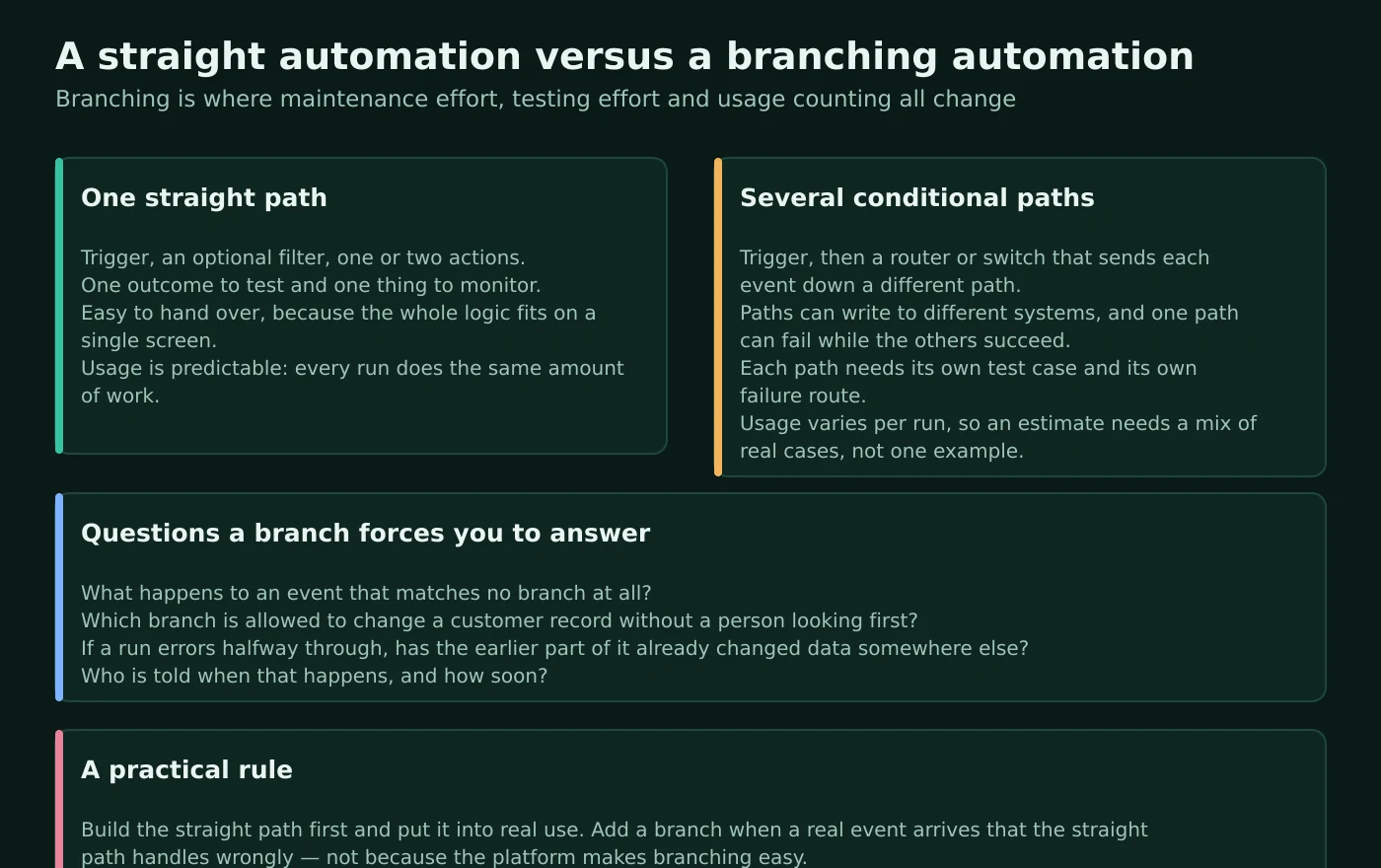
The questions a branch forces you to answer are the same everywhere, and they are business questions rather than technical ones. What happens to an event that matches no branch at all — is it dropped silently, or does somebody see it? Which branch is permitted to change a customer record without a person reviewing the result first? If a run fails partway through, has the earlier part of it already written data somewhere, and does re-running it duplicate that write? Who is told when this happens, and how quickly?
Atlas editorial assessment. Build the straight path first and put it into genuine daily use. Add a branch when a real event arrives that the straight path handles wrongly — not because the canvas makes branching easy. Two of the four platforms give you a documented safety net here worth using: Make’s fallback route and Zapier’s filtered and safely-halted run statuses both let an unmatched event be visible rather than invisible. Where a workflow writes to a system of record, prefer designs that can be re-run safely, because every platform here documents retries and none of them can know whether your destination tolerates a duplicate.
Cloud or self-hosted: what you are really choosing between
Only n8n documents self-hosting the engine itself. Zapier documents no self-hosted option at all. Make documents an on-premises agent that reaches into your network from its cloud. Microsoft documents an on-premises data gateway that does the equivalent. Both of those are connectivity bridges: the workflow engine stays in the vendor’s cloud, and calling them self-hosting is a category error that occasionally appears in comparison articles.
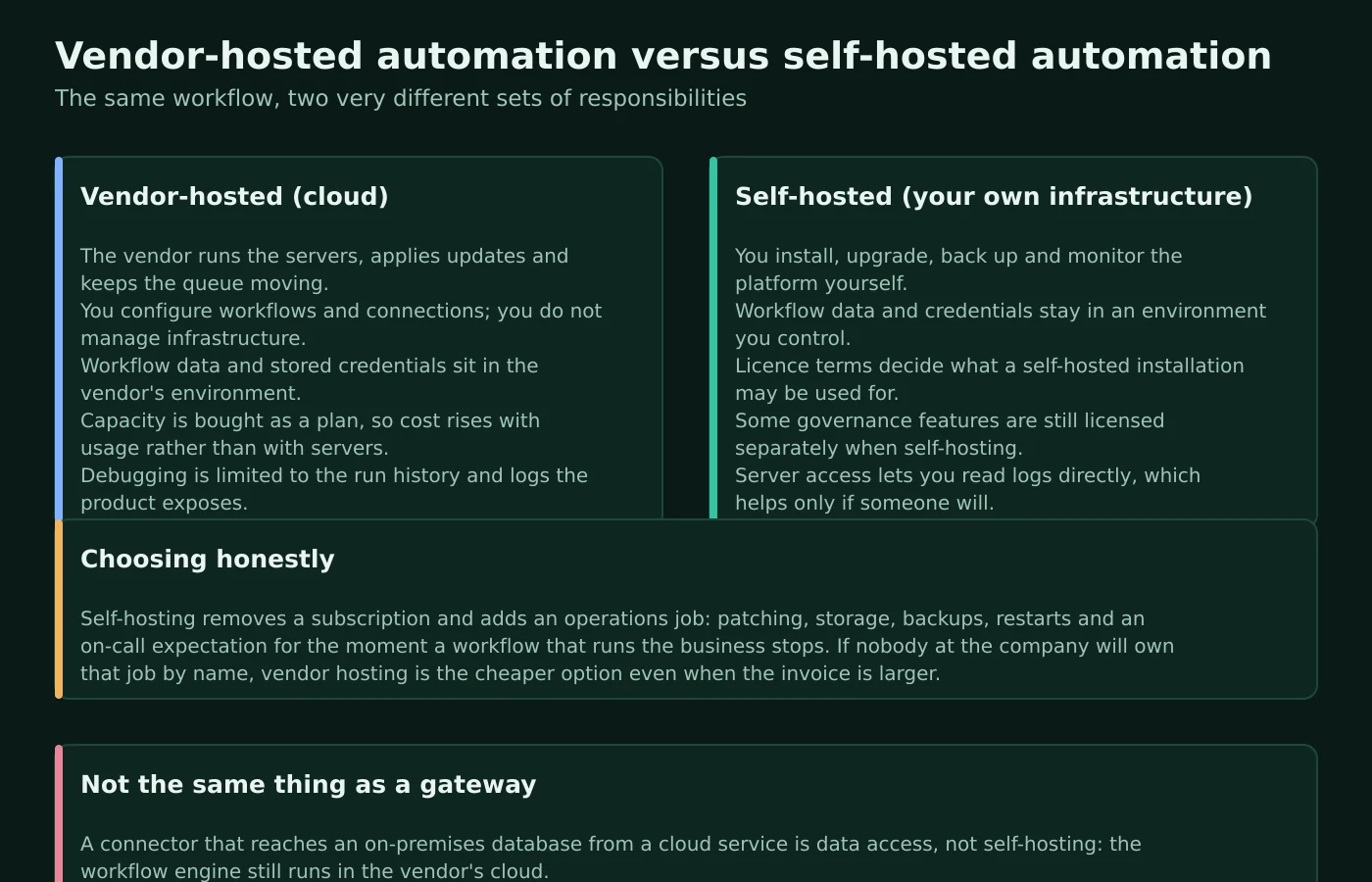
The trade is straightforward once stated honestly. Vendor hosting means the provider runs the servers, applies updates and keeps the queue moving, while your workflow data and stored credentials sit in their environment and your debugging is limited to the history and logs the product exposes. Self-hosting means workflow data and credentials stay in an environment you control and you can read the logs directly — and that you now install, upgrade, back up and monitor the platform. n8n’s own documentation says this in plain terms, warning that mistakes can lead to data loss, security issues and downtime, and recommending its hosted service for teams without the relevant experience.
Atlas editorial assessment. Choose self-hosting for a reason you can write down — a contractual data-residency requirement, a regulator’s expectation, an integration with a system that cannot be exposed — and only when a named person owns upgrades, backups and monitoring. “It is cheaper” is not that reason. The subscription disappears and an operations job appears, and the operations job has a habit of becoming urgent at the least convenient moment. Where residency rather than control is the real requirement, Make’s documented choice of a United States or European data centre at organisation creation, and Microsoft’s environment model, may satisfy it without anyone acquiring a server.
Decision matrix: what actually distinguishes the four
The table below compares only what the vendors document. Empty cells would be more honest than guesses, so where documentation is silent, the cell says so.
| Characteristic | Zapier | Make | n8n | Power Automate |
|---|---|---|---|---|
| Unit of construction | Zap workflow: trigger plus action steps | Scenario: modules connected on a canvas | Workflow: nodes, including code nodes | Cloud flow, desktop flow, business process flow |
| Trigger model documented | Polling or instant, fixed per integration | Scheduled intervals or instant triggers with a run-rate limit | Trigger nodes with separate test and production webhook URLs | Automated, instant and scheduled cloud flows |
| What is metered | Tasks; filters, paths and formatting excluded | Operations converted to credits; count scales with bundles | Whole executions, regardless of step count | Licences per user or per flow, plus platform request limits |
| Branching and data shaping | Paths and Filter on all plans; Formatter, Looping, Sub-Zap documented | Router with fallback route, filters, iterator, aggregator | IF, Merge, Loop Over Items, sub-workflows, JavaScript code node | Scopes, run-after settings, apply-to-each with documented ceilings |
| Error handling documented | Ten run statuses, manual replay, automatic retry on paid plans | Five handlers: Skip, Retry, Resume, Commit, Rollback; incomplete executions | Stop And Error and Error Trigger nodes; configurable execution data | Run-after settings, flow checker, run inspection |
| Hosting model | Vendor-hosted only; self-hosting not documented | Vendor-hosted; on-premises agent for local data on Enterprise | Vendor cloud or self-hosted under the Sustainable Use Licence | Microsoft cloud; on-premises data gateway for local data |
| Single sign-on | SAML listed from the Team plan | SAML documented as Enterprise-only | SAML and OIDC: Enterprise on cloud, Business upward self-hosted | Microsoft Entra identity as the platform default |
| Audit and retention | History retained twenty-nine to sixty-nine days; custom retention on Enterprise | Audit logs Enterprise-only with twelve-month retention | Log retention by tier; log streaming and audit logging on Enterprise | Run retention of thirty days; environment and prevention policies for governance |
| Programmatic access | Developer platform, webhooks, code steps with plan-based runtime | REST API with token or OAuth authentication and scopes | Public REST API; scoped keys on Enterprise, otherwise full access | Custom connectors wrapping REST or SOAP APIs |
| Documented catalogue size | More than ten thousand apps in the directory | More than three thousand apps | 2,147 integrations listed in the directory | Standard, premium and custom connectors split by licence |
Purchasing model: how the money actually works
Prices below are the published figures read on each vendor’s own page in September 2026, in the currency and billing period each vendor publishes. Make does not publish plan prices in the help-centre documentation reviewed here, so no figure is invented for it.
| Platform | How you buy it | Published entry pricing | What raises the bill | Seat and access notes |
|---|---|---|---|---|
| Zapier | Plan tier plus a selected monthly task allowance | Free at $0 per month; Professional from $19.99 per month; Team from $69 per month; Enterprise on request | Task volume, since action steps consume tasks while filters, paths and formatting do not | One seat on Free and Professional, twenty-five on Team, unlimited on Enterprise |
| Make | Subscription plan measured in credits, billed per organisation | Not published in the help-centre documentation reviewed; the docs link out to the main pricing page | Operations, which scale with the number of bundles each module processes, plus token-based usage for AI features | Organisation and team roles are separate; some verified apps require a paid or Enterprise plan |
| n8n | Cloud plan by monthly execution allowance, or self-hosted under the Sustainable Use Licence | Starter at 20€ per month billed annually; Pro at 50€ per month; Business at 667€ per month; Enterprise on request | Number of full executions and concurrency, not workflow complexity | All plans documented as including unlimited users and workflows and every integration |
| Power Automate | Per-user or per-flow licences, with add-ons | Premium at $15.00 per user per month paid yearly; Process at $150.00 per bot per month; Hosted Process at $215.00 per bot per month; process mining add-on at $5,000.00 per tenant per month | Number of licensed users or flows, premium connector requirements, unattended automation and AI capacity | Free and Microsoft 365 licences reach standard connectors only; premium connectors need a qualifying licence |
How automations fail, and what maintaining them actually costs
Every platform here documents the same failure categories, which is a useful signal: these are properties of connecting systems together, not defects in any one product. A stored credential expires or is revoked, and the trigger stops. A field is renamed in the source application, and the action starts writing an empty value. The same event arrives twice, and the workflow runs twice. A destination rate-limits you, and half a batch succeeds. A person edits a live workflow to fix something small and breaks something else.
The differences are in the tools each vendor gives you afterwards. Zapier’s ten documented run statuses and its distinction between an errored run, a handled error and a safely halted run make triage genuinely faster, and automatic retry on paid plans plus its documented default of pausing a persistently failing workflow prevents a broken automation from generating noise indefinitely. Make’s five handlers let you decide per module whether a failure is skipped, retried, resumed with a substitute value, committed or rolled back, and its incomplete-executions feature turns a failure into a queued item somebody can resolve rather than a lost event. n8n’s Error Trigger lets a failing workflow start a second workflow that notifies whoever is on call, and its execution-data settings control how much detail survives for debugging. Microsoft’s run-after settings make the failure path an explicit part of the design, and its flow checker catches definition errors before a run happens at all.
Retention is the constraint that is planned for least often. Zapier documents Zap history retained for between twenty-nine and sixty-nine days. Make documents webhook logs retained for three days on standard plans and thirty on Enterprise. n8n publishes execution log retention by tier, from seven days upward, and prunes execution data by default when self-hosted. Microsoft documents run retention in storage of thirty days from the run’s start. If a dispute about what your automation did to a customer record can surface later than those windows, your logging has to live somewhere else — which is the purpose of n8n’s log streaming and of the observability options Zapier groups under its Enterprise tier.
Atlas editorial assessment. Assume that maintenance is a recurring commitment rather than a one-off. Three habits do most of the work: route every failure notification to a place a person actually reads, keep a short written note per live workflow saying what it does and who owns it, and re-check the workflows that touch money or customer communication whenever either connected system is upgraded. A company automating client intake will feel this fastest, which is why our guide to automating client onboarding in a service business treats the review step as part of the workflow rather than as an optional extra.
Security, access and governance without an enterprise budget
An automation platform is a system that holds credentials for every other system you use. That single sentence should determine how you set it up, and it is the part of the purchase most often deferred until an unpleasant question arrives from a customer’s procurement team.
Start with what each vendor documents. Zapier lists SAML single sign-on from its Team plan and groups directory provisioning, static IP, audit logging and custom data retention under Enterprise, while publishing SOC 2 Type II and SOC 3 attestations and a trust centre. Make documents organisation and team roles separately, restricts audit logs and enforced two-factor authentication to Enterprise, and notes that its enforcement applies to native logins rather than to single sign-on users. n8n documents project-based access control, single sign-on availability that differs between cloud and self-hosted deployments, external secret storage so credentials need not live in its database, and Git-based source control for changes. Microsoft brings environments, managed environments and prevention policies at tenant level, plus its own identity platform as the default.
Then apply the controls that cost nothing. Connect each integration with a dedicated service account rather than a founder’s personal login, so a departure does not break the business. Give each connection the narrowest permissions the workflow needs. Keep a register of which workflow holds which credential. Restrict who can edit a live workflow that writes to customer records, using whatever role model your platform documents. Where a workflow processes personal data, the UK regulator’s guidance on accountability and governance and its guide to data security are the right reference points for what you are expected to be able to demonstrate, and the NIST Cybersecurity Framework is a reasonable structure for a company with no security function of its own.
Atlas editorial assessment. The most common governance failure in small companies is not a missing feature, it is a single person holding every connection under their own account. Fixing that costs nothing and removes the most likely cause of a bad week. The second most common is granting a workflow broader access than it needs because the narrower scope took longer to configure. Both are decisions, not budget items.
Implementing this without creating a second job
A workable sequence looks the same regardless of which platform you chose, and the order matters more than the tooling.
- Write the process down before you build it. One paragraph in plain language: what event starts this, what should happen, what must never happen automatically, and who owns the result. Workflows that cannot be described this way are usually not ready to automate.
- Pick the dullest, highest-frequency task first. Something that happens many times a week, has an unambiguous outcome, and does not send anything to a customer without review. The point of the first workflow is to learn the platform’s failure behaviour on something safe.
- Confirm the integration exists as a documented trigger or action. An app logo in a directory is not a commitment that the specific event you need is available. Check the trigger and action list, and on Power Automate check whether it sits on the premium side of the connector line.
- Estimate usage from one real week of events. Count events, multiply by the metered steps your design causes on your chosen platform, and leave headroom for retries and duplicate events, which consume allowance exactly as successful work does.
- Build the failure path in the first version. Decide where an unmatched or failed event goes and who is told. On Make that means choosing handlers and considering incomplete executions; on n8n an Error Trigger workflow; on Zapier the replay and retry settings; on Power Automate the run-after configuration.
- Run it alongside the manual process before trusting it. A short parallel period surfaces the edge cases that documentation cannot predict, and it does so while somebody is still watching.
- Name an owner and record the workflow. A one-line register of live workflows, their purpose and their owner is the difference between a system and an accumulation of automations nobody dares touch.
- Review on a fixed cadence. Once a quarter, check that every live workflow still reflects the process, that credentials are current, and that nothing is quietly failing inside the retention window you actually have.
Atlas editorial assessment. Companies that succeed with automation almost always start smaller than they intended and document more than they first expected. The failure mode is the opposite: eleven workflows built in a fortnight by one enthusiastic person, none written down, all breaking gradually over the following year. Where automation touches customer-facing work, the same judgement applies as in customer support automation — the question is not what can be automated but what should be, and where a person still belongs in the loop.
Questions small businesses actually ask
Is the free plan enough to start with?
Zapier documents a Free plan with one hundred tasks a month, unlimited workflows, two-step workflows and Paths, which is enough to learn the model and to run one low-volume automation properly. n8n documents a free trial rather than a permanent free tier, with one thousand executions and a three-minute timeout, and its self-hosted Community Edition is available under the Sustainable Use Licence. Microsoft documents a thirty-day trial limited to cloud flows and standard connectors. Treat a free tier as a way to validate that the specific triggers you need exist, not as a long-term plan for anything the business depends on.
Which one is cheapest?
It depends entirely on the shape of your work, which is why no ranking appears here. For many low-complexity automations at moderate volume, Zapier’s task exclusions for filters and formatting matter more than its headline price. For a small number of intricate workflows, n8n’s per-execution model is structurally cheaper because complexity is not metered. For heavy data manipulation over many records, Make’s operations count is the number to model carefully. If most of your automations touch Microsoft 365 and standard connectors suffice, the licence you already hold may be the cheapest option of all.
Do I need a developer?
Not necessarily. Zapier and Make are designed so many ordinary small-business workflows can be built without a developer, while Power Automate can also handle straightforward flows through its visual tools. n8n can be used visually as well, but self-hosting, custom code, infrastructure management and more complex integrations require substantially more technical ownership. A developer becomes useful when the workflow depends on custom APIs, code, unusual authentication, complex data transformations or infrastructure your team must operate itself. For a first automation, start with a documented trigger and action that can be built and tested without custom code.
Should I automate anything that emails a customer?
Only with a review step, at least until the workflow has proved itself over a meaningful period. The failure mode is not technical but reputational, and it is the one category where the cost of a wrong run is not recoverable by re-running it. The same reasoning applies to anything that moves money, deletes a record, or contacts someone for the first time. Automations that summarise or prepare work for a person are far safer than automations that speak on the company’s behalf, which is also the pattern we found in meeting assistants for small businesses.
How to decide
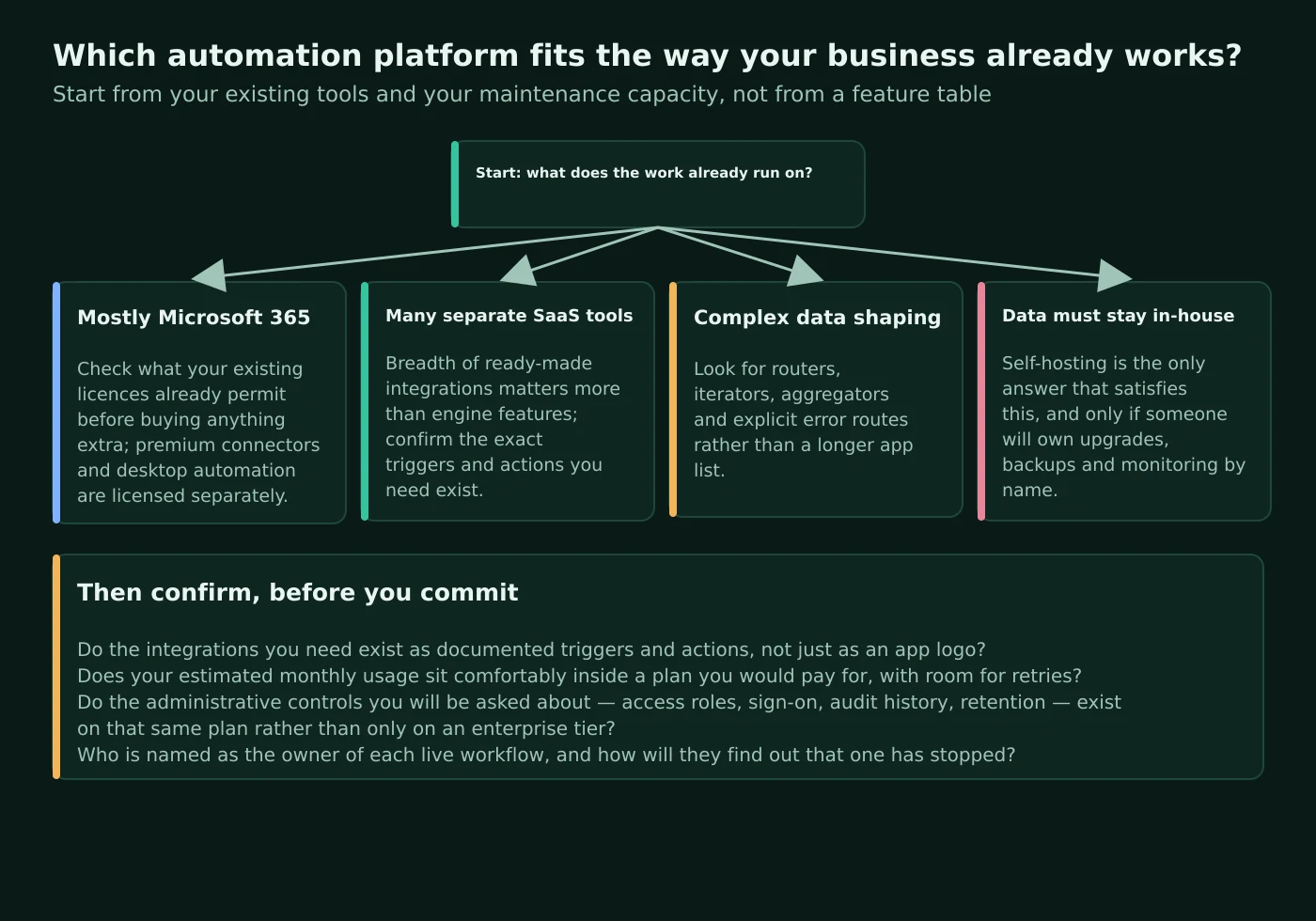
Answer four questions in order, and the field usually narrows to one credible option and one runner-up. First: what does your work already run on, and what do your existing licences already permit? Second: is the hard part in your workflows the connection or the data — because breadth of integrations and depth of data handling are different purchases. Third: must your workflow data stay inside infrastructure you control, and if so, who by name will own the upgrades, backups and monitoring that entails? Fourth: what will your estimated monthly usage cost under that platform’s specific meter, with headroom for retries?
Then check three things before committing: that the integrations you need exist as documented triggers and actions rather than as logos in a directory, that the administrative controls a customer might ask about appear on a plan you would actually buy, and that every live workflow will have a named owner who finds out when it stops. Those checks take an afternoon and they are the difference between a platform decision you can defend to a colleague and one you will quietly regret at renewal.
Sources
- Zapier pricing — plan structure, published prices, seat counts, task tiers, polling intervals by plan, the non-task step list and the plan comparison tables.
- Zapier app directory — the published count of connected apps.
- Zapier: introduction to apps — the help-centre statement of catalogue size.
- Zapier: key concepts in Zap workflows — triggers, actions and workflow vocabulary.
- Zapier: how Zap triggers work — polling and instant triggers, and the fixed nature of trigger type.
- Zapier: when a Zap runs slower than expected — the documented polling interval range and its dependence on plan.
- Zapier: add branching logic with Paths — plan availability and the statement that paths and filters do not consume tasks.
- Zapier: conditional logic to filter and split workflows — how filters and branches are configured.
- Zapier: review run statuses — the ten documented run statuses.
- Zapier: replay Zap runs — manual replay and the Free-plan limitation to errored runs.
- Zapier: advanced error-handling settings — automatic retry by plan and automatic pausing of persistently failing workflows.
- Zapier: view and manage Zap history — run history, filters and task usage.
- Zapier: customise data retention — the documented history retention window and Enterprise controls.
- Zapier: security and compliance — SOC 2 Type II and SOC 3 attestations.
- Zapier trust centre article — where security documentation is published.
- Zapier: how MCP usage works — the task cost of a tool call.
- Zapier webhooks — moving data in and out without a prebuilt integration.
- Zapier developer platform — building integrations.
- Zapier platform documentation: triggers — polling triggers and check intervals.
- Zapier platform documentation: hook triggers — webhook-based instant triggers.
- Make: operations — the definition of an operation, bundle-dependent counting and the trigger-module exception.
- Make: credits — credits as the billing unit and the default one-to-one relationship for non-AI apps.
- Make: credits and operations — why the two measures are reported separately.
- Make: router — sequential routes, ordering and the fallback route.
- Make: filtering — bundle-level conditions and available operators.
- Make: iterator — converting an array into separate bundles.
- Make: overview of error handling — the five handlers and their effect on operations.
- Make: rollback error handler — default behaviour and scenario deactivation after repeated errors.
- Make: schedule a scenario — scheduling options, the default interval and the instant-trigger run-rate limit.
- Make: incomplete executions — storing failed runs for later resolution.
- Make: automatic retry of incomplete executions — the error types retried with backoff.
- Make: manage incomplete executions — the resolution lifecycle.
- Make: webhooks — queue limits, log retention and automatic deactivation.
- Make: organizations — role model, separate billing and the immutable data-centre choice.
- Make: audit logs — Enterprise availability and retention.
- Make: two-factor authentication enforcement — scope and exclusions.
- Make: upgrade to Enterprise — the documented Enterprise feature set.
- Make: on-premise agent — reaching local applications from the cloud service.
- Make: introduction to Make apps — catalogue size and the standard, paid-plan and Enterprise app split.
- Make API documentation — REST structure and plan requirements.
- Make API authentication — token and OAuth authentication with scopes.
- Make: introduction to Maia — the assistant that builds and debugs scenarios.
- Make: introduction to AI agents — agent components and beta status.
- n8n pricing — plan prices, execution allowances, concurrency, retention, trial terms and the statement that full executions rather than steps are billed.
- n8n integrations directory — the published integration count and node categories.
- n8n Sustainable Use Licence — permitted uses, restrictions and the enterprise-licensed exceptions.
- n8n: install with Docker — the recommended installation route and the explicit warning about self-hosting responsibilities.
- n8n: queue mode — main and worker instances, Redis, database choice and the shared encryption key requirement.
- n8n: manage execution data — pruning defaults and the settings controlling what is saved.
- n8n: flow logic — branching, merging, looping, waiting, sub-workflows and error handling nodes.
- n8n: Code node — execution modes, npm module availability by hosting type and the legacy Python note.
- n8n: Webhook node — separate test and production URLs and when each registers.
- n8n: role-based access control — project-scoped roles.
- n8n: configure single sign-on — SAML and OIDC availability by plan and hosting model.
- n8n: external secrets — storing credentials in an external vault.
- n8n: source control and environments — Git-based change management.
- n8n: log streaming — forwarding events externally and the local event-log buffer.
- n8n public API — programmatic equivalents of interface actions.
- n8n API authentication — key headers and the Enterprise-only scoping of keys.
- n8n AI Agent node — chat model and tool sub-nodes, and deprecation notes.
- Microsoft Power Automate pricing — trial terms, plan prices, entitlements and the standard versus premium connector comparison.
- Microsoft: Power Automate licensing FAQ — licence context for flow types, per-licence action entitlement and when a Process licence is required.
- Microsoft: Power Platform licensing and billing — what limited data-platform entitlements inside Microsoft 365 licences do and do not cover.
- Microsoft: Power Automate limits and configuration — request limits by performance profile, loop and duration ceilings, run retention and the untriggered-flow policy.
- Microsoft: introduction to triggers — automated, instant and scheduled cloud flows.
- Microsoft: desktop flows introduction — robotic process automation on the desktop.
- Microsoft: business process flows overview — guided, ordered processes as distinct from unattended automation.
- Microsoft: scopes — grouping actions for organisation and error handling.
- Microsoft: custom connectors — wrapping a REST or SOAP API and supported authentication types.
- Microsoft: error handling guidance — run-after settings and alternative paths.
- Microsoft: flow checker — catching definition errors before a run.
- Microsoft: fix cloud flow failures — identifying and troubleshooting failed runs.
- Microsoft: watch a flow run — inspecting inputs and outputs.
- Microsoft: environments overview — containers for apps, flows and data.
- Microsoft: managed environments overview — premium administrative capabilities and environment groups.
- Microsoft: data loss prevention policies — tenant-level control over connector use.
- Microsoft: manage the on-premises data gateway — secure relay to on-premises data and applications.
- Microsoft: Copilot in Power Automate — natural-language flow building and contextual help.
- Microsoft: AI Builder licensing — capacity-based consumption and what does and does not consume it.
- Information Commissioner’s Office: accountability and governance — what an organisation is expected to demonstrate about its processing.
- Information Commissioner’s Office: a guide to data security — expectations for protecting personal data in connected systems.
- NIST Cybersecurity Framework — a structure for organisations without a dedicated security function.