A small business rarely shops for endpoint protection out of curiosity. The trigger is usually a laptop behaving strangely, an insurer asking what runs on staff machines, a customer sending a security questionnaire, or a bookkeeper opening a file that turned out not to be an invoice. At that moment the question is very concrete: what should be installed on the ten, thirty or two hundred computers the business depends on, who is going to watch what it reports, and how much of it is already covered by a licence the business owns.
This guide compares four documented approaches to that problem: Microsoft Defender for Business, CrowdStrike Falcon Go, SentinelOne Singularity and Sophos Endpoint. Everything stated about a product comes from that vendor’s own documentation, datasheets or published price pages, read in September 2026. Atlas ran no laboratory work, detonated no malware, measured no detection quality and repeated no third-party test scores, so nothing here should be read as evidence that one engine catches more than another. Where a vendor does not publish a number, this article says that it could not be verified instead of estimating it.
Two framing points matter before the comparison starts. The first is that the software installed on the laptop is only half the purchase; the other half is the console someone has to open, the alerts someone has to read and the decision about who is allowed to cut a device off the network at four in the afternoon. The second is that endpoint protection sits inside a wider set of controls. It works alongside email filtering and phishing protection, credential hygiene through a business password manager, and identity controls such as cloud access control. Buying an agent while leaving those gaps open moves the problem rather than closing it.
What endpoint protection actually protects
An endpoint, in this context, is a computer a person uses to do work: a Windows laptop in the office, a Mac at home, sometimes a small server in a cupboard running accounting or design files. Endpoint protection is the software that watches what happens on that machine — files being written, processes starting, scripts running, drivers loading, network connections opening — and intervenes when the pattern looks malicious.
That framing matters because it defines the boundary. Endpoint protection does not stop a phishing message reaching an inbox, does not prevent a person typing a password into a convincing fake sign-in page, and does not protect data held only in a cloud service the laptop merely visits. What it does cover is the moment something lands on the machine and tries to run, and the aftermath when something already ran.
The UK National Cyber Security Centre puts device protection alongside backup, phishing defence, patching and password practice in its small organisations guide, with a dedicated section on protecting your devices covering patching, malware protection, screen locks and encryption. The same body publishes that advice as a short printed small business guide intended for organisations with no security staff at all. Malware protection is also one of the required control themes in the official Cyber Essentials requirements for IT infrastructure that underpins the Cyber Essentials scheme — which is why a certification deadline is so often what makes a small business start reading pages like this one.
The Information Commissioner’s Office frames the same ground from the data protection side, publishing data security advice for small organisations and a list of practical ways to keep IT systems safe. Its emphasis is worth noticing: much of what regulators ask about after an incident concerns whether basic controls were configured and maintained, not whether an expensive product was purchased.
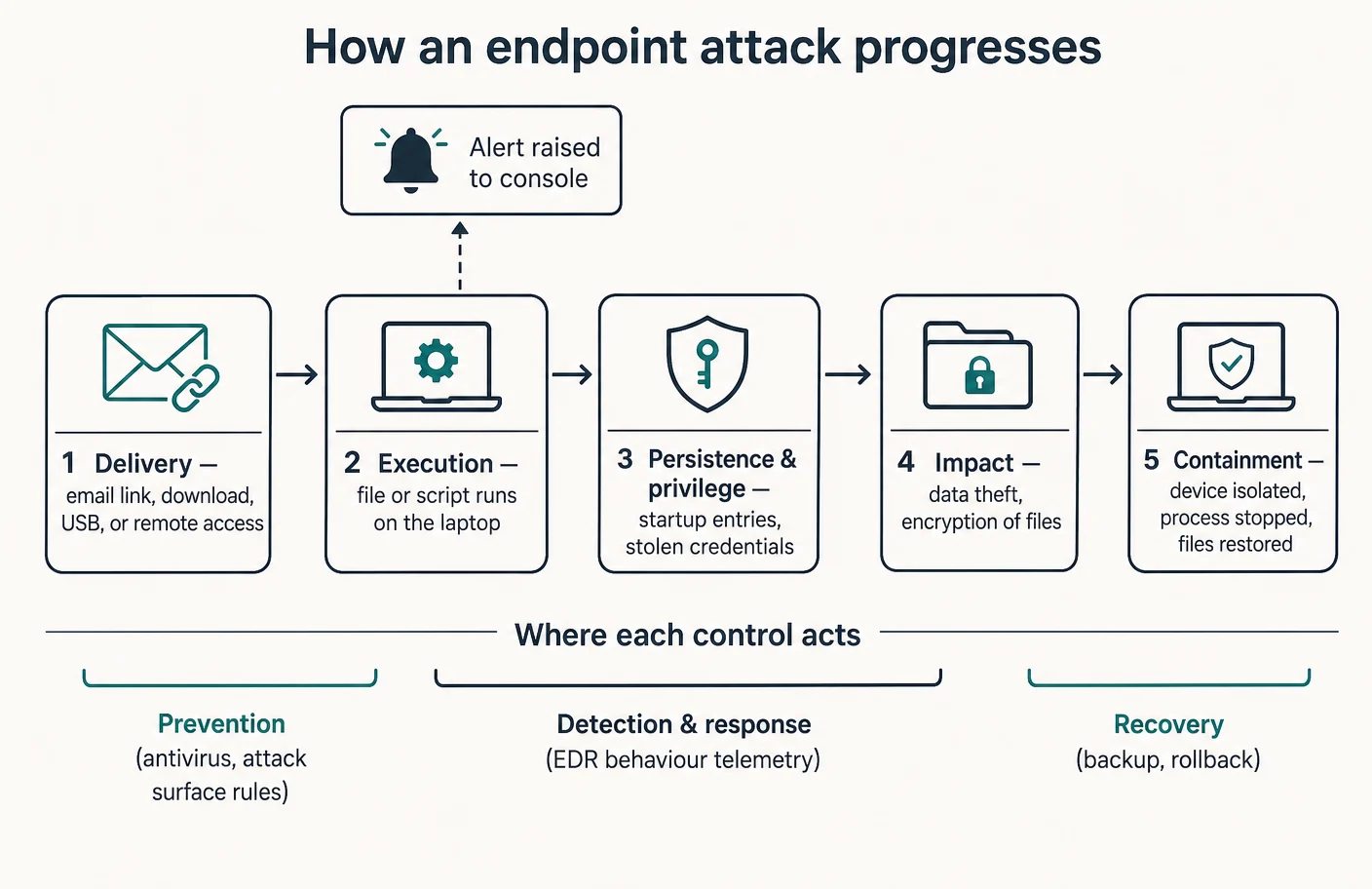
Atlas editorial assessment. The most common mistake in small-business endpoint buying is treating the agent as the whole control. Attacks that matter to a ten-person company usually involve a stolen credential, a document that arrives as a normal-looking attachment, or a remote access tool an employee installed for convenience. An agent helps with all three, but only if someone notices what it says. Judge products on the whole chain in the diagram above, not on the first box.
Antivirus, EDR and managed endpoint protection are not the same purchase
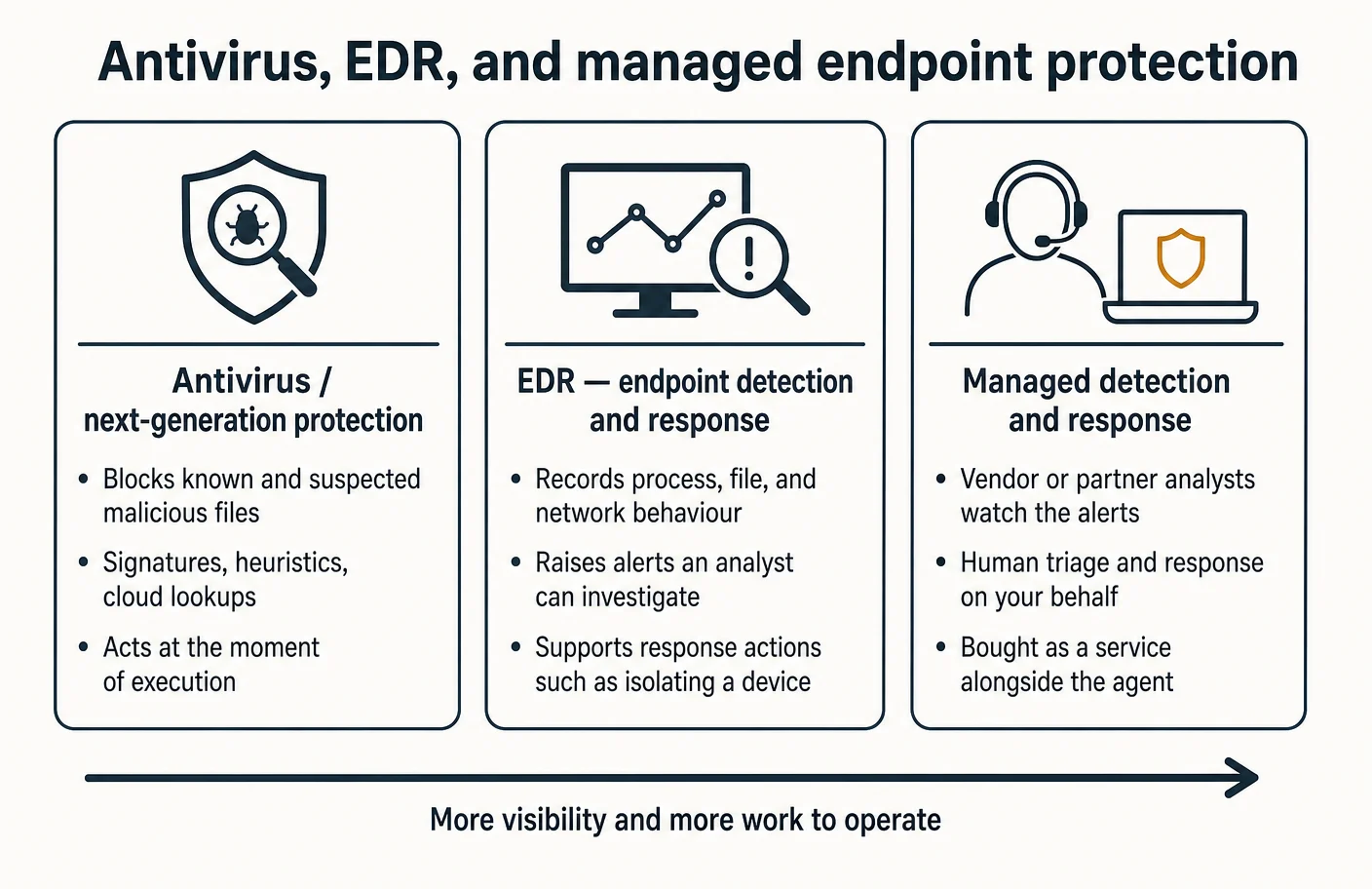
Vendors use overlapping words for three genuinely different things, and the difference decides both the price and the workload.
- Next-generation antivirus, or preventive protection. Software that judges files and behaviour at the moment of execution and blocks what it considers malicious. Microsoft documents this layer as next-generation protection in Defender for Business, and CrowdStrike documents Falcon Prevent as the next-generation antivirus component of its Falcon Go bundle.
- Endpoint detection and response. Software that records what happened on the device, surfaces alerts a human can investigate, and offers response actions such as isolating the machine. Microsoft documents device-level response actions including isolation in its respond to machine alerts guidance, and Sophos documents query-based hunting through Live Discover and remote remediation through Live Response.
- Managed detection and response. A service in which the vendor’s own analysts watch the alerts and act. Sophos describes its managed service in a first-party managed detection and response solution brief and datasheet as round-the-clock detection and response delivered by its team, positioned for organisations building a first line of expert defence rather than staffing one. CrowdStrike lists Falcon Complete as its fully managed option in the same bundle comparison that contains Falcon Go.
The distinction is not cosmetic. Preventive protection either blocks something or it does not, and it needs very little human attention. Detection and response produces a stream of findings that only becomes useful if a person reads and acts on it. Managed services exist precisely because that person often does not exist in a small business.
Public standards reflect the same split. The National Institute of Standards and Technology publishes SP 800-83 Revision 1 on malware incident prevention and handling for desktops and laptops, and SP 800-61 Revision 3 on incident response recommendations aligned to the Cybersecurity Framework 2.0. Prevention and response are separate functions in those documents, staffed and measured differently, and a purchase that covers one does not cover the other.
Atlas editorial assessment. A useful test before comparing products: write down who, by name, will look at an endpoint alert this month. If the answer is the owner or the person who also handles invoicing, detection and response bought without a managed service will accumulate unread findings. That is not an argument against detection capability; it is an argument for deciding deliberately whether the alerts are yours to triage or someone else’s.
What actually matters when the business is small
Enterprise selection criteria translate badly to a company with no security team. The criteria below are the ones that repeatedly determine whether a small deployment survives its first year, and they are the lens applied to each product later in this guide.
- Whether it is already included in a subscription you own. Microsoft documents Defender for Business as available either standalone or as part of Microsoft 365 Business Premium in its product overview and its how to get it guidance.
- Coverage of the machines you actually own. Microsoft documents onboarding for Windows and macOS clients, and mobile platforms, in onboard devices. Sophos documents server protection and licensing as tracked separately from workstation protection in its license usage and installation methods articles.
- Whether one person can operate the console. Microsoft documents a guided setup and configuration sequence with default policies; Sophos publishes a step-by-step endpoint onboarding guide.
- Automated action without a human present. Microsoft documents automated investigation and remediation, noting in its automation levels article that Defender for Business is configured for automatic remediation rather than exposing the tuning available in the larger product, with results tracked as remediation actions.
- Protection against a local administrator turning it off. Microsoft documents tamper protection for security settings; Sophos documents enhanced tamper protection and answers common cases in a tamper protection FAQ.
- A recovery path that does not depend on paying anyone. Backup remains the control that decides how bad a ransomware incident becomes, a point the NCSC makes throughout its guidance on mitigating malware and ransomware attacks.
Notice what is absent from that list: engine comparisons, feature counts and marketing tiers. Those are the easiest things to tabulate and the least predictive of whether a small business ends up better protected.
Microsoft Defender for Business
What Microsoft documents
Microsoft positions Defender for Business as endpoint security designed for organisations with up to three hundred employees, built on the same technology as its larger endpoint product, according to the overview and requirements pages. That employee ceiling is a documented boundary rather than a guideline, and it is the first thing a growing business should check.
The documented capability set covers preventive and investigative layers. Next-generation protection handles antivirus and anti-malware policy with recommended defaults. Attack surface reduction applies rules that constrain risky behaviour on Windows, with each rule described in the wider attack surface reduction rules reference. Security settings and policies can be managed inside the security portal, with device groups used to apply different policies to different collections of machines, and additional behaviour controlled through advanced feature settings.
On the response side, Microsoft documents automated investigation and remediation that examines alerts and takes action, with the outcomes reviewable as remediation actions in an action centre. Manual response is documented too: running a scan, starting an investigation and isolating a device are described in respond to and mitigate threats and the underlying machine response actions reference. Day-to-day operation is documented through device management and reports, and web content filtering allows site categories to be tracked or blocked, enforced through Microsoft Edge SmartScreen or network protection in other browsers.
Vulnerability management is documented as a related capability with its own product pages, including an overview of Defender Vulnerability Management and sign-up guidance for the add-on. Microsoft’s small and medium business security pricing page lists Microsoft Defender for Business at $3.00 per user per month on an annual commitment, and Microsoft 365 Business Premium — which the Microsoft 365 administration overview and Business Premium documentation describe as including Defender for Business — at $22.00 per user per month paid yearly or $26.40 per user per month paid monthly. The same page lists related identity and device-management add-ons separately, and the Defender for Business product page repeats the standalone framing. A separate published per-unit list price for the server add-on could not be verified on any Microsoft page during this research.
Atlas editorial assessment: Microsoft Defender for Business
For a business already standardised on Microsoft 365, the interesting comparison is often not against another vendor but against its own licence drawer. If Business Premium is already in place, endpoint protection is already bought, and the real work is configuration and habit rather than procurement. That situation is common and frequently unnoticed until someone reads the licence description.
The trade-off is that operating this product means living in the Microsoft security portal, which is shared with the rest of the Defender family and unavoidably broad. Small teams often find the initial guided setup pleasant and the ongoing portal intimidating. Where the same tenant also handles identity, the overlap with single sign-on and identity tooling is an advantage, because a device alert and an account alert land in related places rather than in two unrelated products.
CrowdStrike Falcon Go
What CrowdStrike documents
Falcon Go is CrowdStrike’s self-serve bundle aimed at small organisations, described on its Falcon Go pricing page, in a Falcon Go data sheet and on the company’s small business solutions page. The published contents are Falcon Prevent for next-generation antivirus, Falcon Device Control for USB and removable media, mobile device protection, and express support.
Two documented boundaries matter more than anything else in that list. The first is the device ceiling: the pricing page states that purchases of Falcon Go are limited to a maximum of one hundred devices. The second is what the bundle deliberately excludes. CrowdStrike’s own bundle comparison table shows firewall management appearing at the Falcon Pro level, and endpoint detection and response along with threat intelligence and hunting appearing at the Falcon Enterprise level — meaning the smallest bundle is a preventive product rather than an investigative one. The same table lists Falcon Complete as the fully managed option, sold through sales contact rather than self-serve.
Published prices on the pricing page are $7.99 per device per month billed monthly, or $59.99 per device per year billed annually, with the comparison table listing Falcon Pro at $14.99 per device per month and Falcon Enterprise at $19.99 per device per month. Two things could not be verified from CrowdStrike’s public pages during this research: explicit Linux support for the Falcon Go bundle, which the public pages do not enumerate, and detailed sensor deployment documentation, which sits behind an authenticated support portal rather than on an open page.
Atlas editorial assessment: CrowdStrike Falcon Go
Falcon Go is the clearest example in this comparison of a product whose scope is defined by what it leaves out, and CrowdStrike is unusually direct about that in its own comparison table. A business that buys it expecting to investigate an incident afterwards will discover that the investigative layer is a different purchase. Read that table before signing, not after.
The counter-argument is that a preventive product with a simple console and a per-device price is exactly what some businesses need, particularly those with mixed hardware, no Microsoft licence to lean on and no appetite for a security portal. The hundred-device ceiling also makes it a poor destination for a company expecting to grow quickly, because the migration conversation arrives at the same time as the hiring spree.
SentinelOne Singularity
What SentinelOne documents
SentinelOne packages its endpoint capability across several Singularity offerings described on its platform packages page. Singularity Core documents static and behavioural artificial-intelligence detection intended to replace signature-only scanning, on-agent activity context, autonomous operation when the device is offline, and one-click remediation and rollback that reverses unauthorised changes and affected data. Singularity Control adds native operating-system firewall control for Windows, macOS and Linux, device control for USB and Bluetooth peripherals, and network discovery of unmanaged devices. Singularity Complete is documented as the fuller detection and response offering above those.
The rollback capability deserves precision, because it is the feature small businesses most often misread. SentinelOne’s own explainer on ransomware rollback states that rollback features generally work on Windows systems because they rely on Microsoft’s Volume Shadow Copy Service, and warns that if an attacker deletes shadow copies first, some data may be lost. That is a vendor-stated limitation, not an outside criticism, and it means rollback is a useful convenience rather than a substitute for backup.
On price, the platform packages page publishes $179.99 per endpoint per year for Singularity Complete and $229.99 per endpoint per year for Singularity Commercial, which is documented as adding identity detection and response, a longer data retention window and managed threat hunting. Published prices for Singularity Core and Singularity Control could not be verified on any SentinelOne page during this research, and neither could the price of the Enterprise offering. Detailed administration and agent deployment documentation also sits behind an authenticated support portal rather than an open page, so this comparison relies on the public product pages for capability statements.
Atlas editorial assessment: SentinelOne Singularity
SentinelOne reads as the most detection-oriented of the four at its published tiers, and its own material is candid about the mechanics behind rollback. For a small business, the practical question is which package the quote actually covers, because the capability differences between the named offerings are substantial and the two prices that are published sit at the response-oriented end of the range.
The second question is operational. A product built around investigation assumes someone investigates. Where nobody will, the managed threat hunting that appears in the higher published package is not a luxury but the thing that makes the rest of it useful. Businesses in that position should compare it against the managed options from other vendors rather than against unmanaged tiers.
Sophos Endpoint
What Sophos documents
Sophos documents its endpoint product across licence tiers, and its own support article on endpoint, EDR, XDR and managed licences lists which features belong to which tier, with server licensing tracked separately. The first-party Sophos Endpoint datasheet describes deep learning malware detection, ransomware blocking with rollback to a safe state, exploit-technique prevention, adaptive defence that responds to changing attacker behaviour, and application, device and web controls used to reduce the attack surface.
Day-to-day configuration is documented in Sophos Central. The threat protection policy governs malware, risky file types, risky websites and malicious network traffic on endpoints, with server policy documented separately. A data loss prevention policy can monitor or restrict transfers of files containing sensitive content. A data collection and investigation policy governs what endpoint data is uploaded for later querying. Sophos also documents adaptive attack protection, which it describes as switching on automatically when an active adversary is detected on a device, applying behavioural rules aimed at disrupting attacker techniques.
Investigation and remote action are documented as tier-gated. Both Live Discover for query-based hunting and Live Response for remote remediation — stopping processes, restarting devices, browsing and deleting files — are documented as requiring the detection and response, extended detection and response, or managed tiers. Deployment is documented openly: an onboarding guide, agent installation instructions, installation methods for endpoints and servers, Windows command-line installer options, installer options for Windows and Mac and automated software deployment guidance.
Two further documented items are relevant to small networks. Sophos publishes an extended detection and response datasheet describing how endpoint, server, firewall, email and cloud data are brought together for investigation, aimed at both dedicated security teams and administrators without one. And where the business also runs a Sophos firewall, Security Heartbeat is documented as exchanging device health status between the firewall and Sophos Central over an encrypted channel, with documented endpoint health statuses that can drive automatic network restriction of a compromised machine.
Pricing is the notable gap. No exact per-seat rate for Sophos Endpoint could be verified on a first-party Sophos page during this research: the purchasing pages are quote-request forms rather than published price lists. Additionally, pages under the main Sophos marketing domain did not respond to automated retrieval during this work, so the capability statements above are drawn from the documentation, support and datasheet domains that did respond, and no marketing-page claim is cited here.
Atlas editorial assessment: Sophos Endpoint
Sophos is the clearest fit for the business that has decided it does not want to operate security software at all, because its managed service is documented as an ordinary tier of the same product rather than a separate world. That continuity matters more than it sounds: the console, agent and policies stay the same whether the alerts are yours to read or its analysts’.
The cost of that positioning is opacity at the buying stage. A business cannot model a budget from published figures, which makes comparison against the two vendors that publish rates an apples-and-oranges exercise until a quote arrives. Anyone comparing seriously should ask, in writing, which tier includes the hunting and remote-response features documented as gated, because those are the features that decide what happens on a bad day.
Documented capability comparison
The table below records only what each vendor documents on the pages cited in this guide. A cell saying that something is not documented at a given level is a statement about the documentation, not a claim that the technology is absent or weaker.
| Capability | Microsoft Defender for Business | CrowdStrike Falcon Go | SentinelOne Singularity | Sophos Endpoint |
|---|---|---|---|---|
| Preventive malware protection | Documented as next-generation protection with recommended default policy | Documented as Falcon Prevent next-generation antivirus in the bundle | Documented as static and behavioural detection in Singularity Core | Documented as deep learning detection and exploit prevention in the datasheet |
| Detection and response for investigation | Documented, with automated investigation and remediation preconfigured | Not included in this bundle; documented at the Falcon Enterprise level | Documented, positioned in Singularity Complete and above | Documented as requiring the detection, extended detection or managed tiers |
| Isolate a device from the network | Documented as a device response action in the security portal | Not documented as part of this bundle | Documented within the response-oriented packages | Documented through Live Response, plus firewall-driven restriction via Security Heartbeat |
| Rollback or restore after ransomware | Recovery treated as backup and remediation rather than file rollback | Not documented as part of this bundle | Documented as one-click rollback, vendor-stated as reliant on Windows shadow copies | Documented as ransomware blocking with rollback to a safe state |
| Removable media and device control | Managed through security settings and policy in the portal | Documented as Falcon Device Control in the bundle | Documented in Singularity Control for USB and Bluetooth peripherals | Documented as peripheral and application control |
| Web or content filtering | Documented as web content filtering by category | Not documented as part of this bundle | Firewall control documented in Singularity Control across Windows, macOS and Linux | Documented as web control within the threat protection and policy set |
| Vulnerability visibility | Documented through the separate vulnerability management product and add-on | Not documented as part of this bundle | Not verified from the public package pages reviewed | Not verified from the reachable pages reviewed |
| Managed human response option | Not part of this product; sold separately in Microsoft’s wider range | Documented as Falcon Complete, contact sales rather than self-serve | Managed threat hunting documented in the higher published package | Documented as a managed detection and response tier of the same product |
| Server coverage | Servers documented as a separate add-on; per-unit list price not verified | Not documented as part of this bundle | Not verified from the public package pages reviewed | Documented as licensed and tracked separately from workstations |
| Documented size or device ceiling | Designed for organisations with up to three hundred employees | Purchases limited to a maximum of one hundred devices | No published ceiling found on the pages reviewed | No published ceiling found on the pages reviewed |
Pricing and the purchasing model behind it
Endpoint protection is priced on two different units, and mixing them up is the most common budgeting error. Microsoft prices per user, which suits a business where one person has a laptop and a desktop. CrowdStrike and SentinelOne publish per-device or per-endpoint rates, which suits shared machines but multiplies quickly where staff carry two computers. Sophos does not publish a rate at all.
| Purchasing question | Microsoft | CrowdStrike | SentinelOne | Sophos |
|---|---|---|---|---|
| Unit of pricing | Per user | Per device | Per endpoint | Per user, described as simple per-user pricing on the quote pages |
| Published list price for the small-business option | Defender for Business at $3.00 per user per month on an annual commitment | Falcon Go at $7.99 per device per month, or $59.99 per device per year billed annually | Singularity Complete at $179.99 per endpoint per year | Not published; purchasing pages are quote requests |
| Published price for the next level up | Business Premium at $22.00 per user per month yearly, or $26.40 per user per month monthly | Falcon Pro at $14.99 per device per month and Falcon Enterprise at $19.99 per device per month | Singularity Commercial at $229.99 per endpoint per year | Not published for any tier on a reachable first-party page |
| Term commitment visible in the price | Annual commitment stated for the lower rate, monthly rate published separately | Monthly and annual rates both published | Published rates are annual per endpoint | Not verifiable without a quote |
| What arrives bundled rather than bought | Included in Microsoft 365 Business Premium, so it may already be paid for | Bundle includes prevention, device control and mobile protection only | Package boundaries decide whether identity coverage and managed hunting are included | Managed response is a tier of the same product rather than a separate console |
| Cost item most often missed | Server coverage as an add-on, with no verified per-unit list price | Detection and response, which is a higher bundle entirely | Which named package the quote actually covers | Whether hunting and remote response are inside the quoted tier |
Atlas editorial assessment. Two rules survive most small-business budget conversations. First, price the outcome rather than the agent: a cheap preventive licence plus an unstaffed alert queue is not cheaper than a managed tier if the bad day ends in a rebuild. Second, count devices and users separately on paper before asking for a quote, because the same headcount can produce very different totals depending on which unit the vendor uses. The same discipline applies to adjacent spending on cyber insurance requirements, where the questionnaire often asks what is deployed rather than what it cost.
Deployment and day-to-day administration
Every product here follows the same shape: an agent on each machine, a browser console, and policy pushed outward from that console. The differences that matter to a small team are how the agent arrives on a laptop that is never in an office, and how much of the console has to be understood before the product is doing anything useful.
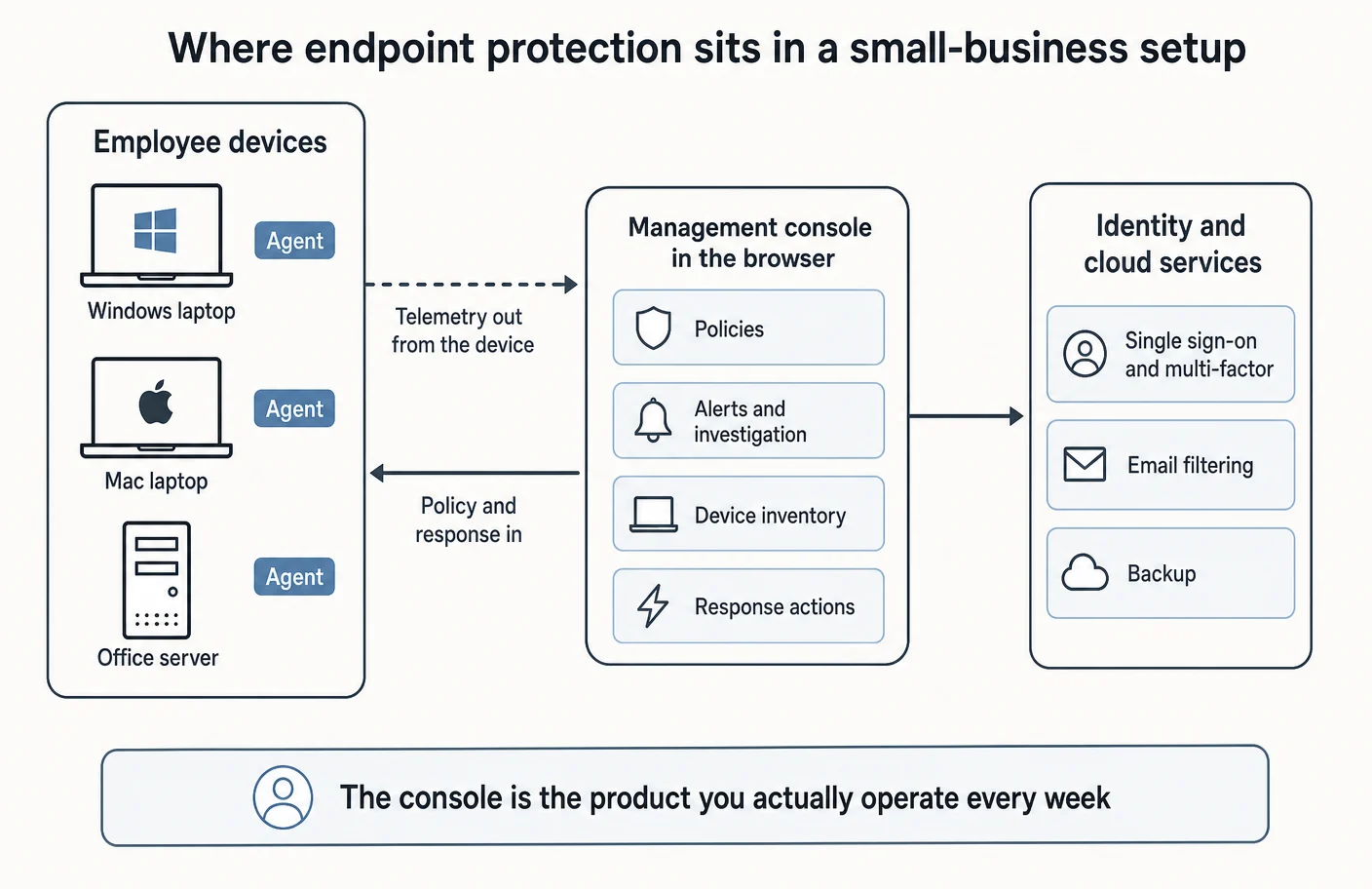
Microsoft documents a guided sequence in setup and configuration: acquire licences, add users, assign roles, set notification preferences, onboard devices and review the default policies. Device onboarding for Windows and macOS is documented in onboard devices, and ongoing work is documented through device management and device groups. The practical implication is that a business already using Microsoft’s device management has one onboarding path, and a business without it has another.
Sophos documents deployment more openly than most, with an onboarding guide covering environment setup, agent installation and initial policy choices, plus installation methods, command-line installer options and automated deployment articles for scripted rollouts. For CrowdStrike and SentinelOne, detailed sensor and agent deployment documentation sits behind authenticated support portals, so a business evaluating them should ask for that material during a trial rather than expecting to read it beforehand.
Administration also means deciding who holds the keys. All four products give a console administrator the ability to weaken protection, and all of them document some form of tamper resistance for the agent itself — Microsoft in tamper protection, Sophos in enhanced tamper protection. Neither protects against a compromised administrator account, which is why console access belongs behind the same multi-factor and access rules as the rest of the business. A zero trust approach to access and disciplined mobile device management are the natural companions here.
Atlas editorial assessment. Judge the console during a trial by doing three specific things: find a single device and see everything known about it, produce evidence that a policy is applied everywhere, and locate the button that isolates a machine. If any of the three takes more than a few minutes to find, the product will be operated badly under pressure regardless of how capable it is.
Ransomware and recovery considerations
Ransomware is where small businesses feel the difference between prevention, response and recovery most sharply, and it is also where marketing language is loosest. Two of the products in this comparison document a rollback capability, and understanding its documented mechanics is more useful than comparing the phrasing.
SentinelOne’s own ransomware rollback explainer states that such features generally depend on Microsoft’s Volume Shadow Copy Service on Windows, and that data can still be lost if shadow copies are deleted before the rollback runs. Sophos documents ransomware blocking with rollback to a safe state in its endpoint datasheet. Microsoft’s documented approach leans on blocking, attack surface reduction and automated remediation actions rather than presenting file rollback as the recovery story.
Public guidance is consistent about where recovery actually comes from. The NCSC’s malware and ransomware mitigation guidance and its ransomware hub put offline, tested backups at the centre, and the joint StopRansomware guide published by CISA and partner agencies, also available at its guide page, organises the same advice around prevention, detection, response and recovery. NIST’s incident response recommendations treat recovery as a planned function rather than an improvisation.
Atlas editorial assessment. Treat every rollback feature as a convenience that sometimes saves an afternoon, and never as the plan. The question that decides how bad a ransomware incident becomes for a small business is whether a restore has been rehearsed on real data by a person who was not the one who set it up. No endpoint product changes that answer.
What happens when an employee device is compromised
The value of detection and response only becomes visible during an incident, so it is worth walking through the sequence a small business realistically faces when the console raises something serious on a laptop.
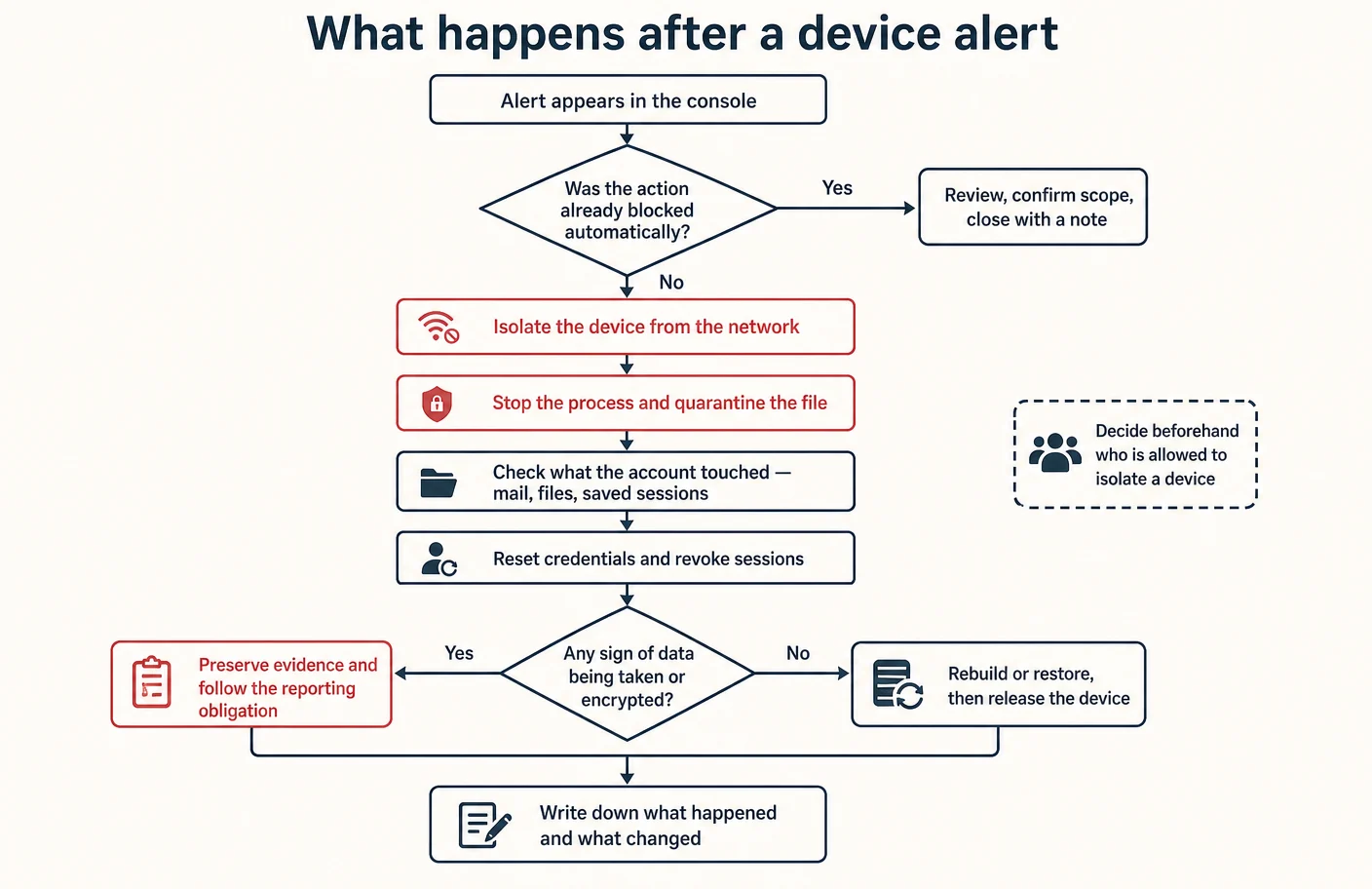
First, containment. Isolating the device stops further outbound activity while preserving the machine for examination, and Microsoft documents that as a device response action in its machine alert response guidance. Sophos documents remote intervention such as stopping processes and restarting a device through Live Response, and where a Sophos firewall is present, a compromised endpoint health status can drive automatic network restriction through Security Heartbeat.
Second, scope. The device is rarely the only thing affected, because whatever ran had access to whatever the signed-in person had access to: mailbox, shared files, saved browser sessions, cloud consoles. This is the point at which the quality of adjacent controls decides how quickly the question can be answered, and where email security tooling and access control do at least as much work as the endpoint agent. Credential reset and session revocation belong here rather than later, and a password manager makes the reset sweep a task rather than an archaeology project.
Third, evidence and obligation. NIST’s incident response recommendations and the older but still practical malware incident handling guide both stress recording what was observed and what was changed. For businesses handling personal data, the regulator’s security guidance is the place to check what reporting the situation triggers, and that check should happen while the facts are fresh rather than after the rebuild has erased them.
Atlas editorial assessment. Decide in advance, in writing, who is permitted to isolate a device without asking anyone. In a small business the honest answer is often one person, and naming them beforehand is what turns a capable product into a fast response. The failure mode worth avoiding is a console that could have contained the machine while three people discussed whether they were allowed to interrupt a colleague’s work.
Implementation considerations for a small team
Deployments fail quietly rather than dramatically. The agent gets installed on most machines, one contractor is skipped, an alert arrives during a busy week, nobody looks, and a year later the console shows more unprotected devices than protected ones. The considerations below are the ones that prevent that drift.
- Inventory before deployment. A device the console has never seen is not protected by any policy. Reconciling the console list against payroll and hardware records is dull and consistently productive.
- Start from documented defaults. Microsoft ships recommended policy in next-generation protection and documents a guided setup; Sophos publishes a threat protection policy reference to configure against. Tuning before there is any operational history usually creates exceptions nobody remembers making.
- Turn on tamper resistance and check it. Both Microsoft and Sophos document behaviour and limits, and the setting is worth verifying on a real machine rather than assuming.
- Route alerts to a person and a place. An email address nobody owns is the most common single point of failure in small deployments. Pair the console with a named owner and a weekly habit.
- Decide about servers explicitly. Server protection is licensed separately in Sophos’s documented license usage model and is an add-on in Microsoft’s range, so a server left out of the plan tends to stay out of it.
- Attach it to the human side. The devices are protected by software; the decisions are made by people, which is why security awareness training belongs in the same budget conversation. Remote and hybrid setups add their own considerations, covered in our guide to endpoint security for remote small businesses.
Atlas editorial assessment. The single highest-value implementation habit is a short monthly review: how many devices are enrolled, how many are reporting, what alerts arrived and what was done about them. It takes very little time, it catches drift early, and it produces exactly the evidence an insurer or a customer asks for later.
Limitations of this comparison
This guide is a documentation review, and its boundaries should be stated plainly rather than implied.
- No hands-on trial informs any statement here. Atlas did not install these agents, generate malicious activity or observe how the consoles behave under load, so nothing in this article speaks to detection quality, false alarms or performance impact.
- No third-party laboratory results are reproduced. Independent test scores exist, but they change frequently and depend on methodology choices a summary cannot carry honestly, so they are omitted rather than paraphrased.
- Some prices are simply not published. No per-seat rate for Sophos Endpoint could be verified on a first-party page, because its purchasing pages are quote requests. Published rates for SentinelOne’s Core and Control offerings, and for its Enterprise offering, could not be verified either, and no per-unit list price was found for Microsoft’s server add-on.
- Some documentation is not publicly reachable. Detailed deployment and administration guides for CrowdStrike and SentinelOne sit behind authenticated support portals. Pages on the main Sophos marketing domain did not respond to automated retrieval during this research, so only its documentation, support and datasheet domains are cited.
- Packaging changes. Bundle contents, tier names and prices move, and every statement here is anchored to what the cited pages said in September 2026. Confirm current packaging on the vendor’s own page before signing anything.
- Platform coverage is stated conservatively. Where a vendor’s public pages do not enumerate an operating system, this guide records that it could not be verified rather than inferring support from silence.
Questions small businesses actually ask
Is the antivirus built into Windows enough on its own?
For a household it may be. For a business the honest answer is that built-in protection covers the preventive layer but leaves the business without central visibility: no single list of devices, no shared alert history, no way to demonstrate that a policy applies everywhere, and no straightforward remote response. Those are the reasons Microsoft documents a managed product for organisations at all, and the reasons the NCSC device guidance talks about managing device protection rather than merely having it. If a questionnaire from an insurer or a customer is what prompted the question, central management is usually the specific thing being asked about.
Do we need detection and response, or is prevention enough?
It depends entirely on whether anyone will act on what detection produces. Prevention answers the question of whether something was blocked. Detection and response answers the question of what happened afterwards, which is the question that arrives when a laptop has already behaved oddly for a week. CrowdStrike’s own bundle comparison is a useful reality check here, because it shows detection and response as a distinct level rather than an assumed feature. If nobody will read the findings, buy the managed version or stay with prevention deliberately.
We already pay for Microsoft 365 Business Premium — are we already covered?
Microsoft documents Defender for Business as included in Microsoft 365 Business Premium in its overview and its administration overview, so a business on that plan very often owns endpoint protection it has never switched on. The catch is that owning it and configuring it are different states. Before comparing other vendors, check the licence, run the documented setup sequence, confirm devices are onboarded, and see what the portal reports. That exercise costs nothing and frequently ends the procurement conversation.
How many devices can these products cover?
Two of the four publish a documented ceiling. Microsoft describes Defender for Business as designed for organisations with up to three hundred employees in its requirements documentation. CrowdStrike states on its Falcon Go pricing page that purchases of that bundle are limited to a maximum of one hundred devices. No published ceiling was found for SentinelOne or Sophos on the pages reviewed. For a business planning to grow past either of those numbers, the ceiling is worth treating as a selection criterion rather than a detail.
Will endpoint protection undo a ransomware attack?
Partly, sometimes, and not reliably. SentinelOne’s own explanation of rollback describes a dependency on Windows shadow copies and the risk that an attacker deletes them first. Sophos documents rollback to a safe state in its endpoint datasheet. Both are worth having and neither is a backup. The joint StopRansomware guide and the NCSC ransomware guidance both put tested, isolated backups at the centre of recovery, and that remains the control that determines the worst case.
Do these products cover Macs and servers as well as Windows laptops?
Microsoft documents onboarding for both Windows and macOS clients in onboard devices, with servers handled as a separate add-on. Sophos documents endpoint and server protection as separately licensed and separately configured, with installer guidance published for both Windows and Mac. SentinelOne documents firewall control across Windows, macOS and Linux in Singularity Control. CrowdStrike’s public Falcon Go pages describe endpoint and mobile protection without enumerating Linux support, so that specific point could not be verified. Always confirm platform coverage for the exact package quoted, not for the vendor’s range as a whole.
Can an employee turn the protection off?
That is precisely the purpose of tamper resistance. Microsoft documents tamper protection to prevent changes to security settings, and Sophos documents enhanced tamper protection covering attempts to stop its services or processes, with edge cases in its FAQ. What no product protects against is a compromised administrator account for the console itself, which is why console access should sit behind strong multi-factor protection alongside the rest of the identity estate.
What does it cost to protect ten laptops?
Work it out from the published unit rather than from a headline. Microsoft publishes Defender for Business at $3.00 per user per month on an annual commitment on its small and medium business pricing page, alongside Microsoft 365 Business Premium at $22.00 per user per month paid yearly. CrowdStrike publishes Falcon Go at $7.99 per device per month or $59.99 per device per year. SentinelOne publishes Singularity Complete at $179.99 per endpoint per year. Sophos publishes no rate, so a quote is required. Multiply by your own count of users or devices, whichever unit the vendor uses, and add server coverage separately.
Is a managed service worth it for a business with no security staff?
Sophos frames its managed offering in its own solution brief and datasheet as round-the-clock detection and response run by its analysts, aimed at organisations establishing expert coverage rather than staffing it, and CrowdStrike lists a fully managed option in its bundle comparison. Whether the money is well spent depends on a question only the business can answer: if an alert arrived at nine on a Friday evening, would anything happen? Where the answer is no, a managed tier converts an unread queue into an actual control.
Does endpoint protection replace anything else we already pay for?
Rarely, and assuming it does is how gaps appear. It does not filter email, so email security remains a separate control. It does not manage identity or sign-in, so multi-factor and access control stay in place. It does not back up data, and it does not manage phones, which is covered by mobile device management. What it can replace is a standalone consumer antivirus subscription and, in some cases, a separate device-control tool, and it can reduce the number of consoles a small team has to open.
How to decide
There is no universal answer here, and any article that names one is selling something. What the documentation supports is a set of situational fits, each of which points toward a different approach.
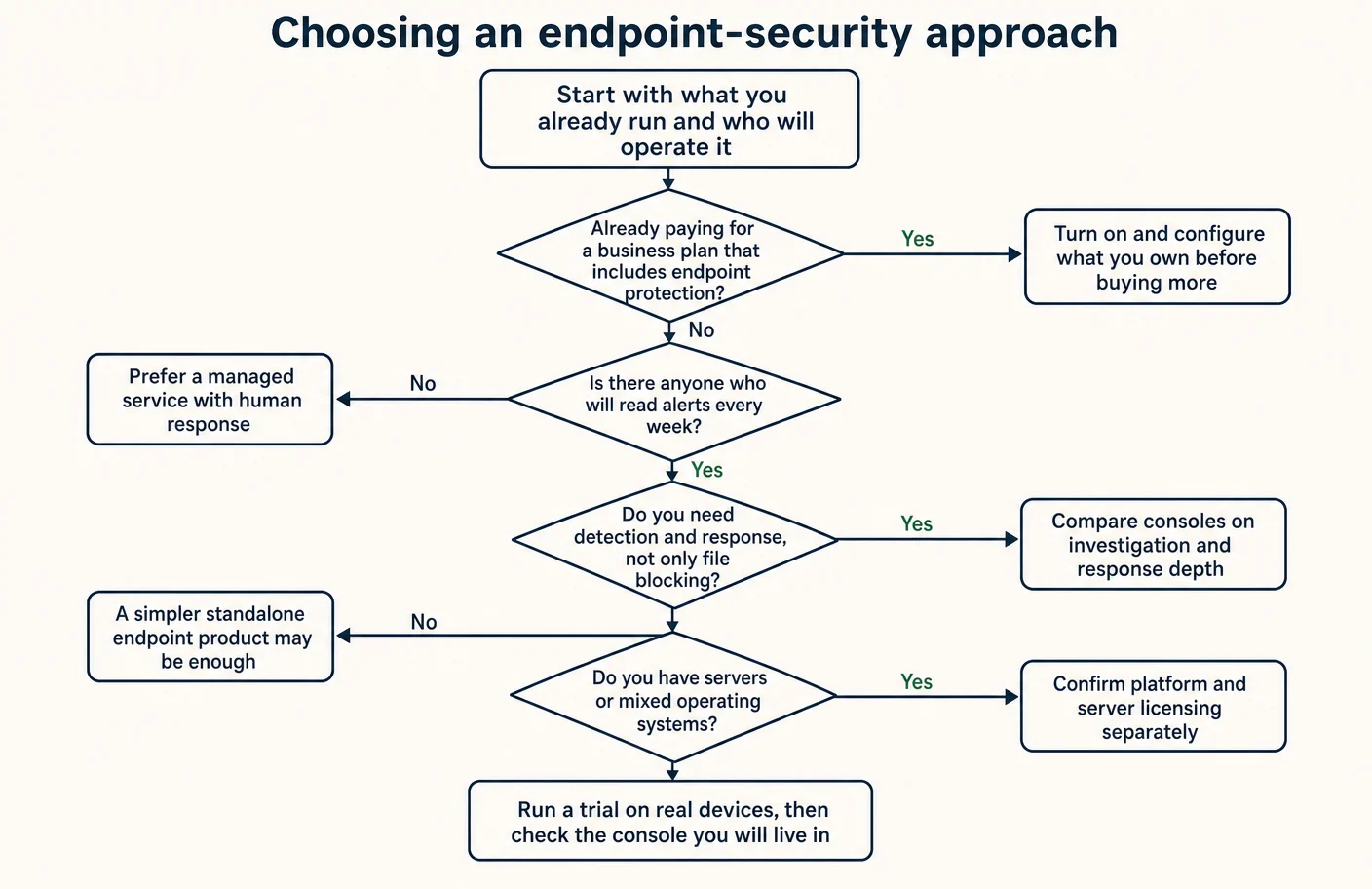
- A Microsoft-centred business. Where email, files and identity already live in Microsoft 365, the documented inclusion of Defender for Business in Business Premium makes checking the licence the first step, and configuring what is already owned the second.
- A business that wants a simple standalone product. Where there is no Microsoft licence to lean on and the goal is preventive protection with a per-device price, CrowdStrike’s published Falcon Go bundle is straightforward — provided the documented exclusion of detection and response, and the hundred-device maximum, are accepted knowingly.
- A business that needs investigation depth. Where the business holds sensitive data, has been through an incident, or answers detailed customer security questionnaires, the response-oriented packages from SentinelOne and the detection tiers from Sophos are the relevant comparison, and the deciding factor is which console a real person will use.
- A business with nobody to watch alerts. Where nobody will read a queue, a managed tier is not an upgrade but the whole point. Sophos documents managed response as a tier of the same product, and CrowdStrike documents a fully managed option, and either is a more honest purchase than an unstaffed investigative tool.
- A business with servers or mixed platforms. Confirm server licensing and operating-system coverage for the exact package being quoted, because this is where documented scope and assumed scope diverge most often.
Atlas editorial assessment. Run a trial on real machines belonging to real staff, not on a spare laptop, and give the console to the person who will actually own it. Then ask three questions: did anything break, could that person find and contain a single device unaided, and does the evidence the console produces answer the questions customers and insurers ask. A product that passes those three will serve a small business better than one that wins a feature comparison it will never operate.
Whatever is chosen, treat it as one control among several. Endpoint protection sits most usefully next to email filtering, a password manager, staff awareness, and a tested backup — and the strength of the weakest of those is usually what a small business actually experiences on its worst day.
Sources
Every URL below was confirmed reachable in September 2026 and is the first-party or official publication behind a statement in this article.
- Microsoft — Defender for Business overview, requirements, how to get Defender for Business, setup and configuration, onboard devices.
- Microsoft — next-generation protection, attack surface reduction, attack surface reduction rules reference, security settings and policies, advanced feature settings, device groups.
- Microsoft — automated investigation and remediation, automation levels, review remediation actions, respond to and mitigate threats, machine response actions.
- Microsoft — manage devices, reports, web content filtering, tamper protection, Defender Vulnerability Management, vulnerability management sign-up.
- Microsoft — small and medium business security pricing, Defender for Business product page, Microsoft 365 Business Premium documentation, Microsoft 365 administration overview.
- CrowdStrike — Falcon Go pricing, Falcon bundle comparison, Falcon Go data sheet, small business solutions.
- SentinelOne — platform packages and pricing, Singularity Core, Singularity Control, Singularity Complete, ransomware rollback explainer.
- Sophos — Sophos Endpoint datasheet, extended detection and response datasheet, managed detection and response solution brief, managed detection and response datasheet, licence and feature list by tier.
- Sophos — threat protection policy, data loss prevention policy, data collection and investigation policy, adaptive attack protection, enhanced tamper protection, tamper protection FAQ.
- Sophos — Live Discover, Live Response, endpoint onboarding guide, agent installation, installation methods, Windows command-line installer options, installer options for Windows and Mac, automated software deployment, licence usage.
- Sophos — Security Heartbeat overview, endpoint health statuses.
- UK National Cyber Security Centre — small organisations guide to cyber security, protecting your devices, small business guide, mitigating malware and ransomware attacks, ransomware hub, Cyber Essentials overview, Cyber Essentials requirements for IT infrastructure.
- CISA — StopRansomware guide, StopRansomware guide page.
- NIST — SP 800-83 Revision 1, SP 800-61 Revision 3, Cybersecurity Framework 2.0.
- Information Commissioner’s Office — data security advice, practical ways to keep IT systems safe and secure.